VirtuNum - Virtual Number
- 20.96K
- 4.4
- Installs
- 5.00M
- Price
- Free

Screenshots
Analysis by Reviewed
Choosing a virtual-number app comes down to more than getting another line on a screen. I’d first ask what you need the number to do: receive a one-time verification code, separate work and personal messages, or keep your main number out of a particular conversation. Those jobs overlap, but they do not have identical requirements. A number that is convenient for occasional SMS may not be the right choice for a long-term account that you cannot afford to lose access to.
That distinction matters especially with verification. If a service is important to you, think about what happens if you change numbers, stop using the app, or need to recover the account later. I treat a virtual number as a useful extra channel, not an automatic substitute for a permanent number tied to banking, identity, or essential recovery. For lower-stakes sign-ups and temporary separation, the convenience can be worthwhile; for accounts where a missed code would cause serious trouble, I would check the service’s accepted verification methods and keep a dependable recovery route.
Start with the job, not the number
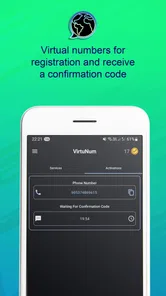
VirtuNum - Virtual Number is a communication app from Morteza Salmanpour, focused on virtual numbers and SMS verification. The way I’d evaluate it is practical: does the available number suit the service you want to use, can you receive the message when you need it, and is the ongoing arrangement worth the cost and effort? The app’s store summary points to OTP, two-factor authentication, and secure SMS, which makes verification the clearest use case to consider first.
It is also worth separating privacy from anonymity. Giving a service a secondary number can keep your primary number out of that particular interaction, but it does not make you untraceable or guarantee that every service will accept the number. Some services may restrict virtual numbers or require another verification method. I would check acceptance before building a routine around one, especially if the account is valuable or difficult to recover.
Where it fits into an ordinary day
A realistic use might be signing up for a local marketplace, a community service, or a short-term project where a phone number is requested and you would rather not give out your everyday line. You can keep the communication channel separate while deciding whether the relationship is worth continuing. If the service sends a code, the key question is whether the number you selected can receive it; if you later need another code, you will also want to know whether you still have access to that same number.
For a freelancer, a separate line can make it easier to distinguish client-related contact from family and friends. It does not replace a proper business phone setup if you need dependable team access, documented call handling, or a number that clients can rely on for years. I see the app as more suitable for individual, lightweight separation than as a complete business communications system.
For travel or international contact, a virtual number may sound appealing, but the useful choice depends on the countries and services you actually need. Avoid assuming that selecting a country code guarantees local reachability, lower costs, or acceptance by every platform. I would test the intended workflow with a low-stakes interaction before relying on it for a time-sensitive conversation or account.
More From Our News Desk
 Instagram
’s Power Comes From Its Place in Your Phone
A close look at how Instagram turns Meta’s reach, recommendation systems and everyday camera habits into durable platform power—and what that costs users.

 Gmail
Gmail in a Busy Inbox: Who Benefits Most?
From first account to crowded workday, Gmail earns its place through dependable search and flexible sorting—but its best fit depends on how much inbox maintenance you can tolerate.

 Prime Video
Switching to Prime Video: What Changes in Your Viewing Routine
Prime Video can make a compelling second home for streaming, but switching means learning a different catalog, rental layer, and route from browsing to playback.

 Universal TV Remote Control
 Works Best as a Reliable Backup
A phone remote earns its place through quick setup and reliable habits. Here is how to get more from Universal TV Remote Control—and where its limits show.

 Weather - By Xiaomi
Weather by Xiaomi Review: Clear at a Glance, Less Clear Up Close
Xiaomi’s weather app makes everyday forecasts quick to scan, but its calm surface can leave useful details and recovery paths harder to find than they should be.

 X
X Under Pressure: Can It Recover When Posting Goes Wrong?
A resilience-focused review of X, examining setup, mistaken posts, interruptions, weak connections, and the gaps that matter when recovery needs to be dependable.
Latest News



There is a small but important organizational benefit to keeping purposes distinct. If you use a secondary number for sign-ups, note which accounts depend on it somewhere secure. That makes it less likely you will forget where a future login code is supposed to arrive. I would not store recovery codes or passwords in an informal note beside the number; keep account credentials in an appropriate password manager and treat the phone number as one part of the recovery plan.
Getting Started with Ease
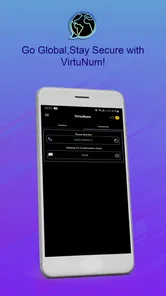
First things first, downloading the app is as straightforward as it gets. Available on both Android and iOS, VirtuNum - Virtual Number installs within minutes. Once you’ve got it on your device, setting up is a breeze. The user interface is sleek and intuitive, making navigation a walk in the park. You simply sign up, pick your desired country code, and boom, you’ve got yourself a new number.
That simple setup is attractive, but I’d slow down before choosing a number. Decide whether you need it mainly for SMS, calls, or both, and check the particular service you intend to use. If you are setting it up for a one-off code, make sure you can receive the code before abandoning another sign-in method. If you plan to use it for ongoing contact, consider how you will keep track of the number and what you would do if you later change it.
Features That Stand Out
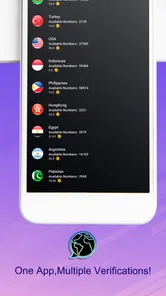
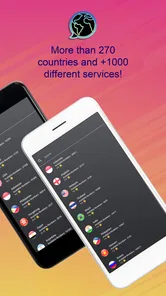
One of the standout features for me is the ability to choose numbers from a variety of countries. Whether you need a number from the US, UK, or even Australia, this app has got your back. It’s perfect for those like me who often deal with international clients.
Country choice is most useful when it matches a real need, not just because a particular code looks convenient. A client may prefer a familiar country code, for example, while a website may require a number from a specific region. Those are different situations: the first is about how you present a contact channel, while the second is about the service’s verification rules. I would confirm the requirement first rather than assume a country selection will solve every sign-up problem.
Another handy feature is the call forwarding option. You can easily forward calls from your virtual number to your main number without missing any important calls. Plus, you get SMS support, which is fantastic for when you’re on the go.
Forwarding can help reduce the need to watch a second line constantly, but it also changes the privacy trade-off. If calls are sent to your main number, the person calling may still reach you through that personal line, and you will need to decide whether that is acceptable. For a work contact that you want to answer conveniently, forwarding may be useful; for a situation where separation is the whole point, keeping the channels distinct may make more sense.
For verification messages, I would keep the workflow deliberate: open the app when you are expecting a code, check that the message belongs to the account you are setting up, and complete the sign-in promptly. Don’t share an OTP with someone who contacts you unexpectedly, even if they claim to be helping. A virtual number can make receiving a code convenient, but it does not make the code itself safe to disclose.
Functionality and Performance
In terms of performance, the call quality is crisp and clear, almost like using your regular number. I’ve made several calls using the app, and there’s been no lag or drop in connection. The SMS delivery is swift too, ensuring that you stay connected with your contacts effortlessly.
For anyone relying on a message to complete a login, the practical test is not only whether SMS generally works but whether the specific service sends codes to the selected number. Services can treat virtual numbers differently, and a message that arrives quickly in one workflow does not prove every platform will accept the number. I’d begin with a non-essential account, then decide whether the arrangement is reliable enough for something more important.
Also, I love that the app doesn’t consume much battery, which is a huge plus. It’s optimized well to run seamlessly in the background without affecting your device’s performance.
Even with a smooth experience, I would not make an app the only route into an account that matters. Keep any recovery email, backup codes, or other account recovery method current when the service offers them. That advice is useful for any second-number setup: the number can help you receive messages, but a separate recovery route can prevent a lost or changed line from locking you out.
When another kind of service may suit you better
The usual alternatives fall into a few broad groups. A second physical SIM or eSIM is often the more natural fit if you need a stable personal line for regular calls and texts. A carrier-provided extra line may be preferable when continuity and conventional phone service matter most. A temporary SMS-receiving option may appeal for a disposable, low-stakes test, but it is a poor match for an account you expect to keep. A dedicated business phone platform may be better for shared access or structured customer support.
I would choose VirtuNum when the appeal is having a virtual number in an app and using it for communication or verification without turning the task into a separate-device setup. I would choose a conventional mobile line when the number needs to be a dependable long-term identity, particularly for important personal accounts. Neither choice is universally better; the deciding factor is how costly it would be to lose access or miss a call.
There is also a difference between keeping personal details separate and securing an account. A secondary number can reduce how often you hand over your main contact number, but two-factor protection is only as dependable as the recovery plan around it. For sensitive accounts, I prefer to use the strongest authentication method the service supports and avoid relying on SMS alone when a more robust option is available.
Costs, plans, and the decision to keep it
The app is free to download, with in-app purchases ranging from $0.99 to $12.99 per item. I’d treat those purchases as a reason to check the exact option you need before committing, rather than assume every number or use case has the same cost. A free app download does not necessarily mean that ongoing access to a particular number or service is free, so work out the likely total for your intended use before making it your main contact route.
A useful way to judge value is to compare the cost with the inconvenience you are trying to avoid. If you only need one verification for a low-stakes registration, paying for an ongoing second line may not be worthwhile. If you regularly separate client calls, online sign-ups, or project messages from your personal number, a paid option may make sense—provided the number and features fit that routine. I would avoid paying first and figuring out the workflow afterward.
Switching away deserves a little planning too. Before you stop using a number, review the accounts that might send login or recovery codes to it and update them while you can still access the relevant services. If you have used the number for contacts, tell the people who need the new channel. The most common practical risk is not the act of changing apps; it is forgetting that an old number has become part of an account’s recovery process.
Who I would recommend it to
If you want a convenient second channel for selected online interactions, work separation, or SMS verification, this is a reasonable app to consider. It has an average rating of 4.4 from around 566,000 ratings, and it has been installed over a million times. It is rated for Everyone, and version 1.6.8 supports Android 6.0 and later. Those details give a useful sense of its audience and availability, though they do not replace checking whether the number works for your particular service.
I would skip it if you need a guaranteed permanent number for high-stakes account recovery, if a service explicitly refuses virtual numbers, or if you need a full business phone system with shared workflows. I would also think twice if you do not want to manage another account or remember which services use a secondary number. The convenience is real, but so is the small administrative burden of keeping that number connected to the right accounts.
Why You Should Consider It
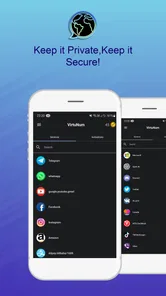
If you’re someone who values privacy, VirtuNum offers a layer of anonymity that’s hard to beat. It’s perfect for online transactions, dating apps, or any scenario where you’d prefer not to share your primary number. I’ve used it extensively for such purposes, and it works like a charm.
I’d describe that benefit more narrowly as separation rather than complete anonymity. It can help keep your main number out of a particular exchange, which is handy when you are contacting a seller, joining a dating service, or trying a new platform. Still, use sensible judgment about what else you share, and remember that a secondary number does not make a conversation or account invisible.
The app also offers affordable plans, making it accessible for everyone. Whether you’re a freelancer, a business owner, or someone who just needs a secondary number, it’s a cost-effective solution.
For me, the best case is a clear, limited purpose: one number for a defined set of interactions, with a plan for what happens if I stop using it. If you are a freelancer, keep client messages organized and avoid presenting a casual virtual line as a permanent support channel unless you can maintain it. If you simply want fewer websites to have your personal number, use the secondary line selectively and keep important accounts attached to a reliable recovery method.
In conclusion, VirtuNum - Virtual Number is a versatile and reliable app that offers a myriad of features to suit different needs. Its ease of use, combined with its robust functionality, makes it a must-have in today’s digital age. So if you’re on the lookout for a virtual number app, this one’s definitely worth a try!
My recommendation is more specific: give it a try if you want an app-based second number for everyday separation or suitable verification tasks, and first test the exact service you intend to use. Choose a carrier line or a more structured business option when long-term continuity, broad acceptance, or shared access matters more than convenience. That makes VirtuNum a sensible fit for the right job, rather than a replacement for every kind of phone number.
VirtuNum - Virtual Number Frequently Asked Questions
What is VirtuNum’s rating, and how many people use it?
VirtuNum - Virtual Number is a communication app developed by Morteza Salmanpour. It has an average rating of 4.4 from around 566,000 ratings, with about 17,000 written reviews and over 1 million installs. Those figures suggest that many people have tried it, though individual experiences can differ depending on how they use the app.
Is VirtuNum - Virtual Number suitable for younger users?
VirtuNum - Virtual Number has an Everyone content rating, making it suitable for a general audience. The app focuses on virtual-number communication, including SMS verification and OTP-related uses. Parents and users should still consider whether a communication app fits their needs and review its features before installing, especially when deciding how a younger person should use phone-number services.
Is VirtuNum - Virtual Number free to download, and does it include paid features?
VirtuNum - Virtual Number is free to download, so you can install it and explore the app without paying an upfront price. It also offers in-app purchases, with individual items ranging from $0.99 to $12.99. Consider those optional costs when deciding whether the app fits your budget, especially if you expect to use paid features or services regularly.
What is VirtuNum - Virtual Number and how does it work?
VirtuNum - Virtual Number is an application that allows users to obtain a secondary virtual phone number, which can be used for various purposes such as business or personal privacy. The app provides a seamless experience by assigning a virtual number that functions like a regular phone line. Users can make and receive calls, send texts, and even set up voicemail, all while keeping their real number private.
Can I use VirtuNum - Virtual Number for international calls and texts?
Yes, VirtuNum - Virtual Number supports international calling and texting. This feature is particularly beneficial for users who need to communicate with contacts in different countries or for those who travel frequently. The app offers competitive rates for international communications, making it a cost-effective option for maintaining global connections without incurring high charges.
Pros
- No need for a second SIM card.
- Easy setup with instant activation.
- Supports multiple countries' numbers.
- Affordable pricing for virtual numbers.
- Enhances privacy for online activities.
Cons
- Limited support for some regions.
- Occasional call quality issues.
- Requires stable internet connection.
- Not compatible with all apps.
- Subscription needed for premium features.