

Virgin Voyages
- 405.00
- 4.8
- Installs
- 100.00K
- Price
- Free

Screenshots
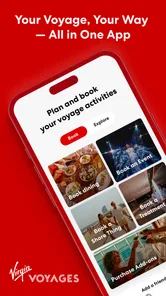


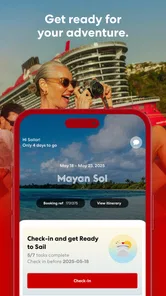
Analysis by Reviewed
Virgin Voyages is the kind of travel app that makes the most sense when your trip is already connected to a Virgin Voyages sailing. I used it less like a general travel planner and more like a trip companion: a place to prepare before boarding, keep an eye on the shape of the voyage, and reduce the need to search through scattered messages or remember every detail myself. That focused purpose is also its biggest strength. It is not trying to replace a broad booking service, a map app, or a general holiday organizer.
As a free Travel & Local app from Virgin Voyages, it is aimed at people who want their cruise information close at hand. The audience rating is Everyone, and the app has built a strong reception, with a 4.8 average from around 8,400 ratings and more than 100,000 installs. I would not read those figures as proof that it suits every traveler, but they do suggest that the cruise-specific approach is working for many people.
What I looked for before relying on it
My first test was simple: does the app help me make decisions, or does it merely repeat information I could already find elsewhere? A useful cruise companion should earn its place by making planning less fragmented. I want to know where to look before the trip, what deserves attention during the sailing, and whether the app remains useful when I am busy, tired, or dealing with a weak connection.
That last point matters more on a ship than it does in a city. A normal travel app can often lean on maps, web search, and familiar booking pages. A cruise app has a different job. It needs to bring the voyage into one recognizable space, so I am not jumping between email, browser tabs, calendar notes, and screenshots. Virgin Voyages is strongest when I treat it as the central place for the cruise relationship rather than as an all-purpose travel tool.
I also judged it by how much effort it asks from the traveler. Cruise preparation can already involve choosing dates, organizing transport to the port, checking personal documents, and coordinating with companions. An app that adds another layer of confusion is not helpful, even if it contains plenty of information. The best experience is one where I can open it with a specific question and find the relevant part without wandering through unrelated travel content.
The current release is version 1.11.1, and the app supports operating system version 9 or later. That makes it accessible to many older devices, although I would still install it before travel rather than waiting until the day I leave. Updating an app at the port, in an airport, or on a ship is exactly the sort of small inconvenience that can become a large one when time and connectivity are limited.
Before sailing: turn it into a preparation checklist
The most useful way I found to approach the app before a voyage was not to browse casually. I opened it with a checklist in mind. First, I would review anything connected to the sailing itself. Next, I would look for items that might affect my day, such as plans with other people or activities that need advance attention. Finally, I would return to it after making decisions, checking that I had not left an important step half-finished.
More From Our News Desk

 Weather - By Xiaomi
Weather by Xiaomi Review: Clear at a Glance, Less Clear Up Close
Xiaomi’s weather app makes everyday forecasts quick to scan, but its calm surface can leave useful details and recovery paths harder to find than they should be.

 X
XX Under Pressure: Can It Recover When Posting Goes Wrong?
A resilience-focused review of X, examining setup, mistaken posts, interruptions, weak connections, and the gaps that matter when recovery needs to be dependable.

 Clash of Clans
Clash of Clans Is Won Between the Battles
Its raids are quick; its community is a long-term project of coordination, teaching, rivalry, and shared responsibility—with all the friction that entails.

 Android Auto
Android Auto Makes the Case for Quieter Car Software
The car interface is no longer judged by how much it can do, but by how quietly it helps. Android Auto shows what drivers now expect—and what still gets in the way.

 MobiOffice: Word, Sheets, PDF
MobiOffice: Transforming Mobile Productivity with Seamless Integration
MobiOffice: Word, Sheets, PDF is redefining mobile productivity with a surprising blend of functionality and innovation.

 EA SPORTS FC Soccer Mobile 26
EA SPORTS FC™ Mobile Soccer: Redefining Mobile Sports Gaming
Dive into EA SPORTS FC™ Mobile Soccer, where immersive gameplay and strategic depth transform mobile sports gaming.
Latest News



This workflow sounds obvious, but it prevents a common problem with travel apps: mistaking browsing for preparation. Looking at attractive options is easy. Confirming what I actually intend to do is more important. I recommend making a short note outside the app with the few things that require action, then using the app to verify each one. That gives me a backup reference without turning the phone into a pile of screenshots.
A second practical habit is to involve everyone in the group early. If I am traveling with a partner or family members, I do not assume that one person opening the app once solves the coordination problem. Each traveler may have different priorities, and a shared plan is easier to manage when we discuss it before boarding. The app can support that conversation, but it cannot decide whether the group wants a tightly scheduled day or plenty of free time.
That distinction is important because cruise planning has a real trade-off. A carefully arranged schedule can reduce uncertainty, but it can also make a relaxing trip feel like a sequence of appointments. I prefer using the app to identify the few moments that genuinely need planning, then leaving space around them. In my experience, that is a better use of a cruise companion than trying to fill every part of the voyage in advance.
During the voyage: useful when the question is specific
Once the trip is underway, the app becomes more valuable when I open it for a concrete reason. I might want to check what I planned, orient myself around the day, or confirm a detail before heading somewhere. That is a better experience than treating it as an endless feed. On a ship, small delays and changing energy levels are normal, so I want information that helps me make the next decision without forcing me to redesign the entire day.
One non-obvious advantage of a dedicated cruise app is context. A general search engine may return broad travel advice, while a map app may show places around a port without understanding my sailing. Virgin Voyages is more focused on the voyage itself. That focus can save time because I am not filtering city guides, unrelated hotels, or advice meant for a different kind of trip.
I also found that it works best as a reference point for a group, not just as a personal planner. When two people remember a plan differently, checking the same app is easier than comparing separate messages. It gives the conversation a shared starting point. I would still keep a simple backup note for essential arrangements, but I would rather consult one cruise-specific source than rely on memory after a busy day.
There is a useful discipline here: check the app at natural transition points instead of constantly. I would look before leaving my room, before changing plans, and before settling in for the evening. That reduces phone time and makes the app serve the trip rather than interrupt it. It also helps reveal whether I truly need a detail or am simply browsing because the device is available.
Where this app is better than general travel tools
Virgin Voyages wins on relevance. A broad travel app is valuable when I am comparing flights, hotels, rental cars, restaurants, or independent activities across many destinations. This app has a narrower purpose, and that narrowness is exactly why I would choose it for the cruise portion of a holiday. It keeps the sailing at the center instead of making me build the trip from unrelated categories.
It is also more comfortable for travelers who dislike carrying their plans across several services. I do not need to remember which piece of information lives in an email, which one is in a browser account, and which one I saved in a note. The app gives me a dedicated place to return to. That does not eliminate every planning task, but it makes the cruise itself feel more coherent.
Another strength is the psychological benefit of having a familiar reference point. Travel can involve a lot of small decisions, and each one consumes attention. A focused app reduces the number of places I need to check. For a first-time cruiser, that can make the experience feel less intimidating. For an experienced traveler, it can simply remove repetitive administration.
The real win is not having more travel information; it is having the right cruise information in one focused context. That is why I would install it even if I already use a favorite map, calendar, or booking app. Those tools remain useful for the wider journey, while this one is designed around the sailing.
Where another type of app may fit better
I would not use Virgin Voyages as my only travel app. It is not the natural choice for comparing transport to the port, planning a road trip, finding an independent hotel, or researching a destination beyond the cruise experience. A general travel service is better for those jobs because it covers more providers and more kinds of reservations.
Independent travelers should also think carefully about the boundary between cruise planning and personal exploration. If I prefer arranging every activity myself, choosing local businesses independently, and keeping a flexible itinerary outside the sailing, I still need other tools. This app may help with the Virgin Voyages part of the trip, but it does not replace my broader travel system.
There is a similar limitation for people who prefer paper or minimal phone use. A dedicated app is convenient, but it can encourage me to check the screen too often or assume that every answer must be found digitally. I would recommend it to someone comfortable using a phone as a travel reference, not to someone who wants a completely offline, paper-first holiday routine.
The app is also not a substitute for human judgment. If a plan changes, a companion has a different need, or a day becomes tiring, I still have to adapt. A well-organized digital itinerary can make a trip smoother, but it cannot tell me when to slow down, leave extra time, or stop adding activities. That is a genuine trade-off of any structured travel companion.
A realistic day-to-day example
Imagine arriving on a sailing day after a morning spent traveling to the port. I am carrying luggage, watching the time, and trying not to lose track of what still needs attention. Instead of opening several unrelated services, I use Virgin Voyages as my cruise-specific checkpoint. I review the information connected to the voyage, confirm the plans I care about, and leave the rest for later. The value is not dramatic; it is the quiet removal of avoidable uncertainty.
Later, after settling in, I check the app again before deciding how structured the evening should be. If I am tired, I do not need to force myself through every available option. If I am traveling with someone who wants a plan, we can use the same reference point and agree on one or two priorities. That is a better experience than each person making assumptions from separate messages.
The following day, the same method helps when plans change. I do not treat the original schedule as a contract. I use it as a starting point, then adjust around energy, timing, and the group’s mood. This is one of the more useful insights I took from using a cruise-focused app: organization works best when it protects flexibility rather than eliminating it.
What switching to it really involves
The financial barrier is low because the app is free. The larger cost is attention. I have to install it, open it before the trip, understand where my information lives, and develop the habit of checking it at the right moments. That setup is worthwhile for a Virgin Voyages passenger, but it would be unnecessary effort for someone who is not taking one of its sailings.
There is also a transition cost if I already have a system I trust. I may use a calendar for personal commitments, a notes app for packing, a map service for transport, and email for confirmations. Moving everything into one place is not always possible or desirable. My recommendation is not to abandon those tools. Instead, use this app for the cruise-specific layer and keep the others for tasks they handle better.
To make the change easier, I would install it while I still have reliable internet, sign in or set it up well before departure, and open it once after any major planning decision. I would also keep essential travel details accessible in a second form. That is not because the app is untrustworthy; it is simply sensible travel practice when a phone battery, connection, or login can become a problem at the worst moment.
People often ask whether a strong general travel app is enough. For the wider holiday, it may be. For the Virgin Voyages sailing itself, I think the dedicated app is worth adding because its value comes from context, not from trying to win every travel category. People also wonder whether it is useful only before boarding. My experience is that the preparation stage is important, but the app becomes more practical when I use it as a calm reference during the voyage rather than a one-time installation.
My recommendation by traveler type
I recommend it clearly to anyone booked on a Virgin Voyages cruise who wants a central digital companion and is comfortable planning from a phone. It is especially suitable for first-time cruisers, couples coordinating plans, and travelers who dislike searching through scattered confirmations. The focused design makes more sense here than trying to force a general travel platform to handle every cruise-specific question.
I would recommend it with reservations to highly independent travelers. Install it for the sailing, but keep your usual tools for transport, destination research, and personal scheduling. You may not want the app to become the center of your entire holiday, and there is no reason it has to. Its best role is narrower and more practical.
I would skip it if I have no Virgin Voyages trip connected to it, if I strongly avoid phone-based planning, or if I am looking for a universal travel marketplace. In those cases, the app’s specialization becomes a limitation rather than an advantage. A broader alternative will serve better when my main task is comparing unrelated travel providers or building a trip from scratch.
Virgin Voyages was released on August 14, 2025, and the developer is Virgin Voyages. With 406 reviews and a growing user base, it has enough presence to feel like an established part of the cruise-planning experience rather than an app I would install without a clear reason. Still, the rating should be treated as a signal of general satisfaction, not a promise that every traveler will have the same experience.
My final view is straightforward: install it before a Virgin Voyages sailing, use it as the cruise-specific home for your plans, and do not expect it to replace every other travel tool. I like it because it reduces friction at the moments when cruise information can become scattered. Its limitations are easy to accept when I understand its role. For the right passenger, this is a practical companion rather than another app competing for attention.
Virgin Voyages Frequently Asked Questions
Can I download the Virgin Voyages app before booking a cruise?
Yes, you can download the app before booking to get familiar with Virgin Voyages and its digital travel companion. Its most useful planning tools are connected to a sailing and booking, so the experience becomes more relevant once you have cruise details associated with your account. The app is free to download, and you can decide whether it suits your travel-planning needs before setting off.
Who develops the Virgin Voyages app, and what kind of app is it?
The app is developed by Virgin Voyages and sits in the travel and local category. Its short description is simply “Virgin Voyages,” while its purpose is summed up as a digital companion and personal guide out on the open ocean. That makes it a focused option for travelers preparing for or taking a Virgin Voyages cruise, rather than a general trip-planning app.
What is the Virgin Voyages app used for?
The Virgin Voyages app is the main digital companion for planning and managing a cruise with Virgin Voyages. After signing in, you can review your sailing details, complete required pre-cruise steps, explore restaurants and entertainment, make reservations, check onboard information, and receive useful updates. It is designed to reduce the need for paper documents and help organize your trip before and during the voyage.
Can I use the Virgin Voyages app before boarding the ship?
Yes. The app is particularly useful before your cruise begins. You can access your booking, review embarkation information, complete check-in requirements, enter traveler details, browse dining and event options, and reserve selected experiences when they become available. Completing these tasks in advance can make embarkation smoother, although availability and features may depend on your sailing, destination, booking status, and the latest version of the app.
Do I need an internet connection to use Virgin Voyages?
An internet connection is generally required to download the app, sign in, synchronize booking information, and receive current updates. Once onboard, some app functions may work through the ship’s onboard network without requiring a separate mobile data plan, but this can vary by feature and sailing. Travelers should avoid relying on cellular roaming at sea and should check Virgin Voyages’ current connectivity and Wi-Fi terms before departure.
Pros
- Adults-only cruises create a relaxed
- child-free atmosphere.
- Dining at included restaurants offers more variety than a standard buffet.
- The app makes reservations and onboard planning convenient.
- Modern ship design provides stylish lounges and lively social spaces.
- Wi-Fi is included
- with faster options available for heavier use.
Cons
- The adults-only policy excludes families traveling with children.
- Specialty dining reservations can fill up quickly on popular sailings.
- Many onboard activities require booking through the app.
- Drinks
- excursions
- and some premium experiences can raise the total cost.
- The energetic nightlife may be unsuitable for guests seeking quiet evenings.











