

Virgin Atlantic
- 58.00
- 4.3
- Installs
- 100.00K
- Price
- Free

Screenshots
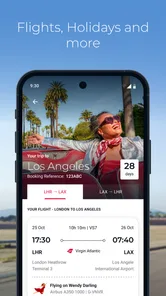
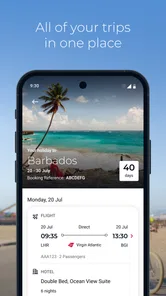

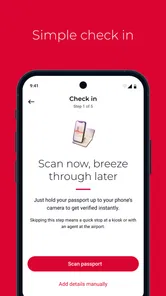
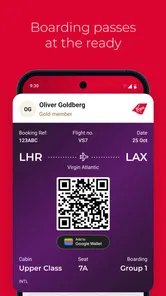

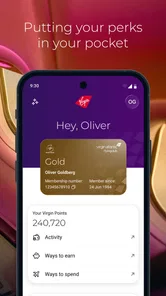

Analysis by Reviewed
When I am planning a Virgin Atlantic journey, I want one place to move from “I should book this” to “I know what happens next.” Virgin Atlantic is a free Travel & Local app from Virgin Atlantic, built around flights, holidays, and the practical steps that sit around them. I found it most useful when I treated it as a journey companion rather than as a general travel search tool.
The difference matters. A broad travel app is usually better when I am comparing many airlines, several booking sites, or a wide range of hotels. This app makes more sense once Virgin Atlantic is already part of my plan. Its job is to keep the airline-specific side of the trip close at hand, reduce the need to search through unrelated travel results, and give me a clearer path from planning to travelling.
It is aimed at an Everyone audience, so the basic idea is approachable even if someone rarely flies. The app is free, and its current version is 1.7.0. I would describe it as a focused companion for people who are considering or already using Virgin Atlantic, not as a universal replacement for every travel app on a phone.
From an early travel idea to a usable trip plan
I find the handoff from a vague holiday idea to a workable plan is where Virgin Atlantic’s focused scope matters most. I would first decide whether I’m comparing airlines or already considering this one, then use the app to examine the airline-specific option without treating that choice as final. Keeping those two stages separate helps me avoid mistaking a convenient planning flow for a complete market comparison.
Starting with the right question
The first useful decision is whether my trip is actually centred on Virgin Atlantic. If I am still comparing every possible airline, I normally begin with a broader flight-search service because it gives me a wider view of routes and alternatives. Once Virgin Atlantic is the airline I want to investigate, this app becomes more relevant: I can keep the search and the later journey tasks in the same airline-branded environment.
That focus is also the first trade-off. I do not expect the app to act like an independent travel marketplace where the best result is always selected from every carrier. The benefit is a more direct relationship with one airline; the cost is that I have to do my wider comparison elsewhere if flexibility matters more than staying inside one ecosystem.
For a realistic example, imagine that I am arranging a holiday and have already narrowed the airline choice to Virgin Atlantic. I would use the app at the beginning to explore the available flight or holiday path, then return to it as the departure gets closer. That repeated use is more convincing than opening it once just to look at a route and deleting it after booking.
More From Our News Desk

 Weather - By Xiaomi
Weather by Xiaomi Review: Clear at a Glance, Less Clear Up Close
Xiaomi’s weather app makes everyday forecasts quick to scan, but its calm surface can leave useful details and recovery paths harder to find than they should be.

 X
XX Under Pressure: Can It Recover When Posting Goes Wrong?
A resilience-focused review of X, examining setup, mistaken posts, interruptions, weak connections, and the gaps that matter when recovery needs to be dependable.

 Clash of Clans
Clash of Clans Is Won Between the Battles
Its raids are quick; its community is a long-term project of coordination, teaching, rivalry, and shared responsibility—with all the friction that entails.

 Android Auto
Android Auto Makes the Case for Quieter Car Software
The car interface is no longer judged by how much it can do, but by how quietly it helps. Android Auto shows what drivers now expect—and what still gets in the way.

 MobiOffice: Word, Sheets, PDF
MobiOffice: Transforming Mobile Productivity with Seamless Integration
MobiOffice: Word, Sheets, PDF is redefining mobile productivity with a surprising blend of functionality and innovation.

 EA SPORTS FC Soccer Mobile 26
EA SPORTS FC™ Mobile Soccer: Redefining Mobile Sports Gaming
Dive into EA SPORTS FC™ Mobile Soccer, where immersive gameplay and strategic depth transform mobile sports gaming.
Latest News



Moving through the booking stage
The app’s store summary points to flights and holidays, and that combination is important. A flight-only tool answers a narrow question: how do I get there? A holiday-oriented route is closer to the way many people actually plan, because the flight is connected to a larger break. I like having both ideas represented in the same app, especially when I am still deciding whether I want to arrange the trip as a holiday rather than assemble every part separately.
My advice is to enter the planning process with the details that affect the decision already clear: approximate travel dates, destination, number of travellers, and whether I am looking for transport alone or a holiday package. This does not make the app smarter, but it prevents the common mistake of browsing without a clear outcome. I can then judge each result against the trip I am really trying to take instead of becoming distracted by options that look attractive but do not fit.
One useful habit is to separate “discovery” from “commitment.” I first use the app to understand what Virgin Atlantic can offer for my journey. I do not rush into a purchase simply because the first option is convenient. I check the journey details, think about the timing, and make sure the holiday shape matches the people travelling with me. That small pause is especially valuable when I am booking for a family or coordinating with someone who is not beside me.
Keeping the handoff between people clear
Travel planning often involves a handoff: one person searches, another approves the dates, and somebody else may need the final booking details. The app cannot remove that human part of the process, but it can make my side of it more organised. I can use the app as the place where I review the Virgin Atlantic option, while messages or email handle the conversation with the other travellers.
I would not rely on memory when sharing the result. After checking the journey, I write down the important details in plain language before sending them to the group: destination, travel dates, flight choice, and what still needs a decision. This is a practical workflow rather than a flashy feature, but it avoids a familiar problem in travel planning—everyone thinks they agreed to the same option when they were actually looking at different possibilities.
The same approach helps when a booking is made by one person for several travellers. The person who paid may be the main account holder, while the others need to know what has been arranged. I treat the app as my reference point for the Virgin Atlantic side of the trip, then keep the wider group informed separately. That division keeps airline information and personal coordination from becoming one confusing conversation.
Using it after the decision
The real test for a travel app is what happens after the exciting part is over. Once the booking decision is made, I want the app to remain useful instead of becoming a one-time search screen. I return to it when I need to reconnect with the airline journey, check what I am doing next, or get myself mentally ready for departure.
This is where a dedicated airline app can feel calmer than a general travel platform. A general service may contain hotel messages, price alerts, unrelated offers, and several carriers in the same interface. That breadth is helpful during comparison, but it can make the final airline journey harder to isolate. With Virgin Atlantic, the context is narrower, so I can approach the trip without sorting through a large amount of information that belongs to other providers.
I still keep a backup of essential travel information outside the app. I do this because a phone can run out of battery, connectivity can be inconvenient, or a travelling companion may need information while my device is unavailable. The app is part of my travel preparation, not the only place where I store every detail that matters.
What the handoffs feel like in everyday use
There are several handoffs in a normal journey. The first is from my own planning to the app: I provide the trip idea and use the available Virgin Atlantic route to shape it. The second is from the app to the booking decision, where I check whether the option is suitable for my dates and group. The third is from digital planning to the airport experience, where I stop browsing and start following the practical rhythm of travel.
I find the app most helpful when I make each handoff explicit. Before leaving the planning stage, I ask myself whether I know what I am booking. Before leaving the booking stage, I make sure the other travellers know the arrangement. Before leaving home, I check that I have the information I need in a form I can access. These checks reduce the pressure on the app to do everything for me.
A less obvious benefit of this workflow is that it exposes uncertainty early. If I cannot explain the trip clearly to another traveller, I probably have not finished making the decision myself. The app gives me a focused place to inspect the Virgin Atlantic option, but I remain responsible for noticing questions about timing, luggage, connections, or personal suitability before I treat the plan as final.
How the result compares with the usual alternatives
Compared with a broad flight-comparison app, Virgin Atlantic offers a narrower but more coherent experience. A comparison service is the better starting point when price, airline variety, or unusual routing is the priority. It can help me see whether another carrier offers a more convenient alternative. Virgin Atlantic is the better fit when I have already chosen the airline and want to continue with that airline’s own travel flow.
Compared with a generic holiday marketplace, the distinction is similar. A marketplace may give me more variety across providers, while this app keeps the attention on Virgin Atlantic flights and holidays. That can make the journey easier to follow, but it also means I should not confuse convenience with independence. If I want a neutral overview of the entire market, I would use a neutral search tool first and then move here when Virgin Atlantic becomes the serious option.
Compared with using a mobile browser, the app feels more intentional for repeat access. A browser is perfectly adequate for a quick search, particularly if I do not want another travel app installed. The dedicated app earns its place when I expect to return to the Virgin Atlantic journey several times, rather than treating the airline as a one-off website visit.
Where the flow breaks down
The first point of friction is the app’s limited scope. If I am undecided between airlines, I may need another service to compare the wider picture. That is not a flaw in a focused airline app, but it is a real limitation for travellers who want one neutral tool to handle every possible carrier and holiday provider.
The second is that digital organisation cannot solve every travel question. A clean booking path does not automatically answer whether a particular itinerary suits a child, an older traveller, or someone who needs extra time between stages. I still read the journey carefully and discuss practical needs with the people travelling. The app can support the decision, but it should not replace it.
The third is dependence on a phone during a high-pressure moment. Even a well-designed travel app becomes less comfortable if I am rushing, my battery is low, or somebody else needs the information immediately. I prefer to prepare before the airport rather than assume I will have the patience or connection to work everything out at the last minute.
There is also a psychological friction point: an airline-specific app can make the chosen airline feel like the default answer. I deliberately compare before committing, because staying inside a familiar app can discourage me from checking whether another route better suits my schedule. The app is strongest after I have made a considered airline choice, not when I am trying to avoid making one.
Who will get the most from it
I would recommend Virgin Atlantic to someone who regularly considers Virgin Atlantic flights or holidays and wants a direct digital companion for that process. It is also a sensible choice for a traveller who prefers to keep airline-specific planning separate from hotel bookings, maps, restaurant research, and other travel clutter.
It can work well for a family organiser, too. I can use it to investigate the trip, confirm the airline choice, and then pass the relevant plan to the rest of the group. The key is to use it as the shared reference for the airline portion, while keeping responsibilities and personal arrangements clear between travellers.
I would be more cautious recommending it to someone who is only searching for the cheapest flight across all airlines. That person will probably benefit more from a comparison service first. I would also suggest skipping it if the trip is not connected to Virgin Atlantic and there is no expectation of returning to the airline’s booking or travel process.
What the numbers suggest about its place
The app has a 4.3 average from around 935 ratings, which gives me a reasonably positive impression without making me treat it as flawless. It has passed the early experimental stage as well, with over 100,000 installs. Those figures make it easier to view the app as an established companion for Virgin Atlantic travellers rather than an obscure download with no visible user base.
Virgin Atlantic is the developer, and the app was released on March 2, 2026. Its free price removes the main barrier to trying it, while the Everyone age rating keeps the audience broad. It requires Android 10 or later, so I would check my phone before travelling rather than discovering an operating-system issue while preparing for a journey.
These details affect my recommendation in practical ways. The free download makes sense if I have an upcoming Virgin Atlantic trip, but I would not install it merely because I collect travel apps. The operating-system requirement is also worth checking on an older device, especially if that phone is reserved for travel and does not receive frequent updates.
My overall experience and recommendation
After following the complete workflow—from deciding whether Virgin Atlantic fits the trip, through checking flights or holidays, to preparing for the handoff to the actual journey—I see the app as a focused tool rather than a complete travel command centre. Its strongest quality is continuity inside one airline’s journey. I can begin with an idea, turn it into a Virgin Atlantic plan, and return to the same context instead of rebuilding the search every time.
That strength comes with a clear boundary. I still want a broader comparison service when I am weighing airlines, and I still keep important travel details available outside my phone. The app does not remove the need for judgement, group communication, or preparation. What it does is make the Virgin Atlantic part of the process more direct and easier to revisit.
For me, the right recommendation is conditional but positive: install it when Virgin Atlantic is a serious option or an existing booking is part of the plan. Use a wider travel tool before that point if you need an impartial market comparison. Once the airline choice is made, Virgin Atlantic is most valuable as a repeat-use travel companion, not as a universal booking replacement.
In short, I would keep it on my phone for a Virgin Atlantic holiday because the free, focused experience is more useful than repeatedly searching through a browser. I would just pair it with sensible preparation: compare before committing, communicate the final plan to everyone involved, and keep essential details accessible if the app or phone is inconvenient at the moment I need them.
Virgin Atlantic Frequently Asked Questions
What does the Virgin Atlantic app cost, and who can download it?
The Virgin Atlantic app is free to download and is intended for a broad audience, with an Everyone content rating. It is a travel and local app from Virgin Atlantic, with a store summary describing flights, holidays and more. Before installing, check that your device meets the app’s operating-system requirement; the app supports Android 10 or later.
Which devices and app version are supported?
The current version is 1.7.0, and the minimum supported Android operating system is version 10. If your device runs an older version, you may need to update its software before installing or using the app. Keeping both your device and the app up to date can help you access the current experience and avoid compatibility issues.
What is the Virgin Atlantic app used for?
The Virgin Atlantic app is a useful travel companion for managing flights from your mobile device. After signing in, you can check upcoming bookings, view flight details, access travel information, and manage parts of your journey without visiting the full website. It is especially convenient for passengers who want important trip details available while travelling.
Can I book or manage a Virgin Atlantic flight through the app?
Yes, the app is designed to help passengers manage many aspects of their Virgin Atlantic journey. Depending on the booking and route, you may be able to review reservations, select or change seats, check available flight information, and access booking details. Some requests, such as complex itinerary changes or special assistance, may still require contacting Virgin Atlantic directly.
Does the Virgin Atlantic app support mobile check-in and boarding passes?
The app can make the airport process easier by providing access to check-in features and, where available for your flight, a digital boarding pass. Availability may depend on your departure airport, destination, passenger details, and booking type. It is still sensible to check the airline’s latest airport guidance and keep a backup of essential travel information.
Pros
- Simple booking and flight management through the mobile app.
- Digital boarding passes are convenient for airport check-in.
- Useful flight status updates help track delays and gate changes.
- Virgin Atlantic offers a generous entertainment selection on many flights.
- Flying Club members can manage rewards and account details in one place.
Cons
- Some features may require a stable internet connection to work properly.
- App performance can vary after updates or on older devices.
- Flight changes and refunds may still require contacting customer support.
- Not every airport supports identical mobile boarding-pass features.
- Fare and seat options can be difficult to compare at a glance.











