

Viking Voyager
- 841.00
- 4.6
- Installs
- 100.00K
- Price
- Free

Screenshots
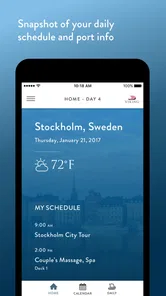
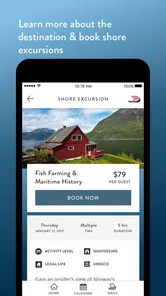

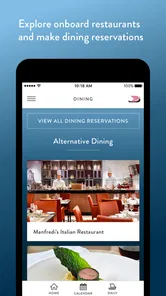
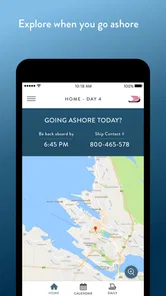
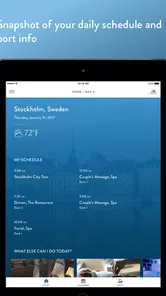
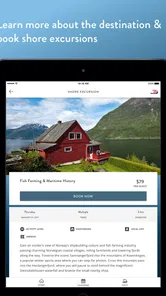
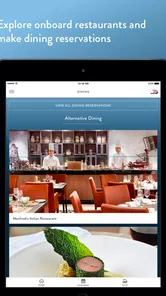
Analysis by Reviewed
Viking Voyager is the kind of travel app that makes the most sense when your trip is already underway. I see it less as a general travel planner and more as a digital companion for guests traveling with Viking Cruises on Ocean, River, or Expedition ships. Its purpose is to bring parts of the onboard experience onto your phone, so you can spend less time looking for printed information, asking where something is, or trying to remember the details of the day.
That focus is important. This is not an all-purpose replacement for a map app, airline app, translation tool, or independent itinerary planner. It is a companion built around a Viking journey. When used in that setting, it can make the trip feel more organized and easier to follow. When used outside that setting, its usefulness naturally becomes much narrower.
I reviewed it as a Travel & Local app from Viking Cruises, and the strongest part of the experience is the way it connects information to the rhythm of a cruise. A ship day has its own pattern: meals, excursions, announcements, port visits, activities, and quiet stretches when you simply want to know what comes next. A dedicated app can reduce the mental effort of keeping all those pieces straight.
How connectivity changes the onboard experience
I find connectivity changes how I plan to use a cruise companion: rather than checking every detail while on the move, I’d use a dependable connection to orient myself before the day gets busy and keep essential instructions close at hand. That small shift helps the phone stay a useful reference instead of becoming another thing to manage. It also makes the choice between a cruise-specific app and general travel tools clearer.
The moments when a connection matters most
The app is most valuable when you are actively moving through the journey and need current trip information. Before leaving your room, you might check what is planned for the day. Later, while walking around the ship, you may use it as a quick reference rather than carrying a folder or searching through messages. At a port, it can help keep the cruise-related part of the day in view while your phone handles everything else through its usual travel tools.
This connected nature also shapes how I would use it. I would open it before heading out, review the information I expect to need, and avoid treating it as the only source of guidance in a time-sensitive situation. A phone becomes less convenient when the network is busy, the signal changes, or the battery is low. The app can simplify access to cruise information, but it does not remove the practical realities of traveling at sea or moving through unfamiliar places.
That is the first useful distinction: Viking Voyager is a convenience layer for the Viking experience, not a guarantee that every travel detail will remain available under every connection condition. I would still keep essential booking details, meeting instructions, and emergency information accessible in whatever official form Viking provides. For a relaxed schedule, the app is a helpful center of reference. For a tightly timed excursion, I would use it alongside common sense and a backup plan.
More From Our News Desk

 Weather - By Xiaomi
Weather by Xiaomi Review: Clear at a Glance, Less Clear Up Close
Xiaomi’s weather app makes everyday forecasts quick to scan, but its calm surface can leave useful details and recovery paths harder to find than they should be.

 X
XX Under Pressure: Can It Recover When Posting Goes Wrong?
A resilience-focused review of X, examining setup, mistaken posts, interruptions, weak connections, and the gaps that matter when recovery needs to be dependable.

 Clash of Clans
Clash of Clans Is Won Between the Battles
Its raids are quick; its community is a long-term project of coordination, teaching, rivalry, and shared responsibility—with all the friction that entails.

 Android Auto
Android Auto Makes the Case for Quieter Car Software
The car interface is no longer judged by how much it can do, but by how quietly it helps. Android Auto shows what drivers now expect—and what still gets in the way.

 MobiOffice: Word, Sheets, PDF
MobiOffice: Transforming Mobile Productivity with Seamless Integration
MobiOffice: Word, Sheets, PDF is redefining mobile productivity with a surprising blend of functionality and innovation.

 EA SPORTS FC Soccer Mobile 26
EA SPORTS FC™ Mobile Soccer: Redefining Mobile Sports Gaming
Dive into EA SPORTS FC™ Mobile Soccer, where immersive gameplay and strategic depth transform mobile sports gaming.
Latest News



Why a cruise-specific app can beat general alternatives
A general calendar can remind you about an appointment, and a notes app can store a list of places. Neither is designed around the way a Viking cruise unfolds. The advantage here is context. Information connected to the ship and the journey is easier to interpret than a collection of manually entered notes, especially when the day includes several activities that would otherwise be easy to confuse.
I also prefer a dedicated cruise companion to relying entirely on email. Email is useful for confirmations, but it tends to scatter information across messages and attachments. A travel app gives the journey a more immediate home on the phone. That can be particularly useful for someone who does not enjoy organizing travel documents or who wants a simpler way to check what is happening without opening several unrelated apps.
There is a trade-off, though. A general travel app is more flexible for flights, hotels, restaurants, public transport, and independent sightseeing. Viking Voyager is better when the question is specifically about the Viking portion of the trip. If most of your vacation is self-planned and the cruise is only a small part of it, a broader travel organizer may remain your main tool, with this app serving as a specialist companion.
Using it in real mobile situations
Imagine waking up on a port day. You are not sitting at a desk with time to sort through every detail. You want to check the day’s plan, confirm what relates to the ship, and then leave your room. This is where a focused mobile interface earns its place. I would use the app in short sessions: check, close it, and get on with the day. That is more practical than continuously monitoring a screen while traveling.
Another realistic situation is returning to the ship after spending time ashore. You may be tired, carrying purchases, and trying to remember what comes next. A cruise-specific app can help you reorient yourself without opening a laptop or searching an inbox. The benefit is not dramatic technology; it is the reduction of small decisions that accumulate during a busy day.
For older travelers or people who are less comfortable with complex travel software, that simplicity can matter. The app is free, has an Everyone content rating, and is intended for a broad audience. I would still recommend setting it up before departure rather than waiting until the first busy day onboard. A calm setup is easier than learning the app while walking through a crowded terminal or preparing for an excursion.
What happens when the connection is unreliable
Connectivity is the main practical limitation I would keep in mind. A ship is not the same as a home Wi-Fi network, and a port day can involve changing surroundings, crowded areas, and moments when your phone is not communicating as smoothly as usual. I would not assume that every screen will behave identically when the connection is weak, nor would I rely on repeatedly refreshing the app at the exact moment I need a detail.
A sensible routine is to open the app while the connection is working well and give yourself time to read the relevant information. If something is especially important, I would write down the meeting time, location, or instruction in a simple note. This is not a criticism unique to Viking Voyager; it is good travel practice whenever an app is part of an organized itinerary. The difference is that cruise schedules can make a missed detail more inconvenient than a delayed restaurant search.
If the app appears slow, my first response would be practical rather than technical: check the phone’s connection, move to a place with better reception if possible, close and reopen the app, and avoid repeated tapping. I would also keep the phone charged before a long day ashore. Those steps sound ordinary, but they are exactly the habits that prevent a small connectivity problem from becoming a stressful travel problem.
Recovery also depends on knowing when not to use the app as the only authority. If an excursion meeting point is unclear, I would ask Viking staff rather than guessing from a partially loaded screen. If the information on the phone seems out of date or conflicts with a direct announcement, I would follow the current instruction from the crew. The app is there to support the journey, while staff remain the better source for urgent clarification.
Managing mobile data without overthinking it
I would be careful with mobile data during a cruise, particularly when the phone moves between networks or when a traveler has a limited roaming plan. The app itself may be free to install, but that does not mean every connection used during a trip is free. The sensible approach is to understand your phone plan before sailing and use the ship’s available connection arrangements according to the terms provided by Viking and your carrier.
From a daily-use perspective, the app should not need to be open constantly. Checking it at a few deliberate points is more efficient than leaving it active in the background or refreshing it every few minutes. I would look once in the morning, again before a scheduled activity, and once more when plans change. This habit keeps the app useful while reducing unnecessary screen time, battery use, and dependence on a live connection.
There is also a privacy-minded advantage to limiting unnecessary app activity: you remain in control of when you consult travel information instead of turning the phone into a permanent dashboard. I prefer that approach on holiday. The app should reduce friction, not encourage me to spend the entire day checking a device.
Setup, compatibility, and the first impression
Viking Voyager has been available since June 26, 2017, and the current release is v1.40.6. Its stated minimum operating system is Android 7.0, which makes it accessible to many older Android phones. That is helpful for travelers who do not upgrade devices frequently. Even so, I would install and open it before the trip, because compatibility on paper is not the same as a comfortable experience on an older phone with limited storage, battery health, or a crowded screen.
The setup stage is where I would confirm that the app recognizes the relevant Viking journey and that the information I expect to use is visible. Doing this early gives me a chance to update the phone, sign in if required, or ask for help before the cruise begins. It also avoids the common mistake of downloading a travel app at the last minute while dealing with airport or port logistics.
Viking Cruises is the developer, and the app’s audience is clearly tied to that company’s Ocean, River, and Expedition products. That narrow identity is a strength for the right traveler, but it also means the app is not something I would recommend installing simply because you enjoy travel apps. Its value depends on having a Viking journey to connect it to.
Who will appreciate it most
I think the best match is a Viking guest who wants one convenient place for cruise-related information and prefers checking a phone to carrying several papers. It should also suit travelers who like to preview the day, confirm details while moving around, and keep the cruise portion of a larger vacation separate from flights, hotels, and personal sightseeing.
It may be especially useful for couples or families with different daily habits. One person can check the plan while the other gets ready, and both can use the same travel companion rather than relying on one person’s memory. That does not replace agreeing on meeting points, but it can reduce the number of “What are we doing next?” conversations.
I would be more cautious recommending it to someone who wants a complete independent travel planner. If your priority is building custom walking routes, comparing unrelated transport providers, saving restaurant research, or managing a multi-company itinerary, a general travel app will be more capable. Viking Voyager works best when you accept its focused role instead of expecting it to organize your entire vacation.
What the adoption figures suggest, and what they do not change
The app has passed 100K installs, with a 4.6 average from around 2.4K ratings and 841 written reviews. Those figures suggest that it has found a substantial audience among Viking travelers and that the overall reception is strong. I treat that as encouraging, but not as proof that every guest will have the same experience. A cruise companion depends heavily on the trip context, the phone, and the quality of the connection at the moment it is used.
The free price is another practical advantage. There is no purchase decision to make before trying it, so Viking guests can install it, explore the interface, and decide whether it fits their habits. Free access does not eliminate the importance of checking data charges or preparing for weak connectivity, but it lowers the barrier to using the official companion rather than ignoring it.
Small habits that make it more useful
My first tip is to treat the app as a planning checkpoint, not a live stream. Open it when you have time to read, identify the parts of the day that matter, and then put the phone away. This makes the experience feel less dependent on constant connectivity and keeps the technology in the background where it belongs on holiday.
My second tip is to separate information you can casually recheck from information that could cause a real problem if missed. A general activity can wait until the next convenient connection. A meeting time or location deserves a handwritten note or another dependable reminder. That simple distinction is more valuable than assuming an app will always be available at exactly the right moment.
My third tip is to use the app together with, rather than instead of, the ship’s human support. If a screen is unclear, ask crew members. If plans change, look for the latest direct guidance. The app is strongest at reducing routine uncertainty; people are better at handling exceptions, confusion, and last-minute changes.
Finally, I would charge the phone before leaving for a full day and keep the app updated before departure. A travel companion is most useful when it is ready before the stressful moment arrives. That preparation also lets you discover whether your device feels comfortable for reading and navigation without trying to solve everything during the trip.
My connectivity verdict
After considering how it fits into real travel, I see Viking Voyager as a focused and worthwhile companion for Viking guests. Its strongest quality is not that it replaces every other travel tool, but that it gives the cruise experience a dedicated mobile reference point. That can make mornings easier, reduce dependence on scattered messages, and help travelers stay oriented as the day changes from ship time to port time and back again.
The main caution is connectivity. I would not build a critical plan around the assumption that the app will always load instantly or that a phone will always be the best source of urgent information. A little preparation—checking details early, keeping the phone charged, watching data use, and saving essential instructions in another form—makes the experience much more dependable.
For a Viking Ocean, River, or Expedition guest, I would recommend trying it because it is free, broadly accessible, and designed for the journey you are taking. For an independent traveler or someone searching for a universal itinerary manager, I would choose a broader travel app and use this only when a Viking booking makes it relevant. In short, Viking Voyager is most successful when it quietly removes small onboard uncertainties without asking you to hand over the whole trip to your phone.
Viking Voyager Frequently Asked Questions
What is Viking Voyager, and what kind of gameplay does it offer?
Viking Voyager is an adventure-focused game centered on Viking exploration, travel, and discovery. Players typically guide a Viking character or crew through different environments, completing objectives, collecting useful resources, and overcoming hazards along the way. The experience combines exploration with light action and progression elements, making it suitable for players who enjoy casual adventures rather than extremely complex strategy games.
Who develops Viking Voyager, and what is it designed for?
Viking Voyager is an app from Viking Cruises, designed to enhance the onboard experience on Viking Ocean, River, and Expedition ships. Its focus is travel support rather than Viking-themed gameplay, so it is most relevant to people planning or taking a Viking cruise. The app is free to download and is listed for everyone, making it accessible to a broad range of travelers.
Is Viking Voyager free to download and play?
Viking Voyager can generally be downloaded without an upfront purchase, although the exact availability of free content may depend on the version and platform. Like many mobile games, it may include optional in-app purchases, advertisements, or additional content that can improve progression or unlock extras. Before downloading, check the store listing for current pricing, supported purchases, and any restrictions in your region.
Does Viking Voyager require an internet connection?
The internet requirements may vary depending on the feature you are using. Basic gameplay could be available offline in some versions, but online access may be necessary for advertisements, cloud saves, updates, leaderboards, special events, or purchases. If you plan to play while traveling, launch the game after installation and test the main modes without a connection, since offline functionality can change after updates.
Can I use Viking Voyager if I am not currently on a Viking cruise?
Viking Voyager is aimed at enhancing the onboard experience on Viking Ocean, River, and Expedition ships. That makes it particularly useful for passengers preparing for or taking one of those cruises. If you are not traveling with Viking Cruises, the app may be less relevant to your needs; consider its cruise-focused purpose before downloading rather than expecting a general travel planner or entertainment game.
Pros
- Simple controls make exploration easy for casual players.
- Viking-themed visuals create a distinctive adventure atmosphere.
- Short play sessions suit mobile gaming on the go.
- Progression rewards regular play and continued exploration.
- Works well for players who enjoy relaxed discovery gameplay.
Cons
- Some objectives may feel repetitive after extended play.
- Limited challenge could disappoint experienced adventure gamers.
- Progress can feel slow without frequent play sessions.
- The interface may take time to understand for new players.
- Performance can vary on older phones or tablets.











