Video to MP3 Convert
- 782.00
- 4.4
- Installs
- 1.00M
- Price
- Free

Screenshots
Analysis by Reviewed
In a shared household, a converter is most useful when it turns a video someone already has into audio they can listen to later. I’d reach for Video to MP3 Convert when a family member wants the spoken part of a clip for a commute, or when I want to keep a short section of a video handy as audio. It is a focused tool in the video-player and editor space, rather than a full music library or editing suite.
A practical fit for shared devices
Picture a household member finding a useful talk in a saved video and wanting to listen while doing chores. Converting that file can make playback simpler and avoid keeping the video open on screen. The same workflow can help with a personal recording, a class clip, or a piece of footage whose audio is more useful on its own. I’d first check that the person has permission to use the source material; extracting audio does not change the rights attached to it.
On a shared phone, I’d also agree on a simple boundary before converting: use the intended video, choose a clear filename, and check where the finished audio is saved so it does not get mixed up with someone else’s files. That small habit matters more in a household than another editing option. The app is free to install, though it also offers in-app purchases ranging from $1.49 to $99.99 per item, so I would check the purchase prompt before confirming anything on a device used by more than one person.
The app is made by BDH Apps, and its appeal is straightforward: it is for people who want to extract audio without moving to a desktop editor. It has a 4.4 average from around 48,000 ratings and over one million installs. That level of uptake suggests it is familiar to many Android users, but I would still judge it by whether its conversion workflow suits the files and habits in your household.
Choosing a sensible household workflow
Before converting anything, I’d have the person who owns or selected the source video identify it in the phone’s media collection. This matters when several people share a device and file names are vague: a short preview can help avoid converting the wrong clip. After conversion, a descriptive name that includes the subject rather than just “audio” makes the result easier for everyone to recognize later.
For a regular routine, decide who is responsible for moving or deleting the finished file. The conversion itself is only one step; if the audio is left among unrelated downloads, another household member may not know whether it is safe to remove. I’d keep the original video until the converted copy has been checked, then let the person who requested it decide whether both files still need to stay on the phone.
This kind of coordination is especially helpful when the source is a lesson, recipe, or recorded family conversation that someone else may still want to watch. Converting a copy, rather than treating the audio as a replacement, avoids accidentally losing the useful visual context. The app is best thought of as a focused tool for making another listening option, not as a household media archive.
More From Our News Desk

Clash of Clans Is Won Between the Battles

Android Auto Makes the Case for Quieter Car Software

MobiOffice: Transforming Mobile Productivity with Seamless Integration

EA SPORTS FC™ Mobile Soccer: Redefining Mobile Sports Gaming

How Microsoft OneDrive Became a Mobile Productivity Giant

How Google Translate Breaks Language Barriers Effortlessly
Turning video audio into something easier to use
Imagine watching a video with an amazing soundtrack and wanting to extract just the audio. Well, that’s where Video to MP3 Convert comes into play. With a sleek and user-friendly interface, this app allows you to effortlessly convert videos into audio files. Whether it’s your favorite concert footage or a motivational speech, grabbing the audio has never been easier.
Getting Started: It’s as Easy as Pie
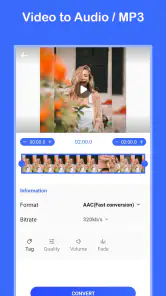
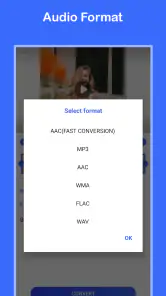
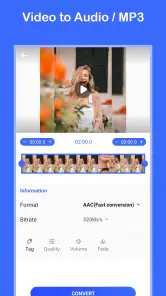
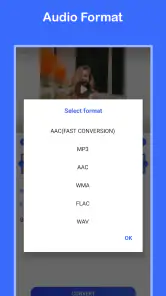
Once you install the app, you’re greeted with a straightforward interface. Simply select the video file you want to convert, choose the desired audio format, and hit convert. Voilà! You’ve got yourself an MP3 file ready to be added to your audio library. The app supports a variety of formats, ensuring compatibility with your device.
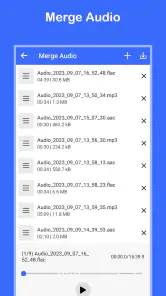
One feature I particularly enjoy is the ability to batch convert multiple files. It’s a real time-saver when you have several videos on your list. Plus, the app processes conversions pretty quickly, so you’re not left twiddling your thumbs.
For a shared-device routine, batch conversion is most useful when the source files are already gathered and clearly identifiable. I would convert a few at once, then listen to a short sample from each result before deleting or moving any original video. That quick check can catch the wrong source clip or an unwanted section before it becomes part of someone’s audio collection. If you only need one brief passage, converting a batch is unnecessary; selecting and trimming a single file is the cleaner approach.
Checking the result before sharing the phone
A small but worthwhile habit is to listen to the beginning and end of each new file before handing the device back. That check can reveal an abrupt cut, a stretch of silence, or an unexpected bit of conversation that makes the audio awkward to use. It is more useful than assuming a successful conversion automatically means the result is ready for a commute or lesson.
If the audio is meant for someone else in the household, ask them to confirm that it is the correct clip before you tidy up the source files. This is a simple way to avoid duplicate conversions and disagreements about what should be kept. I would not treat the output as a private or separately managed copy just because it has a new format; shared-device habits still apply to the resulting file.
Customization at Your Fingertips
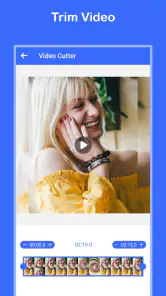
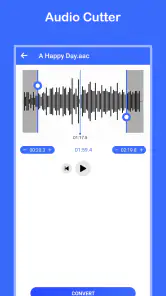
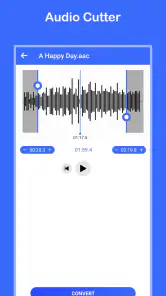
Customization is where this app truly shines. You can tweak the audio quality settings to suit your needs, whether you’re aiming for a smaller file size or top-tier sound quality. There’s also an option to trim the audio, so you’re only left with the parts you love. Talk about efficiency!
Another nifty feature is the built-in equalizer. It allows you to adjust the sound profile to match your preferences, making your listening experience even more personalized. It’s like having a mini studio in your pocket!
Those options involve useful trade-offs. A smaller file is easier to keep on a phone with limited room, while higher-quality settings make more sense for music or audio you expect to replay often. Trimming can remove a long silent lead-in or unrelated conversation, but I would keep the original video until I’m sure the cut starts and ends where I want. The equalizer changes how the audio sounds during listening; it is not a substitute for carefully editing a poor source recording.
For a spoken recording, I’d start with a modest file size and listen back before deciding whether a higher-quality conversion is worth keeping. For music, I’d be more cautious about reducing quality, since flaws can be more noticeable when the track is replayed. These are practical choices rather than a reason to convert everything at the highest setting: the right balance depends on whether the file is a one-time listen or something the household expects to keep.
Trimming is also useful for making a clip easier to revisit, but I’d avoid cutting too close to the first or last word. A tiny amount of breathing room can make speech sound more natural, and checking the cut with playback is safer than relying on a rough estimate. If the source has a long section that is genuinely irrelevant, trimming can help; if the useful part is mixed with noise or overlapping voices, this app’s basic conversion workflow may not be enough to make it clear.
Compared with a general-purpose video editor, this app is the more direct choice when the goal is simply an audio file. A full editor is better if you need to arrange clips, add titles, or make a finished video. A regular music player is better for organizing and listening to an existing collection, but it will not do the extraction step. I would skip this converter if I rarely need audio from video or if I need advanced audio cleanup and production tools.
Where it fits among everyday alternatives
The usual alternatives solve different parts of the job. A desktop editor gives more room for detailed cuts and production work, but it is an unnecessary detour if all you need is the sound from one saved clip. A video editor on a phone is useful when the picture still matters, such as when making a shorter video for someone else. A music player comes into its own after the audio exists, especially if your main need is browsing and listening rather than converting.
That distinction helps me decide whether to install a dedicated converter at all. If I expect to do this only once, using an editor I already have may be simpler than adding another tool. If I regularly want to turn talks, personal recordings, or other appropriate clips into listenable files, a purpose-built converter is a more convenient fit. For audio that needs noise reduction, careful mastering, or multiple tracks combined, I’d choose a proper audio editor instead.
A realistic example is a parent who saves a permitted school talk or personal recording and wants to listen while preparing dinner, while another person still needs the video for its slides. I’d convert only the relevant source, trim a quiet start if needed, sample the output, and leave the original available. That workflow makes the audio useful without pretending it replaces the video or resolves questions about who may share the material.
Age, trust, and household expectations
The app is rated for Everyone, and its current version is v1.1.23; it runs on Android 7.0 or later. That age rating is a helpful starting point, not a reason to hand a shared phone over without guidance. For younger users, I’d explain which files are appropriate to convert and have an adult handle purchase decisions. There is no need to assume a family-control feature: ordinary device-level supervision and a clear agreement about shared files are the practical safeguards.
For a child using a family phone, I’d keep the rules simple: convert only material the household has permission to use, ask before changing or deleting shared files, and get an adult to review any purchase prompt. Those expectations are more useful than assuming an age label settles every question. They also help older family members who are less familiar with file conversion understand what the new audio copy is and where it belongs.
It is also worth setting expectations about what the app does not solve. It converts a video’s audio, but it does not make a copyrighted track yours to redistribute, nor does extraction guarantee that a quiet or distorted recording will sound clean. If the source contains several voices or background noise, I would listen to the result before relying on it. For a clean personal recording, the workflow is much more likely to be satisfying.
Another practical question is whether to keep both versions. I’d retain the video when it contains visual information someone may need, such as demonstrations, captions, or slides. If the audio is only a temporary convenience and the source can be accessed again legitimately, the household can decide whether the extra copy is worth the storage. The important part is making that decision deliberately instead of assuming conversion should always be followed by deletion.
Why It’s Worth the Download
If you’re someone who loves to curate playlists or enjoy audio on the go, this app is a must-have. The ease of use, combined with powerful features, makes it a standout choice among audio converters. Plus, it’s free! Who doesn’t love a good deal?
For me, its strongest audience is someone who already has suitable video files and wants a straightforward way to listen to their audio separately. It is less compelling for a person whose phone is already organized around a full media-editing workflow, or who simply wants a better player for music they already own. The free install makes it easy to try, but the in-app purchase range is worth keeping in mind when another person may be using the same device.
In conclusion, Video to MP3 Convert is a fantastic tool for anyone looking to extract audio from videos without any fuss. It’s reliable, efficient, and offers a range of features that cater to both casual users and audio aficionados. So go ahead, give it a try, and transform your video library into an audio haven!
My household verdict is that it works best as an occasional, practical utility: one person can prepare a spoken clip for offline listening, or several family members can convert a small set of clearly named videos without needing a desktop workflow. It is less compelling as a shared music manager, a collaborative editing tool, or a place to organize everyone’s media. If that modest job matches your needs, the simple conversion, trimming, and quality choices make it worth trying; if your priority is complex editing or careful library management, another kind of app will be a better fit.
Video to MP3 Convert Frequently Asked Questions
Can Video to MP3 Convert save converted audio where I can find it later?
The app is intended to extract audio from video files on your device and save the result as an MP3. Before converting, make sure you know where your original video is stored and allow the app to access it if prompted. Once conversion finishes, check the app’s output area or your device’s audio and file folders to locate the saved track.
Do I need to create an account to convert a video?
Video to MP3 Convert is presented as a tool for selecting a video on your device and extracting its audio. You can begin by installing the app and choosing a file, rather than planning around a separate account-based service. Review any prompts shown during setup and grant only the access needed to select and save files for conversion.
Can I convert audio from a video I recorded myself?
Yes, a video recorded on your phone can be a suitable source if it is saved on the device and the app can access it. Select the recording from the available videos, then use the conversion controls to extract its audio as an MP3. Remember that the resulting audio will be saved separately, so keep the original video if you may need its images later.
Is the app suitable for extracting speech, music, or other audio?
The app’s stated purpose is to extract audio from video, so it can be useful when you want an audio-only version of a clip. The result reflects the sound already present in the source video; it does not create new speech or music. Listen to the converted file afterward to make sure the portion you wanted was captured clearly.
Can I share or use the MP3 after converting it?
After conversion, an MP3 is an audio file that you may be able to play or share using compatible apps on your device. Whether you may publish, distribute, or reuse the content depends on the rights attached to the original audio. Keep copyright and permission in mind, especially when the video contains music or recordings made by someone else.
Pros
- Fast conversion speed.
- High-quality audio output.
- Supports various video formats.
- User-friendly interface.
- Batch processing available.
Cons
- Ads in free version.
- Limited features without premium.
- Occasional crashes reported.
- No cloud saving option.
- Requires internet for some features.
- Category
- Video Players & Editors
- Version
- v1.1.23











