

Video Downloader & Video Saver
- 8.97K
- 4.4
- Installs
- 50.00M
- Price
- Free

Screenshots

Analysis by Reviewed
I often want a clip handy when I know I’ll be away from reliable internet, and that’s the basic appeal of Video Downloader & Video Saver. It’s a free Android video-downloading app from All Video Downloader, Saver & Player Studio, aimed at saving online videos for later viewing. I’d think of it as a practical utility rather than a full media-management system: its value depends on whether saving clips locally fits the way you watch.
Checking the cost against your routine
There’s no purchase price to weigh up: the app is free to use. That makes trying it a low-commitment option if you regularly want offline copies of videos, though “free” alone doesn’t tell me whether it suits your habits. I would install it for a specific need, then judge whether the download flow and saved files are convenient enough to keep using.
The app sits in the video players and editors category, but its central job is downloading rather than editing. It has a 4.4 average from around 339,000 ratings and more than 10 million installs, so it has reached a substantial audience. It’s rated Teen, and its current version is 1.28.5, compatible with Android 5.0 and later.
What the free download needs to deliver
For me, the real measure of a free utility is not how many options it claims to cover; it is whether it saves time without adding a new chore. A downloader should make it easy to move from finding a clip to watching it offline, and it should leave the saved file somewhere I can locate. If I only need this occasionally, the benefit may be modest. If I repeatedly save material for commutes, study, or reference, even a simple workflow can make the app worth keeping on my phone.
I’d also separate “free to install” from “free of trade-offs.” A free app can still cost attention, storage, and a little setup time. My practical test would be to try a clip I’m allowed to save, confirm it plays after disconnecting, and see whether I can find it again without searching through several folders. If that routine feels fussy, the absence of a purchase price won’t make it a good fit.
Your Personal Media Library
One of the standout features of Video Downloader & Video Saver is its ability to download videos from a wide array of platforms. Whether you’re pulling content from Instagram, Facebook, or even smaller niche sites, this app seems to handle it all with ease. The interface is user-friendly; even if tech isn’t your strong suit, you’ll find yourself navigating through the app like a pro.
Saving a clip without losing track of it
For a realistic everyday example, imagine finding a short cooking demonstration during a lunch break and wanting it available later in a kitchen with weak reception. I’d save it while connected, give the file a quick playback check, and keep it in a location I can recognize. That small routine is more dependable than assuming every video is ready just because a download appeared to finish. It also helps me avoid repeating the search when I’m in a hurry.
More From Our News Desk

 Gmail
GmailGmail in a Busy Inbox: Who Benefits Most?
From first account to crowded workday, Gmail earns its place through dependable search and flexible sorting—but its best fit depends on how much inbox maintenance you can tolerate.

 Prime Video
Switching to Prime Video: What Changes in Your Viewing Routine
Prime Video can make a compelling second home for streaming, but switching means learning a different catalog, rental layer, and route from browsing to playback.

 Universal TV Remote Control
Universal TV Remote Control Works Best as a Reliable Backup
A phone remote earns its place through quick setup and reliable habits. Here is how to get more from Universal TV Remote Control—and where its limits show.

 Weather - By Xiaomi
Weather by Xiaomi Review: Clear at a Glance, Less Clear Up Close
Xiaomi’s weather app makes everyday forecasts quick to scan, but its calm surface can leave useful details and recovery paths harder to find than they should be.

 X
XX Under Pressure: Can It Recover When Posting Goes Wrong?
A resilience-focused review of X, examining setup, mistaken posts, interruptions, weak connections, and the gaps that matter when recovery needs to be dependable.

 Clash of Clans
Clash of Clans Is Won Between the Battles
Its raids are quick; its community is a long-term project of coordination, teaching, rivalry, and shared responsibility—with all the friction that entails.
Latest News



A useful, less obvious habit is to decide on a simple folder approach before collecting many clips. I might keep temporary material together and remove it once I no longer need it, rather than letting every saved video accumulate in one undifferentiated pile. If I download something for a class or project, I’d use a recognizable filename or folder where the device allows it. The app’s storage choice is useful only if I make that choice consistently.
Seamless Integration
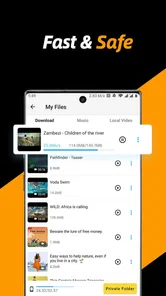
What truly sets this app apart is its seamless integration with your device’s storage. You can choose where to save your videos, making organization a breeze. No more hunting through endless folders to find that one clip you downloaded weeks ago. Plus, the app supports various file formats, so you're not stuck with just one option. This flexibility ensures that your favorite videos are always at your fingertips, ready for viewing whenever you want.
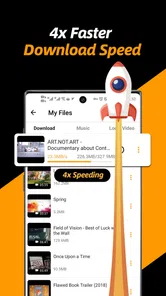
The download speed is another aspect worth mentioning. I was pleasantly surprised to find that even lengthy videos were captured and stored in a matter of seconds. Fast downloads mean less waiting and more watching, which is a significant plus in my book.
Storage choices and playback checks
Choosing where files go is more than a tidy-phone preference. If I save material somewhere that is awkward to browse, I may end up opening the downloader every time just to find a clip. A location that is easy to reach through the phone’s usual file-browsing tools gives me more flexibility later, especially if I want to move or remove a file. I’d test the chosen destination with one download before building a larger collection around it.
File-format flexibility can also matter when a clip needs to be opened in another player, but it does not remove the need to check playback on the device I plan to use. A file that downloads successfully may still be inconvenient if the player I prefer handles it poorly. My advice is simple: test a representative clip, including its sound and picture, before saving a batch for an offline trip. That quick check is more useful than relying on a format label alone.
Making offline viewing work for you
A useful habit is to save only the clips you actually expect to revisit, then choose a storage location you can recognize later. For example, before a long commute, I’d collect a few tutorials or entertainment clips while connected to Wi-Fi and check that they appear in the chosen folder. That quick check matters: a download is only useful offline if the file is easy to find and plays as expected.
This also helps keep storage manageable. Video files can take up room, so I wouldn’t treat the app as an automatic archive for everything I see. A small, intentional collection is easier to browse and less likely to leave me wondering why my device has run short on space. If you mainly want streaming recommendations or cloud access across several devices, a streaming service or cloud library is likely a better fit.
When a downloader is not the better alternative
The main comparison is with official offline viewing inside a streaming app. When the video belongs to a service I already use and its own app offers a supported download, that route is usually more predictable: the content stays within its intended catalog and playback environment. This downloader is more appealing when I want a local file from a source that can be reached through its browser and I have a legitimate reason to keep it. Those are different jobs, so I would choose based on the source rather than assume one tool replaces the other.
A file manager solves a different problem, too. It can organize or move files already on the phone, but it does not provide the same browsing-and-saving workflow. Conversely, a dedicated video editor is the right choice when the task is cutting clips together or preparing a finished project. This app’s value is narrow by design: it is for saving eligible online video, not for cataloging a large personal library or producing new media.
Privacy at the Forefront
In today’s digital age, privacy is paramount, and this app takes that seriously. It doesn’t require unnecessary permissions, and you can rest assured that your downloads remain private. This makes Video Downloader & Video Saver not only a convenient choice but a secure one as well.
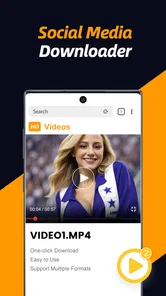
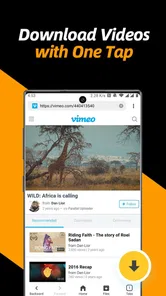
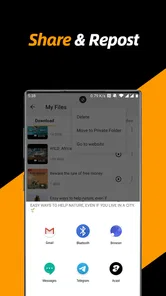
Another nifty feature is the built-in browser, which allows you to search and download content within the app itself. This means you can browse your favorite sites, find the videos you love, and save them all without ever leaving the app. It’s a one-stop-shop for all your video downloading needs.
Working through the built-in browser
Keeping browsing and saving in one place can reduce app-switching, particularly when I’m collecting a few short clips for a specific purpose. I would still treat the browser as a route to try, not a guarantee that every page will offer a usable download. Websites can present video in different ways, and a page that plays normally may not provide a file that this workflow can save. Trying the exact type of site I care about is the most practical compatibility check.
There is a useful order to that test: open a familiar page, choose a clip I have permission to download, save just that one, then locate and play the result. If it works, I can decide whether the process is repeatable enough for my needs. If it does not, I would avoid spending time trying to force the same route and use an official offline option or another permitted source instead.
Where the convenience has limits
The built-in browser can make a save-and-watch routine feel simpler than switching between apps, but it also means your experience depends on whether a particular site’s video can be accessed and saved through that route. I’d try one short, non-essential clip first rather than assume every page behaves the same way. If you need a guaranteed offline copy for work or travel, test the exact kind of content you plan to use before you rely on it.
There’s another important distinction: being able to save a video does not automatically grant permission to reuse or redistribute it. I’d keep downloads for personal viewing and respect the creator’s rights and the platform’s rules. If your main goal is editing, trimming, or producing finished videos, a dedicated editor will be a more suitable tool; this app is focused on getting clips onto your device.
What I would check before relying on it
People often want to know whether they can count on a saved clip away from the internet. I would not plan around that until I had tested the same kind of content I intend to watch, confirmed the file appears in the selected location, and played it with the phone offline. That is a more meaningful test than seeing a progress indicator complete, because it checks the whole chain from source to local playback.
Another practical question is whether downloads can be kept indefinitely. I would treat them as local files that need ordinary storage housekeeping, not as a permanent cloud backup. Keep the clips you still need, remove ones that have served their purpose, and make a separate backup if a file is important. This approach avoids confusing convenient offline access with long-term archiving.
Who will get the most from it
I’d recommend trying it if you often revisit online clips, have patchy connectivity, or want a simple way to keep a few useful videos available on your phone. Students may find it handy for saving reference material they are allowed to download, while commuters can prepare a small watchlist before heading out. On the other hand, people who rarely watch videos offline, prefer official in-app downloads, or need an editing suite may not gain much from adding another app.
It can also suit someone who needs to review a how-to clip while working somewhere with unreliable reception, or a traveler who wants a few permitted videos ready before leaving a stable connection. In those cases, I would prepare a short, relevant selection rather than trying to build a complete archive. The payoff is having a particular reference at hand, not collecting every video encountered online.
Who should choose something else
I would skip it if most of my viewing already happens inside streaming services with their own offline modes. Those built-in options avoid the extra step of finding a separate saving route and are a better match for content tied to a service’s catalog. I would also look elsewhere if I need dependable access to every video on a site, advanced sorting for a large media collection, or tools to edit and export finished work.
It may be a poor fit for someone who dislikes managing local files or has little spare storage. Downloading can solve a connection problem, but it shifts responsibility to the user to choose, find, and eventually clear the files. If that sounds like more effort than simply streaming when a connection is available, there is little reason to install another app just because it costs nothing.
Final Thoughts
All in all, Video Downloader & Video Saver is a robust app that delivers on its promises. Whether you’re downloading videos for entertainment or educational purposes, this app makes the process straightforward and efficient. With its user-friendly interface, fast download speeds, and strong privacy features, it’s a must-have for anyone looking to build their own offline video library.
So, if you’re tired of losing track of those must-watch videos, give this app a try. It might just become your new favorite tool for media management. Happy downloading!
Video Downloader & Video Saver Frequently Asked Questions
How much storage space should I have before downloading videos?
It is sensible to check your available device storage before saving videos, especially if you plan to keep several files for offline viewing. Video files can take up space, and the amount depends on the content you download. Leaving room for other apps and files can help prevent storage from becoming inconveniently full.
Can I choose which videos to save to my device?
Video Downloader & Video Saver is intended for saving videos from the internet, so it is useful to decide which content you want to keep before starting a download. Choose videos you are permitted to save and consider how much storage they may use. Once saved, downloaded videos can be watched offline.
Is Video Downloader & Video Saver free to download?
Video Downloader & Video Saver is free to download. Before installing, consider whether its basic video-saving purpose matches what you need and check the app’s current store page for details relevant to your device. The app is listed for a Teen audience, so that rating is also worth considering when deciding whether it is suitable.
What is Video Downloader & Video Saver used for?
Video Downloader & Video Saver is an app in the video players and editors category, designed to help save videos from the internet. Its short description is “Video Downloader,” and its summary presents it as a fast, private way to save videos. Once a download has completed, you can watch the saved video offline.
Does Video Downloader & Video Saver work on my device?
Video Downloader & Video Saver is a video players and editors app for Android devices running Android 5.0 or later. Its current version is 1.28.5, so it is worth checking your device’s Android version and available storage before installing. The app is free to download, and its age rating is Teen.
Pros
- Easy-to-use interface for all users
- Supports multiple video formats
- Fast download speeds
- Allows batch downloading
- No annoying ads during usage
Cons
- Limited free version features
- Requires internet for downloads
- Occasional app crashes reported
- No built-in video editor
- Some formats may not be supported












