

Video Downloader & HD Download
- 1.00
- 3.7
- Installs
- 1.00M
- Price
- Free

Screenshots


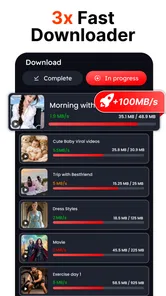


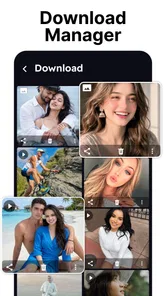
Analysis by Reviewed
I approached Video Downloader & HD Download as a practical video tool rather than a full editing suite. It sits in the video players and editors category, but its main appeal is simple: it is designed to help you save videos and watch them later. That makes it interesting for commuters, travelers, students, and anyone who regularly deals with unreliable mobile connections.
My first impression is that the app is built around convenience, not creative production. You are not choosing it because you need a timeline, color correction, captions, or advanced export controls. You are choosing it because keeping a video available offline can be more useful than repeatedly streaming it. The free entry point also makes it easy to try before deciding whether it fits your routine.
The app comes from HD Downloads and has passed the one-million-install mark, which suggests that the basic idea has found a sizeable audience. Its average rating is 3.7 from around 560 ratings, so I would describe the reception as mixed but reasonably positive rather than universally enthusiastic. That is a useful expectation to set: this is a focused utility with practical value, not an app I would recommend blindly to everyone.
How the app feels when speed matters
Download tools are judged differently from ordinary media players. With a streaming app, I mainly notice whether playback starts quickly. With a downloader, I care about how much effort it takes to begin saving a video, whether the process remains understandable, and whether the resulting file is easy to find and play. Video Downloader & HD Download makes the most sense when I want to prepare content before leaving a dependable connection.
The perceived speed will naturally depend on the source, network, video size, and available storage. I would not treat the app as a way to overcome a slow connection. Its practical advantage is that it can turn one good connection into later offline access. That changes the workflow: instead of waiting for a video to buffer at the exact moment I want to watch it, I can prepare it earlier and avoid that interruption.
A useful habit is to start downloads while the phone is connected to a stable Wi-Fi network, then check that the file appears in the app before closing everything. This is more reliable than beginning a large transfer just before boarding a bus or entering an area with weak coverage. The app is most valuable when used as a preparation tool, not as an emergency solution after connectivity has already disappeared.
I also prefer to queue only the videos I genuinely expect to watch. Saving everything can make a downloader feel slower simply because storage becomes crowded and the library becomes harder to manage. A smaller offline collection is easier to scan, easier to remove, and less likely to leave me wondering which files are still useful.
More From Our News Desk

 Instagram
Instagram’s Power Comes From Its Place in Your Phone
A close look at how Instagram turns Meta’s reach, recommendation systems and everyday camera habits into durable platform power—and what that costs users.

 Gmail
GmailGmail in a Busy Inbox: Who Benefits Most?
From first account to crowded workday, Gmail earns its place through dependable search and flexible sorting—but its best fit depends on how much inbox maintenance you can tolerate.

 Prime Video
Switching to Prime Video: What Changes in Your Viewing Routine
Prime Video can make a compelling second home for streaming, but switching means learning a different catalog, rental layer, and route from browsing to playback.

 Universal TV Remote Control
Universal TV Remote Control Works Best as a Reliable Backup
A phone remote earns its place through quick setup and reliable habits. Here is how to get more from Universal TV Remote Control—and where its limits show.

 Weather - By Xiaomi
Weather by Xiaomi Review: Clear at a Glance, Less Clear Up Close
Xiaomi’s weather app makes everyday forecasts quick to scan, but its calm surface can leave useful details and recovery paths harder to find than they should be.

 X
XX Under Pressure: Can It Recover When Posting Goes Wrong?
A resilience-focused review of X, examining setup, mistaken posts, interruptions, weak connections, and the gaps that matter when recovery needs to be dependable.
Latest News



What happens during heavier use
The demanding moments are not necessarily ordinary playback. They are more likely to come when several sizeable videos are being saved, when the phone has limited free space, or when I switch between downloading and watching at the same time. Those situations can make any downloader feel less responsive, especially on older hardware.
For that reason, I would use a staged workflow on a modest phone: begin one download, let it finish, confirm playback, and then continue with the next. It takes a little more attention than starting a large batch, but it makes failures easier to identify. If something goes wrong, I know which item needs attention instead of having to inspect a crowded queue.
There is also a practical storage trade-off. A high-quality video can occupy much more space than a short clip, and keeping many files offline can compete with photos, messages, and other apps. Before a trip, I would review the available space, remove watched material, and avoid treating the phone as an unlimited video archive. This is one of the less obvious parts of using a downloader: the real bottleneck may be storage rather than the app itself.
Watching while another transfer is active can also be less comfortable on a device with limited memory or an older processor. If playback stutters or the interface feels delayed, I would finish the download first, close other demanding apps, and then watch the saved file. That simple separation keeps the app’s two main jobs from competing unnecessarily.
Reliability and recovering from interruptions
Reliability matters more to me than a flashy interface in this category. A download that fails near the end is far more frustrating than a plain-looking screen. In everyday use, I would treat every important offline video as something to verify before relying on it. Open the saved item, move through it briefly, and make sure it is available without a connection.
That check is especially important before travel, outdoor activities, or long periods away from Wi-Fi. It is easy to assume that a visible item in a download list is ready, but a completed-looking entry is not the same as personally confirming playback. A quick test avoids discovering a problem when the original source is no longer reachable.
If a transfer stops, my recovery approach would be conservative. I would first check the connection, available storage, and whether the source is still accessible. Then I would retry the individual video rather than immediately starting several new downloads. This keeps the process clear and reduces the chance of filling the device with partial or duplicate files.
The same principle applies after leaving the app. I would not interrupt an important download casually, especially when the phone is low on battery or storage. If the app returns to a clean state after an interruption, restarting the item is usually simpler than trying to diagnose a complicated batch. The app is best suited to users who are comfortable giving downloads a little supervision instead of expecting completely invisible background handling.
Another reliability question is whether the app is appropriate for every video source. A downloader can only work within the access allowed by the source and the relevant service rules. I would use it for content I am permitted to save and would avoid assuming that every online video can or should be copied. That is not merely a technical concern; it is part of using the tool responsibly.
Everyday scenarios where it earns its place
One realistic example is a daily commute. At home, I can prepare a few videos over Wi-Fi, confirm that they play, and then watch them underground or in a weak-signal area. The benefit is not just saving mobile data. It is having predictable playback when the network cannot be trusted.
It can also help during travel. Before leaving, I would save only the material I expect to use, label my expectations mentally, and test the files while still connected. That workflow is more useful than downloading a huge collection without checking it. If storage is tight, I would prioritize short, essential videos and remove them after the trip.
For learning, offline access can make a difference when a lesson is split into several videos. I would save the next few sessions rather than the entire course, then clear completed material regularly. This keeps the phone organized and reduces the risk that a large educational collection crowds out everyday storage.
Families may also find the player-oriented approach convenient for shared viewing, but I would pay attention to the Teen content rating and to the source of every saved video. The rating is a reminder that the app should not automatically be treated as a child-focused environment. Parents who need strict content controls or a curated catalog may be better served by a dedicated family video service.
Device limits, operating system support, and resource habits
The minimum operating system is Android 7.0, so the app is aimed at a broad range of Android phones rather than only current models. That is helpful if I am using an older spare device for travel or media playback. At the same time, operating-system compatibility does not guarantee identical performance across every phone. Processor age, memory, storage speed, and the condition of the device will still affect how comfortable downloads and playback feel.
On an older phone, I would keep the offline library modest and avoid running several demanding tasks at once. I would also leave breathing room in storage instead of filling the final available space with videos. A phone that is nearly full can become inconvenient even when the downloader itself is functioning normally.
Resource demands are also influenced by video quality and duration. Large files take longer to save and occupy more space, while short clips are easier to manage. My practical choice would be to download the quality that matches the screen and situation rather than automatically selecting the largest available file. On a phone used mainly for casual viewing, maximum size is not always the best trade-off.
Battery planning matters as well. I would start substantial downloads while charging or when the phone has plenty of power, particularly before a journey. This is a simple precaution, but it prevents an otherwise useful offline plan from being interrupted at the worst time.
Where it differs from familiar alternatives
Compared with ordinary streaming apps, this tool is more focused on ownership of a local viewing copy rather than immediate access to a large online catalog. Streaming services are usually better when I want recommendations, synchronized accounts, polished discovery, or officially managed offline viewing inside their own ecosystems. Video Downloader & HD Download is more appealing when I want a straightforward place to save and play suitable videos outside that routine.
Compared with a full video editor, it is much narrower. An editor is the better choice for trimming footage, arranging clips, adding transitions, or producing a finished project. This app belongs earlier in the workflow: getting a video onto the device and making it available for later playback. Expecting it to replace an editing package would lead to disappointment.
A phone’s built-in file manager and media player may already cover basic local playback, but they do not necessarily offer the same download-centered workflow. If I already have a reliable method for saving permitted videos and organizing them, adding another app may not change much. The strongest reason to try this one is convenience for people who want downloading and watching handled in one focused place.
There is a financial detail worth considering. The app is free to install, but its in-app purchase range runs from $6.99 to $299.99 per item. That is a very wide range, so I would inspect the purchase screen carefully before confirming anything and would not assume that every useful function is included without charge. Users who want a completely cost-free experience should be particularly cautious about optional purchases.
Who should use it, and who should skip it
I would recommend trying it if your main problem is unreliable connectivity and you regularly watch videos away from home. It is also a reasonable fit for someone using an older Android phone, provided there is enough storage and the device is not already struggling with several background tasks.
I would be more hesitant to recommend it to someone who wants a polished streaming ecosystem, automatic synchronization across devices, or advanced editing controls. People who mainly watch content from services with their own official offline modes may find those built-in options simpler and more predictable. Likewise, anyone who dislikes checking downloads, managing storage, or reviewing purchase prompts may prefer a more tightly controlled alternative.
The Teen rating should also influence the decision. It does not make the app unsuitable for adults, but it means I would not hand it to a child without supervision and separate content guidance. The downloader gives access to a viewing workflow; it does not replace parental judgment.
Version, support expectations, and my practical verdict
The current version is 1.1.8, and the app was released on September 26, 2025. I would keep it updated through the normal app store process, especially when relying on it for travel or regular offline viewing. A current version is generally the sensible starting point when judging stability on a compatible phone.
After weighing speed expectations, heavy-use behavior, recovery, storage, and device limits, I see Video Downloader & HD Download as a useful but situational Android utility. Its strength is the simple offline workflow: prepare videos when the connection is good, verify them, and watch later without depending on a live stream.
My recommendation is to use it deliberately rather than casually. Start with a small download, confirm that the file plays, check how comfortably your phone handles it, and review any purchase prompt before proceeding. That approach gives you a fair sense of whether the app fits your device and habits without filling storage or creating unnecessary frustration.
For my needs, it makes the most sense as a travel and weak-signal companion, not as a replacement for a streaming service or an editor. The 3.7 average shows that the experience will not be perfect for everyone, and the broad in-app purchase range deserves attention. Still, if your priority is keeping permitted videos available offline on an Android device running 7.0 or later, Video Downloader & HD Download is worth testing with realistic expectations.
Video Downloader & HD Download Frequently Asked Questions
Is Video Downloader & HD Download free to install, and does it include in-app purchases?
Video Downloader & HD Download is free to install, so you can try its video-saving and playback features without an upfront purchase. The app also offers in-app purchases, with items priced from $6.99 to $299.99. Review any purchase details shown in the app before confirming, and use your device’s purchase controls if you want to manage or restrict transactions.
What should I know about compatibility before downloading the app?
Video Downloader & HD Download is an app in the Video Players & Editors category, developed by HD Downloads. Its current version is 1.1.8, and it requires Android 7.0 or later. Check your device’s operating system before installing, since an older version may not meet the minimum requirement. The app has a Teen content rating, which may also matter when choosing apps for younger users.
What is Video Downloader & HD Download used for?
Video Downloader & HD Download is designed to help users save supported online videos to their device for later viewing. After opening the app, you can usually paste a video link or use its built-in browsing features, select an available quality, and start the download. Its usefulness depends on the websites it supports, so results may vary between platforms and individual videos.
Can Video Downloader & HD Download download videos in HD quality?
The app may offer several resolution choices, including HD, when the source video and website make those qualities available. However, HD downloading is not guaranteed for every clip. The final quality depends on the original upload, the platform’s restrictions, your internet connection, and the app’s current compatibility. Higher-resolution files also require more storage space and take longer to download.
Where are downloaded videos saved, and can they be watched offline?
Downloaded files are generally stored in the app’s download folder or in a location selected through the device’s storage settings. Once a video has finished downloading successfully, it can usually be played without an internet connection using the app’s internal player or another compatible media player. Check the app permissions and file manager if a downloaded video is difficult to locate.
Pros
- Supports HD video downloads for clearer offline playback.
- Simple interface makes finding download controls quick and easy.
- Useful for watching saved videos without a stable internet connection.
- Download progress is easy to monitor from the app.
- Can help reduce mobile data use when videos are saved over Wi-Fi.
Cons
- Download availability may vary by website and video provider.
- Some videos may be restricted by copyright or platform policies.
- HD files require considerable storage space on your device.
- Download speed depends heavily on your internet connection.
- The app may include advertisements or optional in-app purchases.











