Video Downloader for Pinterest
- 464.00
- 4.5
- Installs
- 1.00M
- Price
- Free

Screenshots

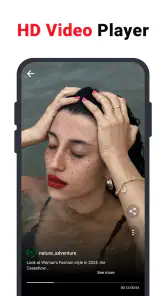
Analysis by Reviewed
If you’re anything like me, Pinterest is your go-to for inspiration, whether it's for fashion, home décor, or just some good ol’ DIY projects. But, let’s be honest, one of the biggest frustrations is not being able to directly download those captivating videos! Enter the Video Downloader for Pinterest, a nifty app that promises to solve this dilemma. Let me walk you through my experience with it.
The appeal of a separate video library
What makes this kind of tool useful is not simply saving a clip; it is the change in how you can use a pin. A Pinterest board is excellent for collecting ideas and revisiting their source. A downloaded file, by contrast, is convenient when you want to watch a tutorial somewhere your connection is poor or when you need to compare a few visual examples without repeatedly searching your feed. I see this app as a focused utility for that second job, rather than a replacement for Pinterest itself.
That distinction matters before installing anything. If your saved pins are mostly mood-board material that you revisit online, a downloader may add little value. If a clip contains steps you expect to follow while cooking, making something, or working away from home, keeping a local copy can remove friction. The strongest reason to use this app is therefore practical: it turns selected Pinterest videos into references you can open from your device, while leaving the broader process of discovering and organizing ideas where it already works well.
Getting Started with Ease
First off, the installation process of the Video Downloader for Pinterest is a breeze. Available on both Android and iOS, it takes mere seconds to get up and running. As soon as you open the app, you’re greeted with a straightforward interface that even your tech-challenged aunt could navigate without breaking a sweat. The app’s design is minimalistic, focusing on functionality over flashy graphics, which I personally find refreshing.
This is a free video app from ETM Video Downloader, rated for Everyone and sitting in the video-player and editing category. Its audience is easy to understand: people who browse Pinterest for practical ideas and want a copy of a clip available beyond the moment they see it. The app has a 4.5 average from around 61,000 ratings, and more than a million installs, so it has clearly found a sizeable audience. It includes in-app purchases, which is worth bearing in mind if you prefer apps with no paid extras at all.
Simplicity at Its Best
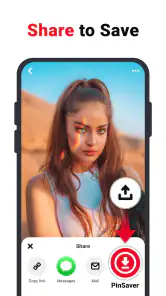
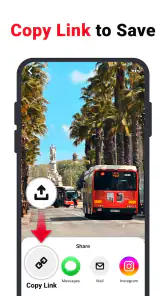
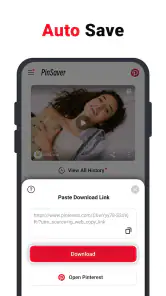
Using the app is as simple as pie. You just copy the link of the Pinterest video you’re drooling over, paste it into the app, and voila, the download begins! What’s cool is that it supports high-quality downloads, so you won’t be compromising on your video’s resolution. I tested this feature by downloading a few craft tutorials and was impressed with how crisp and clear the videos turned out. It’s like having your cake and eating it too!
The link-based workflow is also a useful way to keep your Pinterest browsing separate from saving. When I find a clip I may need later, I can copy its link first, then decide whether it belongs in my phone’s saved collection instead of filling my Pinterest boards with items I only want for a short project. For a weekend furniture refresh, for example, I might save a painting tutorial for offline reference, then remove it once the job is done. That makes the app more useful as a temporary toolbox than as another permanent archive.
More From Our News Desk

Clash of Clans Is Won Between the Battles

Android Auto Makes the Case for Quieter Car Software

MobiOffice: Transforming Mobile Productivity with Seamless Integration

EA SPORTS FC™ Mobile Soccer: Redefining Mobile Sports Gaming

How Microsoft OneDrive Became a Mobile Productivity Giant

How Google Translate Breaks Language Barriers Effortlessly
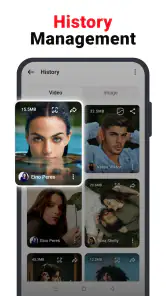
One practical habit helps keep that collection manageable: give each download a clear purpose before saving it. A clip meant for a recipe, a workout, or a craft project can be easy to forget among unrelated files, so I’d download only what I expect to use soon and organize it using the phone’s usual file or gallery tools. That small bit of housekeeping matters because saving a video is not the same as keeping the original Pinterest context, such as its pin description or place on a board.
Small habits that make downloads more useful
I’d treat each saved clip like a working note rather than a finished collection. Before downloading, I’d check the pin itself for the detail that makes it useful: the creator’s name, a materials list in the description, or a related pin with a missing step. Then I’d keep the source pin saved on Pinterest as well as the local copy. This two-part routine takes a little longer, but it means the video remains convenient without losing the route back to its context.
It also helps to be selective about what counts as worth keeping. A short demonstration with a clear action may be ideal for offline viewing; a pin that depends on written instructions or a sequence of related posts may be better left on its board. Downloading everything can make the phone’s gallery harder to browse, while saving only clips tied to an upcoming task gives each file a clear reason to be there. For a project with several stages, I’d note the relevant board or creator alongside the downloaded item using whatever organization tools I already use, rather than expecting the video file to carry all that information.
Performance and Reliability
Now, onto how the app performs. I’ve used it for a couple of weeks, and I have to say, it hasn’t let me down yet. The downloads are swift, and the app doesn’t crash – a big win in my book. Plus, it doesn’t bombard you with ads every two seconds, which is a massive relief. It’s a smooth operator in the world of apps, and that’s saying something.
There are still trade-offs to consider. A downloader depends on the link you give it and on the source content being accessible, so a failed attempt may call for checking that you copied the right Pinterest link rather than repeatedly retrying. I’d also keep the source pin saved if I might want to find the creator or instructions again. The downloaded file is handy for viewing, but it should not replace crediting the person who made the work or respecting how they allow it to be reused.
For anyone comparing options, the usual alternative is to stay inside Pinterest and save pins to boards. That is better when discovery, organization, and returning to the creator matter most; this app is more appealing when having a local video copy is the priority. Screen recording is another workaround, but it is less tidy and can capture unwanted interface elements. If you only save an occasional clip, Pinterest’s own boards may be enough. If you often need a clean reference for offline viewing, a dedicated downloader has a clearer role.
Where it fits among other ways to save
Compared with a general-purpose video downloader, this app’s appeal is its narrow purpose: the workflow is aimed at Pinterest links rather than asking you to manage downloads from many unrelated services. That focus can feel simpler if Pinterest is where you find most of your visual references. The trade-off is that it is not an all-purpose media library; if you want one tool for saving material from several platforms, a broader downloader may suit your habits better, provided it supports the sources you use.
There is also a meaningful difference between a local copy and a bookmark. A board keeps a pin attached to its creator and Pinterest setting, which is usually better for attribution and future discovery. A file is more immediately available in places where the app or website may not be convenient, but it can become detached from the context that explains how it should be used. I would use both approaches selectively: board-save anything I may want to revisit or credit, and download only the clips that have a clear offline purpose.
Why You’ll Love It
Beyond the technical stuff, what really makes this app a keeper is its convenience. No more screenshots or shaky recordings to capture those how-tos or inspiring clips. And for those who are always on the move, you can quickly build a collection of videos to view offline. It’s perfect for long commutes or flights where Wi-Fi is non-existent.
That offline use is especially helpful for a realistic everyday routine: I can collect a couple of short tutorials before leaving home, then check the steps while shopping for supplies or working somewhere with unreliable reception. I would still plan ahead rather than assume every pin will download successfully at the last minute. The app’s current version is 1.4.8, and it requires Android 8.0 or later; the store release date is July 12, 2024. Those details make it easier to judge whether it fits an older Android phone, while the free entry point lets a new user try the basic workflow before deciding whether any optional purchase is worthwhile.
For example, if I’m heading to a craft shop to pick up supplies, I might save one tutorial that shows the technique and keep its pin on a board with the project ideas. At the shop, the local clip gives me a quick visual reminder without relying on a strong connection. Back home, the board is still the better place to find the creator’s notes or explore related ideas. This is a modest convenience, not a reason to download every attractive video I encounter, and that distinction keeps the tool useful instead of turning it into another cluttered folder.
Who should use it—and who can skip it
I’d recommend it to Pinterest users who repeatedly rely on video pins for recipes, craft instructions, décor ideas, or other visual references and want a straightforward way to keep selected clips on their device. I would skip it if you mainly want to organize inspiration into searchable boards, preserve creator details in context, or rarely need offline access. In those cases, Pinterest itself is the simpler home for saved ideas, and adding a downloader may create extra files without solving a real problem.
It is also not the right choice for someone who expects a downloaded video to function like a complete project record. A clip may show a technique but not include measurements, a full materials list, or the explanation found in the pin’s text. I would check those details before leaving the source behind. Likewise, anyone who needs a carefully indexed research archive may prefer a note-taking or bookmarking routine that stores links and written observations together. This downloader solves the local-video part of the problem; it does not turn scattered pins into a structured reference system.
One question people naturally have is whether using it means they can forget about connectivity altogether. For a video that has successfully been saved to the device, offline viewing is the point of having a local copy. The useful planning step is to download and check the clip before you leave, rather than discovering at the destination that the source link was inaccessible or the file is not the one you meant to keep. I’d also make sure I still have enough room for the media I choose to save, especially if I am building a collection for a longer trip.
Another reasonable question is whether the free starting point makes the app cost-free in every respect. It is free to install, but optional in-app purchases are listed, ranging from $0.99 to $19.99 per item. I’d try the basic link-and-save routine first and only consider spending money if I understand what an optional purchase adds and know I need it. The app is best judged by whether it makes a real task easier, not by assuming that every paid extra is necessary.
On the practical side, the minimum Android requirement is 8.0, so I’d check the operating system on an older handset before planning around it. The age rating is Everyone, which describes its content classification rather than guaranteeing that every Pinterest pin is suitable for every viewer. Since the app’s job is to handle videos from Pinterest, the material you choose to save still depends on what you find there. That is another reason I see it as a personal utility, not a curated video service.
Finally, I’d keep copyright and creator credit in mind. Saving a clip for private reference is different from reposting it or presenting someone else’s work as your own. If a tutorial inspires a project that I share, I’d return to the original pin and identify its creator where appropriate. That small bit of care preserves the connection to the person whose work made the download useful in the first place.
In conclusion, the Video Downloader for Pinterest is a must-have tool for avid Pinterest users who want to save and savor their favorite videos. It’s reliable, easy to use, and does exactly what it promises without any fuss. If you’re tired of missing out on those mesmerizing video pins, give this app a whirl. Trust me, it’s a game-changer.
Video Downloader for Pinterest Frequently Asked Questions
Can I save downloaded Pinterest media directly to my phone’s gallery?
The app is designed to download Pinterest videos, photos, GIFs, and images, making it useful for keeping media on your device. Before using a saved item elsewhere, check that you have permission to download or reuse it. Once a download is complete, look for it on your device and in the app’s available download options.
Do I need to copy and paste a Pinterest link, or can I share it to the app?
The download process is centered on sharing or entering a Pinterest link in the app. You can open the Pinterest item you want, use its link, and provide that link to Video Downloader for Pinterest. Make sure the item is accessible before starting. This link-based approach is intended to make it straightforward to choose the media you want to save.
Does Video Downloader for Pinterest work with photos and GIFs as well as videos?
Yes. Video Downloader for Pinterest is designed for saving Pinterest videos, photos, GIFs, and images, so it may be useful if you want to keep more than just video content on your device. The process is centered on sharing or entering a Pinterest link in the app. Check that the item is accessible and that you have permission to save or reuse it.
What should I check before installing Video Downloader for Pinterest?
Before installing, check that your device runs Android 8.0 or later and that you are comfortable with the app’s permissions and purchase options. The app is free to download, with optional in-app purchases priced from $0.99 to $19.99 per item. It is rated for Everyone and is listed in the Video Players & Editors category, which gives a quick sense of its intended use.
How do I download videos using Video Downloader for Pinterest?
To download videos using Video Downloader for Pinterest, open the app and paste the URL of the Pinterest video you wish to download. The app will process the link and provide you with options to download the video in your preferred format and quality. Ensure you have a stable internet connection for a smooth downloading experience.
Pros
- Fast download speed
- User-friendly interface
- Supports various formats
- No login required
- Free to use
Cons
- Contains ads
- Limited to Pinterest
- No video editing tools
- Requires stable internet
- Occasional bugs

- Category
- Video Players & Editors
- Version
- 1.4.8