Video Download
- 7.00
- 4.1
- Installs
- 1.00M
- Price
- Free
Screenshots
Analysis by Reviewed
I reach for a video downloader when I want to keep a clip handy, but the experience depends on more than a download button: the source needs to be reachable, the connection needs to hold, and the file needs to be worth the space it takes. Video Download is a free video-player and editor app from FortuneCat, and its appeal is straightforward: it is aimed at people who want a simple way to save videos they can watch later. I would consider it for occasional, practical saves rather than as a complete media library or editing suite.
When the network is part of the task
A key point with any downloading app is that finding a clip and saving it are separate steps. You need a working connection to reach online content, and a slow or unstable network can make the process feel less effortless than the app’s simple premise suggests. I’d start a download while connected to reliable Wi-Fi, especially for a longer video, rather than assume a weak mobile signal will finish the job smoothly.
That distinction also helps set expectations about later viewing. A downloaded file can be useful when reception is poor, but you first need to complete the save and make sure the video is available on your device. I would not plan around a trip or a commute until I had checked that the download finished and the clip opens as expected.
Best suited to quick mobile saves
The app makes the most sense for someone who occasionally spots a useful or entertaining video and wants a copy ready for a particular moment: a tutorial to revisit, a recipe to follow in the kitchen, or a short clip to show a friend when service is patchy. For that kind of small task, a focused downloader can be less cumbersome than managing a large collection through several apps.
It is less compelling if you mainly watch through streaming services that already provide their own permitted viewing options, or if you need a full-featured editor, detailed file organization, or a reliable archive workflow. I also wouldn’t treat every online video as automatically available to save: the source’s rules and the creator’s rights matter, so I’d only download content I’m allowed to keep.
Seamless Downloading Experience
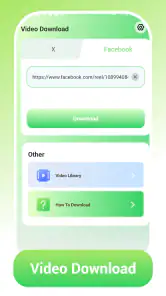
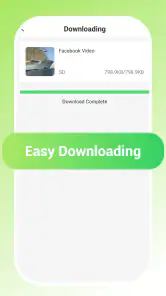
When I first stumbled upon the app, I was intrigued by its promise of a seamless downloading experience. And boy, did it deliver! From the get-go, navigating the app was smooth sailing. The user interface is intuitive, making it easy for even the least tech-savvy among us to download videos in a jiffy. Whether it’s a funny cat video from your Facebook feed or an inspiring TED Talk, this app handles all with the same efficiency.
Compatibility and Formats Galore
One of the standout features of this app is its compatibility with multiple platforms. Whether you’re an avid YouTube surfer or a Twitter scroller, this app has got you covered. It supports a wide array of formats too, so you’re not stuck with just one video type. MP4, AVI, MOV—you name it, it’s got it. I found this particularly useful because I like to switch between devices and having a flexible format option is a godsend.
More From Our News Desk

Clash of Clans Is Won Between the Battles

Android Auto Makes the Case for Quieter Car Software

MobiOffice: Transforming Mobile Productivity with Seamless Integration

EA SPORTS FC™ Mobile Soccer: Redefining Mobile Sports Gaming

How Microsoft OneDrive Became a Mobile Productivity Giant

How Google Translate Breaks Language Barriers Effortlessly
Offline Viewing
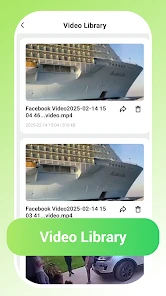
Ah, the beauty of offline viewing! There’s nothing quite like being able to watch your favorite clips without the dreaded loading icon. No more buffering blues when you’re on a long train ride or chilling at a remote cabin. The app allows you to save videos directly to your device, making offline viewing a reality. This feature has been a game-changer for me, especially during those long flights with limited in-flight entertainment.
Efficient Storage Management
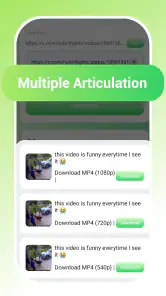
Now, I know what you’re thinking—won’t downloading a ton of videos eat up my storage space? The app developers thought of that too! The app has a nifty feature that lets you choose the quality of the video before downloading. Want to save space? Opt for a lower resolution. Want that crisp, clear quality? Go for the high-res option. It’s all about choices and this app offers them in spades.
Security and Privacy
In an era where privacy concerns are at an all-time high, it’s reassuring to know that this app takes security seriously. Your data remains yours, and the app doesn’t pry into your personal information. It’s like a digital vault for your downloaded content. Plus, with regular updates, any potential security loopholes are promptly addressed, ensuring a safe user experience.
Recovering smoothly when a save goes wrong
When a download stalls, I’d first check whether the source still opens and whether the connection has recovered, then retry only after confirming the clip is still accessible. Repeated tapping while reception is poor can make it harder to tell which attempt completed. A practical habit is to check the saved file before leaving Wi-Fi; that quick check is more useful than discovering on a train that the clip never finished.
For longer videos, I’d also avoid starting several saves at once on a busy mobile connection. Handling one at a time makes it easier to spot a failed attempt and keeps the task manageable. If a particular site or clip does not work, I would not assume every source behaves the same way; a downloader can only be useful when the content source allows a compatible route to saving it.
Making sensible choices with mobile data and storage
On a limited data plan, Wi-Fi is the safer default for larger files. If I do need to save something while away from home, I’d prioritize a short clip I genuinely expect to watch, rather than build a queue of videos I may never open. Video files can take up room quickly, so deleting a clip once it has served its purpose is a simple way to keep the phone useful for photos, messages, and other everyday needs.
Choosing a lower resolution can be a sensible trade-off for a small screen or a quick reference, while a higher-quality copy makes more sense when image detail matters. I would make that choice based on how I plan to watch, not simply pick the largest option by habit. This is especially useful for tutorials: clear enough to follow is often more valuable than a file that consumes extra space.
How it fits beside other ways to watch
Compared with streaming directly, saving a clip can reduce dependence on a live connection after the file is ready, but it asks you to plan ahead and manage storage. Compared with a platform’s built-in save option, a separate downloader may feel more direct for sources it supports, while the platform option is often the simpler choice when it is available and permitted. I’d use this app for occasional clips, not as a replacement for a streaming service or a carefully organized personal video collection.
The app is rated for Everyone, has a 4.1 average from around 589 ratings, and has passed 1M+ installs. It was released on February 14, 2025; version 1.8 requires Android 7.0 or later. Those details make it easy to judge basic fit, but my practical recommendation is simpler: check that your phone meets the requirement, try a short permitted clip first, and see whether the saving workflow suits you before relying on it for anything important.
A small test makes the decision easier
If you’re unsure whether a downloader belongs in your routine, I’d test it with a short video you have permission to keep and already know you’ll use. That checks several practical things at once: whether the source is reachable, whether the saving steps make sense to you, whether the file opens afterward, and whether its quality is suitable on your screen. It also avoids committing time or storage to a long clip before you know how the process feels.
That test is especially worthwhile if your main goal is to prepare material for a specific setting, such as a recipe for a kitchen with unreliable reception or a short explainer for a journey. Think about where the video will be watched and how much detail matters before choosing a quality. A compact copy can be enough for spoken instructions, while a demonstration that relies on small visual details may call for a clearer image. The useful choice is the one that fits the task, not automatically the largest file.
Who will appreciate it, and who may not
I can see this app suiting people who save videos now and then, prefer a direct mobile workflow, and are willing to check that a clip has finished before they leave a connection. It is a practical fit for short reference material and occasional entertainment, particularly when the alternative is searching for the same clip again later. Its free price also makes it easy to try without treating the decision as a major commitment.
I’d skip it if you want a complete media organizer, editing tools for shaping clips, or a dependable way to collect large numbers of videos across different sources. A platform’s own viewing or save option is a better first choice when it covers the content and suits your needs. And if you do not want to think about available storage, network conditions, or whether a creator permits saving, streaming may be a less fussy match.
What I would check before relying on a clip
People often wonder whether a save will work from every site, whether they can start it on mobile data, and whether the result will be ready when they need it. I would treat source compatibility as something to test rather than assume, use Wi-Fi for bigger files when practical, and confirm that the completed video opens before depending on it. Those habits answer the most important day-to-day questions without turning a quick save into a complicated routine.
I’d also keep expectations modest about privacy and file handling. The app’s purpose is saving videos, but I would still use ordinary care with content and storage: choose material I’m entitled to keep, avoid filling the phone with clips I won’t revisit, and remove files when they are no longer useful. That approach makes a small downloader more helpful and prevents it from becoming another place where forgotten media accumulates.
In conclusion, if you’re on the lookout for a reliable and efficient video downloading app, this app might just be the answer. With its user-friendly interface, wide compatibility, and emphasis on security, it ticks all the boxes for a dependable app. So next time you spot a video worth saving, you know exactly where to turn!
Video Download Frequently Asked Questions
Who developed Video Download, and how is it categorized?
Video Download is an app from FortuneCat in the video player and editor category. Its purpose is straightforward: help users download videos they want to watch. The app is free and is rated for Everyone, making it broadly accessible to users who meet the device requirements. Its simple positioning may appeal to people looking for a focused video-downloading tool rather than a broader media suite.
What devices and operating systems can run Video Download?
Video Download is listed for Android devices running Android 7.0 or later. Before installing, check your device’s Android version in its settings and make sure there is enough available storage for the app and any videos you save. The app is intended for Android, so iPhone and iPad users should not assume it can be installed on iOS. Keeping your operating system compatible can help the app install and run as expected.
What is the primary function of the Video Download app?
The Video Download app is designed to allow users to easily download videos from various websites directly onto their devices. With this app, you can save your favorite videos for offline viewing at any time, providing convenience and the ability to watch content without an internet connection. This makes it perfect for frequent travelers or anyone with limited data access.
Is the Video Download app compatible with all websites?
While the Video Download app supports a wide range of popular video-hosting websites, it might not be compatible with every site due to website restrictions or technical limitations. It's always a good idea to check the app's supported site list, which can usually be found within the app itself or on the developer's website, to ensure compatibility with your desired sites.
Are there any in-app purchases or subscription fees for using the Video Download app?
Video Download is free to download. Its straightforward purpose is to make video downloads easy to use, so users can try the app without paying an upfront price. Review the purchase details shown in the app before confirming any transaction, and check the platform’s payment prompts if they appear. This helps you understand any optional costs before proceeding.
Pros
- Easy-to-use interface enhances user experience.
- Supports multiple video formats.
- Fast download speeds save time.
- Allows batch downloads.
- Includes built-in video player.
Cons
- Contains ads that may be intrusive.
- Limited features in the free version.
- May not support all websites.
- Requires stable internet connection.
- Occasional app crashes reported.

- Category
- Video Players & Editors
- Version
- 1.8