Video AI - AI Hug & Kiss Maker
- 452.00
- 4.4
- Installs
- 1.00M
- Price
- Free

Screenshots
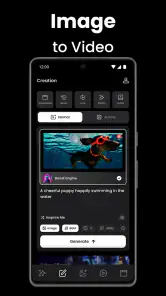
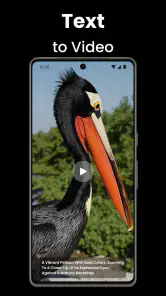
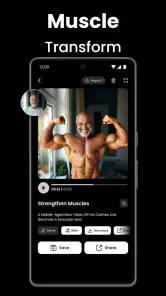
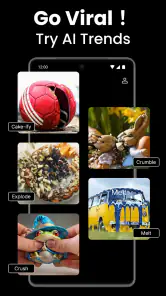
Analysis by Reviewed
I judge a creative app not only by the clip it can make, but also by how comfortable I feel choosing a photo and deciding where the result goes. Video AI - AI Hug & Kiss Maker sits in the art-and-design space, with a focus on turning photos and text into AI-made videos and short dramas. That gives it a broader creative promise than its name alone suggests, though I would approach any tool that animates personal images with a little care.
A playful tool, with a personal subject
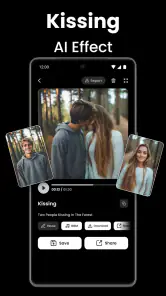
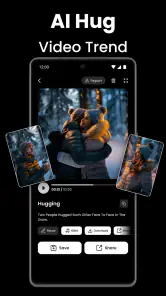
The idea is easy to understand: choose a photo, pick a template or style, and let the app generate a moving scene. Hug and kiss effects are the most obvious draw, but the app also presents image creation and short-form stories as part of its creative toolkit. I can see the appeal for someone who wants a quick, expressive post without learning a full video editor.
There is a meaningful difference between making an effect with a landscape and animating a recognizable person. Before selecting a family photo or a friend’s portrait, I’d consider whether that person would be comfortable with the result being generated and shared. A private joke can feel very different once it is posted publicly, especially if the animation could be mistaken for genuine footage.
What I would check before choosing a photo
AI animation works best as a playful interpretation, not as a faithful record of what happened. I’d start with a clear, well-lit image where faces are visible and not crowded by other people or objects. I’d also try a copy of a photo rather than treating the generated result as a replacement for the original. That keeps the creative experiment separate from the image I want to preserve.
When a result looks awkward, I wouldn’t keep changing several things at once. I’d test a different image or template first, then compare the outputs. This makes it easier to tell whether the issue comes from the source photo or from the chosen effect. For a greeting, a short and obviously playful result may work better than trying to make an animation look convincingly real.
Creating Magic with Every Clip
Upon downloading the app, I was immediately drawn into its intuitive interface. You don’t need to be a tech wizard to navigate through it. The setup is as friendly as a hug itself, making it accessible for everyone. Imagine taking a still photo and transforming it into a heartwarming video where your loved ones are seen hugging or blowing kisses. The app uses sophisticated AI algorithms to animate these gestures, and the results are surprisingly impressive.
Features That Stand Out
Now, I know what you're thinking—how does it actually work? Well, the app offers a simple step-by-step guide. Upload a photo, choose the type of animation, and let the AI do its magic. The sheer range of animations is impressive, and whether it’s a gentle hug or a playful kiss, each animation is crafted with detail that makes it feel genuine.
More From Our News Desk

Weather by Xiaomi Review: Clear at a Glance, Less Clear Up Close

X Under Pressure: Can It Recover When Posting Goes Wrong?

Clash of Clans Is Won Between the Battles

Android Auto Makes the Case for Quieter Car Software

MobiOffice: Transforming Mobile Productivity with Seamless Integration

EA SPORTS FC™ Mobile Soccer: Redefining Mobile Sports Gaming
One of the standout features is its real-time preview. You can see what your final video will look like before you even hit save. This feature allows for tweaks and adjustments, ensuring that the video is just right. Plus, the app supports a wide array of formats, so sharing your creations on social media is a breeze.
Choosing it over a conventional editor
A conventional mobile video editor gives me more direct control over cuts, timing, captions, and layers. This app’s appeal is different: it uses AI templates to do much of the transformation for me, which can be quicker when I want a themed result rather than a carefully edited montage. I’d choose it for a lighthearted reaction or a birthday greeting, but use a standard editor when exact timing, detailed sound work, or precise control over every frame matters more.
For example, if I wanted to send a relative a warm message on an ordinary afternoon, I could try a suitable portrait and a gentle animation, preview it, and decide whether it feels affectionate rather than uncanny. I’d keep the message clear and the clip brief. The same workflow is less suitable for a formal announcement or anything where viewers might mistake an AI-made gesture for real footage.
Cost, audience, and practical fit
The app is free to install, while optional in-app purchases range from $4.99 to $59.99 per item. I’d explore the available choices before paying, especially if I only need one occasional clip; a subscription or purchase makes more sense only if the templates and generation options are useful enough for repeated projects. Its Everyone age rating makes the intended audience broad, but adults should still guide younger users when they are choosing other people’s photos to animate or share.
It has a 4.4 average from around 244,000 ratings and more than 1 million installs, so it has attracted a sizeable audience. The current version is 1.4.0, and it was released on November 10, 2024. The developer is AI Video Generator - AI Hug & Kiss Video Maker. Those details are useful context, but they don’t tell me whether a particular generated clip will suit my taste; trying a low-stakes image is the better test.
Privacy and control deserve a pause
Photos can be sensitive, and AI generation involves submitting an image to a tool. I would review the app’s permission prompts and privacy information before choosing a personal photo, then grant only the access I’m comfortable with. I would also look for visible choices around saving, sharing, or account use rather than assuming how those controls work. If the image is especially private, I’d skip uploading it and use a less sensitive picture instead.
This is also a reason to keep the first experiment simple: choose a photo you have permission to use, inspect the preview, and decide deliberately before sharing the output. If the available controls don’t match what you need, a local editor that gives you direct control over the media may be a better fit. For anyone wondering whether the app can replace a full editing suite, my answer is no: its strength is quick AI-led effects, not comprehensive post-production.
Making a first attempt count
For a useful first test, I’d choose a photo that is expressive but not precious: perhaps a casual portrait taken in good light, with one clear subject and an uncluttered background. That choice makes it easier to judge the animation itself without worrying about damaging an irreplaceable image or exposing something private. I’d keep the original untouched and treat the generated version as a separate creative experiment.
If the app offers several styles, I’d compare only a couple at a time rather than cycling through every option. That keeps the decision manageable and helps reveal which visual treatment suits the photo. A dramatic template may add energy to a playful greeting, while a softer effect can feel more natural for a family message. The goal isn’t to force every image to work; it’s to find a match between the picture and the mood.
I’d also think about the audience before choosing a template. A result meant for a private message can be more personal than one intended for a public feed, where viewers lack the context to understand the joke. If the animation changes how someone appears to behave, a clear caption or an obviously stylized treatment can help signal that it is an AI-made effect, not a record of a real moment.
Where the format helps—and where it gets in the way
This kind of app makes most sense when the starting point is a single image and the desired outcome is a quick visual surprise. It is less suited to projects that begin with several clips, a planned sequence, or a specific story that needs precise pacing. In those cases, I’d reach for a conventional editor first and use an AI effect only if it adds something to the finished piece.
It also occupies a different space from a basic photo editor. A photo app is usually the better choice when I want to adjust color, crop carefully, or make a restrained improvement without inventing motion. Here, the appeal is the transformation: the image becomes a scene. That can be charming, but it also means the output may draw attention to the AI effect rather than to the original photo or message.
For a short drama built from text or images, I’d plan the idea before generating anything. A simple premise, a small number of clear visual beats, and a consistent mood are easier to manage than a complicated plot. I would not assume that an automated result will follow every detail I have in mind; the creative trade-off is speed and surprise in exchange for less frame-by-frame control.
Everyday uses that suit its strengths
One realistic use is a quick birthday greeting for a relative who enjoys playful digital messages. I could select a photo the person is happy for me to use, try a gentle effect, preview it, and send it privately if the result feels right. If it looks odd, I can abandon that image rather than spending time trying to repair an effect that was never a good fit.
Another possibility is making a lighthearted post from a non-sensitive image, such as a portrait shared with permission for a friends-only audience. The app’s template-led approach can make that faster than assembling an animation manually. For a public post, I’d be more selective: avoid intimate or misleading scenarios, and make the playful nature clear so that viewers don’t mistake generated movement for an actual event.
I would skip it for memorial images, serious announcements, or photos whose subjects have not agreed to this kind of use. Even a technically polished result can feel wrong when the context is emotional or the person pictured would not welcome it. In those moments, a static photo with a thoughtful message is often more respectful and communicates more clearly.
What to consider before spending or sharing
The free starting point makes it possible to judge whether the creative approach suits me before spending money, but I would check what a particular purchase unlocks at the point of decision. The listed in-app purchase range is wide enough that I would not treat “free to install” as a promise that every useful option is free. If I only expect to make one greeting, I’d compare the available choices with how often I’ll realistically use them.
Before sharing, I’d review the finished clip as someone seeing it without the backstory. Does the animation look affectionate, funny, or simply confusing? Could it imply that a real person did something they did not do? That quick check is especially worthwhile for hugs and kisses because they can suggest intimacy. If the result feels ambiguous, keeping it private or choosing another effect is the safer call.
My comfort also depends on the visible choices the app presents while I use it. I’d pay attention to permission requests, any account-related prompts, and the options shown around saving and sharing. I would not infer from a polished interface that a photo is handled in a particular way. If I cannot find controls or information that meet my expectations, I’d choose a less sensitive image or use a tool that better matches my needs.
Why You’ll Love It
What really sets the Video AI - AI Hug & Kiss Maker apart is its ability to evoke emotions. In a world where digital interactions can often feel cold, this app adds a layer of warmth and personal touch. It's perfect for sending heartfelt messages or just spicing up your social media feed with something unique and loving.
Moreover, the app is continuously updated with new animations, so there's always something fresh to try out. And let's not forget the support team, which is just as responsive as the app itself. Any issues, and they’re just an email away, ready to help you out.
My cautious verdict
I’d recommend giving it a try if you enjoy experimenting with AI visuals, want a quick affectionate effect, and are happy to treat the output as playful rather than documentary. I’d pass if you need precise editing, want a result that looks reliably realistic, or aren’t comfortable using personal photos with an AI tool. My practical approach would be to begin with a non-sensitive image, check the available choices, and only share a result that both I and the person pictured would be comfortable seeing online.
In conclusion, Video AI - AI Hug & Kiss Maker is more than just an app. It’s a delightful experience that combines technology and creativity to bring joy into our lives. Whether you’re a social media enthusiast, a sentimental soul, or just someone looking to have fun with videos, this app is worth every megabyte. So go ahead, give it a shot, and watch as your photos come to life with the magic of hugs and kisses!
Video AI - AI Hug & Kiss Maker Frequently Asked Questions
Do I need to provide a photo or text to make a creation?
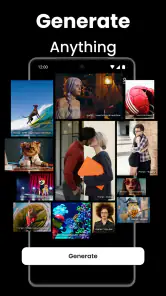
The app is described as creating AI videos, images, and short dramas from text or photos, so either can be a starting point for a project. Templates are also available to explore, which may help if you would rather begin with an existing creative direction. Think about the kind of result you want before downloading, since the app is focused on making visual content with AI.
Does Video AI - AI Hug & Kiss Maker offer templates?
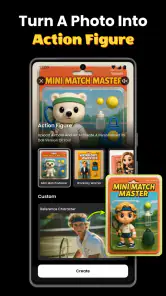
Yes. Video AI - AI Hug & Kiss Maker lets users explore templates as part of its creative experience. They can provide a starting point for creating AI videos, images, or short dramas from text or photos, rather than requiring every project to begin from scratch. If you prefer guided inspiration when making visual content, the templates are a useful part of what the app offers.
Is Video AI - AI Hug & Kiss Maker suitable for beginners?
The app is aimed at creating AI videos, images, and short dramas from text or photos, and its templates offer a starting point for people who do not want to build every creation from scratch. If you are new to AI creative tools, exploring the available templates can help you understand the kinds of results the app supports before you make a project.
What kind of content can I create with Video AI - AI Hug & Kiss Maker?
Video AI - AI Hug & Kiss Maker is an innovative app that utilizes artificial intelligence to create personalized videos featuring virtual hugs and kisses. It also lets users create AI videos, images, and short dramas from text or photos, with templates to explore. This gives the app a broader creative focus than affectionate video messages alone, while keeping visual, AI-assisted creation at its center.
What is Video AI - AI Hug & Kiss Maker and what does it do?
Video AI - AI Hug & Kiss Maker is an innovative app that utilizes artificial intelligence to create personalized videos featuring virtual hugs and kisses. This app allows users to generate heartwarming video messages by integrating advanced AI technology to mimic real-life gestures, making it a unique tool for expressing affection and connection through digital means.
Pros
- Easy to use interface for beginners.
- Generates videos quickly and efficiently.
- High-quality video output.
- Offers a variety of customization options.
- Supports multiple video formats.
Cons
- Limited free version features.
- Occasional glitches in video rendering.
- Requires high processing power.
- Ads in the free version can be intrusive.
- No offline editing capability.
- Category
- Art & Design
- Version
- 1.4.0











