Videa: AI Video Maker, Effects
- 1.65K
- 4.5
- Installs
- 1.00M
- Price
- Free

Screenshots
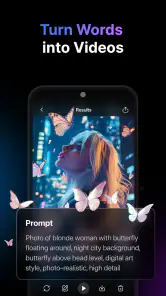
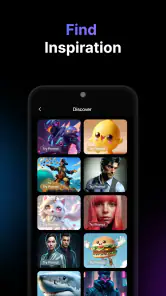

Analysis by Reviewed
When I try an AI video app, the frustrating part is often not editing but figuring out what to do when the first result misses the mark. With Videa: AI Video Maker, Effects, I’d treat automatic suggestions as a starting point, not a finished cut: check the clip order, watch the full preview, and make a small adjustment before exporting. That helps me catch an awkward transition or a moment that feels too slow while changes are still easy.
When a first attempt needs a reset
If a project looks different from what I expected, I’d return to the source clips and confirm that the intended footage is included and arranged in the order I want. Then I’d preview the edit from beginning to end instead of judging it from a single frame. AI suggestions can save time, but they may not know which moment matters most to me, so a quick manual review is still worthwhile.
For a short everyday video, I’d keep the first pass simple: choose a few clips that tell one clear story, try one effect, and listen to the result before adding more. This makes it easier to tell whether a problem comes from the edit, the source footage, or an effect that doesn’t suit the scene. It also avoids spending time polishing a version I may later decide to rebuild.
Setup checks and a steadier workflow
Before starting, I’d make sure the app is current and that the device meets its Android requirement of version 7.0 or later. Videa is free to install, though in-app purchases range from $2.99 to $119.99 per item, so I’d check any purchase prompt carefully and decide whether a paid option is useful before proceeding. The app is rated for Everyone, and PURE APPS is the developer.
If an export or edit seems to stall, I’d avoid tapping repeatedly or immediately rebuilding the whole project. Reopen the project, preview it again, and make one change at a time so it’s clear what helped. If the issue remains, try a shorter edit using a small selection of clips; that can help distinguish a project-specific snag from a broader problem. I wouldn’t assume every delay is caused by the app: the phone, source files, or available device resources may also affect how smoothly a video task runs.
What to check before choosing a workflow
A practical question is whether you need a fast starting point or precise control over every cut. Videa’s AI-led approach is most useful when your footage already has a clear subject and you want help turning it into a short, coherent piece. If the important moment is buried among unrelated clips, selecting a smaller group first gives the app a clearer brief and makes the preview easier to judge.
I’d also decide where the finished video will be watched before editing. A clip intended for a quick social post has different needs from one that will be viewed with sound on a larger screen. In the first case, a concise sequence and a clear visual subject matter more than stacking on effects. For footage that depends on spoken explanation, I’d check that the music doesn’t compete with the voice and that the central point is still understandable without relying on a flashy transition.
More From Our News Desk

Clash of Clans Is Won Between the Battles

Android Auto Makes the Case for Quieter Car Software

MobiOffice: Transforming Mobile Productivity with Seamless Integration

EA SPORTS FC™ Mobile Soccer: Redefining Mobile Sports Gaming

How Microsoft OneDrive Became a Mobile Productivity Giant

How Google Translate Breaks Language Barriers Effortlessly
Who will get the most from it
I think Videa suits people who want a quick social clip or a polished personal montage without learning a full desktop-style editor. A realistic use would be choosing a few moments from a weekend outing, letting the app suggest a starting edit, then checking the pacing and applying a restrained effect before sharing. That workflow is more dependable than expecting one tap to make every creative decision for you.
Compared with a conventional timeline editor, an AI-led approach can reduce the amount of manual arranging, but it gives you less reason to expect fine-grained control at every step. If you’re making a carefully timed short film, need a very specific sequence, or want to adjust every detail, a more hands-on editor may suit you better. Videa’s appeal is speed and approachability, not a promise that every automated choice will match your taste.
A realistic outing-to-post workflow
For example, after a day out I might have clips of the journey, the place itself, and one or two moments worth remembering. I would not feed every recording into the first edit. I’d pick the shots that establish where I am, show the main activity, and provide a natural ending, then preview the sequence to see whether the story makes sense without explanation. That selection is a small step, but it can prevent an automated edit from giving equal weight to footage that I only captured as a casual extra.
Next, I’d decide whether an effect helps the memory or distracts from it. A strong treatment may suit a playful clip, while a quieter look can keep a family moment or scenic view feeling natural. I’d make that choice after checking the unadorned sequence, rather than using effects to compensate for a confusing order. This is one reason I’d save the original footage and avoid making the first pass overly elaborate: a clean base gives me room to change direction without losing the moments I wanted to keep.
For a small business or creator, the same approach can help with a quick behind-the-scenes post. I’d gather a few relevant shots, keep the message to one point, and review the video as if I were a viewer who knows nothing about the process. If the result needs exact branding, carefully timed captions, or strict approval, I’d treat this kind of app as a rough-draft tool and move to a more controlled editor for the final pass. The convenience is valuable only when it doesn’t create extra correction work.
Getting Started with Videa
When I first launched the Videa: AI Video Maker, Effects app, I was greeted with a sleek and user-friendly interface. The app is designed to cater to both beginners and seasoned editors, which I found quite appealing. The onboarding process was smooth, with helpful tooltips guiding me through the basic functionalities. If you're new to video editing, don’t worry! Videa’s intuitive design ensures you won’t feel overwhelmed.
Features that Stand Out
One of the standout features of Videa is its AI-powered editing capabilities. The app can automatically analyze your video clips and suggest edits that enhance the overall quality. You can also add stunning effects with just a few taps. From filters to transitions, the variety of effects is impressive. I particularly enjoyed using the slow-motion effect, which added a dramatic touch to my action shots. The app also offers a range of music tracks and sound effects to elevate your video’s audio.
Another feature worth mentioning is the app’s ability to create videos in various formats optimized for different social media platforms. Whether you're making an Instagram story or a YouTube video, Videa has got you covered. The app even allows you to export videos in high definition, ensuring your content always looks crisp and professional.
Ease of Use
I was pleasantly surprised by how easy it was to navigate through Videa. The drag-and-drop functionality makes it super simple to arrange clips and add effects. The timeline is clear and easy to edit, allowing me to make precise cuts and adjustments. Plus, the app’s AI feature means you can create a polished video in minutes, which is perfect for those of us who are always on the go.
As an app in the Art & Design category, Videa sits between quick template-driven tools and traditional editors that expect you to build a cut manually. Its current version is 1.8.2, and it has a 4.5 average from around 29,000 ratings, with more than 1 million installs and around 1,700 written reviews. Those figures suggest it has found an audience, but they don’t tell me whether its style suits a particular project; I’d still judge it by the result I can make with my own clips.
Where I’d draw the line
For someone posting casually, the combination of AI suggestions, effects, audio choices, and social-friendly formats may be enough to turn scattered footage into something shareable. For a small business owner, it could help prepare a quick behind-the-scenes post without opening a complex editor. But I wouldn’t make it my only tool for a campaign with strict brand rules or exact shot timing. In that situation, I’d use Videa for a rough draft and finish in an editor that offers the level of control the brief demands.
A useful trade-off is to make one clean version before experimenting. Save your original clips, assemble the story, and then test effects on a copy or separate pass if your workflow allows it. That way, an eye-catching filter doesn’t become difficult to undo after you’ve already tuned the pacing around it. I’d also listen with headphones when choosing music or sound effects; a track that seems fine on a phone speaker can compete with voices or distract from the moment you want viewers to notice.
If you’re wondering whether Videa is worth trying before paying for anything, the free installation makes it reasonable to explore, while the in-app purchase range means it’s sensible to pause at checkout and consider what you actually need. I’d also ask whether a social-ready format is enough for your destination or whether you need a particular crop and timing. Those decisions matter more than adding another effect, especially when the clip has to fit a specific post.
When a problem may be outside the edit
If the project behaves differently from one attempt to the next, I’d first separate what I can observe from what I’m guessing. Does the same source footage behave oddly in a shorter project? Does the preview look right, but the exported file seem wrong? Those comparisons can help narrow down where to focus without assuming that a particular setting or app feature is responsible. I’d keep the original clips untouched while testing, so troubleshooting doesn’t risk the only copy of something important.
It’s also worth checking the finished file in the place where I plan to use it. A video can look different when viewed in another app or on another screen, and a crop that seems acceptable in an editor may hide a subject when displayed in a different layout. I’d leave a little breathing room around faces and key details and review the result at its destination before sharing widely. That’s a general editing precaution, not a reason to blame Videa for every display difference.
My practical verdict
In my opinion, Videa: AI Video Maker, Effects is a fantastic tool for anyone looking to up their video editing game without spending hours learning complex software. Its AI-driven features, combined with an easy-to-use interface, make it a standout choice for both novices and pros alike. So, if you're looking to create eye-catching videos with minimal effort, I highly recommend giving Videa a try. Trust me, you won’t be disappointed!
I’d qualify that recommendation by matching the app to the job. If you want to turn a handful of personal clips into a shareable montage, or need a quick visual draft and are happy to review the automated choices, it is a sensible place to start. If you need exact edits, a dependable brand template, or a carefully controlled audio mix, a traditional editor is the safer choice. The useful question is not whether AI can make a video without help, but whether its first pass saves you more time than it takes to review and correct.
For a first try, I’d keep the project short, preserve the original footage, and make decisions in order: select the story, check the pacing, choose an effect only if it adds something, then listen through before exporting. That approach gives Videa a fair test without turning a simple post into a long editing session. Its free installation makes exploration approachable, while the purchase prompts are a good reason to decide what you need before spending. If that balance of speed and hands-on checking suits you, I can see it earning a place in a casual mobile video workflow.
Videa: AI Video Maker, Effects Frequently Asked Questions
What is the current version of Videa: AI Video Maker, Effects?
Videa: AI Video Maker, Effects is currently at version 1.8.2. Checking the version details before downloading can help you confirm that you are looking at the current release and understand whether your device meets the app’s requirements. Videa is an Art & Design app from PURE APPS, focused on AI-assisted video creation and effects.
What does Videa: AI Video Maker, Effects help me create?
Videa is presented as a tool for making video content with AI-assisted generation, editing, and visual effects. Its focus may appeal to people who want to shape a video project without relying entirely on manual editing. The app’s store summary describes it as a way to revolutionize content creation with advanced video generation, making it worth considering for creative projects.
Is Videa: AI Video Maker, Effects free to download?
Videa is a free app in the Art & Design category, so you can download it without an upfront purchase. It also offers in-app purchases, with options priced from $2.99 to $119.99 per item. The free starting point may suit people who want to explore AI video creation, while anyone considering paid options should check the available purchase details in the app before buying.
What is Videa: AI Video Maker, Effects?
Videa: AI Video Maker, Effects is an innovative application designed to help users create professional-quality videos with ease. It leverages artificial intelligence to offer a range of features including video editing, special effects, and personalized content creation tools. The app is suitable for both beginners and experienced video creators looking to enhance their projects with cutting-edge technology.
How does the AI technology in Videa enhance video editing?
The AI technology in Videa assists users by automating several complex editing tasks. It can intelligently identify key elements in footage, suggest edits, and apply effects that enhance the visual appeal of videos. This not only saves time but also ensures that even users with limited editing skills can produce high-quality videos effortlessly.
Pros
- Intuitive user interface for easy navigation.
- Wide variety of effects to enhance videos.
- Fast rendering speeds for quick results.
- High-quality video output.
- Regular updates with new features.
Cons
- Limited free version features.
- Occasional glitches with certain effects.
- Requires high-performance device.
- No offline editing mode.
- Subscription-based pricing model.

- Category
- Art & Design
- Version
- 1.8.2











