Vibify-offline MP3
- 85.00
- 4.4
- Installs
- 5.00M
- Price
- Free

Screenshots
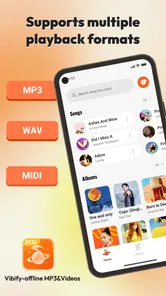
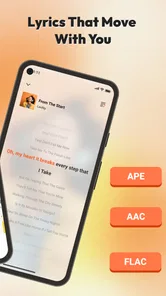
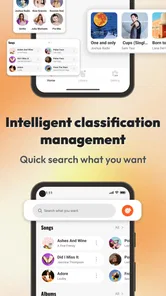
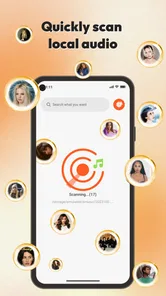
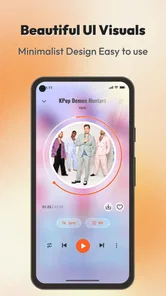
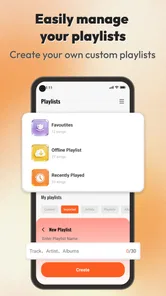
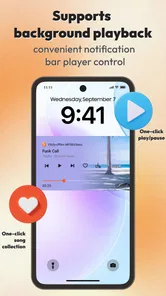
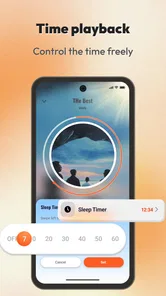
Analysis by Reviewed
If you want a straightforward way to put music into the gaps in your day, Vibify-offline MP3 is worth a look. I’d approach it as a focused music-and-audio app rather than a replacement for every streaming service or a full-featured music studio. That distinction matters: the best reason to try it is the possibility of getting from opening the app to listening without turning a quick break into a hunt through complicated menus.
Who should give it a try
I’d consider Vibify if you want to try a free music app without first committing to a subscription or rebuilding your listening routine. It is most appealing when your goal is modest and practical: find something to listen to, use it for a particular part of the day, and decide from experience whether it fits. Someone who already knows they need a huge catalog, highly personalized recommendations, or careful control of a substantial music collection should start with a service built around those priorities instead.
That distinction can save time. If you mainly listen to a handful of familiar tracks while walking, cooking, or doing chores, you may value a quick, repeatable route to playback more than a wealth of discovery tools. If you routinely search for specific albums, make collaborative playlists, or manage files by folder and metadata, the usual streaming or specialist-player alternatives are more likely to meet your expectations. I would treat Vibify as a candidate for a particular listening job, not assume it has to become your one app for everything.
What to expect from Vibify
Vibify is a free music and audio app from Khan eCoding. It is aimed at everyday listening, with a name that suggests a casual, music-forward experience rather than a tool for managing a large professional library. Its store summary points to music for ordinary moments, but I would keep expectations practical: the app is most useful if its available listening options suit the way you already enjoy music.
The scale of its audience is encouraging without being a guarantee that it will fit everyone. It has more than five million installs and an average rating of 4.4 from around four thousand ratings, alongside 85 written reviews. Those figures suggest many people have given it a try, but they cannot tell you whether its particular approach matches your habits. I’d use the first session to answer one simple question: can I find something I want to hear quickly and comfortably?
It is listed for everyone and is free to download. The app was released on July 11, 2025, and its current version is 1.3.6. It supports Android 7.0 and newer, so it can be an option for people using older Android devices as well as more recent ones. These details make it easy to consider, but they do not make it automatically the right choice if you need a specific catalog, advanced library tools, or a particular playback workflow.
Compared with a mainstream streaming service, an offline-oriented MP3 app points toward a different kind of listening. Streaming services are usually the better fit when you want a large, searchable catalog and recommendations tied to an account. A local music player is often better when you already maintain a carefully organized collection and want detailed control over folders, tags, and playlists. Vibify makes most sense to a first-time user who wants to explore a simpler route to everyday music, rather than assuming it will reproduce every feature of those alternatives.
More From Our News Desk

Weather by Xiaomi Review: Clear at a Glance, Less Clear Up Close

X Under Pressure: Can It Recover When Posting Goes Wrong?

Clash of Clans Is Won Between the Battles

Android Auto Makes the Case for Quieter Car Software

MobiOffice: Transforming Mobile Productivity with Seamless Integration

EA SPORTS FC™ Mobile Soccer: Redefining Mobile Sports Gaming
Start with a small, useful goal
Before exploring every screen, decide what a successful first use would look like. It might be finding a track for a short walk, setting up something to listen to while tidying, or checking whether the app suits a commute. A small goal helps you judge the experience on something that matters instead of spending your first session tapping around without knowing what you are looking for.
For example, imagine you have ten minutes before leaving home and want music ready for the walk to a nearby shop. Open the app with that one purpose in mind. If you can reach a listening choice without confusion, that is a more useful early test than trying to evaluate every possible use case at once. If the route to playback feels unclear, take a moment to understand the app’s own options before deciding whether it belongs in your routine.
Set up without rushing
On your first launch, give yourself a quiet minute to look at the screens and labels rather than tapping through automatically. I recommend noticing what the app presents as its main listening route and where it places any browsing or organization choices. A first-time user does not need to configure an elaborate system right away; the goal is simply to learn where to begin and how to return to a useful screen later.
If you already have music files you want to use, keep that in mind as you explore, but do not assume that every MP3 app handles local files in the same way. Check what Vibify actually makes available on your device and follow the choices shown in the app. That is a better approach than importing or reorganizing a whole collection before you know whether its workflow suits you.
A useful first-session habit is to test one short listening task before making the app part of a longer routine. Try choosing something, leaving the current screen, and returning to the app. This reveals whether the basic navigation makes sense to you. It also gives you a chance to spot any point where you are unsure what to tap next, while the stakes are low and you have time to explore.
For someone who shares a device or prefers a tidy home screen, it can help to decide in advance how you want to use Vibify: as an occasional option for a particular moment, or as the main place you go when you want music. That choice affects how much setup is worthwhile. If you only need it now and then, a simple, repeatable path to listening is more valuable than organizing everything immediately.
Make the first play count
The first meaningful success is not merely opening the app; it is reaching music you actually want to hear and being able to continue your day. Pick a familiar listening situation, such as background music while making breakfast, then try the most direct route the interface offers. If you can do that without second-guessing every choice, you have learned something concrete about whether the app feels approachable.
Here is a practical way to assess it: choose one track or listening option, start playback, and then set the phone aside for a few minutes. Notice whether the experience fits the task you chose. For background listening, a simple path and minimal interruption may matter more than deep controls. For focused listening, you may care more about selecting exactly what comes next. Those are different needs, so judge the app against the one you have rather than an abstract idea of a perfect music player.
One non-obvious tip is to test Vibify in two contrasting situations before settling on an opinion. Use it once when you can give it your attention, then again when you are doing something else, such as preparing a meal. The first test tells you whether you can navigate it; the second tells you whether it is convenient enough to become a habit. An app that seems clear while you are exploring can feel different when you only have one hand free.
Another useful check is to think about how you choose music. If you tend to return to a small set of familiar tracks, a direct player may be more important to you than discovery. If you regularly want new music, you may be happier with a service whose main strength is a broad catalog and recommendation tools. This is not a flaw in Vibify so much as a decision about the kind of listening experience you want from an app.
Where a new user may hesitate
The word “offline” in the app’s name can lead to an understandable question: what exactly will be available without an internet connection? Do not assume that every track or listening option is automatically stored on the device. Check the app’s own presentation and try a brief offline test only after you understand how it makes music available. That small check can prevent frustration later, especially if you hope to use it somewhere with unreliable connectivity.
Likewise, the word “MP3” can make people expect a traditional file player with familiar folder browsing and detailed library controls. If that is what you need, look carefully at how Vibify handles your music before investing time in a full library setup. A dedicated local player may be a better choice when you want precise control over file locations, metadata, sorting, or playlist maintenance. Vibify is easier to recommend when your priority is uncomplicated access to listening rather than painstaking collection management.
A second common source of confusion is treating “free” as a promise that the app will match every paid service’s catalog or tools. Free makes it easy to try, but the right comparison is not just price. Think about what you listen to, how you find it, and whether the app’s available choices meet that need. If you rely on a particular artist, album, or advanced playback option, check that your preferred use is supported before making it your only music app.
There is also a trade-off between a quick start and a personalized library. Spending time organizing music can pay off if you listen to the same collection often, but it is wasted effort if the app’s approach does not match your preferences. I’d first use Vibify for one ordinary listening session, then decide whether it deserves a larger role. This keeps the trial low-effort and gives you a fair impression based on actual use.
Who will get the most from it
I can see Vibify suiting someone who wants a free, approachable music option for casual moments and is comfortable exploring a focused app before committing to it. It may also appeal to people using an older Android phone, since Android 7.0 is the minimum operating system. The strongest case for trying it is not a promise that it will replace everything else, but that it may make a small part of your listening routine easier.
It is less compelling for listeners who depend on a very large streaming catalog, sophisticated recommendations, extensive playlist collaboration, or precise local-library management. If those are your daily requirements, a major streaming platform or a dedicated file player is likely the safer starting point. You can still try Vibify alongside one of those apps, but there is no reason to force it into a role it is not suited to fill.
For a first-time user, I would keep the decision simple: install it, identify the most direct way to reach music, and test that route during a real everyday task. If you can repeat the process comfortably, keep it as an option for those moments. If you find yourself repeatedly searching for controls or listening choices that matter to you, move on without feeling that you missed a hidden trick.
A sensible next step
After the first successful listen, try one more session in a different setting before deciding whether to rely on Vibify. A relaxed moment at home and a brief outing can reveal different strengths and annoyances. Pay attention to whether you can get back to the music you want, whether the app’s organization makes sense to you, and whether its approach suits your connection and library habits.
My overall view is that Vibify is worth a low-pressure trial if you want a free music-and-audio app and are open to a straightforward alternative to your usual player. Its large install base and solid average rating make it a reasonable candidate to explore, not a substitute for checking your own needs. Start with one familiar listening task, confirm what works for you, and keep a streaming service or specialist MP3 player in the mix if it handles your preferred workflow better.
Decide whether it earns a regular place
Once you have tried it in the situations that matter to you, make the decision based on friction rather than novelty. Ask whether you can get to the kind of listening you want without having to remember a complicated sequence, and whether the app’s way of presenting music makes sense after a short break from using it. If the answer is yes, it can be a handy part of your routine even if you continue using another player for different needs.
If you plan to use it away from home, test that exact situation before depending on it. Check what remains usable when connectivity is poor, and do so while you still have another option available. That is more reassuring than discovering during a commute that your understanding of “offline” did not match what the app provides. For occasional listening at home, this concern may matter much less.
My practical recommendation is to keep the first trial small: one familiar listening moment, one repeat use, and then a clear decision about whether the route feels natural. That gives Vibify a fair chance without turning setup into a project. It is a sensible option for casual listeners who value a simple experiment, while people with exacting catalog or file-management needs will be better served by choosing a specialist alternative first.
Vibify-offline MP3 Frequently Asked Questions
What is Vibify-offline MP3?
Vibify-offline MP3 is an app for listening to music files stored on your device without needing an internet connection. It is intended for people who want to play downloaded or transferred audio rather than stream tracks from an online catalog. Before installing it, check the store listing for the supported audio formats and features, as these can vary by platform and app version.
Can I use Vibify-offline MP3 without Wi-Fi or mobile data?
Yes, offline playback is the main purpose of an offline MP3 player: once compatible music files are saved on your phone, you can listen without Wi-Fi or mobile data. You may still need an internet connection to download the app, and some optional features—such as ads, updates, or online content if offered—could require connectivity. Availability of offline playback can also depend on file access permissions.
How do I add music to Vibify-offline MP3?
An offline music player generally plays audio files that are already available on the device, rather than providing songs to download. Depending on your phone and the app’s permissions, Vibify may scan accessible folders or let you choose files manually. You may need to transfer MP3s from a computer or save them through another service first. Review the app’s instructions and ensure you have the right to use your music files.
Does Vibify-offline MP3 support playlists, background playback, and common audio formats?
Those features can make a big difference in day-to-day use, but they may depend on the current version of Vibify and your device. Check the app’s store description or settings for confirmation of playlist controls, background playback, lock-screen controls, and supported formats beyond MP3. If a file does not appear or play, it may be in an unsupported format, stored in an inaccessible folder, or restricted by device permissions.
Is Vibify-offline MP3 free, and what permissions should I consider?
Check the store listing before downloading to see whether Vibify-offline MP3 is free, contains ads, or offers paid features, since pricing and monetization may change. An offline player may request access to audio files or media so it can find and play music; that permission is relevant to its core function. Review the requested permissions and the developer’s privacy information, and download the app only from a trusted store.
Pros
- Plays locally stored MP3 files without needing an internet connection.
- Useful for listening where mobile data is limited or unavailable.
- Offline playback can help reduce streaming data usage.
- Does not depend on a streaming subscription to play your own music.
- A practical option for users who prefer keeping music files on their device.
Cons
- You need to provide your own music files; streaming catalogs may not be included.
- Available tracks depend on the audio files stored on your device.
- Offline playback means no access to online music discovery or streaming libraries.
- MP3-only support may limit compatibility with other audio formats.
- The app may need storage and media permissions to find and play local tracks.













