WeTrack - Location Tracker
- 32.00
- 3.7
- Installs
- 1.00M
- Price
- Free

Screenshots
Analysis by Reviewed
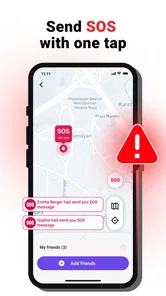
Keeping track of family members can be useful, but it is also the kind of task where convenience and privacy need to stay balanced. I spent time with WeTrack - Location Tracker to see whether its approach feels practical for everyday family coordination rather than simply adding another map to a phone. Developed by Khan eCoding, this free Tools app focuses on family location tracking, alerts when someone reaches a place, and SOS sharing with consent.
My first impression is that WeTrack is aimed at people who want a straightforward safety and coordination tool without paying to get started. It is available for everyone in terms of content rating, supports devices running Android 7.0 or later, and the current version is 1.0.4. Those details make it accessible to a broad range of phones, although the experience still depends heavily on whether every person in the group understands and agrees to location sharing.
How WeTrack approaches family location sharing
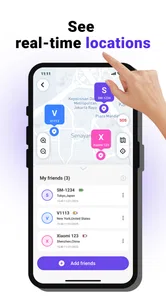
The central idea is simple: instead of repeatedly asking where someone is, family members can share their locations with consent and use place-based alerts to reduce unnecessary checking. That makes the app more suitable for coordination than for silent observation. I see an important distinction here. A location tool works best when everyone knows what it is doing, why it is being used, and when sharing should be paused.
The SOS function adds a second purpose. It gives a family member a way to share an emergency signal with the people who have agreed to receive it. I would treat this as an additional communication layer, not as a replacement for emergency services or a guarantee that help will arrive. In a stressful situation, the usefulness of any SOS feature depends on the recipient noticing it and knowing how to respond.
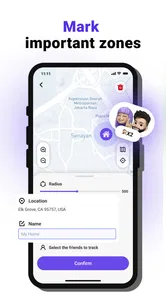
The place-alert idea is particularly practical. A parent might want to know when a child arrives at school, or a family could use an alert for a relative arriving at home. This is less intrusive than constantly opening a map and can turn a vague concern into a simple notification. The trade-off is that alerts need sensible locations and willing participants; otherwise they can become noise or feel controlling.
What the free access means in practice
WeTrack is free, so there is no purchase decision involved before trying its core concept. That matters for families who want to test whether shared location and place alerts fit their routine before committing money. I would still judge the app on the quality of the experience rather than assuming that free automatically means better value. A free tracker that creates confusion or tension is not especially useful.
The most honest way to describe its value is free access to a family-oriented location tool, with the practical benefit coming from whether the group actually uses it consistently. The app’s listing does not establish a paid tier or a specific subscription structure, so I would not plan around premium capabilities or promise that every possible tracking option is included. For a reader deciding whether to install it, the safe expectation is to begin with the free offering and evaluate the functions available on the device.
More From Our News Desk

Weather by Xiaomi Review: Clear at a Glance, Less Clear Up Close

X Under Pressure: Can It Recover When Posting Goes Wrong?

Clash of Clans Is Won Between the Battles

Android Auto Makes the Case for Quieter Car Software

MobiOffice: Transforming Mobile Productivity with Seamless Integration

EA SPORTS FC™ Mobile Soccer: Redefining Mobile Sports Gaming
That also changes how I compare it with alternatives. A service with a familiar ecosystem may offer deeper integration with a phone’s built-in maps, messaging, or family controls. A dedicated safety service may provide a broader emergency focus. WeTrack’s appeal is more focused: it brings family locations, place alerts, and consent-based SOS into one app from Khan eCoding. Whether that is enough depends on how much you value a separate tool over using features already present on your phone.
A realistic family routine
Imagine a household where one parent finishes work later, one teenager travels to school, and another relative lives alone. In the morning, the teenager can share their location for the journey, while the parent avoids sending repeated “Have you arrived?” messages. A place alert can handle the arrival check, and the relative can use agreed SOS sharing if they need to draw attention to an urgent situation.
The important part of that routine is the agreement before anything happens. I would decide who can see whom, which places deserve alerts, and when sharing should be turned off. Without those boundaries, the app can quickly shift from helpful coordination into an uncomfortable expectation that everyone is visible all the time.
There is also a useful communication habit here: use the location feature for logistics, not as proof of trust. If someone takes a different route, stops somewhere unexpected, or loses signal, the map should prompt a conversation rather than an accusation. This is one of the less obvious trade-offs of any family tracker, and WeTrack’s consent-based positioning makes that conversation especially important.
Where the app can save time
The strongest everyday benefit is reducing repetitive check-ins. A parent waiting for a child after an activity can rely on a place alert instead of opening a map every few minutes. A family member collecting someone from a station can check the shared location when plans change. These are small conveniences, but they add up when used with clear boundaries.
I also like the possibility of separating routine updates from urgent communication. A location alert can handle a normal arrival, while SOS sharing is reserved for situations that need attention. That distinction prevents every ordinary delay from being treated like an emergency. It also gives family members a shared vocabulary: an alert means a planned event, while SOS means something more serious.
Another practical insight is to keep the number of tracked places limited. Adding every school, shop, workplace, and regular stop may sound thorough, but too many alerts can make people ignore them. I would begin with one or two genuinely important locations, observe whether the notifications are useful, and only then expand the setup.
Consent is not just a setup step
WeTrack’s emphasis on consent is central to using it responsibly. Consent should be specific and changeable, not a one-time agreement that silently covers every future situation. Families should talk about who has access, what the location is used for, and whether someone can stop sharing without being pressured.
This matters even more with teenagers and adults who may have different expectations about privacy. A family safety plan can be reasonable while still allowing personal space. I would avoid presenting continuous visibility as the only way to care for someone. The app is more likely to remain useful when everyone sees it as a shared safety arrangement rather than a monitoring tool imposed on one person.
There is a technical reason to keep expectations realistic as well. A location tracker is only useful when the relevant phone can provide a current position and the people involved notice the resulting information. Delays, unavailable devices, or a recipient missing an SOS message can affect the outcome. I would never use WeTrack as the sole plan for a vulnerable person or an emergency.
Comparing WeTrack with usual alternatives
The usual alternative is to rely on built-in phone location sharing, ordinary messaging, or a family account already connected to a map service. Those options may feel more convenient because they are already familiar and may require fewer separate apps. If your household only needs occasional location sharing, an existing phone feature could be the simpler choice.
WeTrack makes more sense when you specifically want a dedicated family tool with place alerts and consent-based SOS sharing in the same experience. It gives the idea of family coordination its own space instead of burying it inside a general map or chat application. The downside is that each additional app creates another account, another interface to learn, and another thing family members must remember to maintain.
Compared with a specialist safety service, WeTrack appears more focused on the basic family workflow described in its store presence. A specialist product may be preferable if you need a wider emergency ecosystem, professional response arrangements, or more advanced safety management. I would not choose WeTrack on the assumption that it offers those broader services.
Compared with simply calling someone, WeTrack can be more convenient for repeated arrival updates, but it cannot replace direct conversation. A phone call or message is still better when plans change, a person needs reassurance, or a situation requires details rather than a map position. The app works best as a quiet background aid for agreed routines, not as the family’s only communication channel.
Small workflows that make a difference
My preferred setup would start with a short family discussion, followed by a deliberately small test. Choose one trusted group, one regular destination, and one person who will receive SOS notifications. Use the arrangement for a few days and ask whether the alerts arrive at useful moments or simply interrupt everyone. This trial reveals more than adding every possible contact at once.
I would also create a clear rule for temporary sharing. For example, someone might share their location during a late journey but not throughout the entire day. Even if the app supports the required controls, the family still needs to make the rule understandable. That keeps the technology from becoming an unspoken demand for permanent access.
A third useful habit is to review the arrangement after a change in routine. A child starting a new school, a relative recovering from an illness, or a family member changing work hours can make old alerts irrelevant. Removing outdated places is not just tidying up; it prevents false reassurance and notification overload.
For SOS use, I would make sure recipients know what action they are expected to take. One person might call the sender, another might contact a nearby relative, and another might handle follow-up communication. The app can share the signal, but the family’s response plan determines whether that signal becomes meaningful help.
Who is likely to get the most value
WeTrack is a good fit for families who want a dedicated, free way to coordinate locations and arrivals with everyone’s agreement. It may suit parents managing school journeys, adults checking on an older relative, or households whose members regularly travel at different times. The place-alert concept is especially useful when the same destinations appear in the family’s routine.
It can also help people who dislike constant messaging but still want a basic safety connection. Instead of asking for updates throughout a journey, they can use an agreed alert and reserve direct messages for exceptions. That is a more respectful workflow than treating every delay as a reason to demand an immediate response.
The app is less suitable for someone who wants covert tracking, since consent is part of its stated purpose and should remain part of responsible use. It is also not the best choice for a person seeking a full emergency-response platform, professional monitoring, or a highly specialized fleet and workforce system. Those needs call for a different category of product.
I would hesitate to recommend it to a household that already has a trusted built-in location-sharing setup and only needs occasional use. In that situation, the extra installation and coordination may not justify a separate app. WeTrack earns its place when the family wants its location, alerts, and SOS routine gathered around a dedicated tool.
What the current adoption suggests
WeTrack has passed one million installs, and its average rating is 3.7 from around 3,300 ratings. That tells me the app has reached a meaningful audience, while the score also encourages a measured approach rather than blind enthusiasm. I would read it as evidence that the concept is useful to many people but that individual experiences may vary.
The listing shows 31 written reviews, which is a relatively small amount of detailed public feedback compared with the broader install figure. I would therefore pay attention to how the app behaves on your particular phones and within your family’s routine. Location tools are unusually sensitive to device settings, network conditions, notification habits, and human cooperation, so a general rating cannot answer every practical question.
The Everyone age rating makes the app broadly approachable, but that should not be confused with a recommendation for unsupervised use by children. The people sharing locations still need age-appropriate explanations and family rules. The rating describes content suitability; it does not remove the responsibility to manage privacy carefully.
My verdict on value and limitations
After looking at the complete workflow, I see WeTrack as a useful free option for families that want basic location coordination without turning every update into a conversation. Its most convincing strengths are the combination of family sharing, place-based alerts, and consent-oriented SOS communication. Those features address ordinary situations as well as occasional safety concerns.
The limitations are just as important. It should not be treated as a guaranteed emergency service, a substitute for calling someone, or a reason to expect constant visibility from family members. It also may be unnecessary if your phone already handles the same routine smoothly. The app’s value depends less on having a map and more on whether the family agrees on sensible boundaries and follows them.
I would recommend trying WeTrack if you want a free starting point for shared family locations and arrival alerts, especially when several people need the same simple routine. Begin with a small group, keep alerts limited, and agree on what SOS means before relying on it. If you need advanced emergency support or already have a dependable built-in alternative, I would skip the extra layer.
Overall, WeTrack - Location Tracker is best understood as a practical family coordination app rather than an all-purpose safety system. Its free access lowers the barrier to testing it, while its consent-based approach gives the experience a healthier foundation than secret monitoring. The real value comes from clear family agreements, not from tracking for its own sake.
WeTrack - Location Tracker Frequently Asked Questions
What devices can run WeTrack - Location Tracker?
WeTrack - Location Tracker is an Android app in the Tools category, developed by Khan eCoding. It requires Android 7.0 or later, so check your device’s operating system before downloading. The app is free and rated for Everyone. If you are choosing an app for a family member, make sure their phone meets the system requirement and that they understand how location sharing works.
What is WeTrack - Location Tracker used for?
WeTrack - Location Tracker is designed to help users share and monitor locations, making it useful for families, friends, and trusted groups who want to stay connected. Its store summary highlights family location tracking, place alerts, and SOS sharing with consent. Before using it, review the app’s permissions and confirm that everyone being tracked has provided consent.
Does WeTrack - Location Tracker require GPS and internet access?
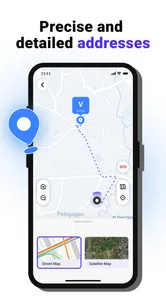
Yes, location-tracking applications generally need access to your device’s location services, while an internet connection is usually required to send and receive location updates. Accuracy can vary indoors, underground, in crowded urban areas, or where the mobile signal is weak. If GPS, mobile data, Wi-Fi, or background activity is disabled, updates may be delayed or unavailable.
Can WeTrack track someone without their knowledge?
Location tracking should only be used with the clear knowledge and permission of the person being tracked. WeTrack is intended for legitimate purposes such as family coordination, personal safety, or sharing your own location with trusted contacts—not for secretly monitoring another person. Users should check the app’s sharing controls, revoke access when necessary, and follow local privacy and consent laws.
Does using WeTrack affect battery life or mobile data?
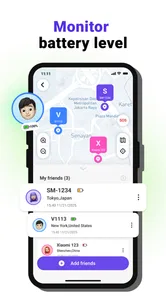
Continuous location services can consume more battery than ordinary applications because the phone may use GPS, Wi-Fi, mobile networks, and background processing to update its position. Data usage depends on how frequently locations are refreshed and whether map content is loaded. To reduce battery impact, adjust update settings where available, keep the app updated, and avoid unnecessary always-on tracking.
Pros
- Simple interface makes location sharing easy to set up.
- Useful for coordinating family members
- friends
- or small groups.
- Location updates can improve safety during trips and commutes.
- Supports real-time tracking for quicker awareness of group members.
- Can reduce the need for repeated calls or status messages.
Cons
- Continuous GPS use may noticeably reduce battery life.
- Accurate tracking depends on GPS
- mobile data
- and signal quality.
- Background location access raises privacy concerns for some users.
- Some features may require an account or paid subscription.
- Location sharing can feel intrusive if permissions are not managed carefully.









