Musicnix - MP3 Player
- 46.00
- 4.1
- Installs
- 5.00M
- Price
- Free

Screenshots
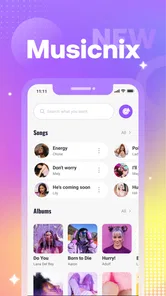



Analysis by Reviewed
I tend to judge a music app by the small moments: whether I can get a track playing without fuss, keep it going while I do something else, and return to the right point when I’m interrupted. Musicnix - MP3 Player presents itself as a straightforward way to listen to music on an Android device, with playback controls built around play, pause, and repeat. That makes it an interesting choice for people who want a practical local listening tool rather than a sprawling music service.
My overall take is that Musicnix is best approached as a simple player, not as a production studio or a complete music library service. It can suit a listener who already has audio files and wants a focused place to play them. If your idea of managing music includes editing tracks, publishing releases, or collaborating on creative work, you’ll need other tools for those jobs.
A quick fit check before settling in
Before making a new player part of your routine, I’d try it in the exact situation where you expect to use it: on a walk, during a desk task, or while rehearsing a passage. Notice whether reaching for play, pause, and repeat feels natural and whether the app works with the audio you intend to hear. That small test is more revealing than judging a player by how many options it appears to offer.
Musicnix is a better match for someone with a defined listening habit than for someone who wants an app to build that habit for them. If you already know what you want to play, a direct player can keep the choice simple. If you open music apps mainly to browse, discover, and let recommendations guide you, you may find this focused approach too narrow.
A simple starting point for everyday listening
Musicnix is a free music and audio app from Khan eCoding. Its central appeal is easy to understand: put on a track, pause when life gets in the way, and use repeat when you want to hear something again. In practice, that narrow focus can be a benefit. A player does not need to turn every listening session into a search for recommendations or a tour through a complicated service.
The app’s audience is broad: it has an Everyone content rating, and its Android requirements begin at version 7.0. It has a 4.1 average from around 4,300 ratings, with over 5 million installs. Those figures suggest that many people have tried it, but they don’t tell me whether it will match your particular library or habits. The useful question is simpler: do you want basic playback controls for music you can already access?
That distinction matters when choosing between a local player and a streaming app. A streaming service is usually the better fit if you want to discover unfamiliar artists, browse a large online catalog, or keep playlists synchronized through an account. Musicnix is more appealing when you want to press play on your own listening material without making discovery the main event.
More From Our News Desk

Weather by Xiaomi Review: Clear at a Glance, Less Clear Up Close

X Under Pressure: Can It Recover When Posting Goes Wrong?

Clash of Clans Is Won Between the Battles

Android Auto Makes the Case for Quieter Car Software

MobiOffice: Transforming Mobile Productivity with Seamless Integration

EA SPORTS FC™ Mobile Soccer: Redefining Mobile Sports Gaming
For a commute, a study session, or a familiar album while doing chores, a lightweight routine can be more valuable than an elaborate set of options. I’d start by trying it with a short, familiar selection rather than moving an entire collection over at once. You’ll quickly learn whether its basic controls suit the way you listen and whether it feels comfortable in your everyday routine.
Where the listening routine works best
A realistic use case is getting ready in the morning: start a familiar playlist or track, pause to take a call, then resume when you have a free moment. Another is repeating one song while practicing along with it. Repeat is not merely a convenience in that situation; it removes the need to keep reaching for the phone after every play.
That said, the app’s straightforward premise also sets a boundary. I would not choose a basic player as my main tool if I needed carefully curated recommendations, a shared listening queue, or cloud access to a library across several devices. Those are service-level features, not things I would assume from a player focused on playback. If those needs shape your routine, compare Musicnix with established streaming or library-management alternatives before settling in.
The app is also not a music-making environment. It doesn’t belong in the same category as a recorder, multitrack editor, or mastering tool. You can use a player to check a finished audio file by listening to it, but that is review, not editing. For creators, that makes Musicnix a possible listening endpoint in a larger workflow—not the place where a track is created, revised, or prepared for release.
Making playback easier to manage
The most useful way to evaluate a simple player is to notice how little attention it asks for. When I’m listening while cooking or walking around the house, I don’t want to stop and explore menus just to pause or replay something. Musicnix’s emphasis on the core controls makes it a plausible fit for those low-friction sessions, especially if your listening habits are already settled.
One practical tip is to use repeat deliberately. For a track you’re learning, repeating the whole song can help you follow its structure without constantly restarting it. For a long listening session, however, repeat may keep a single selection going longer than you intend. Before leaving the phone unattended, check the playback state so you don’t return to the same track still looping.
A second useful workflow is to treat playback as a focused check rather than assuming the app can manage every stage of a project. If you’ve exported an audio draft elsewhere, you can listen for obvious issues—an abrupt ending, an uneven transition, or a section that feels too long—and then return to the editor for changes. The trade-off is that this kind of handoff depends on your separate creation tools; Musicnix itself should be considered the listening step.
A third tip is to test interruptions early. Pause and resume during an ordinary task, and see whether that behavior fits your day before you rely on the app for a long study block or commute. A brief trial helps you decide whether a simple player is enough, without first changing your whole music routine. It also makes clear whether you need a more feature-rich alternative for queues, discovery, or cross-device continuity.
What it can and cannot do for creators
The editorial question for a creative tool is whether it helps carry work from an idea through revision and delivery. Musicnix contributes only at the listening end of that chain. I can imagine using it to play a completed audio file while checking it away from the editing desk, but I would not treat it as a place to trim silence, adjust levels, add effects, or package a release.
That limitation is not necessarily a flaw. Many people simply want to listen, and a player is easier to judge on playback than on an imagined production feature set. But creators should be clear about the boundary: the app may fit a personal review step, while the actual making and export process belongs in dedicated software. If your main goal is to record a voiceover, polish a mix, or send a finished file to collaborators, choose a tool built for those tasks.
For personal listening, I’d keep the workflow uncomplicated: use your existing method to organize or prepare audio, open the player when it’s time to listen, and return to the source tool if anything needs changing. That separation avoids expecting one small app to perform jobs it was not designed to perform. It also makes it easier to compare Musicnix fairly with another player: focus on whether its everyday playback controls are enough for you.
There is a similar distinction around publishing. Playing a finished file is useful quality control, but it does not publish it. If you distribute music or spoken audio, you’ll still need the appropriate export and delivery tools, plus whatever service you use to share the work. Musicnix can be part of a creator’s listening routine, but it should not be mistaken for a delivery platform.
Version, cost, and choosing an alternative
Musicnix is currently at version 1.3.3 and is free to use. That removes the purchase decision from the first try: you can see whether its approach works for your own listening before making it part of your routine. The version number is useful context, but it is not a reason on its own to expect any particular feature or level of polish.
Compared with a full streaming app, Musicnix’s apparent strength is its emphasis on straightforward playback rather than a broader discovery experience. Compared with a feature-heavy local library manager, its appeal is simplicity; the trade-off is that people who want detailed organization or advanced playback controls may prefer a more specialized player. I would decide based on the tasks you actually perform, not on the assumption that a longer feature list is always better.
If you mainly listen to familiar audio, want to pause and resume without ceremony, or need to replay a track while practicing, Musicnix is worth trying. If your listening depends on finding new releases, coordinating playlists with other people, or keeping a collection consistent across devices, a streaming service may be the more natural choice. And if you want to edit or publish audio, look for a creator-focused tool instead of asking a player to become an editor.
My verdict: a useful listener, not a studio
I see Musicnix - MP3 Player as a practical option for people who want the basic act of listening to stay basic. Its play, pause, and repeat focus is easy to understand, and that can be exactly right for a personal music routine. The strongest reason to try it is not a promise of advanced production features; it is the possibility that a modest player is all you need.
The honest limitation is that a simple playback role leaves out the wider needs many listeners and creators have. Discovery, elaborate library management, collaboration, editing, and publishing call for other tools. If you know you need those things, choose an app designed around them. If your day-to-day goal is simply to play familiar audio, pause when interrupted, and return to it later, Musicnix is a sensible free place to start.
One last practical decision
For a student, commuter, or home listener, the useful test is whether the app makes a known listening choice easier to repeat—not whether it replaces every other audio tool on the phone. Try it with one familiar track and one longer session, then decide whether its controls suit both. If either test leaves you wanting better organization, discovery, or advanced control, switching to a broader player is a sensible choice rather than a failure of the app.
For anyone using it alongside creative work, I’d keep the handoff equally clear: finish and export in the software built for making audio, then use Musicnix only if you want a straightforward way to listen back. That separation makes its role easy to understand. It is for hearing the result, not shaping or delivering it.
Musicnix - MP3 Player Frequently Asked Questions
What is Musicnix - MP3 Player?
Musicnix - MP3 Player is designed for listening to music files stored on your device, rather than serving as a music-streaming catalog. Its main purpose is to help you play and manage your local audio collection in one place. Before downloading, check the app listing to confirm which audio formats, library tools, and playback features are supported in the version available for your device.
Can I use Musicnix - MP3 Player without an internet connection?
A local music player can generally play audio files already saved on your device without an internet connection, which is useful for travel or areas with limited coverage. However, online-dependent features, if offered, may require access to the internet. Make sure your music files are downloaded or transferred to your device first, and review the app’s permissions and store description for details about any network use.
Does Musicnix - MP3 Player include music, or do I need to add my own songs?
Musicnix - MP3 Player is intended to play music available on your device, so you should not assume that downloading it provides a built-in song catalog. You may need to copy, download, or otherwise save audio files to your phone before they appear in the player. Only use music you have the right to access, and check the app listing for supported file types and library-scanning options.
Is Musicnix - MP3 Player free, and does it contain ads or in-app purchases?
Pricing, advertising, and optional purchases can vary by platform, region, and app version. Check the Google Play or Apple App Store listing before installing to see whether the download is free, whether it offers in-app purchases, and whether ads are mentioned. If you prefer an uninterrupted listening experience, also look at recent user reviews, since they may describe how advertising appears during everyday use.
What permissions does Musicnix - MP3 Player need, and is it available for Android and iOS?
A music player typically needs permission to access audio files or media on your device so it can find and play your songs. The exact permission names and availability depend on your operating system and the app’s current release. Download Musicnix only from the official store for your device, review the permissions shown there, and confirm that your OS version is supported before installing.
Pros
- Supports common audio formats
- so fewer files need converting.
- Playlist controls make it easy to organize music for different moods.
- Background playback lets you listen while using other apps.
- A compact player interface keeps playback controls easy to reach.
- Local music playback can work without an internet connection.
Cons
- Requires music files to be stored on your device.
- Audio quality depends on the source files and device hardware.
- Large music libraries may take time to scan and organize.
- Some features or settings may be difficult to discover at first.
- Availability and features may differ between Android and iOS.













