

vFairs
- 14.00
- 3.7
- Installs
- 100.00K
- Price
- Free

Screenshots
Analysis by Reviewed
When I first opened vFairs, I understood its purpose quickly: it is an event companion rather than an app I would browse every day. It is built by vFairs for virtual, hybrid, and in-person events, and its usefulness depends heavily on whether the event organizer has prepared a good experience around it. That makes it different from a normal social app or a permanent productivity tool. You install it because something is happening, then decide whether it deserves to remain on your phone afterward.
My first impression was practical rather than exciting. The app is free, aimed at Everyone, and available for Android devices running Android 9 or later. Those details make it easy for a broad audience to join an event without paying for the companion software or needing a recent phone. The important question is not whether the app is fun in isolation, but whether it removes enough friction from registration, schedules, sessions, exhibitors, and follow-up to justify another temporary app.
What the first week feels like
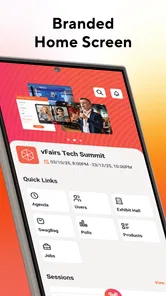
The strongest moment for vFairs is the period immediately before and during an event. A conference attendee may otherwise have to juggle an email invitation, a browser page, a calendar, printed information, and perhaps a separate chat channel. Having the event experience gathered in one place can make the day easier to manage, especially when the program contains several sessions or changes during the event.
I found the all-in-one approach most convincing for hybrid events. People attending online need a clear route into the digital program, while people on site may need quick access to schedules or exhibitor information between meetings. A single event app gives both groups a shared reference point. It does not magically improve the event itself, but it can reduce the number of places I need to check when I am trying to decide where to go next.
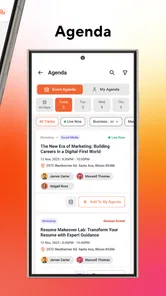
A useful habit is to open the app before the event begins, not when the first session is already starting. I would check the event page, look through the agenda, identify the sessions that matter most, and note which exhibitors or speakers I want to revisit. This small preparation step is more valuable than simply installing the app at the last minute. It also reveals whether the organizer has supplied enough information for the app to be genuinely useful.
For a virtual event, the app can serve as a doorway into the day rather than just a reminder. I would use it to move between scheduled content and the event’s other areas without relying entirely on a long email thread. For an in-person event, the value is more selective: I would mainly want the program, exhibitor details, and any practical updates close at hand. The same application therefore feels different depending on the event format.
There is also a real trade-off here. The app’s quality is partly outside my control. vFairs provides the platform, but the organizer decides how carefully the event is structured, how current the information is, and how much of the available experience is actually used. A well-prepared event can make the app feel organized and purposeful. A poorly maintained event space can make it feel like a wrapper around information I could have received elsewhere.
More From Our News Desk

 Gmail
GmailGmail in a Busy Inbox: Who Benefits Most?
From first account to crowded workday, Gmail earns its place through dependable search and flexible sorting—but its best fit depends on how much inbox maintenance you can tolerate.

 Prime Video
Switching to Prime Video: What Changes in Your Viewing Routine
Prime Video can make a compelling second home for streaming, but switching means learning a different catalog, rental layer, and route from browsing to playback.

 Universal TV Remote Control
Universal TV Remote Control Works Best as a Reliable Backup
A phone remote earns its place through quick setup and reliable habits. Here is how to get more from Universal TV Remote Control—and where its limits show.

 Weather - By Xiaomi
Weather by Xiaomi Review: Clear at a Glance, Less Clear Up Close
Xiaomi’s weather app makes everyday forecasts quick to scan, but its calm surface can leave useful details and recovery paths harder to find than they should be.

 X
XX Under Pressure: Can It Recover When Posting Goes Wrong?
A resilience-focused review of X, examining setup, mistaken posts, interruptions, weak connections, and the gaps that matter when recovery needs to be dependable.

 Clash of Clans
Clash of Clans Is Won Between the Battles
Its raids are quick; its community is a long-term project of coordination, teaching, rivalry, and shared responsibility—with all the friction that entails.
Latest News



That dependence is the first thing I would explain to a friend. Installing it does not guarantee a polished event. Before committing time to exploring every area, I would look for signs that the host has built a complete program: clear session names, useful timing, current exhibitor information, and a sensible path for online or on-site participation. If those basics are missing, the app cannot compensate for them.
Where it helps during a busy event day
Imagine I am attending a professional event with a morning presentation, two afternoon sessions, and a short list of exhibitors I want to visit. Without a central event app, I might keep switching between a calendar, a PDF, email, and notes. With vFairs, I can treat the event space as my working checklist. I would review the schedule early, prioritize the sessions that overlap, and use the quieter gaps to revisit exhibitors or event information.
The less obvious benefit is decision-making under pressure. Event schedules rarely feel spacious once the day starts. A central place for the program helps me make a quick choice when two sessions compete or when I finish earlier than expected. I would not expect the app to replace personal notes, but I would use it to reduce the mental load of remembering what comes next.
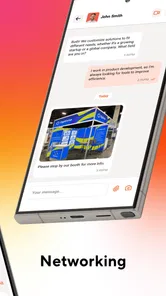
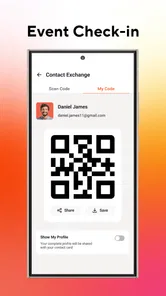
For networking, I would approach the app with realistic expectations. An event platform can make it easier to discover the people, exhibitors, or sessions associated with an event, but the quality of the interaction depends on participation. I would not install it expecting a permanent professional network. I would use it as a focused bridge between the event agenda and the conversations I want to continue.
One practical tip is to capture follow-up actions while the event is still fresh. If I meet an exhibitor or attend a useful session, I would record the next step in my own notes rather than assuming I will remember it once the event closes. This matters because an event app is usually strongest during the event window. My personal record is what turns a temporary visit into something useful later.
What changes after the novelty wears off
After the first event, the central question becomes whether vFairs has recurring value for me. For most attendees, the answer will probably be occasional rather than continuous. I would keep it installed if I regularly attend events that use the platform, especially if those events are spread across the year and each one benefits from a dedicated mobile experience.
For someone attending only one event, the long-term case is weaker. Once the schedule is over and the follow-up work is complete, there may be little reason to open the app. That is not necessarily a failure. Event software is often seasonal by nature, and a tool can do its job well without becoming a daily habit. I would judge it by how much confusion it removes during an event, not by how often I use it on an ordinary week.
Organizers and frequent attendees have a different calculation. If I participate in many virtual, hybrid, or in-person events, a familiar platform can reduce the learning curve from one event to the next. I still need to learn each event’s structure, but I am not starting from the idea of using an entirely unfamiliar type of tool. That familiarity can become a modest recurring advantage.
The app’s current version is 41.8.0, which shows that it is an actively evolving product rather than a one-off event page. I would still avoid assuming that every event will feel identical. Updates to the app and differences in organizer setup can change the experience from one event to another. The platform may be consistent at a broad level while the practical quality remains event-specific.
Its average rating is 3.7 from around 185 ratings, and the app has passed 100 thousand installs. I read those figures as signs of a useful but not universally frictionless tool. They suggest that vFairs has reached a meaningful audience, while also reminding me that event apps can attract mixed reactions because users judge both the software and the particular event attached to it.
For recurring value, I would use a simple rule: keep it if upcoming events in my calendar rely on it, and remove it when there is no near-term reason to return. That approach avoids turning a temporary event tool into background clutter. Reinstalling it for a later event is reasonable if the event invitation and platform experience justify doing so.
The maintenance burden is mostly organizational
From an attendee’s perspective, maintenance is relatively light at the beginning. I need a compatible Android device, the app, and the relevant event access. The more demanding work is keeping my own information organized: checking the agenda, deciding priorities, and saving useful follow-up details before the event disappears from daily attention.
There is also a phone-maintenance cost that is easy to overlook. If I install an event app for a single occasion, I should remember to review it afterward. Temporary apps can remain in storage, send reminders at an inconvenient time, or become confusing when several past events sit alongside a current one. I would clean up old event material after finishing my follow-up, while keeping anything I genuinely need for reference.
For organizers, the burden is more serious. A platform like this only feels dependable when event information is maintained carefully. A changed session time, incomplete exhibitor profile, or outdated instruction can damage trust quickly because attendees use the app at moments when they have little patience for uncertainty. The app can centralize information, but centralization also makes poor updates more visible.
This is one of the most important trade-offs for a host considering vFairs. The benefit is a unified event destination. The cost is the need for disciplined preparation and ongoing checking. If the team cannot keep the event space current, a simpler communication method may sometimes be more reliable, even if it looks less sophisticated.
As an attendee, I would protect myself with a lightweight backup. I would keep the event confirmation and essential timing in my email or calendar, particularly for a large event or a day with travel involved. That does not undermine the app; it recognizes that a central digital experience should not be the only place where a critical appointment exists.
Where fatigue begins
The first source of fatigue is repetition. If every event asks me to install another app, create another event-specific routine, and search through another version of a schedule, I may stop engaging deeply. vFairs can reduce that burden when the event is well designed, but it cannot eliminate the general fatigue associated with too many event platforms.
The second is information density. An event can contain sessions, exhibitors, speakers, announcements, and networking areas, yet more content does not automatically mean better navigation. I prefer a clear priority path: what is happening now, what comes next, and what deserves my attention later. When an event presents everything with equal importance, I have to do too much sorting myself.
Virtual attendance creates another challenge. Sitting at home makes it easy to switch to another browser tab, check messages, or leave a session running without paying attention. A dedicated event app may organize access, but it cannot create the focus of a physical room. I would see vFairs as a useful container for the experience, not as a substitute for a compelling speaker, practical content, or thoughtful event design.
In-person use has its own friction. When I am moving between rooms or speaking with people, I want quick interactions and minimal typing. If using the app requires too much searching at exactly the moment I am busy, I will fall back to a screenshot, a calendar entry, or a paper note. This is why preparation matters: the more I can identify in advance, the less I need to operate the app while walking between sessions.
There is also a privacy and attention question that I would handle carefully. I would provide only the information needed to participate comfortably and would review what I am sharing before using social or networking areas. An event app is temporary, but the professional connections created through it may not be. I would treat every interaction as part of my public event presence rather than assuming the platform is merely a private schedule.
People who dislike event-specific software should probably skip vFairs when the organizer provides a complete browser alternative and the event is simple. If I only need one meeting time and a location, installing an app may be unnecessary. Likewise, if I rarely attend organized events, the short-term convenience may not outweigh the extra setup.
I would also choose a different option when my main need is permanent project management, a long-running community, or a personal calendar. vFairs is event-centered. It is not the tool I would use to manage everyday tasks, maintain an enduring contact database, or replace a general communication service. Its focused nature is a strength during an event and a limitation outside one.
How it compares with familiar alternatives
The usual alternative is a combination of email, a calendar, a website, and perhaps a PDF schedule. That combination can be perfectly adequate for a small event, and it has one major advantage: I already know how to use each part. It also leaves information scattered. vFairs earns its place when the event has enough moving parts that a single event environment saves real time.
A mobile browser is another close comparison. A responsive event website may be faster for a one-time visitor because it avoids installation and can be opened from any device. I would favor the browser when I need a quick glance or when I am unsure whether the event deserves a permanent app on my phone. I would favor vFairs when the organizer has built a richer, repeatedly visited event experience and I expect to move through several parts of the program.
Dedicated networking platforms may be better for people whose main goal is maintaining professional relationships over months or years. vFairs makes more sense when networking is tied to a particular event and I want the conversations to remain connected to its sessions, exhibitors, and schedule. That distinction prevents disappointment: it is an event companion first, not a replacement for a broad professional network.
For organizers, the comparison is less about features and more about operational discipline. A unified platform can look more coherent than a collection of separate tools, but it requires the team to maintain one central experience properly. If the event is small and static, a well-written email and calendar invitation may be the better choice. If the event is complex and has online and physical participants, a dedicated platform becomes easier to justify.
Who will keep using it, and who will not
I would recommend vFairs to people attending conferences, career events, exhibitions, training programs, or other organized gatherings that use the platform as their central event space. It is especially suitable when I need more than a single appointment: a schedule to navigate, exhibitors to revisit, sessions to compare, and follow-up work to organize.
It is also a sensible choice for someone joining a hybrid event. The ability to approach the same event through a mobile experience can make the boundary between remote and physical attendance less awkward. I would still check the event instructions early, because the host’s setup determines how much of that promise becomes practical.
I would not recommend keeping it installed permanently just because I attended one event. The app is free, but free does not mean costless in attention or storage. Once the event is finished, I would export or copy the information I need, complete my follow-up, and decide whether another event is already scheduled.
People who want a daily app, a permanent community, or a full personal organizer should look elsewhere. vFairs can support a concentrated period of activity, but its lasting value is conditional. It earns a recurring place only when my calendar repeatedly contains events that depend on it.
My long-term verdict
After the novelty fades, I see vFairs as a useful specialist rather than a habit-forming general app. Its best contribution is bringing the moving pieces of an event into one place, particularly when the event is virtual or hybrid and would otherwise be spread across several channels. The payoff is strongest when I prepare before the event, use the app selectively during it, and turn important contacts or tasks into my own lasting records afterward.
The limitations are equally clear. The experience depends on the organizer’s maintenance, event-specific apps can create installation fatigue, and a polished interface cannot rescue a weak schedule or unhelpful content. I would keep a calendar or email backup for essential details and avoid expecting the app to become a permanent networking or productivity system.
With an average rating of 3.7 and more than 100 thousand installs, vFairs appears established enough to be a familiar choice for event participation, while its mixed reception fits a product whose success varies with each event. The fact that it is free and supports Android 9 or later lowers the barrier to trying it. That makes the decision straightforward: install it when an event genuinely uses it, prepare before the day begins, and reassess once the follow-up is complete.
My final recommendation is therefore conditional but positive. I would tell a friend to use vFairs for a substantial event with a busy program, especially a hybrid one, because the centralized experience can save time and reduce confusion. I would not tell them to keep it forever. Its lasting space on my phone has to be earned by the next event, not by the last one.
vFairs Frequently Asked Questions
Is vFairs suitable for attending in-person events as well as virtual ones?
Yes. vFairs is designed for virtual, hybrid, and in-person events, so the app can support different ways of participating in an event. What you can do in it depends on how the organizer has set up that particular event. Check the event invitation or registration details to see how the app fits into your visit and which event activities are available to attendees.
What is vFairs used for?
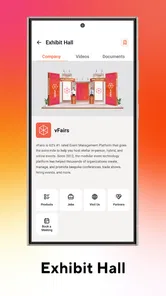
vFairs is a virtual and hybrid events platform designed for conferences, trade shows, job fairs, webinars, expos, and other professional gatherings. After joining an event, attendees can usually browse exhibitor booths, watch live or recorded sessions, download resources, chat with participants, schedule meetings, and network with speakers or sponsors through a web browser or supported mobile experience.
Do I need an account or an invitation to use vFairs?
Access requirements depend on how the event organizer configured the vFairs event. Some events allow visitors to register publicly, while private conferences, career fairs, and corporate events may require an invitation, registration approval, or an access code. You will generally need to provide basic information such as your name and email address before entering the event environment.
Is vFairs free to download and use?
The attendee experience is commonly provided at no direct cost, but availability and pricing are controlled by the event organizer rather than by individual users. You may be able to register and attend sessions for free, although certain events can restrict access to selected content or require payment. Check the specific event page for registration fees and conditions.
What features can attendees use in vFairs?
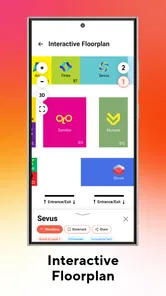
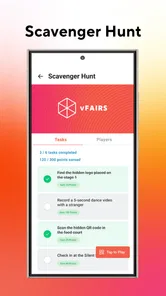
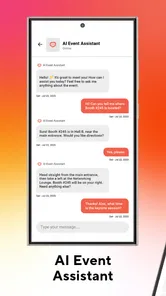
Depending on the event, vFairs may include live presentations, on-demand videos, exhibitor profiles, downloadable brochures, private or group chat, appointment scheduling, networking tools, polls, Q&A, notifications, and virtual booths. Feature availability can vary significantly because organizers choose which tools to activate. A stable internet connection and an updated browser or app are recommended.
Pros
- Interactive virtual booths make online events feel more engaging.
- Supports live chats
- Q&A sessions
- polls
- and attendee networking.
- Useful analytics help organizers track registrations and engagement.
- Available on mobile devices for convenient access while traveling.
- Exhibitors can share documents
- videos
- and contact details in one place.
Cons
- Some events may require a paid registration or invitation to access.
- The experience depends heavily on the quality of the event organizer.
- Large events can make navigation and networking feel overwhelming.
- Video sessions may use significant mobile data and battery power.
- Certain features may work better on desktop than on smaller phone screens.











