Veho Driver
- 1.96K
- 4.6
- Installs
- 500.00K
- Price
- Free

Screenshots

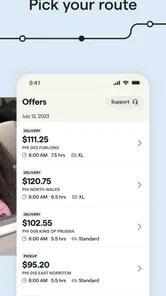
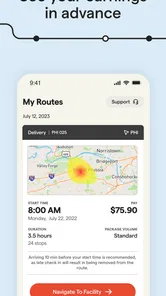
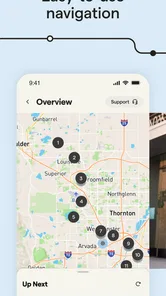

Analysis by Reviewed
I approached Veho Driver as a work tool rather than just another delivery app. Its purpose is straightforward: it helps drivers choose routes, service areas, and trip lengths through Veho, the business developer behind it. That focus makes the experience easier to understand than many gig-work platforms that mix shopping, deliveries, earnings, messaging, and promotions into one crowded interface.
The app is free, rated for Everyone, and belongs in the business category. It has built a sizeable audience, with more than 500 thousand installs, a 4.6 average from roughly 14 thousand ratings, and about 2 thousand written reviews. Those figures suggest that the basic idea is working for many users, although they should not be mistaken for a guarantee that every route, market, or driving situation will feel equally convenient.
My main question was not simply whether it can help someone find delivery work. I wanted to know how clearly it communicates choices, how much effort it demands during a busy day, and whether its flexible route concept remains practical for people with different physical, sensory, or situational needs. My conclusion is positive, but conditional: this is most appealing when control over the shape of a trip matters more than having the widest possible range of delivery options.
How the app presents work and choices
I found the app’s clearest starting point is the choice it puts in front of a driver: what area feels workable, and how much time or energy is available for a trip. That makes the first decision more personal than simply taking the next task offered. In the next section, I’ll look at how that choice can fit into an ordinary routine—and where flexibility still depends on planning beyond the screen.
Readability and navigation come first
The strongest part of the experience is the way its central promise is easy to grasp. Instead of beginning with a complicated explanation of the whole delivery business, the app revolves around selecting an area and a trip length that fit the driver. That makes the first decision feel manageable. I can think about where I want to drive and how long I want to be out, rather than committing myself to an undefined shift.
That clarity matters for new drivers. A person who is unfamiliar with gig delivery can understand the basic workflow quickly: look for an appropriate opportunity, consider its boundaries, and decide whether it fits the day. The approach is less intimidating than a platform that presents a long list of unrelated tasks before explaining what each one involves.
At the same time, route selection is not the same as complete control over a working day. Choosing a preferred area or trip length still leaves practical questions that a driver must consider independently. How easy will it be to reach the starting point? Will the return journey be convenient? Does the route suit a vehicle with limited cargo space or a driver who needs frequent breaks? The app’s focused design helps with the first decision, but it does not remove the need for personal planning.
More From Our News Desk

Weather by Xiaomi Review: Clear at a Glance, Less Clear Up Close

X Under Pressure: Can It Recover When Posting Goes Wrong?

Clash of Clans Is Won Between the Battles

Android Auto Makes the Case for Quieter Car Software

MobiOffice: Transforming Mobile Productivity with Seamless Integration

EA SPORTS FC™ Mobile Soccer: Redefining Mobile Sports Gaming
I found that distinction important because flexibility can sound broader than it feels in practice. It is useful to have a choice, but the choice only has real value when the driver checks it against fuel, traffic, parking, weather, and energy. I would treat the app as a route-selection tool, not as an automatic planner for every part of the day.
Useful for a deliberate routine
The most effective way to use the app is to decide on personal limits before opening it. I would choose a maximum driving distance, identify areas I already know, and then compare available options with those boundaries. This prevents the attractive idea of “choosing your own route” from turning into a rushed decision made simply because an option is visible.
That workflow can also make the interface easier to read. Rather than scanning everything with no plan, I can look specifically for a manageable area and a trip length that matches my schedule. Drivers who prefer predictable routines may appreciate this approach, especially if they want to work around another job, family responsibilities, or appointments.
One practical tip is to consider the route’s endpoint before accepting it. A trip that finishes near home, another workplace, or a familiar charging or refueling location may be more useful than one that looks attractive only at the beginning. This is not a special feature of the app; it is a way of getting more value from the choices it offers.
Where the interface may demand extra attention
Delivery work naturally involves quick decisions, location awareness, and repeated checking. Even a clean screen can become tiring when I am moving between navigation, vehicle controls, packages, and the phone. For that reason, I would review route details while parked and avoid trying to interpret options in motion.
Drivers with reading difficulties, reduced vision, attention-related needs, or limited comfort with small touch targets should test the app during a quiet setup period. The important question is not only whether the text is readable at home, but whether it remains understandable in bright sunlight, at the end of a long shift, or when the driver is wearing gloves. Those conditions can change the experience substantially.
The simple concept helps, but simplicity should not be confused with full accessibility. A focused delivery interface can still become demanding when several pieces of information must be checked quickly. I would recommend enlarging the phone’s system text where possible, keeping the display clean, and preparing a preferred workflow before starting a route.
Motor considerations during real delivery work
The app is aimed at drivers, so the physical act of using it is only one part of the experience. Reaching for a phone, tapping a route option, handling packages, getting in and out of a vehicle, and repeatedly checking directions can create a tiring sequence. Someone with limited hand movement, tremors, joint pain, or difficulty making precise taps may find the cumulative effort more significant than the individual actions suggest.
My advice is to separate planning from driving as much as possible. Review the route while stationary, set up the phone securely, and use the vehicle’s normal navigation habits rather than treating the app as something to stare at continuously. This reduces unnecessary hand movements and allows the driver to concentrate on the road and the delivery itself.
A second useful adjustment is to keep the workflow consistent. If the driver always checks the same information in the same order before leaving, fewer actions are needed under pressure. This can help people who tire easily or who find repeated switching between screens distracting. It also reduces the chance of accepting a route without noticing a detail that affects comfort or timing.
Drivers who need voice control or hands-free interaction should judge the app according to their own phone setup rather than assuming that every important action can be completed without touch. The practical solution may involve combining the app with built-in device controls or a separate navigation arrangement, but that adds complexity. If a person depends on fully hands-free operation, I would test the complete workflow before relying on it for paid work.
Sensory load is easy to underestimate
Visual attention is only one concern. Delivery driving can involve road noise, traffic, weather, unfamiliar buildings, time pressure, and frequent changes in surroundings. A person who is sensitive to noise or visual clutter may find the work environment more challenging than the app itself.
The focused purpose of Veho Driver is helpful here because it is not trying to be a social feed or an entertainment hub. There is less reason to browse aimlessly. Still, the driver must combine the app with external navigation and the physical demands of delivery work, so the overall sensory load can remain high.
I would recommend choosing routes that match personal tolerance rather than selecting solely by length. A short trip in a dense, crowded area may be more exhausting than a longer route through familiar streets. Someone who finds uncertainty stressful may prefer a known area, even if another option appears more efficient.
Lighting also matters. Checking a phone in direct sun, at dusk, or in a dark vehicle can be uncomfortable. Adjusting the device before starting and avoiding repeated screen checks can make the experience easier. These are small habits, but they are particularly valuable for drivers who experience eye strain, migraines, or difficulty shifting between bright and dark environments.
Situational access: when flexibility genuinely helps
The app’s route and trip choices are most useful when a driver’s availability changes from day to day. Imagine someone who has a morning appointment and only wants to work for a limited period afterward. A selectable trip length can make the platform feel more compatible with that schedule than a fixed, all-day commitment.
Another realistic case is a driver who is comfortable in one part of a city but not another. Familiar streets can reduce navigation stress, make parking easier, and shorten the time spent figuring out building layouts. Being able to focus on a preferred service area may support confidence and reduce the mental cost of every stop.
This flexibility may also help a person who manages fluctuating energy. On a good day, a longer option may be realistic; on a difficult day, a shorter route could be the better decision. The value is not merely earning potential. It is the ability to make work fit a changing capacity instead of treating every day as physically identical.
However, flexibility has a trade-off. A driver who needs highly predictable hours, guaranteed accessibility at every stop, or a particular kind of vehicle arrangement may still need another work option. The app can help choose the shape of a route, but it cannot make every destination easy to enter, every parking situation comfortable, or every package manageable.
How it compares with familiar alternatives
Compared with general gig-delivery apps, Veho Driver feels more specialized. Broad platforms often give drivers a larger mix of task types and may offer more variety in how work is found. That can be useful for someone who wants to switch between different kinds of deliveries or keep several earning sources open at once.
Veho Driver’s advantage is focus. If I already know that I want route-based delivery work and care about selecting an area and trip length, a specialized tool can be easier to approach than a general marketplace. There is less temptation to jump between unrelated offers, and the core decision is more closely tied to how I want the driving period to feel.
The downside is that specialization can be limiting. A driver who wants maximum choice, frequent short tasks, or a backup stream of work may prefer a broader platform. Someone who wants a standard employee schedule may prefer a conventional job instead, because app-based flexibility also requires personal discipline and planning.
I would not choose this app purely because its rating is strong. I would choose it because its working model matches my needs. The rating and large user base make it worth investigating, but the real test is whether the available routes in my area fit my vehicle, stamina, and preferred driving environment.
Remaining barriers before depending on it
The biggest barrier is the difference between digital choice and physical reality. A route may look suitable in the app yet become difficult because of stairs, distant parking, heavy items, poor weather, or a complicated building entrance. Drivers with mobility limitations should think through the delivery environment, not only the screen layout.
Another barrier is the need to manage several systems at once. The app handles the Veho work experience, but driving still involves the phone’s operating system, navigation, calls, maps, and sometimes vehicle equipment. Every additional handoff can create confusion or require more taps. A person who needs a very simple, single-screen workflow may find this arrangement tiring.
There is also a financial planning barrier. Because the app is free to download, the cost of using it is not the same as the cost of working through it. Fuel, maintenance, insurance, vehicle wear, parking, and unpaid travel can affect whether a route is worthwhile. I would calculate those costs before judging a trip by its apparent convenience.
New drivers should also allow time to learn their own rhythm. The first route may involve more checking, slower loading, and greater uncertainty than later trips. That learning curve is normal, but it matters for anyone with limited energy or a strict schedule. Starting with a manageable option is wiser than testing personal limits immediately.
For people who rely on specific accessibility tools, the best approach is a practical trial. Check whether the phone’s magnification, text-size settings, voice controls, screen reader, or alternative input method work comfortably with the actions required. I would do this while parked, then repeat the test in the vehicle before accepting a route. That small preparation can reveal whether the app fits a person’s actual needs.
What the current release means for prospective drivers
The current version is 3.4.2, and the app has been available since September 2019. That history gives it the feel of an established business tool rather than a brand-new experiment. Veho is the named developer, and the product has had time to build recognition among drivers.
Even so, an established app still deserves a personal check after installation. Interfaces change, phone settings differ, and the experience may vary by location. I would open it on the device intended for work, confirm that the text and controls are comfortable, and explore the route-selection process before arranging a full day around it.
Because the age rating is Everyone, the app is presented as suitable for a general audience. That says little about whether delivery work is suitable for every individual. The more important questions are physical capacity, driving confidence, local route conditions, and comfort with independent work.
My inclusive verdict
I see Veho Driver as a good fit for people who want a focused way to consider Veho delivery routes and who value choosing an area and trip length. Its clear central idea can reduce the confusion that often comes with broad gig-work apps. For drivers managing changing schedules, familiar neighborhoods, or variable energy, that control may be genuinely useful.
I would recommend it to a friend who is comfortable driving independently, can handle the physical side of deliveries, and is willing to plan beyond what appears on the screen. I would especially suggest starting with a route that matches familiar streets and a realistic time limit. That gives the driver a fair chance to judge the complete experience instead of evaluating it through an unnecessarily difficult first shift.
I would not recommend depending on it without testing the workflow to someone who needs fully hands-free interaction, guaranteed accessible stops, a fixed wage schedule, or minimal vehicle-related costs. In those situations, a different employment arrangement or a broader support system may be more appropriate.
Overall, the app’s most inclusive quality is not a promise that every barrier disappears. It is the ability to make some important choices before the work begins. That flexibility is valuable when it is paired with honest self-assessment: choose the area, trip length, and routine that fit the person behind the wheel, then treat the app as one part of a safe and sustainable working setup.
Veho Driver Frequently Asked Questions
Is Veho Driver available for Android and iOS?
Veho Driver is a mobile app for managing delivery work, and you can look for it in the app store for your device. Before installing, make sure the developer is Veho and that the app is intended for drivers. The app’s usefulness depends on having an approved driver account; downloading it by itself does not provide access to delivery assignments.
Do I need a Veho account before downloading Veho Driver?
You can download the app before completing driver onboarding, but using its delivery tools requires an account with appropriate access. Veho Driver is designed to support drivers working with Veho, not to operate as a general route-planning app. If you are considering signing up, check Veho’s driver onboarding process and make sure you meet the requirements before relying on the app for work.
Does Veho Driver work without an internet connection?
A dependable internet connection is important when using Veho Driver for route details, delivery updates, and communication with the service. Mobile data may also be needed while you are out on a route. It is sensible to check your connection before starting work and keep your phone charged. Do not assume every app feature will remain available if your connection drops.
Can customers use Veho Driver to track a package?
No. Veho Driver is built for delivery work, not for customers checking the progress of an order. Its tools are intended to help approved drivers manage routes, package handling, navigation, and delivery updates. If you are waiting for a Veho delivery, look for the tracking option associated with your order rather than downloading this driver-focused app.
What is Veho Driver, and who is it designed for?
Veho Driver is a delivery-driver app designed for independent drivers who complete scheduled routes for Veho, a package delivery service. After signing in, drivers can review available routes, check pickup and delivery details, follow navigation, scan packages, and update delivery statuses. It is intended for approved Veho drivers rather than customers tracking personal orders.
Pros
- Flexible delivery work with the option to choose available routes.
- Clear route details help drivers plan stops and delivery times.
- In-app navigation reduces the need to switch between multiple apps.
- Delivery updates can be recorded directly from the driver app.
- Useful for drivers seeking local gig-based courier opportunities.
Cons
- Route availability may vary significantly by location and demand.
- Earnings can be affected by fuel
- vehicle wear
- and unpaid travel time.
- The app depends heavily on a reliable mobile data connection.
- Large delivery batches may be difficult to complete within tight time windows.
- Support response times may vary when problems occur during a route.











