Vector Ink: SVG, Illustrator
- 331.00
- 4.1
- Installs
- 1.00M
- Price
- Free
Screenshots
Analysis by Reviewed
I found that Vector Ink: SVG, Illustrator makes its best first impression when I want to sketch a clean logo, icon, or simple illustration without opening a desktop design program. It is a free art and design app from Vector Ink LLC, and its mobile-first approach makes the basic appeal easy to grasp: build vector artwork directly on a phone or tablet, then keep refining it as a project grows. The first session feels approachable, though the lasting question is whether it fits into a regular creative routine rather than just providing a fun afternoon of experimentation.
A small project is the best first test
I’d begin with something modest and useful rather than trying to recreate a full brand system on a phone. A two-color badge, a simple event symbol, or a clean label gives you a reason to try the drawing and alignment workflow without burying you in decisions. If the result is easy to revisit and adjust, that tells you more about the app’s lasting value than a long tour through menus.
That first test also helps answer a practical question: can I comfortably make the kind of artwork I actually need? Someone who mostly edits existing SVGs may find the learning curve less demanding than someone starting with a blank canvas and building detailed illustrations. I’d keep the first file uncomplicated, then add complexity only when I know how selecting, arranging, and refining elements feels on my device.
From first-week appeal to repeat use
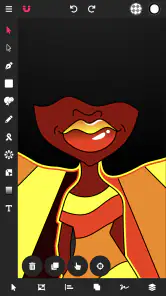
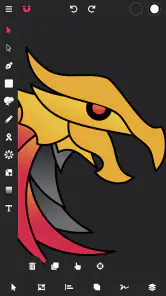
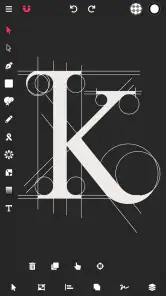
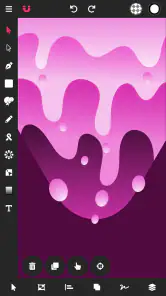
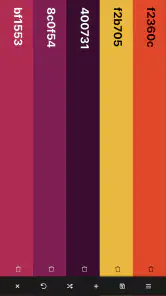
The first thing that struck me about Vector Ink was its intuitive interface. From the moment I opened the app, it was clear that the developers put a lot of thought into making it user-friendly. Whether you're a seasoned designer or a newbie, navigating through the app feels natural. The tools are neatly organized, and I found myself creating some cool designs within minutes of launching it.
Getting useful work done on a small screen
One of the standout features is the app's ability to handle SVG files seamlessly. Importing and exporting SVG files is a breeze, making it perfect for designers who want to work on projects across different platforms. The app also supports layers, which is a godsend for anyone who wants to create complex illustrations.
That combination is useful beyond drawing for its own sake. I’d use it to make a small set of matching social graphics, draft an icon before building a larger identity, or adjust an existing SVG while away from my usual workspace. Layers help keep separate elements manageable: I can isolate a wordmark from its decorative shapes, for example, instead of repeatedly selecting items from a crowded canvas. A practical habit is to name or organize layers as a project becomes more involved; the extra care can save time when returning to the file later.
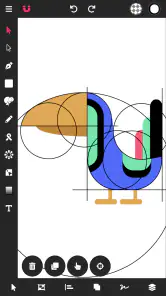
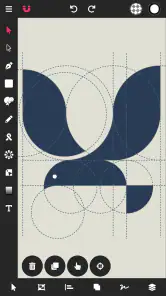
Another feature that deserves a mention is the precision tools. With the snap-to-grid function and customizable guides, getting those perfect lines and shapes is super easy. Plus, the app includes a plethora of vector shapes and fonts ready for you to use, which really speeds up the design process.
More From Our News Desk

Clash of Clans Is Won Between the Battles

Android Auto Makes the Case for Quieter Car Software

MobiOffice: Transforming Mobile Productivity with Seamless Integration

EA SPORTS FC™ Mobile Soccer: Redefining Mobile Sports Gaming

How Microsoft OneDrive Became a Mobile Productivity Giant

How Google Translate Breaks Language Barriers Effortlessly
Where the workflow helps—and where it asks for patience
For a realistic everyday use, imagine noticing that a club poster needs a small icon tweak while waiting for a meeting to start. I could open the vector file, make a measured adjustment using guides, and export the revised artwork without turning the task into a full desktop session. That is where a phone-based vector editor earns its place: quick edits and compact design jobs, not necessarily every stage of a demanding production pipeline.
Compared with drawing apps built around brushes and painting, this is a better fit when crisp shapes and scalable artwork matter more than textured strokes. Against a desktop vector editor, the trade-off is convenience for screen space and the finer control a mouse or stylus setup can offer. Touch gestures make moving and zooming around natural, but a crowded illustration can still require careful selection and repeated zooming. I’d keep the mobile workflow focused on deliberate edits rather than assuming every complex job will feel effortless.
A useful way to avoid rework is to establish the canvas and rough layout before adding lots of detail. On a small display, it is easy to perfect one element and later discover that it crowds the composition. I’d place the main shapes first, check their spacing with guides, then add typography and smaller accents. That sequence takes advantage of the app’s precision tools without making every adjustment a fussy, isolated task.
Building a repeatable SVG routine
For recurring work, I’d treat the source SVG as the master copy and make a separate working version before experimenting with a major redesign. That small bit of file discipline matters when an asset has already been used in a poster or profile image: a quick mobile edit should not accidentally become the only version you have. Keeping related elements on separate layers also makes later changes less disruptive, especially when the request is only to alter a symbol or shift a label.
There is a useful trade-off between using ready-made shapes and drawing everything from scratch. Starting with a shape can make a first draft faster, but a distinctive mark often needs adjustment so it does not look like a stock combination. I’d use the available forms as scaffolding, then refine proportions and spacing with guides. That approach gives a beginner a manageable starting point while leaving room for a more personal result.
Performance and responsiveness
Performance-wise, Vector Ink doesn’t disappoint. The app runs smoothly on both Android and iOS devices, without any noticeable lag. This is crucial, especially when you're working on intricate designs that require a lot of detail. The developers have done a fantastic job optimizing the app for mobile devices.
Moreover, the app's responsiveness to touch inputs is spot on. Whether you’re pinching to zoom or dragging elements around, the app responds without any hiccups. It's this level of responsiveness that makes designing on a mobile device enjoyable rather than a chore.
What determines its month-to-month value
For me, an editor becomes a keeper when it solves recurring small problems, not merely when its opening screen looks inviting. This one makes sense if SVG work returns often in your week: logo adjustments, simple illustrations, or assets that need to move between devices. It is less compelling as an occasional novelty if you rarely create vector artwork, since learning any editing workflow takes attention that may not pay back between infrequent projects.
The app has an average rating of 4.1 from around 6.1K ratings, with 331 written reviews, and has passed 1M+ installs. Those figures suggest that it has found an audience, but they don’t tell me whether it suits a particular designer’s habits. I’d judge it by trying a real task—such as editing a logo or preparing a reusable icon—rather than by browsing tools without a project in mind.
Small-screen trade-offs in everyday work
One question I’d ask before relying on a mobile editor is whether the finished artwork needs to move into another part of my workflow. SVG support is useful because the format is suited to scalable graphics, but I would still check the exported file in the place where it will actually be used. A logo that looks balanced on a phone may need a different spacing choice when placed beside text or resized for another layout. A quick review at the intended size is a better final check than judging only by a zoomed-in canvas.
For someone who works on a tablet, this kind of task may feel more comfortable than on a compact phone, simply because there is more room to inspect the composition. On a phone, I’d reserve the app for short edits, rough concepts, and tidy assets rather than extended sessions involving many small objects. The same project can be manageable or tiring depending on how crowded the canvas becomes, so I’d let the screen size shape the scope of the job.
Cost, upkeep, and creative fatigue
It is free to install, with in-app purchases ranging from $2.99 to $74.99 per item. I would start with a project I genuinely need to finish and see whether the available workflow covers it before spending on anything. That keeps the decision grounded in use rather than the temptation to collect extras. The age rating is Everyone, and version 6.0.4 is the current version; Android support begins at version 6.0.
The maintenance burden is mostly creative rather than technical: keep track of the source SVG, use layers sensibly, and make time to check the final composition at a useful zoom level. The potential fatigue comes from doing precision work with touch controls when a screen is busy. If you need extensive typography control, intricate path editing, or a long production session, a desktop vector tool may be the more comfortable choice. If you mainly want quick, scalable graphics and value portability, that compromise is easier to accept.
When a different tool makes more sense
I would choose a raster painting app instead when the goal is expressive brushwork, blended color, or a hand-drawn surface where tiny scalable shapes are not the priority. I’d move to a desktop vector editor when precision and sustained control matter more than being able to work anywhere. Those are not knock-on effects of a flaw so much as different tools being better matched to different jobs. Vector Ink sits in the middle: more suited to structured graphic work than a painting app, and more portable than a full computer-based setup.
It is also worth asking how often a project will be edited after the first export. A one-off graphic may not justify building a new habit, while a collection of icons or repeated logo revisions can make a mobile vector workspace genuinely useful. If I only need to open an SVG once in a while, I would avoid adding another routine to my device. If the same kinds of adjustments keep coming back, the ability to handle them in short sessions is the point.
Who should keep it in their toolkit
I’d recommend giving it a place on your device if you regularly make vector assets and want to work away from a desk, especially for rough concepts and revisions to existing SVGs. Beginners can also benefit from getting comfortable with layers and alignment tools on manageable projects. I would skip it if your main creative work depends on natural-media painting, or if your routine demands a large canvas and extensive desktop-style control; a raster drawing app or computer-based editor will likely suit those needs better.
It may also suit a small-business owner, volunteer, or club organizer who occasionally needs a crisp icon or a simple graphic and prefers to make a practical revision without starting a computer workflow. For those users, the strongest benefit is not replacing a professional design setup; it is reducing the friction of modest, repeatable jobs. A dedicated designer with a demanding production pipeline may instead use it as a companion for early ideas or quick corrections, while keeping the main work in a desktop editor.
Long-term verdict
In conclusion, Vector Ink: SVG, Illustrator is a robust app that brings the power of vector design to your fingertips. With its user-friendly interface, powerful features, and flawless performance, it’s a must-have for anyone interested in graphic design on the go. Whether you're looking to create professional-grade illustrations or just doodle for fun, this app has got you covered.
So, if you’re on the hunt for a reliable vector design app for your mobile device, look no further. Give Vector Ink a try, and unleash your creativity wherever you are.
Vector Ink: SVG, Illustrator Frequently Asked Questions
What is Vector Ink: SVG, Illustrator, and who makes it?
Vector Ink: SVG, Illustrator is an art and design app for creating vector graphics in the cloud with smart design tools. It is developed by Vector Ink LLC and is available for free, with optional in-app purchases. If you want to make illustrations, logos, or other scalable artwork, its vector-focused approach is the main thing to know before installing.
What is the primary function of Vector Ink: SVG, Illustrator?
Vector Ink: SVG, Illustrator is primarily designed for creating and editing scalable vector graphics (SVGs). It offers a robust set of tools similar to those found in professional design software, making it suitable for both beginners and experienced designers. Users can create intricate designs, illustrations, and logos with precision and ease.
Is Vector Ink: SVG, Illustrator suitable for beginners?
Yes, Vector Ink: SVG, Illustrator is suitable for beginners. It features an intuitive interface and a variety of tutorials and guides to help new users get started. Although it offers advanced tools for professional designers, its user-friendly design makes it accessible for those just starting in vector graphic design.
Can I use Vector Ink: SVG, Illustrator on both Android and iOS devices?
Vector Ink: SVG, Illustrator is compatible with both Android and iOS devices, allowing users to create and edit vector graphics on the go. This cross-platform support ensures that you can access your work from multiple devices, providing flexibility and convenience whether you're using a smartphone or a tablet.
Does Vector Ink: SVG, Illustrator support file import and export?
Yes, Vector Ink: SVG, Illustrator supports a wide range of file import and export options. Users can import existing SVG files for editing and export their creations in various formats. This feature is particularly useful for designers who need to share their work with clients or other design tools seamlessly.
Pros
- Intuitive user interface for beginners
- Wide range of design tools and features
- Supports SVG file format
- Frequent updates with new features
- Cross-platform compatibility
Cons
- Limited advanced features for professionals
- In-app purchases can be expensive
- Occasional bugs and crashes
- Requires internet for full functionality
- Limited export options

- Category
- Art & Design
- Version
- 6.0.4











