

Vacation Rentals - HomeToGo
- 243.00
- 4.1
- Installs
- 1.00M
- Price
- Free

Screenshots
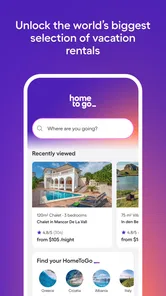
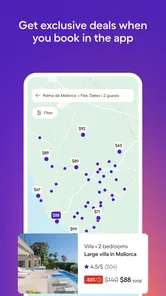
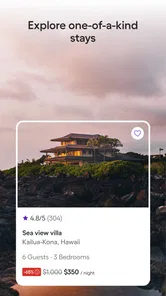

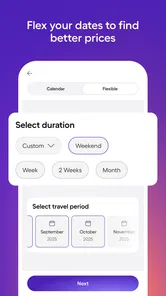

Analysis by Reviewed
When I plan a stay somewhere unfamiliar, I want to compare places without opening a dozen tabs or settling for the first promising photo. Vacation Rentals - HomeToGo is a free travel app from HomeToGo that brings rental browsing into one place. I’d treat it as a way to build and compare a shortlist, rather than assume the first attractive listing is automatically the right one.
What to expect on your first search
The app is aimed at finding vacation rentals, not at covering every part of a trip. Its broad selection is useful if you are flexible about the kind of stay: a cabin, apartment, or villa can all be part of the same search. HomeToGo’s app has a 4.1 average from around 12,000 ratings, and more than a million installs, so it is a familiar option in the travel category. It is rated for Everyone, and its current version is 25.12.0101.
For a first-time user, the simplest route is to choose a destination and travel dates, then narrow the results to what matters most. I would decide on essentials before scrolling: for example, whether a kitchen or a particular location is non-negotiable. That makes filters more useful and helps prevent a polished photo from distracting you from the practical needs of the trip.
From browsing to a confident booking
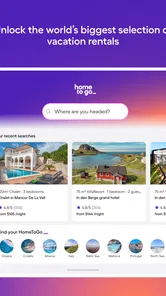
One of the first things that struck me about Vacation Rentals - HomeToGo is the sheer variety of options available. Whether you're yearning for a cozy cabin in the woods, a chic city apartment, or a luxurious villa with a pool, this app has got you covered. I was pleasantly surprised to find listings from all over the globe, making it a one-stop-shop for all your vacation rental needs.
User-Friendly Interface
Navigating through the app is a breeze thanks to its intuitive interface. The search function is particularly impressive, allowing you to filter results based on your preferences—be it price range, amenities, or location. I found myself effortlessly scrolling through stunning photos and detailed descriptions, each listing better than the last. It’s like window shopping, but for places to stay!
Make the shortlist work harder
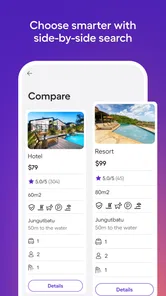
A useful habit is to compare a few plausible stays side by side instead of judging each one in isolation. Check the location against your daily plans, then look closely at the amenities you will actually use. A cheaper place farther from your activities may not be the better fit if getting around will add inconvenience. Likewise, a pool or extra room only earns its keep if it suits the people and routine on this particular trip.
For a realistic weekend away, I might search for a city stay, filter for a kitchen, and compare locations near the places I expect to visit. Before booking, I would read the listing details carefully and confirm any important point with the host. That last step matters: a search result can help you discover a candidate, but it is the specific listing’s terms and details that should guide the decision.
More From Our News Desk

 Weather - By Xiaomi
Weather by Xiaomi Review: Clear at a Glance, Less Clear Up Close
Xiaomi’s weather app makes everyday forecasts quick to scan, but its calm surface can leave useful details and recovery paths harder to find than they should be.

 X
XX Under Pressure: Can It Recover When Posting Goes Wrong?
A resilience-focused review of X, examining setup, mistaken posts, interruptions, weak connections, and the gaps that matter when recovery needs to be dependable.

 Clash of Clans
Clash of Clans Is Won Between the Battles
Its raids are quick; its community is a long-term project of coordination, teaching, rivalry, and shared responsibility—with all the friction that entails.

 Android Auto
Android Auto Makes the Case for Quieter Car Software
The car interface is no longer judged by how much it can do, but by how quietly it helps. Android Auto shows what drivers now expect—and what still gets in the way.

 MobiOffice: Word, Sheets, PDF
MobiOffice: Transforming Mobile Productivity with Seamless Integration
MobiOffice: Word, Sheets, PDF is redefining mobile productivity with a surprising blend of functionality and innovation.

 EA SPORTS FC Soccer Mobile 26
EA SPORTS FC™ Mobile Soccer: Redefining Mobile Sports Gaming
Dive into EA SPORTS FC™ Mobile Soccer, where immersive gameplay and strategic depth transform mobile sports gaming.
Latest News



Booking Made Easy
Gone are the days of complicated booking processes. With HomeToGo, booking your dream vacation rental is as simple as a few taps on your screen. I appreciated the transparency in pricing, with no hidden fees creeping up at the last minute. Plus, the app provides direct contact links to hosts, making it easy to ask any lingering questions before finalizing your booking.
Where it fits among travel apps
Compared with searching one rental service at a time, an aggregator can make it easier to survey a wider mix of options without repeating the same destination search across several apps. That is most helpful early in planning, when you are still deciding what kind of place and area suit the trip. A single-provider app may be preferable when you already know where you want to book or want to manage a reservation within that provider’s own service. HomeToGo’s strength is comparison; it does not remove the need to inspect each property’s details.
One point that can cause confusion is the difference between finding a property and knowing exactly what the stay involves. Before committing, I would check the total shown for the dates, the location, and any conditions or amenities that affect my plans. If something important is unclear, asking the host before booking is more sensible than relying on an assumption based on photos or a short description.
Who will get the most from it
I’d recommend the app to travelers who are open to different kinds of rentals and want a practical starting point for comparing them. It can be especially handy for groups or families weighing space and location against their budget. If you need a conventional hotel, prefer a tightly curated shortlist, or already have a specific property in mind, a hotel-focused app or the property’s own booking channel may be a better fit.
Why Choose HomeToGo?
If you're still on the fence about which app to trust for your vacation rentals, consider this: HomeToGo aggregates listings from multiple platforms, giving you the best chances of finding the perfect spot for your getaway. The convenience of having all these options in one place is simply unbeatable.
HomeToGo is free to install, and the app was released on April 10, 2017. I would use it as a discovery and comparison tool, then take the time to verify the details of the place that makes my shortlist. That approach is more useful than browsing endlessly: start with your must-haves, compare realistic options, and ask about anything that could affect the stay.
In summary, Vacation Rentals - HomeToGo is a game-changer for anyone looking to simplify their travel planning. With its vast selection of rentals, user-friendly design, and seamless booking process, it's an app that truly stands out in its field. So next time you're planning a trip, give HomeToGo a try and watch as your vacation dreams turn into reality.
A calmer way to plan with other people
For a group trip, I would use the app before everyone has settled on a favorite. Each person can name one practical requirement—such as separate sleeping space, a kitchen, or a location that avoids a long commute—then the search can focus on options that satisfy the group rather than the loudest opinion. This is a more useful way to compare rentals than sending around attractive photos with no shared criteria.
It also helps to decide which compromises are acceptable before looking at individual listings. If the group can trade a central location for more room, that is a real choice to apply consistently. If one traveler needs to be close to a particular place, treat that as a firm constraint. HomeToGo is most helpful when the people browsing know what they are comparing; a large pool of choices can otherwise make a simple decision feel endless.
Use filters as a first pass, not a verdict
Filters can reduce clutter, but I would not let them make the final decision. A listing may match the basics and still be wrong for the way I plan to spend the trip. I would open the details of promising properties and check whether the described amenities fit the actual routine: a kitchen matters more for a stay built around meals at home than for a quick overnight, and extra space is valuable only if the group will use it.
Photos are useful for getting a feel for a property, but they do not answer every practical question. I would look for details that connect directly to my plans, such as whether the location makes daily travel manageable and whether the listed facilities cover the essentials. When a detail could change my decision, I would ask rather than infer it. That is a small extra step, but it is a better safeguard than treating a polished listing as a complete picture.
When a rental search is the wrong starting point
HomeToGo is less compelling when the trip calls for a very standardized stay. If I only need a straightforward hotel room, want hotel-specific services, or have no interest in comparing different property types, a hotel-focused search is likely to get me to a suitable choice faster. Likewise, if I already have a particular rental in mind, going directly to that property’s booking channel may be a simpler route than starting a broad search.
The app also asks for a little judgement from the traveler. A broad set of rental options is not the same as a hand-picked recommendation, and a result that looks suitable still needs a careful read. I would not use the number of photos, an appealing price, or a convenient search result as a substitute for checking location and stay details. Its value is in helping me find candidates, not in deciding which candidate is right for me.
Getting from install to a useful result
My first meaningful session would be short and focused: enter the destination and dates, set only the filters that reflect genuine needs, and save attention for a small group of plausible places. Then I would compare those options against the itinerary rather than keep expanding the search. If I am planning a weekend with friends, for example, the best result is not necessarily the most impressive property; it is the one whose location, layout, and practical details work for the actual plan.
If the first search feels too broad, I would change one decision at a time. Tightening the location or removing a preference that was merely nice to have can show whether the search was being constrained in the wrong way. If it feels too narrow, I would reconsider whether every filter is essential. This approach makes the search easier to interpret and prevents me from confusing a lack of obvious matches with a lack of suitable rentals.
Questions worth resolving before you commit
People often wonder whether they can choose a place directly from the search results or need to investigate further. I would treat the results as a discovery stage: open a listing, read its details and terms, and make sure the features I care about are actually described. If a point remains unclear, contact the host before making a decision. That is especially sensible for anything that would affect comfort, access, or the shape of the trip.
Another common concern is whether a cheaper-looking option is genuinely the better value. I would compare the total shown for the dates and weigh it against location and the facilities I expect to use, rather than comparing headline prices alone. A lower cost can be a poor trade if it makes the trip harder, while a more spacious place may not be worth paying for if most of the day will be spent elsewhere. The right comparison depends on the itinerary, not just the listing.
For travelers who want to know whether the app replaces a booking provider, my answer is no: I see it as a way to explore and compare rental possibilities. The process still calls for attention to the particular property and its booking details. That distinction makes the app useful without asking it to do more than it can reliably do for a traveler making a real choice.
A good fit for deliberate, flexible travelers
I would reach for HomeToGo when I have a destination but have not yet decided what sort of rental suits it. It is particularly useful when the group is open to apartments, cabins, or villas and needs to compare location with space and amenities. The app can make that early stage less fragmented than searching provider by provider, while still leaving room to check an individual listing carefully.
My advice is to begin with a clear picture of the stay, not a fantasy version of it. Decide what must be true, identify what would merely be nice, and use the app to find a manageable shortlist. If you do that, HomeToGo can turn an open-ended browsing session into a practical next step. If you want a conventional hotel, a single known property, or a decision made for you, another route will probably feel more direct.
Vacation Rentals - HomeToGo Frequently Asked Questions
What should I know about HomeToGo before downloading it?
Vacation Rentals - HomeToGo is a travel app for searching vacation stays. Its focus is bringing rental options together so you can explore places and compare available choices while planning a trip. It is free to download and use, and its Everyone age rating makes it suitable for a broad audience. Before installing, check that your device meets the app’s operating-system requirement.
Who develops HomeToGo, and when was it released?
HomeToGo is developed by HomeToGo, and the app was released on April 10, 2017. It is a travel and local app centered on finding vacation rentals, with a current version of 25.12.0101 and a minimum operating-system requirement of 10. Knowing the developer and release details can help you identify the app and check that it is compatible with your device before downloading.
What is Vacation Rentals - HomeToGo?
Vacation Rentals - HomeToGo is a comprehensive app designed to help users find and book vacation rentals from a wide range of options. With listings from all over the world, it serves as a convenient platform to compare prices, amenities, and reviews, ensuring users find the perfect accommodation for their vacation needs.
How does HomeToGo compare prices for vacation rentals?
HomeToGo aggregates listings from multiple vacation rental websites, allowing users to easily compare prices from different sources. This feature ensures that users can find the best deals available by viewing all options in one place, saving time and potentially reducing costs by securing the most competitive rates.
Is the HomeToGo app free to use?
Yes, the HomeToGo app is free to download and use. Users can browse listings, compare prices, and check availability without any cost. However, booking a rental may involve fees set by the rental provider, which are separate from the app itself.
Pros
- Extensive global property listings
- User-friendly interface
- Advanced search filters
- Secure booking process
- Competitive pricing options
Cons
- Limited customer support
- Occasional app crashes
- Inconsistent property info
- Slow loading times
- Limited offline features











