USB Camera
- 748.00
- 3.0
- Installs
- 5.00M
- Price
- Free

Screenshots
Analysis by Reviewed
If you're anything like me, you've probably found yourself in a situation where you need to use your smartphone or tablet as a webcam. Enter the USB Camera app, a nifty little tool that transforms your device into a fully functional webcam. Whether you're a content creator looking to up your streaming game or someone who simply needs a reliable webcam for video calls, this app is worth checking out.
Getting Started with USB Camera
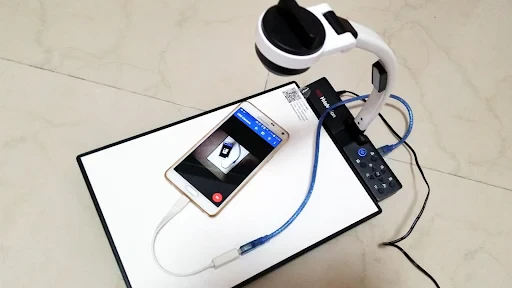
First things first, downloading the USB Camera app is a breeze. Available on both Android and iOS, this app offers a seamless installation process. Once installed, connecting your device to a computer is straightforward. You just need a compatible USB OTG cable, and voilà, your smartphone or tablet is now a webcam!
Features That Stand Out
One of the standout features of the USB Camera app is its versatility. It's compatible with a wide range of Android and iOS devices, ensuring that no matter what you're using, the app should work smoothly. Another feature I found particularly useful is the app's ability to record videos directly. This means you can not only stream live content but also save your recordings for later use.
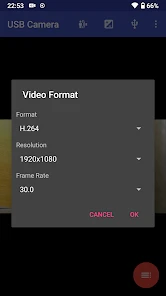
The app also supports various resolutions, which is a big plus for those who need high-quality video. You can adjust the resolution to your liking, ensuring that your video quality matches your needs—be it for professional streaming or casual video calls.
User Experience
Using the USB Camera app is a user-friendly experience. The interface is clean and intuitive, making it easy even for those who aren't tech-savvy. Navigating through the app is a breeze, and all the essential functions are just a tap away. I particularly liked how the app provides helpful tips and guidance throughout, ensuring you get the most out of your experience.
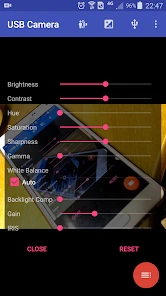
Moreover, the app offers a range of settings to tweak your video output. From adjusting brightness and contrast to applying filters, the customization options are numerous. This makes it easier to tailor your webcam footage to suit your specific needs and preferences.
Performance and Reliability
One thing that truly impressed me about the USB Camera app is its reliability. During my time using it, I encountered no crashes or glitches. The connection remained stable, and the video quality was consistently good. Whether you're using it for long video calls or streaming sessions, the app holds up well under pressure.
More From Our News Desk

Weather by Xiaomi Review: Clear at a Glance, Less Clear Up Close

X Under Pressure: Can It Recover When Posting Goes Wrong?

Clash of Clans Is Won Between the Battles

Android Auto Makes the Case for Quieter Car Software

MobiOffice: Transforming Mobile Productivity with Seamless Integration

EA SPORTS FC™ Mobile Soccer: Redefining Mobile Sports Gaming
Additionally, the app doesn't drain your battery excessively, which is great news for those long meetings or streams. It's optimized to run efficiently, ensuring your device doesn't overheat or die on you in the middle of something important.
In conclusion, the USB Camera app is a fantastic solution for anyone in need of a webcam alternative. Its ease of use, versatile features, and reliable performance make it a must-try app for both professionals and casual users alike. If you haven't given it a shot yet, I highly recommend downloading it and exploring its capabilities for yourself.
USB Camera Frequently Asked Questions
Can I use USB Camera to preview an external camera before recording?
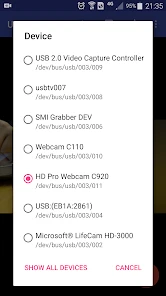
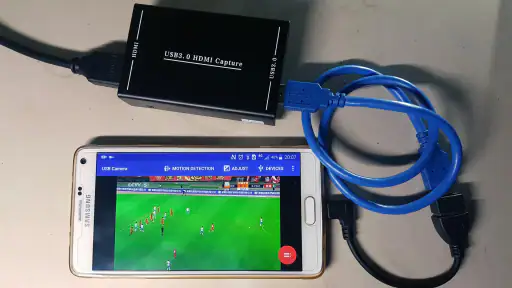
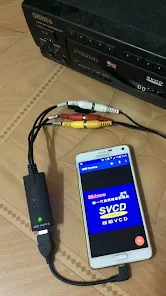
USB Camera is intended for connecting EasyCap or UVC devices and working with their video and audio streams. If you plan to record, checking the connected camera in your setup first can help you make sure the physical connection is secure and the device is recognized. Its main purpose is to work with external camera input rather than replace every function of your phone’s built-in camera.
Is USB Camera suitable for someone who has never used an external USB camera?
The app is aimed at people who want to connect an EasyCap or UVC device to an Android device for recording or broadcasting. A first-time user should be comfortable checking that the camera, connection, and phone can work together. You will also need suitable connecting equipment, so it is worth identifying your camera type and checking USB OTG support before downloading.
Can USB Camera replace my phone’s built-in camera app?
USB Camera is designed to connect and use an external USB camera, rather than serve as a general replacement for the built-in camera app. Its role is to work with an EasyCap or UVC device for video and audio recording or broadcasting. If you mainly want to take ordinary pictures with your phone, this app’s external-camera focus may not match that need.
Does USB Camera require an internet connection?
USB Camera focuses on connecting an EasyCap or UVC device for recording and broadcasting video or audio streams. Whether you need an internet connection depends on how you intend to use a stream and the services involved; recording from a connected camera is a separate use from broadcasting. Consider your planned setup and test the connection before depending on the app for a particular session.
Is USB Camera free, and who is it intended for?
USB Camera is a free app in the Video Players & Editors category, developed by 沈垚 / ShenYao China. It is intended for people who want to connect an EasyCap or UVC device to use video and audio for recording or broadcasting. Its content rating is Everyone, so its stated audience is broad; the main practical consideration is whether your Android device and camera setup are suitable.
Pros
- Supports high-resolution video streaming
- Compatible with various USB cameras
- Easy setup and user-friendly interface
- Low latency for real-time video
- Offers recording and snapshot features
Cons
- May require additional hardware
- Limited to USB camera compatibility
- Battery consumption can be high
- In-app ads may disrupt experience
- Not all devices are supported
- Category
- Video Players & Editors
- Version
- Varies with device












