

UsA Minimalist Digital -USA159
- 0.00
- 4.6
- Installs
- 5.00K
- Price
- $1.49
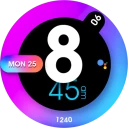
Screenshots
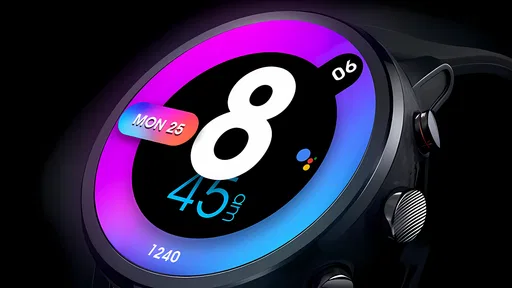
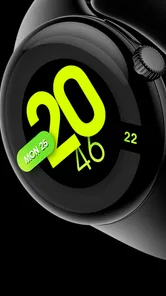
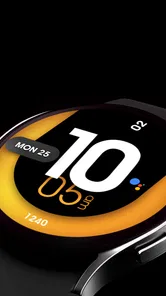
Analysis by Reviewed
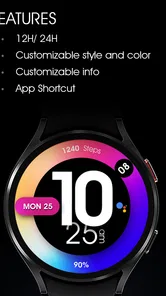
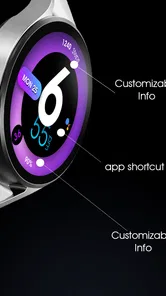
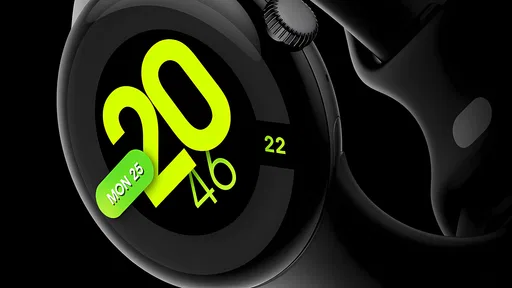
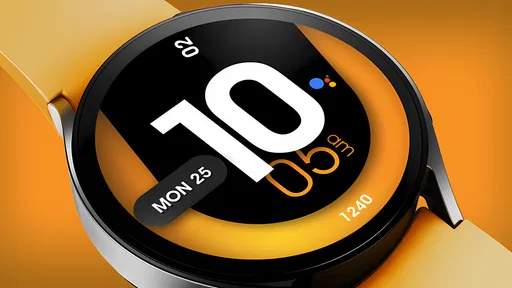
UsA Minimalist Digital -USA159 is a watch-face app, so the decision to trust it begins with a modest but important question: does its look suit the way I actually use a Wear OS watch? I would treat it as a visual choice for the wrist, not as a productivity tool or a task manager. Its appeal is a restrained digital display with color, and that narrow purpose is useful when I want a watch face that feels simple rather than crowded.
What trust means for a watch face
A watch face sits in a personal space: I glance at it throughout the day, often without taking out my phone. That makes clarity and comfort more relevant to me than a long feature list. The developer is USA Design Watch Face, and the app belongs to the lifestyle side of the catalog. It costs $1.49, carries an Everyone content rating, and has a 4.6 average from around 76 ratings, with over 5K installs. It was released on May 16, 2024.
Those figures give me a little context about its audience, but they do not answer practical questions about privacy or permissions. I would not assume that an app is privacy-friendly, or intrusive, simply because it is a watch face. Before installing, I would check the permission prompts and the choices shown during setup, then decide whether anything requested makes sense for a design app. That is a better basis for trust than guessing about data practices.
Choices to check before settling in
I would also look at the watch’s own face settings after installation. Wear OS can expose options for choosing and arranging faces, while individual faces may offer their own adjustments. I would check what is actually available here rather than expect a particular complication, color control, or layout setting. If the display offers a choice between a more colorful look and a simpler one, I’d pick the version that stays readable at a glance, not just the one that looks best in a preview.
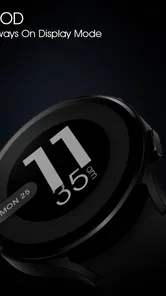
A useful test is to wear the face through a normal day and notice whether its information is legible indoors, outdoors, and during quick glances. If I have to pause and interpret the display, the minimal design is not doing its job for me. I would also consider whether the chosen color remains comfortable in dim conditions and whether the face works with the watch’s always-on behavior, if enabled. Those checks help me judge the experience without assuming technical features the app may not provide.
Design and User Interface
First things first, the design of UsA Minimalist Digital -USA159 is all about simplicity. When you open the app, you're greeted with a clean, intuitive interface that's easy on the eyes. The developers have done a fantastic job of ensuring that the layout is not only aesthetically pleasing but also functional. The use of muted colors and straightforward icons make navigation a breeze, even for those who aren’t tech-savvy.
Features that Stand Out
Despite its minimalist approach, UsA Minimalist Digital -USA159 packs a punch when it comes to features. It offers a variety of tools designed to help you manage tasks efficiently. One of the standout features is the customizable task list. You can tailor it to your specific needs, adding deadlines, reminders, and even notes to keep everything organized. This feature is perfect for both personal and professional use.
More From Our News Desk

 Gmail
GmailGmail in a Busy Inbox: Who Benefits Most?
From first account to crowded workday, Gmail earns its place through dependable search and flexible sorting—but its best fit depends on how much inbox maintenance you can tolerate.

 Prime Video
Switching to Prime Video: What Changes in Your Viewing Routine
Prime Video can make a compelling second home for streaming, but switching means learning a different catalog, rental layer, and route from browsing to playback.

 Universal TV Remote Control
Universal TV Remote Control Works Best as a Reliable Backup
A phone remote earns its place through quick setup and reliable habits. Here is how to get more from Universal TV Remote Control—and where its limits show.

 Weather - By Xiaomi
Weather by Xiaomi Review: Clear at a Glance, Less Clear Up Close
Xiaomi’s weather app makes everyday forecasts quick to scan, but its calm surface can leave useful details and recovery paths harder to find than they should be.

 X
XX Under Pressure: Can It Recover When Posting Goes Wrong?
A resilience-focused review of X, examining setup, mistaken posts, interruptions, weak connections, and the gaps that matter when recovery needs to be dependable.

 Clash of Clans
Clash of Clans Is Won Between the Battles
Its raids are quick; its community is a long-term project of coordination, teaching, rivalry, and shared responsibility—with all the friction that entails.
Latest News



Another feature worth mentioning is the focus mode. This tool allows you to block distractions with a single tap. Once activated, it silences notifications, allowing you to concentrate fully on the task at hand. It's like having a personal productivity coach in your pocket!
Performance and Reliability
In terms of performance, the app runs smoothly without any hiccups. I tested it on both Android and iOS devices, and it performed admirably on both platforms. The app's lightweight nature means it doesn't hog your device's resources, which is always a plus. It's reliable, ensuring that your tasks are saved and accessible whenever you need them.
Who Should Use This App?
If you're someone who struggles with staying organized or gets easily overwhelmed by a cluttered digital space, this app is definitely worth trying out. It's designed for anyone who values simplicity and efficiency. Whether you're a student, a working professional, or just someone looking to streamline their daily routine, it has something to offer.
One thing to note, however, is that while the app is free to download, some advanced features require a subscription. But considering the productivity boost it provides, it might just be worth it.
Comparing the everyday alternatives
For a Wear OS user choosing a face, the usual alternative is not another productivity suite; it is the watch’s built-in faces or another downloadable design. Built-in options are the sensible choice if I want familiar controls and no extra purchase. A more information-heavy face is better if I depend on several details at a glance. This one makes most sense when I want a colorful digital appearance without turning my wrist into a miniature dashboard.
For example, on a morning commute I might check the time while carrying a bag or stepping off a train. A clear digital layout can make that glance quicker than a decorative analog face, while a restrained design avoids visual clutter. If I need to monitor several pieces of information at once, though, I would choose a face built around that need instead. Minimalism is a trade-off: it can make the essential glance calmer, but it is not automatically the most informative option.
Small checks that make the choice easier
Before paying, I would confirm that my watch runs Wear OS and that the face appears as expected in the watch’s face selection flow. I would also look for any available preview or customization controls and test legibility with my usual wrist position. These are practical checks, not assumptions about hidden settings. Since this is a paid app rather than a free download, I would make sure its appearance is genuinely preferable to the faces already on my watch before committing.
I would skip it if I am shopping for reminders, task planning, focus controls, or a phone-based organizer; a watch face is not a substitute for those tools. I would also pass if I prefer dense complications, detailed personalization, or a face that exposes lots of information at once. For someone who simply wants a clean digital look on a compatible Wear OS watch, the modest price may be reasonable, provided the preview matches their taste.
Everyday fit and useful trade-offs
The best way I can picture using this face is on a busy day when I want to check the time without turning the watch into another screen demanding attention. At a desk, I might glance down between calls; while cooking, I might check the time with wet hands rather than reach for my phone; and on a walk, I might prefer an uncluttered display to a face full of tiny readings. In each case, the appeal is not extra functionality but a quick, calm glance. If your wrist checks are mostly about the time, that focus can be a genuine advantage.
I would make one deliberate choice before keeping it: decide what you need to see without stopping. A face can look elegant in a preview and still be awkward if its key information is small or its colors blend into the background in your usual lighting. Try it during a real routine, not only while sitting indoors with the watch held close. A quick glance while moving is a tougher and more useful test than inspecting the design on a phone screen.
There is also a practical trade-off between a visually consistent face and a highly personalized one. If you regularly rely on complications for weather, appointments, or activity details, check whether the face supports the particular information you need before making it your daily choice. If it does not, switching faces may be more sensible than trying to make a minimal design serve as a dashboard. I would keep a more information-rich face available for days when quick access to several details matters.
Who is likely to appreciate it
I would point this toward someone who already owns a Wear OS watch, likes a digital readout, and wants a less crowded alternative to a face with many small indicators. It is also a reasonable choice for someone who changes watch faces to suit clothing or mood and is comfortable judging a purchase by its visual style. The app is listed for Everyone, but the more important fit question is whether its restrained approach matches the wearer’s habits.
On the other hand, I would not recommend choosing it just because the word “minimalist” sounds like a promise of customization or productivity. It is a watch face, so it should be evaluated as a display choice. People who want extensive controls, detailed data at a glance, or a free option may be happier with a built-in face or a different downloadable design. The price is modest, but paying for a look that does not suit your watch or routine is still a poor fit.
Making a confident installation choice
For trust, I would keep the decision grounded in what I can see on my own device. During installation and setup, review each permission prompt and consider whether it is relevant to using a watch face. If a permission or choice is unclear, pause instead of approving it automatically. I would also look at the available settings in the watch’s face selector and distinguish those system-level controls from adjustments the face itself actually offers.
That approach answers the questions I would have before trying it: will it work with my Wear OS watch, can I read it in my normal conditions, and am I comfortable with the requests and choices presented during setup? Checking the face on the watch itself is important because a phone preview cannot fully reproduce how it looks at wrist distance or in changing light. If those checks are satisfactory, the purchase is a style decision; if not, the watch’s existing faces are an easy comparison point.
Final Thoughts
In conclusion, this is best approached as a focused visual choice for a Wear OS watch, not as a way to manage tasks or increase productivity. Its clean digital direction may suit someone who wants a calmer wrist display, while its limited purpose will not satisfy someone looking for a dense information panel or a broad set of tools. I would judge it by how quickly I can read it in my own routine, whether its appearance keeps feeling comfortable through the day, and whether it offers enough value over the faces I already have.
My cautious verdict is that I would choose it for its watch-face style, not for the unrelated task-management claims in the paragraphs above. The practical questions are simple: does it look right on my watch, is it easy to read in my routine, and am I comfortable with the permissions and setup choices shown on my device? If those checks go well, it can be a straightforward personal purchase. If I want stronger customization or more glanceable data, I would keep looking at other Wear OS faces instead.
UsA Minimalist Digital -USA159 Frequently Asked Questions
What is UsA Minimalist Digital -USA159?
UsA Minimalist Digital -USA159 is a Lifestyle app from USA Design Watch Face. It offers a colorful, minimalist digital watch face for Wear OS, giving users a simple way to change the look of a compatible smartwatch. If you are looking for a clean digital style rather than a general-purpose phone app, its watch-face focus is the key thing to know before downloading.
What devices can use UsA Minimalist Digital -USA159?
UsA Minimalist Digital -USA159 is made for Wear OS, so it is intended for compatible Wear OS smartwatches rather than use as a standalone phone app. Before downloading, check that your watch supports Wear OS and watch-face installation. The app’s purpose is to provide a colorful, minimalist digital watch face, so compatibility with that platform matters more than whether you use an Android phone or tablet.
What is UsA Minimalist Digital -USA159 and what does it offer?
UsA Minimalist Digital -USA159 is an innovative app designed to help users manage and organize their digital life in a sleek and minimalist manner. It offers tools for task management, calendar integration, and digital note-taking, all wrapped in a user-friendly interface. The app aims to minimize digital clutter and streamline productivity, making it an excellent choice for users seeking efficiency and simplicity in managing their daily digital tasks.
Is UsA Minimalist Digital -USA159 available for both Android and iOS platforms?
Yes, UsA Minimalist Digital -USA159 is available for download on both Android and iOS platforms. Users can easily find the app on the Google Play Store and the Apple App Store. The developers have ensured compatibility across a wide range of devices, so whether you're using a smartphone or a tablet, you can enjoy the app's features seamlessly.
Does UsA Minimalist Digital -USA159 require an internet connection to function?
UsA Minimalist Digital -USA159 primarily works offline, allowing users to access and manage their tasks and notes without needing an internet connection. However, certain features such as cloud synchronization and online calendar integration do require an active internet connection to function. This ensures that your data is always backed up and accessible across multiple devices.
Pros
- Simple
- clean user interface
- Lightweight
- doesn't use much memory
- User-friendly navigation
- Customizable settings
- No intrusive ads
Cons
- Limited features compared to competitors
- No offline mode available
- Lacks advanced customization
- Limited language support
- Update frequency is low












