

UsA Cyber Two - USA153
- 0.00
- 0.0
- Installs
- 1.00K
- Price
- $1.49
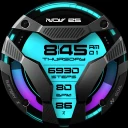
Screenshots
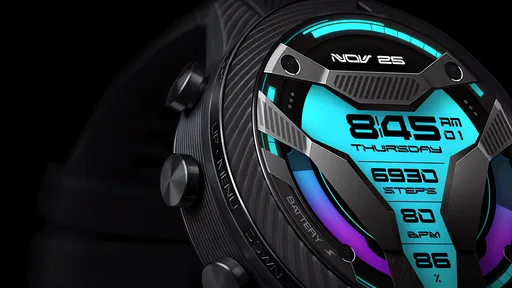
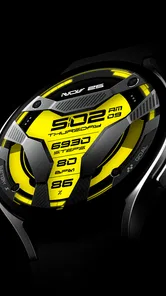
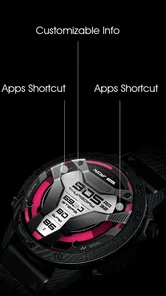
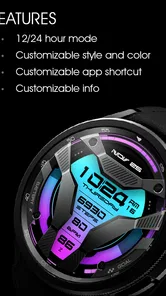
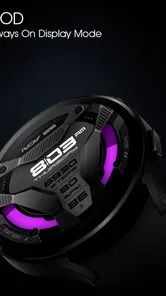
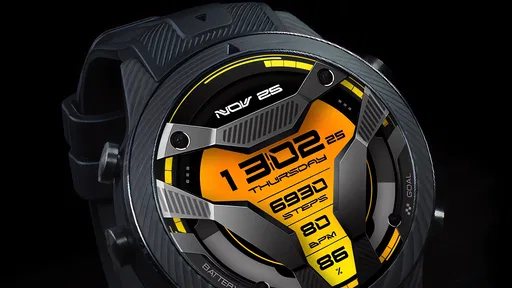
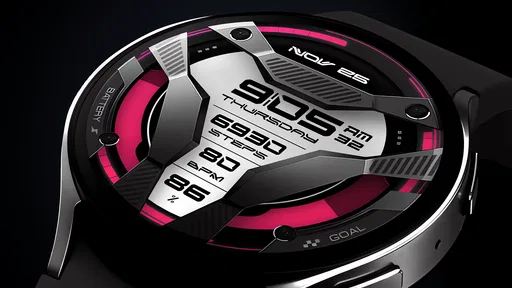
Analysis by Reviewed
I judge UsA Cyber Two - USA153 as a Wear OS watch face, not as a phone security product. That distinction matters: the name may suggest digital protection, but what you’re choosing here is a particular look for your watch’s main screen. I’d consider it if you want a more futuristic wrist display and are happy to make style part of the decision. If you came looking for antivirus, a VPN, or cybersecurity tools, this is not the right app.
How it fits into a day
A watch face is most useful in the small pauses when pulling out a phone would be overkill: checking the time before a meeting, glancing down at a crossing, or seeing whether you have a moment before the bus arrives. With a cyber-inspired design, the appeal is visual personality rather than a new task or service. I’d look at the screen in those ordinary situations and ask whether I can read it quickly without stopping to study the layout.
That quick-glance test is more revealing than admiring the design while the watch is idle. Try looking at it indoors, outdoors, and while moving at your usual pace. If the time is immediately clear, the face may work well as an everyday choice. If you have to focus on decorative details before finding what you need, I’d reserve it for a change of mood and keep a plainer face ready for workdays or travel.
What to expect when you put it on
Because this is a watch face rather than a full mobile app, I wouldn’t expect a long setup routine or a collection of services running in the background. The developer is USA Design Watch Face, and the listing describes the design as futuristic. That gives me a clear sense of its visual direction, but not a reason to assume particular complications, customization controls, or animated effects. Before buying, I’d check that the face is compatible with your Wear OS watch and decide whether its cyber-inspired look will be easy to read at a glance.
The practical test is simple: glance at your wrist while walking, carrying groceries, or waiting for a bus. If the design makes the information you rely on easy to spot, its bold style can be a welcome change from a plain digital face. If you mostly want a quiet, uncluttered display, a standard system face may be a better fit. A busy-looking design can feel striking when you first install it but less comfortable if you check the time dozens of times a day.
Speed, stability, and everyday use
A watch face generally has a different performance role from a feature-heavy app: it changes the watch’s home display rather than serving as a separate tool you open for extended sessions. I’d therefore judge speed by how promptly the watch returns to the face and how legible it is during quick glances, not by expecting a suite of functions. Battery life and smoothness can depend on the watch and how the face is implemented, so I wouldn’t treat the futuristic theme alone as proof that it is especially light or demanding.
For a realistic routine, imagine checking the time between meetings and later while heading home. In those brief moments, a strong visual identity can make the watch feel more personal, but clarity matters more than novelty. If you find yourself pausing to interpret the screen, or regularly switching back to a simpler face for busy stretches, that is a useful sign that the style is better for occasional wear than as your everyday default. Trying it during a normal day before settling on it can help you make that call.
More From Our News Desk

 Gmail
GmailGmail in a Busy Inbox: Who Benefits Most?
From first account to crowded workday, Gmail earns its place through dependable search and flexible sorting—but its best fit depends on how much inbox maintenance you can tolerate.

 Prime Video
Switching to Prime Video: What Changes in Your Viewing Routine
Prime Video can make a compelling second home for streaming, but switching means learning a different catalog, rental layer, and route from browsing to playback.

 Universal TV Remote Control
Universal TV Remote Control Works Best as a Reliable Backup
A phone remote earns its place through quick setup and reliable habits. Here is how to get more from Universal TV Remote Control—and where its limits show.

 Weather - By Xiaomi
Weather by Xiaomi Review: Clear at a Glance, Less Clear Up Close
Xiaomi’s weather app makes everyday forecasts quick to scan, but its calm surface can leave useful details and recovery paths harder to find than they should be.

 X
XX Under Pressure: Can It Recover When Posting Goes Wrong?
A resilience-focused review of X, examining setup, mistaken posts, interruptions, weak connections, and the gaps that matter when recovery needs to be dependable.

 Clash of Clans
Clash of Clans Is Won Between the Battles
Its raids are quick; its community is a long-term project of coordination, teaching, rivalry, and shared responsibility—with all the friction that entails.
Latest News



When the watch is under pressure
The most demanding moments for a watch face are not long sessions of active use; they are the quick returns to the home screen while other watch tasks are competing for your attention. I’d pay attention to whether the face appears consistently after checking a notification or finishing another activity, rather than judging it from a single launch. If the watch feels sluggish across several faces, I would not blame this design alone. Switching briefly to a built-in face gives you a useful comparison before deciding whether to keep it installed.
There is also a practical trade-off between visual detail and glanceability. A design can look sharper when you hold your wrist still than it does while you are carrying a bag or walking. I’d test it during the part of the day when I use my watch most, not just during setup. If I rely on quick checks in a crowded commute, I’d prioritize the face that gives me the time at once; if I mainly use the watch as a personal accessory, a bolder look may be worth that compromise.
Who it suits, and what to compare
I’d look at this option if you enjoy futuristic design and want your Wear OS watch to look less conventional. Compared with the basic faces already available on many watches, a dedicated design can give the home screen a more deliberate personality. The trade-off is that a built-in face is often the sensible choice when you value familiarity, quick readability, or avoiding an extra purchase. Someone who wants extensive layout controls should also compare the face’s actual on-watch options before paying rather than infer flexibility from its theme.
It is best suited to someone who is choosing for appearance first and is comfortable checking how the design works on their own watch. It is a weaker fit for a person who needs a very plain display, expects a broad set of tools, or wants a face primarily for detailed at-a-glance information. For those needs, a familiar system face may be the better everyday option; for variety, this paid design could be worth considering if its look is exactly what you want.
The app sits in the lifestyle category, costs $1.49, and is rated for Everyone. It was released on Jan 24, 2024, and has reached over a thousand installs. Its average rating is 0.0, so I wouldn’t use ratings as a reason to expect a particular experience; I’d make the decision based on the design, the price, and compatibility with my own watch. Since it is a paid watch face, checking the purchase and installation flow on the device you intend to use is a sensible step before committing.
Before purchasing, I’d confirm that the watch runs Wear OS and that the face can be selected through the watch’s normal face controls. I’d also think about whether I want one distinctive look or a face I can tune around changing routines. Those are different priorities: a fixed visual identity can be appealing precisely because it is decisive, while people who like rearranging information may be happier with a configurable alternative.
Reliability and sensible troubleshooting
If the face seems slow to appear or behaves oddly, I’d first check the watch’s face-selection and compatibility settings, then switch temporarily to a standard face to see whether the issue is specific to this design. That’s a practical way to separate a face-related problem from a general watch slowdown without assuming the cause. For someone who changes faces often, it is also worth considering whether a distinctive look will earn its place in the rotation or simply be a one-day experiment.
I’d treat battery concerns the same way: compare the watch over a normal routine rather than drawing a conclusion from a short glance or a single busy day. A watch’s age, settings, and use can affect how it feels, so the design alone is not enough to explain a change. If performance is important to you, test the face during your usual schedule and switch back if the experience is less comfortable. There is little reason to keep a style choice that makes the watch harder to use.
One helpful habit is to decide what a successful first day would look like before installing a new face. For me, that means being able to read the time naturally, returning to the face without frustration, and still liking the design after the initial novelty fades. This small check prevents an attractive preview from carrying too much weight. If it passes, keep it; if not, returning to a built-in option is an easy way to restore a familiar routine.
First Impressions and the Final Call
My overall view is that this is a style-led purchase, not a performance upgrade or a utility package. The key question is whether its futuristic appearance earns a place on your wrist after the first impression. If you want a distinctive look and your watch handles it comfortably, it can add a personal touch. If you value simplicity, extensive customization, or a screen you can read instantly in every situation, I’d choose a more familiar face instead.
If you're on the hunt for a cybersecurity app that promises both functionality and ease of use, then let me introduce you to UsA Cyber Two - USA153. This app has been making waves in the digital security space, and after giving it a spin, I can see why.
First Impressions with UsA Cyber Two
Upon first launching UsA Cyber Two - USA153, the clean and intuitive interface immediately caught my attention. The developers have clearly prioritized user experience, making it a breeze even for those who aren’t tech-savvy. Setting it up was as simple as downloading, installing, and following a few straightforward prompts. In no time, I was navigating through its features with ease.
Features That Stand Out
One of the standout features of this app is its comprehensive threat detection system. It runs quietly in the background, ensuring real-time protection without bogging down my device’s performance. I appreciated how it didn’t bombard me with notifications unless absolutely necessary, striking a good balance between vigilance and subtlety.
Another impressive feature is the VPN service integrated within the app. In today’s digital age, privacy is paramount, and having a reliable VPN adds an extra layer of security. I tested it on public Wi-Fi, and the connection was both fast and secure, which is a major plus for anyone frequently on the go.
User Experience and Performance
The user experience with UsA Cyber Two was seamless. The app is lightweight, meaning it doesn’t drain your battery or take up unnecessary space on your device. Even when running multiple apps, there was no noticeable lag, which is a testament to its efficient design.
Moreover, the support team deserves a shoutout. I had a minor question about one of the features and reached out via their in-app support. The response was prompt and helpful, showcasing their commitment to customer satisfaction.
Wrapping It Up
In conclusion, UsA Cyber Two - USA153 is a must-have for anyone looking to bolster their device’s security without compromising on performance. Its user-friendly design and robust features make it accessible to everyone, from cybersecurity novices to seasoned experts.
If you’re serious about protecting your digital footprint, UsA Cyber Two is worth checking out. With this watch face, you’re choosing a visual change for your Wear OS display, not extra digital protection.
UsA Cyber Two - USA153 Frequently Asked Questions
What does the name UsA Cyber Two - USA153 refer to?
UsA Cyber Two - USA153 is a Lifestyle app by USA Design Watch Face. Its short description is “UsA Cyber Two,” and it is presented as a futuristic watch face for Wear OS. That makes it a watch-face app rather than a mobile cybersecurity tool, so it is best considered by people looking to personalize a compatible Wear OS watch.
Is UsA Cyber Two - USA153 a cybersecurity app?
UsA Cyber Two - USA153 is not a cybersecurity application. Despite the word “Cyber” in its name, it is a futuristic watch face for Wear OS, intended to change the appearance of a compatible watch. It should not be relied on for malware detection, firewall protection, phishing prevention, or other security functions.
What is UsA Cyber Two - USA153?
UsA Cyber Two - USA153 is a cutting-edge cybersecurity application designed to protect your mobile device from a wide range of digital threats. It offers real-time monitoring, malware detection, and advanced firewall features to ensure your data and privacy are secure. Whether you're using Android or iOS, this app provides robust protection and peace of mind.
How does UsA Cyber Two - USA153 protect my device?
UsA Cyber Two - USA153 employs a multi-layered security approach to safeguard your device. It uses real-time threat detection to identify and neutralize malware, phishing attempts, and other cyber threats. Additionally, the app features a built-in firewall to prevent unauthorized access and continuously updates its threat database to tackle new vulnerabilities.
Is UsA Cyber Two - USA153 compatible with all devices?
UsA Cyber Two - USA153 is compatible with most Android and iOS devices. However, to ensure optimal performance, your device should meet certain system requirements. It's recommended to check the app's specifications on the Google Play Store or Apple App Store to verify compatibility with your device model and operating system version before downloading.
Pros
- User-friendly interface for easy navigation
- Comprehensive cybersecurity tutorials
- Regular updates with new content
- Offers real-time threat alerts
- Compatible with most devices
Cons
- Requires constant internet connection
- Limited offline features
- Premium features locked behind paywall
- Occasional in-app ads
- User data privacy concerns












