

US Public Lands
- 67.00
- 3.7
- Installs
- 10.00K
- Price
- $3.99
Screenshots
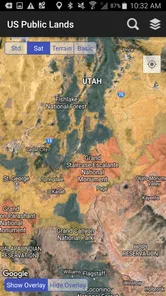
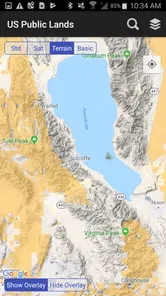
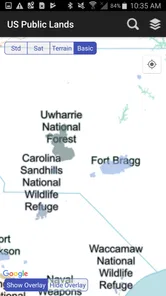
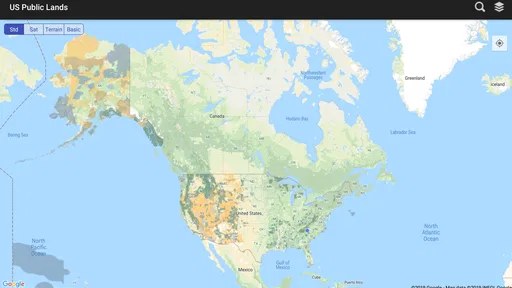
Analysis by Reviewed
When I’m planning a walk, drive, or overnight stop, knowing where public land begins can matter as much as knowing where the trail goes. US Public Lands is a paid travel app from Two Steps Beyond LLC focused on those boundaries. I see its value less as a general trip planner and more as a map for checking land ownership while deciding where to explore. It costs $3.99, has a 3.7 average from around 120 ratings, and has been installed over 10,000 times. Those figures suggest a useful but fairly specialized tool, not an app that will suit every casual traveler.
What a boundary map can—and cannot—settle
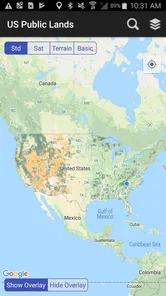
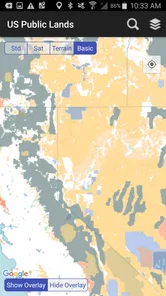
Public-land boundaries are practical information, not just map decoration. A route that looks open on a standard road map may cross between public and private property, and that distinction can affect where I walk or pause. This app’s central purpose is to make those boundaries visible on a device, which gives it a clear role beside ordinary navigation apps rather than making it a replacement for them.
I would treat a boundary line as a planning aid, not as permission to do anything on the ground. Public ownership does not automatically mean every activity is allowed, and land rules can vary by location. Before a trip, I would check the relevant land manager’s current guidance for access, closures, camping, fires, and other restrictions. The map can help me ask the right questions; it should not be my only source for answering them.
Trust starts with what the app actually does
Because this is a location-focused travel tool, it is reasonable to think carefully about privacy and permissions. I would check the permission prompts on my device and grant location access only if I want the app to use my position on the map. I would also review those choices in the phone’s settings later, since access controls belong to the user and can be changed there.
I don’t assume that a map app handles location in a particular way just because it shows a map. Nor would I infer account options, data retention practices, or sharing controls without seeing them stated clearly in the app and its privacy information. My practical approach is simple: use only the permissions needed for the task at hand, and read the current privacy details before relying on any location-sensitive app for a trip.
The app is listed for Everyone and supports Android 5.0 or later, so it can work on a range of Android devices. Its current version is 2025.8. I’d still check the app’s present store page and device compatibility before paying, particularly if I use an older phone. The $3.99 purchase makes sense if boundary maps solve a recurring problem for me; if I only need them once, I’d first compare that cost with the official maps and guidance available for my destination.
Your Guide to Nature's Wonderland
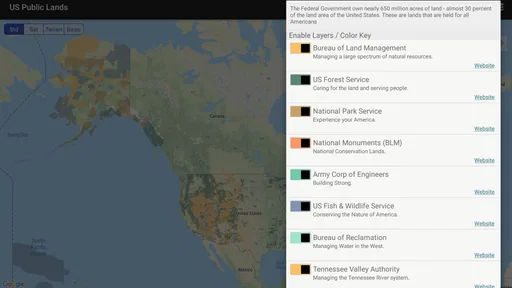
At first glance, the US Public Lands app appears to be a simple map tool, but oh boy, it’s so much more than that! This app is essentially a treasure map for adventure seekers. It gives you detailed insights about public lands across the United States, allowing you to find national parks, forests, and other lands open for public use.
More From Our News Desk

 Weather - By Xiaomi
Weather by Xiaomi Review: Clear at a Glance, Less Clear Up Close
Xiaomi’s weather app makes everyday forecasts quick to scan, but its calm surface can leave useful details and recovery paths harder to find than they should be.

 X
X Under Pressure: Can It Recover When Posting Goes Wrong?
A resilience-focused review of X, examining setup, mistaken posts, interruptions, weak connections, and the gaps that matter when recovery needs to be dependable.

 Clash of Clans
 Is Won Between the Battles
Its raids are quick; its community is a long-term project of coordination, teaching, rivalry, and shared responsibility—with all the friction that entails.

 Android Auto
 Makes the Case for Quieter Car Software
The car interface is no longer judged by how much it can do, but by how quietly it helps. Android Auto shows what drivers now expect—and what still gets in the way.

 MobiOffice: Word, Sheets, PDF
MobiOffice: Transforming Mobile Productivity with Seamless Integration
MobiOffice: Word, Sheets, PDF is redefining mobile productivity with a surprising blend of functionality and innovation.

 EA SPORTS FC Soccer Mobile 26
EA SPORTS FC™ Mobile Soccer: Redefining Mobile Sports Gaming
Dive into EA SPORTS FC™ Mobile Soccer, where immersive gameplay and strategic depth transform mobile sports gaming.
Latest News



Features That Stand Out
One of my favorite features is the offline map functionality. I mean, who wants to be stuck in the wilderness with no signal and no clue where they are? With this app, you can download maps ahead of time and access them without needing to worry about cell reception. This is a game-changer for those spur-of-the-moment trips.
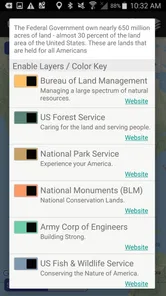
Another cool aspect is how it categorizes different types of public lands. Whether you’re looking for a national park, a state park, or a wildlife reserve, it’s all there, neatly organized. This makes planning your next hiking trip or camping weekend a breeze.
Intuitive and User-Friendly
The app’s interface is super easy to navigate. Even if you’re not particularly tech-savvy, you’ll find it a breeze to use. The design is clean and intuitive, and the information is presented in a way that’s easy to digest. Plus, the GPS tracking is spot-on, helping you stay on track with your adventure plans.
Personal Experience
On my last trip to the Rocky Mountains, this app was my trusty sidekick. It not only helped me locate some hidden gems that aren’t listed in the usual travel guides but also kept me informed about the boundaries of public lands, ensuring I stayed on legal grounds. There’s nothing quite like the peace of mind knowing you’re exploring within the rules.
Using the map as part of a real trip
For a realistic day out, I’d use the app before leaving home to identify where the public-land boundary sits near a trailhead or a planned stop. I’d then save or download the area if that option is available for my trip, check the route with a dedicated navigation map, and confirm current access rules with the agency responsible for the land. That sequence matters: boundary context helps me plan, while route navigation and official notices answer different questions.
On the drive, I might use the map to distinguish a public parcel from nearby private property before choosing where to pull over. Once I’m walking, I’d check my position against the boundary at decision points, especially where a road, creek, or trail seems to cross from one ownership area to another. I would avoid treating a phone screen as a survey-grade determination; if a line is close to where I intend to go, I’d leave a margin and seek clearer official guidance.
That is one of the less obvious strengths of a boundary-focused map: it can change a route choice before a mistake happens. It is not only useful after I reach a trail. A quick look during planning can help me choose a different access point, avoid wandering across a parcel whose status is unclear, or decide that a proposed stop needs more research.
Where it fits beside other map options
Most general navigation apps are better at turn-by-turn driving, finding businesses, or showing familiar roads. Hiking apps may be stronger for trail details and route recording, while an agency’s own maps and notices are the better place to verify rules and closures. US Public Lands has a narrower job: showing public-land boundaries. I’d use it alongside those alternatives rather than expect one app to handle every part of an outdoor trip.
This division of labor is useful, but it adds a small amount of preparation. I may need to move between a boundary map, a route map, and official information instead of finding everything in one place. For a short walk in a well-marked city park, that extra step may be needless. For a route near mixed ownership, where crossing a boundary could change access, the specialized view is more worthwhile.
Offline availability is especially helpful in remote areas, but it calls for a deliberate pre-trip check. I would open the intended area while I still have a reliable connection and make sure the map is ready before setting out. I would also keep my phone charged and carry a backup navigation plan on trips where losing battery or access to the device would create a safety problem. Offline maps reduce dependence on reception; they do not remove every risk of relying on a phone.
Small habits that make boundary checks more useful
Rather than checking only the destination, I’d inspect the approach as well. A public site can be surrounded by private land, and the route used to reach it may matter as much as the destination itself. Looking at the whole access corridor can reveal a need to use a different trailhead or road before I leave, when changing plans is easy.
I’d also avoid making a last-minute boundary decision from a single zoom level. Zooming in and out can put the immediate location in context, but no screen view should be treated as proof of a legal right of way. When a boundary appears to follow a narrow strip or meet a road, I’d verify the access route through the land manager or an authoritative local source. That caution is particularly useful for campers, anglers, and people exploring unfamiliar rural areas.
For group outings, I’d share the plan in plain language rather than assume everyone has the same map or interpretation. I can identify the intended public area and agree on a meeting point, while reminding the group that activity rules still need checking. This helps prevent a common kind of confusion: people see “public land” and assume that every adjacent route or use is automatically open.
Who will get the most from it
I’d recommend considering this app if public-land access is a regular part of your weekends, if you travel through areas with a mix of ownership, or if you want boundary context while choosing a route. Hikers, campers, road-trippers, and other outdoor visitors may all benefit, provided they understand that the map is one part of trip planning rather than a complete guide to local regulations.
It is less compelling for someone who rarely leaves familiar urban parks, already relies on authoritative maps that meet their needs, or expects turn-by-turn directions and detailed trail planning from one purchase. It also may not be the right choice for anyone unwilling to check boundaries carefully or verify rules with the responsible land manager. In those situations, a free official map or a broader navigation app may be the more sensible starting point.
The cost is easy to judge against how often I’d use the boundary view. If it helps me plan several trips or avoid repeated uncertainty about public versus private ground, a one-time purchase may feel worthwhile. If I need a map only for one destination, I’d compare the app with agency resources first. The average rating of 3.7 from around 120 ratings is a reason to read recent user feedback and check that the current version suits my device and expectations, rather than assume every person will find it equally polished.
Conclusion
In a nutshell, if you’re someone who loves to explore the great outdoors, the US Public Lands app is a must-have. It’s like having a knowledgeable guide in your pocket, ready to lead you to the best spots nature has to offer. So, next time you’re planning an escape into the wild, ensure you have this app downloaded. Trust me, it will make your adventures not just easier, but a whole lot more exciting! "
My more cautious recommendation is to see it as a focused boundary reference, not a guarantee of access or a substitute for local rules. Its strongest case is a trip where land ownership affects the route or the choice of stopping place; its weakest is a simple outing where a standard map already answers the questions I have. If that distinction matches the way you travel, this paid app may earn a place on your phone. I’d prepare the map before heading out, keep location permissions under my control, and confirm important access decisions with the appropriate land manager.
US Public Lands Frequently Asked Questions
What devices can run the US Public Lands app?
The US Public Lands app is a Travel & Local app developed by Two Steps Beyond LLC. It supports Android devices running version 5.0 or later and is also available for iOS. Before downloading, check that your device meets the relevant platform requirements and has enough room for the app and any maps you may want to use.
Who is the US Public Lands app intended for?
The app is intended for people who want to view public land boundaries while exploring or planning trips in the United States. Its Everyone content rating makes it suitable for a broad audience. Hikers, campers, travelers, and others interested in public lands may find its boundary maps useful when researching places to visit.
What is the purpose of the US Public Lands app?
The US Public Lands app is designed to help users identify and understand the boundaries and locations of public lands within the United States. It provides detailed maps that cover various types of public lands, including national parks, forests, and wildlife refuges, allowing users to explore and plan outdoor activities accordingly.
Is the US Public Lands app available for both Android and iOS devices?
Yes, the US Public Lands app is available for download on both Android and iOS platforms. Users can easily find it in the Google Play Store for Android devices and the Apple App Store for iOS devices, ensuring accessibility for a wide range of users looking to explore public lands across the US.
Does the US Public Lands app work offline?
Yes, one of the key features of the US Public Lands app is its offline capability. Users can download maps for specific areas before heading out, allowing them to access crucial information about public lands and navigate through them even when they don't have internet connectivity.
Pros
- Comprehensive map coverage.
- Offline access available.
- User-friendly interface.
- Detailed trail information.
- Regular updates.
Cons
- Limited free features.
- Requires GPS for accuracy.
- No social sharing features.
- Battery drain on long use.
- In-app purchases needed.











