

Unity by Hard Rock
- 1.07K
- 4.6
- Installs
- 100.00K
- Price
- Free

Screenshots

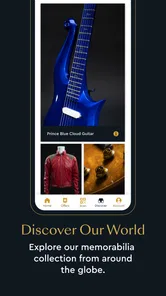
Analysis by Reviewed
When I first opened Unity by Hard Rock, I understood its main purpose quickly: it is a travel and local app built around the Unity rewards experience from Hard Rock. Rather than treating it like a general trip planner, I see it as a companion for people who already visit participating Hard Rock destinations and want a more convenient way to keep track of their relationship with the brand.
The app is free to install, carries a Mature 17+ age rating, and is developed by Seminole Hard Rock Support Services, LLC. It has reached over 100 thousand installs and holds a 4.6 average from around 13 thousand ratings, which suggests that the core idea is working well for a substantial group of users. My own impression is more specific: its value depends heavily on whether Unity is relevant to your travel habits. If it is, the app can make visits feel more organized. If it is not, there is little reason to keep it on your phone.
One account for a more connected rewards experience
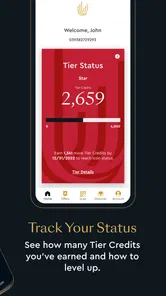
The capability that matters most here is the way the app puts the Unity by Hard Rock experience in one mobile place. That sounds simple, but it changes how I approach a visit. Instead of relying entirely on a physical card, scattered emails, or a browser session, I can use the app as a central point for checking into the rewards side of my Hard Rock activity.
I would not describe it as a replacement for every travel tool. It is not the app I would open to compare flights, build a sightseeing itinerary, or find a restaurant across an unfamiliar city. Its strength is narrower and more useful: it connects the rewards experience with the moment when I am deciding where to go, what to check, and how to make better use of a Hard Rock visit.
That focus is important because many travel apps try to cover too much. A hotel app may be excellent for reservations, a map app may be better for directions, and a wallet app may be better for storing payment cards. Unity by Hard Rock sits in a different space. It is most helpful when the trip itself includes a Hard Rock property or activity and I want the rewards relationship to remain visible while I am there.
The store summary presents it as a way to unlock rewarding experiences, but in daily use I think of it less as a discovery app and more as a practical access point. The distinction matters. I would install it before a planned visit, sign in when I have time, and make sure I understand where the important account information is before arriving. That small preparation makes the app feel much more useful than downloading it in the middle of a busy trip.
Why the mobile format helps
A phone is already the object I carry through an airport, hotel lobby, restaurant, or entertainment venue. Putting the Unity experience there reduces the need to remember another physical item or search through old messages. The convenience is not dramatic every minute, but it appears at exactly the moments when small delays become irritating.
More From Our News Desk

 Weather - By Xiaomi
Weather by Xiaomi Review: Clear at a Glance, Less Clear Up Close
Xiaomi’s weather app makes everyday forecasts quick to scan, but its calm surface can leave useful details and recovery paths harder to find than they should be.

 X
XX Under Pressure: Can It Recover When Posting Goes Wrong?
A resilience-focused review of X, examining setup, mistaken posts, interruptions, weak connections, and the gaps that matter when recovery needs to be dependable.

 Clash of Clans
Clash of Clans Is Won Between the Battles
Its raids are quick; its community is a long-term project of coordination, teaching, rivalry, and shared responsibility—with all the friction that entails.

 Android Auto
Android Auto Makes the Case for Quieter Car Software
The car interface is no longer judged by how much it can do, but by how quietly it helps. Android Auto shows what drivers now expect—and what still gets in the way.

 MobiOffice: Word, Sheets, PDF
MobiOffice: Transforming Mobile Productivity with Seamless Integration
MobiOffice: Word, Sheets, PDF is redefining mobile productivity with a surprising blend of functionality and innovation.

 EA SPORTS FC Soccer Mobile 26
EA SPORTS FC™ Mobile Soccer: Redefining Mobile Sports Gaming
Dive into EA SPORTS FC™ Mobile Soccer, where immersive gameplay and strategic depth transform mobile sports gaming.
Latest News



For example, imagine that I am spending a weekend at a Hard Rock destination. Before leaving home, I can open the app and get familiar with the account area. During the trip, I have a single place to return to when I want to review the rewards side of the visit. Afterward, I can check the app again instead of trying to reconstruct what happened from receipts and memory. That simple before, during, and after pattern is the most convincing reason to use it.
There is also a psychological benefit. Rewards programs are easy to ignore when they are disconnected from the activity that earns or uses them. A dedicated app keeps the relationship present without requiring me to remember a separate web address or search for the right page. I still need to pay attention to the actual terms of any offer or reward, but the app makes the account easier to revisit.
How I use it before and during a visit
My preferred workflow starts before travel. I install the app, open the account section, and look through the main navigation rather than waiting until I am standing in a queue. I want to know where the rewards information lives, how the app presents available experiences, and whether I need to complete any account-related step before I can use it comfortably.
This is one of the less obvious lessons with a rewards app: the best time to test it is when nothing is urgent. A few minutes at home can reveal whether I remember my sign-in details, whether my account information appears correctly, and whether I need to update anything. That preparation is more valuable than simply installing the app on the day of a trip.
Once I am at a destination, I would keep the app available but avoid treating it as something I need to stare at constantly. The useful habit is to check it at natural points: before making plans, when arriving, and after an activity or stay. Frequent refreshing without a clear reason can turn a convenient tool into another source of distraction.
I also recommend reading the wording around any reward or experience carefully. A mobile presentation can make an offer look easy to use, but the practical details still matter. Eligibility, timing, location, and any conditions should be understood before I make decisions based on them. The app can organize access to the program; it does not remove the need for common sense.
A realistic weekend example
Suppose I am visiting a Hard Rock property for a weekend and expect to spend time there rather than simply passing through. On the evening before departure, I open Unity by Hard Rock, confirm that I can access my account, and review the areas I am likely to use. I do not depend on it for navigation or transportation, so I keep my usual map and booking apps ready as well.
On arrival, I use the Unity app when I want to reconnect with the rewards experience. If I am deciding between activities associated with the destination, I can use the app as part of that decision rather than treating rewards as an afterthought. Later, I check back to keep the visit organized. The benefit is not that the app plans the entire weekend; it is that the rewards element has a clear home on my phone.
On the way home, I make one final check instead of assuming that every detail will be obvious later. This is a useful workflow for anyone who tends to forget loyalty information after a trip. The app becomes a record of the relationship I am maintaining with Hard Rock, while my other travel apps continue handling maps, reservations, and general planning.
What feels smoother than using a browser
Compared with visiting a mobile website, a dedicated app feels more intentional. I do not need to begin with a search, identify the correct page, and navigate through unrelated browser tabs. The app gives the rewards experience its own place, which is especially helpful when I am moving between travel tasks.
That said, the advantage is strongest for repeat users. If I only visit a Hard Rock destination once and do not expect to return, a browser may be enough for a quick check. Installing an app creates a little more commitment: I need to manage another account, another notification source, and another item in my app library. For regular visitors, that trade feels reasonable. For occasional travelers, it may not.
I also find that the app works best when I treat it as a companion rather than the sole source of trip information. My booking confirmation, maps, transportation tools, and payment methods still have separate jobs. Trying to force Unity by Hard Rock into all of those roles would make the experience less efficient, not more.
The tradeoffs behind the convenience
The biggest limitation is its specialized audience. This is not a broad travel utility with value for every destination. Its usefulness rises sharply when Hard Rock is part of my plans and drops sharply when it is not. Someone who rarely visits associated properties may install it, look around once, and find that it does not justify regular space on the phone.
Another point is that rewards can encourage extra attention to spending and activity. I appreciate having program information close at hand, but I would not let an app determine my travel budget. The right question is whether the visit already makes sense for me, not whether a mobile reward makes an unnecessary purchase appear worthwhile. That is a personal discipline the app cannot provide.
There can also be friction when I move between several travel apps. Unity by Hard Rock handles its own purpose, while hotel reservations, airline details, maps, and digital payments remain elsewhere. This is normal for modern travel, but it means I still need a simple system. I keep the essential booking details in the tools that created them and use Unity specifically for the Hard Rock rewards relationship.
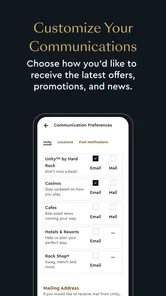
Notifications are another area where I would be selective. Rewards apps are more useful when they surface something relevant, but too many alerts can make me ignore all of them. I prefer to review the app intentionally and adjust my phone settings if notifications become distracting. The best experience comes from staying informed without allowing the app to dominate the trip.
Account access deserves practical attention too. Because the app is tied to a personal rewards experience, I would use a strong password and avoid signing in casually on a shared device. I would also check that the account details are correct before relying on the app during travel. These are not dramatic obstacles, but they are the kind of small habits that prevent avoidable frustration.
Where other apps are better
For flights, I would choose the airline's app. For hotel reservations, I would normally use the booking provider or the property's dedicated reservation channel. For directions and nearby places, a map app is still the better tool. Those alternatives are not competitors in every sense; they solve different problems more directly.
A general loyalty wallet may be preferable for someone who wants every membership card in one place. The tradeoff is that a broad wallet can be less focused on the details of one rewards program. Unity by Hard Rock makes more sense when I want the Hard Rock relationship to have its own dedicated space rather than being reduced to a barcode or account entry among many others.
This distinction helps answer a common question: should I install it if I already use other travel apps? I would say yes only when Hard Rock visits are a meaningful part of my travel. The app complements a travel toolkit; it does not replace the toolkit. If my trips are mostly independent hotels, museums, road trips, or outdoor destinations, the usual alternatives will serve me better.
Who gets the most value from it
Frequent Hard Rock visitors are the clearest audience. If I return to associated destinations often, a dedicated mobile connection to Unity can save repeated searching and make the rewards side of each visit easier to manage. The benefit grows through repetition because the app becomes part of my normal travel routine rather than a one-time experiment.
It is also a sensible choice for travelers who dislike carrying physical loyalty cards or keeping account details in email. The phone is already present, and the app gives the program a visible place. I would especially recommend it to someone who plans visits in advance and is willing to review account information before arriving.
People traveling as part of a group may find the app useful in a quieter way. It can help me keep my own rewards decisions separate from the group's general plans. I do not have to make everyone use the same travel tools, and I can still maintain my own connection to the program while friends or family handle maps and reservations differently.
On the other hand, I would skip it if I am only curious about Hard Rock, have no upcoming destination in mind, or prefer to minimize accounts and notifications. Downloading every brand app creates clutter, and this one earns its place through actual relevance rather than broad usefulness. A person who wants a universal travel organizer should look elsewhere.
The Mature 17+ rating is another reason to consider context before installing. It signals that the app is intended for an adult audience, so I would not treat it as a general family travel app for children. Adults planning or taking part in the relevant Hard Rock experience are the natural users.
My practical setup advice
I would install the current version, listed as 2.5.41, before a trip rather than during it. The app supports devices running iOS or Android 9 and above, so I would check the operating system on an older phone before relying on it. I would also leave enough time to update the app, sign in, and understand the main screens while I still have a stable connection.
My three best habits are straightforward. First, sign in and verify the account before traveling. Second, check reward details at a calm moment instead of while making a rushed purchase. Third, keep a backup of essential reservation and transportation information in the tools designed for those tasks. These steps preserve the app's convenience without making the entire trip depend on one service.
I would also avoid judging the app solely by how much information appears on the first screen. Its real value is in returning to the Unity experience at the right moments. A less crowded interface can be an advantage when I am traveling, because I want to reach the relevant account area quickly rather than browse a large collection of unrelated travel features.
My final take after using it
Unity by Hard Rock is a focused rewards companion, not an all-purpose travel planner. I like that its purpose is clear: it gives Hard Rock visitors a mobile way to stay connected with the Unity experience before, during, and after a trip. The free price removes the main barrier to trying it, and its strong 4.6 average across around 13 thousand ratings indicates that many users find the approach worthwhile.
My recommendation is conditional but positive. If I were planning regular Hard Rock visits, I would keep it installed and build it into my travel routine. I would use it alongside, not instead of, my booking, map, and payment apps. The most important improvement in my experience comes from preparation: opening the app before travel, learning where the account information sits, and checking reward details without rushing.
If Hard Rock is not part of my normal travel pattern, I would pass. The app's specialization is both its strength and its limitation. It does not need to become a universal travel tool to be useful; it only needs to make the Unity relationship easier for the people who actually use it. For that audience, the best reason to download it is continuity: one dedicated place to manage the rewards side of a visit instead of treating it as an afterthought.
Unity by Hard Rock Frequently Asked Questions
Is Unity by Hard Rock available for both Android and iPhone?
Yes. Unity by Hard Rock is available for Android and iOS, so you can check for it in the official app store for your device. Before downloading, make sure your phone meets the operating system requirements shown in its store. Using the official store also gives you the standard installation and update process for your platform.
Who develops Unity by Hard Rock?
Unity by Hard Rock is developed by Seminole Hard Rock Support Services, LLC. The app is intended to support Hard Rock’s Unity loyalty and rewards program, bringing membership information and related features together on a phone. If you are deciding whether to install it, check that the developer name matches in your app store so you select the intended app.
Who is eligible to join Unity Rewards?
Unity by Hard Rock is intended for people who want to participate in Hard Rock’s loyalty and rewards program. Eligibility, account verification, and access to particular benefits may depend on the rules that apply in your location and at the Hard Rock property you visit. Before signing up, review the membership terms and any local requirements so you understand what applies to your account.
Will Unity by Hard Rock work on my phone?
The app is available for Android and iOS devices, and its current version is 2.5.41. For Android, the minimum operating system requirement is version 9. Checking your phone’s operating system and the app’s requirements in the relevant store before downloading can help avoid compatibility problems. The app is free to download, although some services connected to Hard Rock may involve separate costs.
What is Unity by Hard Rock?
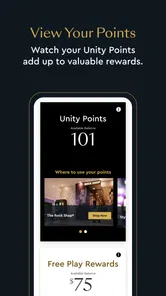
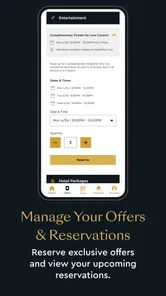
Unity by Hard Rock is the official loyalty and rewards app for Hard Rock guests. After creating an account, members can access their Unity Rewards information, review available offers, explore participating Hard Rock locations, and keep track of benefits connected to eligible activity. The exact features and rewards can vary by country, venue, membership level, and current promotional terms.
Pros
- Personalized rewards and offers through the Unity loyalty program.
- Earn points from eligible Hard Rock purchases and gaming activity.
- Easy access to member benefits
- promotions
- and exclusive experiences.
- Supports account management across participating Hard Rock locations.
- Useful companion for tracking loyalty activity while traveling.
Cons
- Benefits and point-earning rules vary by location and membership level.
- Some features require an active Unity account and verified personal details.
- Offers may have expiration dates
- restrictions
- or limited availability.
- The app’s usefulness is limited outside participating Hard Rock properties.
- Certain functions may depend on location permissions and a stable internet connection.











