

UNATION - Discover Events
- 93.00
- 3.0
- Installs
- 100.00K
- Price
- Free

Screenshots
Analysis by Reviewed
Finding something worthwhile to do nearby sounds easy until I actually try it. Search results scatter information across venue pages, social networks, ticketing services, and local calendars, while the details that matter most—time, location, ticket availability, and whether an event suits my plans—can be spread across several screens. UNATION - Discover Events approaches that problem as an events app for discovering local activities and handling tickets in one place. I found it most useful when I started with a vague intention such as “I want something to do this weekend” rather than with one specific concert or venue already in mind.
The app is developed by UNATION, INC. and is free to use, with an Everyone age rating. It has been available since December 23, 2015, and the current version is 7.9.14 for devices running Android 8.0 or later. Its reach is respectable at over 100 thousand installs, although the average rating sits at 3.0 from around 242 ratings and 93 written reviews. That combination tells me to approach it as a useful discovery tool that may not feel equally smooth for everyone, rather than as a flawless replacement for every ticketing service.
From a vague plan to a real event
I like to begin event planning with a loose idea, but turning “let’s do something this weekend” into a workable choice takes more than inspiration. In this section, I look at how UNATION helps narrow that gap—and why checking the practical details before committing is part of making the discovery genuinely useful.
Starting with the problem I actually have
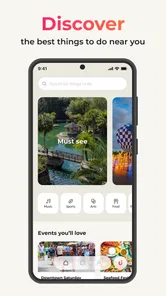
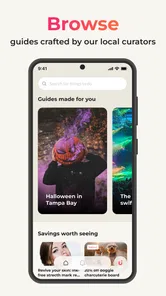
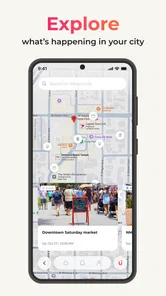
My normal starting point is not a polished search phrase. It is usually a free afternoon, a date-night idea, or a message from a friend asking what is happening locally. That is where this app makes sense. Instead of forcing me to know the exact event name first, it gives the search a more exploratory feel. I can browse possibilities and narrow my attention toward activities that fit the occasion.
This distinction matters. If I already know the artist, venue, or event title, a direct search engine or the organizer’s own ticket page may be faster. UNATION is more valuable when I need inspiration. It is aimed at the messy first stage of planning, when I am comparing several possibilities and trying to turn a general idea into a concrete choice.
I would also treat the location context carefully. A nearby event is only useful if the app is showing the area I actually care about. Before committing to anything, I check the event address and date rather than assuming that every result is within an easy trip. That simple habit prevents one of the most common failures in local-event discovery: finding something appealing that is technically nearby but inconvenient in practice.
Browsing before making a decision
The browsing stage is where I spend most of my time. I look at an event’s title, timing, place, and ticket information, then compare it with other listings instead of opening the first attractive result. This is a better workflow than reacting to a single colorful listing because an event can look ideal until the schedule or location changes the calculation.
More From Our News Desk

 Gmail
GmailGmail in a Busy Inbox: Who Benefits Most?
From first account to crowded workday, Gmail earns its place through dependable search and flexible sorting—but its best fit depends on how much inbox maintenance you can tolerate.

 Prime Video
Switching to Prime Video: What Changes in Your Viewing Routine
Prime Video can make a compelling second home for streaming, but switching means learning a different catalog, rental layer, and route from browsing to playback.

 Universal TV Remote Control
Universal TV Remote Control Works Best as a Reliable Backup
A phone remote earns its place through quick setup and reliable habits. Here is how to get more from Universal TV Remote Control—and where its limits show.

 Weather - By Xiaomi
Weather by Xiaomi Review: Clear at a Glance, Less Clear Up Close
Xiaomi’s weather app makes everyday forecasts quick to scan, but its calm surface can leave useful details and recovery paths harder to find than they should be.

 X
XX Under Pressure: Can It Recover When Posting Goes Wrong?
A resilience-focused review of X, examining setup, mistaken posts, interruptions, weak connections, and the gaps that matter when recovery needs to be dependable.

 Clash of Clans
Clash of Clans Is Won Between the Battles
Its raids are quick; its community is a long-term project of coordination, teaching, rivalry, and shared responsibility—with all the friction that entails.
Latest News



For a realistic example, imagine that I have a Saturday evening free and want to meet two friends. I would first browse events in the relevant area, open the options that match the evening, and compare their practical details. One might be more appealing but require a longer journey; another might be less exciting but easier for everyone to reach. The app helps with the discovery and comparison stage, but the final decision still depends on details I verify inside the listing and, when necessary, at the point of purchase.
A useful, less obvious habit is to separate “interesting” from “ready to buy.” I can save time by collecting a short mental list of possible events first, then checking the purchase path only after the group agrees on one. That avoids repeatedly moving through ticket screens for events that never become the final choice. It also makes the app more useful for group planning, where the hardest part is often reaching agreement rather than finding a listing.
Moving from discovery to tickets
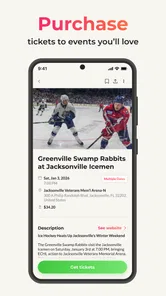
The promise of buying and selling tickets with less effort is important, but I would not treat the app as a universal ticket wallet. Ticket transactions can depend on the event and the organizer, so I pay close attention to where the purchase process leads and what information is displayed before confirming anything. The discovery screen is only the beginning of the transaction.
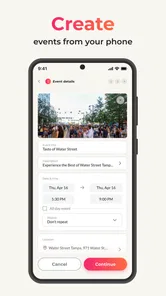
My preferred workflow is straightforward: identify the event, inspect the date and venue, review the ticket route, and then make sure the final details match what I intended. I would not rely on a thumbnail or a short title alone. For events with strict timing, travel plans, or multiple ticket types, I take an extra moment to check the exact selection and any instructions shown during checkout.
This is also where the app’s role becomes clearer. It can bring discovery and ticket access closer together, which is convenient compared with searching the web and then hunting for an official sales page. However, convenience does not remove the need for careful reading. I still want to know who is handling the transaction, what kind of ticket I am selecting, and where the confirmation will appear after purchase.
Where the handoffs happen
A local event app is only as strong as the handoffs between people and services. In this case, the journey can involve me as the attendee, the event organizer, the ticket seller, and the venue. UNATION, INC. provides the app experience, but the event itself is controlled by the people running it. That means a polished listing cannot guarantee that the real-world experience will be equally polished.
I think of the app as the planning bridge rather than the entire event operation. It helps me move from “what could I do?” to “which listing should I investigate?” and potentially onward to tickets. The organizer remains responsible for the event’s actual schedule and delivery, while the ticketing side handles the transaction. Keeping those roles in mind helps me know where to look if a question comes up.
For a group outing, the handoff is even more practical. I might discover the event, send the details to friends, and wait for them to agree before buying. The useful information is not just the name of the event; it is the combination of time, place, and ticket path. I would share those details together so nobody agrees based on an incomplete impression and then discovers that the venue or schedule does not work.
People who organize events may approach the app differently. Its store positioning includes promoting events as well as discovering them, so it is not only an attendee-facing idea. For an organizer, the appeal is being present where people are already browsing for local activities. The trade-off is that a listing still needs clear, accurate information to earn attention. An unclear title, incomplete timing, or vague location can create friction before a potential attendee ever reaches the ticket stage.
The result: turning free time into a plan
When the workflow goes well, the result is modest but valuable: I finish with a specific event instead of an open-ended search. That is the app’s strongest contribution. It reduces the distance between local discovery and a practical decision, especially when I am willing to browse rather than demanding one exact answer immediately.
I find it most suitable for people who enjoy trying different local activities, visitors who want to understand what is happening in an area, and residents who are tired of checking several unrelated sources. It can also help a small group start a conversation because the choices become concrete. Rather than asking everyone to search independently, one person can bring a few event options to the group and compare them against the shared schedule.
There is a useful trade-off here. A broad discovery app can expose me to events I would never search for directly, but that breadth can also create decision fatigue. I need to be willing to filter mentally and ignore listings that do not fit. If I only want the fastest route to a known ticket, a venue website or a dedicated ticketing service may be more efficient.
Three practical habits that improve the experience
First, I check the event details twice: once while browsing and again immediately before committing to tickets. This is not unnecessary caution. It is a way to catch a mismatch between the plan I formed from the listing and the exact option presented during the transaction.
Second, I use the app as a comparison workspace rather than a one-result search box. I compare the practical shape of an evening—travel, timing, and ticket route—before judging which event sounds most exciting. This makes the app more useful for real plans than simply scrolling through attractive names.
Third, I keep the handoff to friends simple. I send the event name together with the time, venue, and ticket information, then wait for agreement before buying. That avoids the common group-planning problem where one person purchases first and everyone else discovers a scheduling conflict later.
A fourth habit is to distinguish discovery from confirmation. I may find an event in the app, but I still read the final purchase screen carefully. This is especially important when an event has several ticket choices or when the outing depends on arriving at a particular time. The app can shorten the search, but it does not replace my responsibility to check the final details.
Where the flow breaks down
The rating of 3.0 suggests that the experience has not been consistently satisfying for all users, and I can understand why an events workflow may feel fragile. Local listings are inherently changeable. A result can be useful at the moment I see it but less useful if the event details, availability, or ticket route are not as clear as I expect.
The biggest limitation is that discovery convenience can create false confidence. Seeing an event in a central browsing experience may make it feel fully verified and ready, even though I still need to inspect the practical details. I would be particularly cautious when planning travel, buying several tickets, or arranging an outing for people with limited flexibility.
Another friction point is the difference between browsing and purchasing. Combining those steps sounds simple, but the transition can feel less direct than a dedicated ticketing app designed around one event provider. If I already know exactly what I want, extra discovery layers may slow me down. In that situation, the official organizer channel or a specialist ticket service is often the better choice.
The app is also not my first recommendation for someone who needs a highly structured personal calendar. Its value is finding and pursuing events, not replacing every planning tool I use afterward. Once I have chosen an event, I still prefer to place the confirmed details into my normal calendar and share the plan through my usual messaging app.
Who should use it—and who should skip it?
I would recommend giving it a try if you regularly ask, “What is happening near me?” and enjoy discovering possibilities before choosing. It is particularly well suited to flexible weekend plans, casual outings, and people who want one place to begin exploring rather than searching venue by venue.
I would be more selective if I were buying expensive tickets, coordinating a large group, or traveling a long distance. In those cases, I would use the app for discovery but verify the event through the relevant organizer or ticket route before making a serious commitment. That is not a rejection of the app; it is simply the sensible division between browsing convenience and high-stakes planning.
Someone who dislikes scrolling, wants only a specific venue, or expects every event service to behave like a dedicated ticket marketplace may find it frustrating. The app’s strength is breadth and discovery, not necessarily the shortest possible route for every transaction.
My final take after following the whole journey
UNATION - Discover Events is a free events app with a clear everyday purpose: help me move from spare time or a vague idea to a nearby event worth considering, with ticket access included in the same general journey. I appreciate that it supports the early, often neglected part of planning—the moment when I do not yet know what I want to attend.
At the same time, I would use it with realistic expectations. I see it as a starting point and planning bridge, not an automatic guarantee that every listing, ticket handoff, or event outcome will be effortless. The average rating of 3.0 reinforces that balanced view. It is worth trying for local discovery, particularly when I want options, but I would verify important details and switch to a direct organizer or specialist ticketing service when certainty and speed matter more than exploration.
For me, the deciding question is simple: am I looking for an event, or am I already looking for one exact ticket? If I am still exploring, this app can make the search more focused and more social. If I already know the answer, the usual direct alternatives may be quicker. Used in the right situation, it earns a place at the beginning of my weekend-planning workflow.
UNATION - Discover Events Frequently Asked Questions
Is UNATION available for both Android and iOS?
UNATION is an event-discovery app, and its store description presents it as a way to promote and discover events near you. Before downloading, check the official app store for your device to confirm availability and compatibility. On Android, the current version is 7.9.14 and requires Android 8.0 or later. The app is free to download.
Who makes UNATION, and is it suitable for everyone?
UNATION is developed by UNATION, INC. and is intended for discovering and promoting events. Its content rating is Everyone, which makes it broadly suitable for general audiences. Individual events can still have their own age restrictions, entry rules, and venue policies, so check the details for a particular listing before making plans or purchasing tickets.
What is UNATION – Discover Events used for?
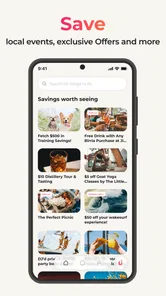
UNATION is an event-discovery and planning app that helps you find things to do near you, including concerts, festivals, sports, nightlife, family activities, food experiences, and local community events. After choosing a location, you can browse event listings, view dates and details, save interesting options, and share plans with friends. Availability and event categories depend on your selected area.
Does UNATION show events in my city or nearby areas?
UNATION is designed to provide local event recommendations, but the quality and quantity of listings can vary by city. The app generally uses your selected location, and in some cases device location permissions, to display nearby activities. If your area appears to have limited results, try searching another city or widening the location settings before assuming that no local events are available.
Can I buy tickets directly through UNATION?
Some events may allow you to access ticket information or continue to an external ticketing provider, while others may simply provide event details and organizer contact information. Ticketing options depend on the individual listing, so UNATION should not be treated as a universal ticket marketplace. Always check the final seller, fees, refund rules, age restrictions, and venue policies before completing a purchase.
Pros
- Wide range of local events
- from concerts to classes and festivals.
- Personalized recommendations help surface activities matching your interests.
- Event details
- dates
- locations
- and ticket links are easy to find.
- Useful for discovering lesser-known events beyond major entertainment venues.
- Available across multiple cities
- making it helpful when traveling.
Cons
- Event coverage can vary significantly depending on your location.
- Some listings redirect to external sites for registration or ticket purchases.
- Recommendations may feel limited until the app learns your preferences.
- Occasional outdated listings or changes may require checking with organizers.
- Popular events may sell out before you complete the booking process.











