

Umo Mobility
- 1.56K
- 4.5
- Installs
- 500.00K
- Price
- Free

Screenshots
Analysis by Reviewed
When I tried Umo Mobility, I found a travel app with a practical focus rather than a broad tourist-planning toolbox. Its real value is helping public-transport users keep their journeys in one place, especially when they are already moving through a local transit system that supports the service. I would describe it as a useful companion for everyday riders, not as a universal replacement for every map or ticketing app.
That distinction matters. Many travel apps try to cover flights, hotels, attractions, walking routes, car journeys, and public transport all at once. Umo Mobility feels more focused. It is built by Delerrok and sits in the Travel & Local category, with a free download and an Everyone age rating. In my experience, that focused approach makes it easier to understand what the app is for: supporting a transit trip rather than becoming a complete travel diary.
What makes Umo Mobility useful on a real journey
The best way to judge this app is to imagine a normal weekday rather than a holiday brochure. I might be leaving home for work, checking how to reach a different part of town, and needing a quick view of my public-transport options. In that situation, a dedicated mobility app can be more comfortable than jumping between a general map, a browser page, and a separate transit account. Umo Mobility is designed for that kind of repeated, local use.
Its strongest quality is concentration. Instead of surrounding a journey with unrelated recommendations, it keeps attention on getting from one place to another by transit. That is particularly helpful when I already know my destination but need to make a practical decision: which service to use, where to begin, or how to organize the trip without searching through several unrelated screens.
I also think the app is more appealing to regular riders than to people who use public transport only once. A daily commuter can build a habit around opening the same tool before leaving, while an occasional visitor may still prefer a familiar general mapping service that combines transit with walking, driving, and sightseeing. Umo Mobility makes the most sense when transit is the central part of the journey.
One useful habit is to check the route before walking to the stop, rather than waiting until I am already standing there. That small change gives me time to compare the available journey choices and notice whether the trip requires a transfer. It also reduces the temptation to board the first vehicle that appears and hope it goes in the right direction.
Another practical workflow is to use the app at two separate moments: once while planning and again immediately before departure. The first check helps me understand the shape of the trip. The second is a quick confirmation that I am still following the intended option. This is more reliable than taking a screenshot too early and assuming the situation will remain unchanged.
More From Our News Desk

 Weather - By Xiaomi
Weather by Xiaomi Review: Clear at a Glance, Less Clear Up Close
Xiaomi’s weather app makes everyday forecasts quick to scan, but its calm surface can leave useful details and recovery paths harder to find than they should be.

 X
XX Under Pressure: Can It Recover When Posting Goes Wrong?
A resilience-focused review of X, examining setup, mistaken posts, interruptions, weak connections, and the gaps that matter when recovery needs to be dependable.

 Clash of Clans
Clash of Clans Is Won Between the Battles
Its raids are quick; its community is a long-term project of coordination, teaching, rivalry, and shared responsibility—with all the friction that entails.

 Android Auto
Android Auto Makes the Case for Quieter Car Software
The car interface is no longer judged by how much it can do, but by how quietly it helps. Android Auto shows what drivers now expect—and what still gets in the way.

 MobiOffice: Word, Sheets, PDF
MobiOffice: Transforming Mobile Productivity with Seamless Integration
MobiOffice: Word, Sheets, PDF is redefining mobile productivity with a surprising blend of functionality and innovation.

 EA SPORTS FC Soccer Mobile 26
EA SPORTS FC™ Mobile Soccer: Redefining Mobile Sports Gaming
Dive into EA SPORTS FC™ Mobile Soccer, where immersive gameplay and strategic depth transform mobile sports gaming.
Latest News



For visitors, the app can be helpful when staying in an area served by the relevant transit network. I would use it as a local orientation tool, especially during the first day in an unfamiliar place. It can make the difference between vaguely knowing that a bus or train exists and having a clearer idea of how that service fits into my journey.
However, the local nature of mobility apps is also important. A person should not assume that one transit application automatically covers every city or every operator. Before depending on it for an airport transfer or an important appointment, I would first confirm that the local network is supported and that the app presents the journey information I need. That is sensible preparation, not a criticism unique to this product.
The app’s public reception is encouraging. It holds a 4.5 average from around 5.5 thousand ratings, and the wider install figure is over 500 thousand. Those numbers suggest that it has found a substantial audience among people looking for a dedicated mobility tool. They do not guarantee that every local experience will be identical, but they make the app worth considering instead of dismissing it as an obscure experiment.
A better way to use it than simply searching once
I found that the most effective use is not a single search followed by immediate closure. The app works better as part of a small travel routine. I would first choose the destination, look at the available transit path, and pay attention to the points where the journey changes from one service to another. Transfers are where rushed decisions usually happen, so understanding them before leaving is more valuable than merely seeing a total route.
When I have a choice between a faster route with a transfer and a simpler route with more walking, I would consider the conditions outside the app as well. Heavy luggage, poor weather, limited mobility, or an unfamiliar neighborhood can make the supposedly fastest option less attractive. A route display is a starting point; the final choice still benefits from human judgment.
A second non-obvious tip is to treat the app as a decision aid rather than an authority that removes all responsibility. I would compare what it suggests with the physical signs at a station or stop, particularly when several services share a location. Transit environments can be confusing even when the digital route is correct, and checking the vehicle or platform information in front of me is a sensible final step.
For a recurring trip, I would also notice which parts of the journey cause the most friction. Perhaps the difficult point is not the main ride but the walk to the stop, a transfer in a busy area, or uncertainty about where to exit. Once I know that, I can use the app more selectively: planning the troublesome section carefully while treating the familiar parts as routine. That makes the tool less distracting and more useful.
Where it compares well with general map apps
General map applications are excellent at showing a whole area and combining many travel modes. They are often the better choice when I am deciding between walking, driving, cycling, and transit, or when I need restaurants and landmarks around the destination. Their broad coverage can also be more convenient for a trip that crosses several kinds of transport.
Umo Mobility has a clearer identity. A dedicated transit interface can feel less cluttered when the only question is how to use public transportation. That focus may help a new rider avoid being distracted by options that are irrelevant to the journey. I would choose it when public transport is already my preferred mode and I want a tool centered on that decision.
The trade-off is flexibility. If my plans change and I suddenly need to walk a long distance, drive to a different station, or compare a rideshare with a bus, a broad mapping app may answer the new question more naturally. I would not delete every other travel tool just because I installed Umo Mobility. The two types of app can complement each other, with this one handling transit-focused planning and a general map handling the wider surroundings.
It also differs from relying on a transit operator’s website. A website can be useful when I need official notices or detailed network information, but opening a mobile app is often more convenient during an active journey. On the other hand, when a trip is unusually important, I would still check the operator’s own information if I needed confirmation about a disruption or a special service condition. Convenience and official detail are not always the same thing.
The friction I would want new users to understand
My main reservation is that the experience depends heavily on the transit environment around the user. An app can provide a polished way to plan a ride, but it cannot make an unsupported network appear or solve every problem caused by confusing stop names, local service changes, or incomplete coverage. That means the first question should always be whether Umo Mobility fits the city and services I actually use.
There is also a learning curve for people who rarely ride public transport. Even a straightforward route can involve unfamiliar terms, transfers, stop directions, and choices that experienced commuters take for granted. The app may organize the information, but it cannot replace the first few real-world trips needed to build confidence. I would give myself extra time on an initial journey instead of testing it when I am already late.
Another limitation is the danger of overconfidence in a digital plan. I would avoid treating a route selected earlier as permanent. Transit conditions can change, and a phone screen is not a substitute for paying attention to announcements, signs, and the actual vehicle. The most dependable approach is to use the app for preparation and orientation while staying alert during the trip.
Battery and connectivity are practical concerns for any travel app, even though they are not unique to this one. Before leaving for an unfamiliar destination, I would make sure my phone is charged and keep the essential destination details easy to access. I would also avoid making the app my only source of information for a journey where being stranded would create a serious problem.
These limitations do not cancel out the app’s strengths, but they define its proper role. Umo Mobility is strongest when it supports a known or supported transit network and when the user is willing to make the final practical checks. It is less suitable for someone expecting a single application to manage every transport mode, every city, and every unexpected change.
Who should install it, and who should choose something else
I would recommend Umo Mobility to regular public-transport riders who want a dedicated companion for local journeys. It is especially appealing to someone who dislikes switching between a general map and transit information, or to a traveler who wants to become comfortable with a supported network over several days rather than making one isolated trip.
It can also suit families and less experienced riders who prefer to plan before reaching the stop. A parent traveling with children, for example, may value the chance to understand transfers and walking sections in advance. The app does not remove the need to supervise the journey, but it can make the preparation stage calmer and more deliberate.
I would be more cautious about recommending it to a person whose travel is mostly international, mostly by car, or spread across many unrelated transport systems. That user may get more value from a broad mapping platform with wider multimodal coverage. Likewise, someone who only needs a one-time route and already has a trusted local option may not gain much from adding another app.
The free price makes trying it less of a commitment, and the Everyone rating makes it broadly approachable from an audience standpoint. It is available as an app rather than requiring a browser-only routine, which suits people who want a travel tool ready on their phone. The current version is 6.9.0.2184, and the minimum operating-system requirement is Android 7.0, so compatibility is worth checking before installation on an older device.
If I were helping a friend decide, I would ask three questions. Do you regularly use a transit network that the app supports? Do you want a focused mobility tool instead of a general map? Are you comfortable checking real-world signs and service information when conditions change? If the answer to all three is yes, Umo Mobility is a sensible trial. If the answer to the first is no, its central benefit may not apply.
My final view after using it as a travel companion
Umo Mobility is at its best when it stays in its lane: helping people plan and manage public-transport journeys without the clutter of a full travel super-app. I appreciate that clear purpose. It makes the app easier to recommend to commuters and local riders than to tourists looking for an all-in-one itinerary manager.
The strongest evidence in its favor is the combination of a focused travel role, a free entry point, and a sizeable user base with a 4.5 average from around 5.5 thousand ratings. Delerrok has created something that appears useful enough for repeated everyday travel, not merely a novelty installed for one weekend.
My criticism is equally straightforward: the app’s usefulness is tied to network support and to the quality of the surrounding transit information. It should not be treated as a universal replacement for general maps, operator notices, or common sense at a busy station. Users who understand that boundary are likely to have a better experience than those expecting it to solve every travel problem.
For me, the verdict is positive but specific. I would install it when my routine depends on a supported public-transport system and use it to prepare routes, think through transfers, and confirm the journey before setting out. I would keep a broader map available for walking, driving, and exploring the destination. Used that way, Umo Mobility earns its place as a practical travel companion rather than pretending to be the only travel app anyone needs.
Umo Mobility Frequently Asked Questions
Is Umo Mobility free to download, and are transit fares included?
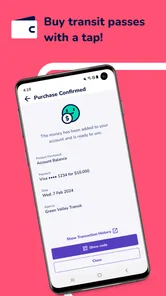
Umo Mobility is free to download, but that does not mean your journeys are free. Fares and passes are purchased through the app when supported by your local transit provider, and the available options depend on the agency and service area you choose. Check the fare details before confirming a purchase so you understand what the ticket covers and when it is valid.
Which phones can run Umo Mobility?
Umo Mobility is available for Android devices running Android 7.0 or later. Before downloading, check your phone’s operating system and make sure it meets that requirement. The app is a travel companion for participating transit services, so having a compatible phone is only one part of getting started; you will also need to use a supported agency or service area to access its local features.
What is Umo Mobility and what can I use it for?
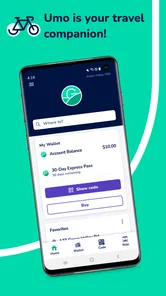
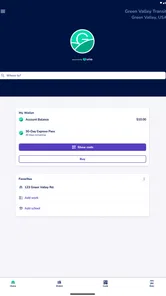
Umo Mobility is a transportation app designed to help users plan and pay for trips on participating public transit systems. Depending on the city or agency, you may be able to search routes, check schedules, view service information, purchase passes, and use a mobile ticket or account balance when boarding. Available features vary by location, so confirm that your local transit provider is supported before downloading.
Does Umo Mobility work in every city or with every public transportation system?
No. Umo Mobility is available only in regions and transit networks that support the platform. After installing the app, you may need to select your transit agency or service area before viewing routes and purchasing fares. Coverage, ticket types, payment options, and real-time information can differ significantly between cities, so check the supported agencies list and your local provider’s instructions before relying on the app for a journey.
How do I buy tickets or passes through Umo Mobility?
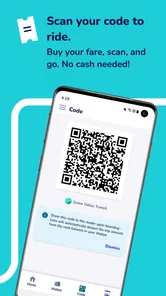
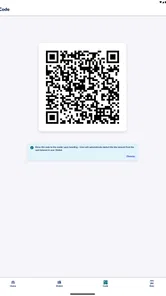
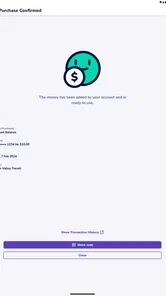
The usual process involves creating or signing into an account, selecting your transit agency, choosing an available fare, and paying with one of the supported methods. Depending on the provider, the app may offer single-ride tickets, day passes, stored-value funds, or longer-term passes. Always activate a ticket before boarding when required, and make sure your phone can display the valid ticket during inspection.
Pros
- Real-time bus tracking helps reduce uncertainty at stops.
- Mobile ticketing can make boarding faster and more convenient.
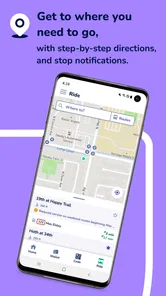
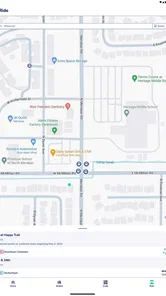
- Route planning combines nearby stops with scheduled departures.
- Service alerts can highlight delays
- detours
- and canceled trips.
- Useful coverage for participating public transport networks in one app.
Cons
- Availability and features vary significantly by city and transit agency.
- Live vehicle locations may be delayed or inaccurate during disruptions.
- Some tickets or passes may require account creation and payment details.
- The interface can feel confusing when several routes serve the same stop.
- Battery and mobile data usage may increase when tracking vehicles continuously.











