

UK ETA
- 995.00
- 3.1
- Installs
- 5.00M
- Price
- Free

Screenshots
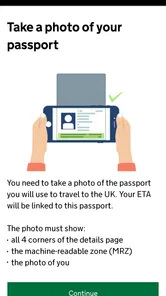
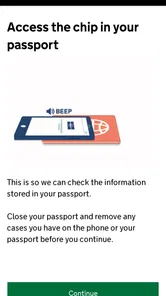
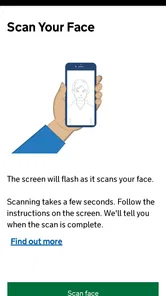
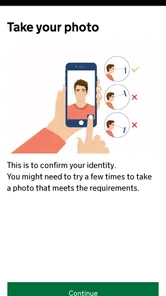
Analysis by Reviewed
When I am preparing for a UK trip, I want travel permission to be a separate, clearly defined task rather than something lost among bookings and reminders. UK ETA gives eligible travellers a dedicated mobile route to apply for an electronic travel authorisation. I find that narrow focus helpful: this is not a general travel planner or visa-advice service, but an official app from UK Visas and Immigration for one important step before a journey.
That focus is both its strength and its limit. If an ETA is the right requirement for your circumstances, the app offers a direct place to handle the application. Installing it does not complete the process, though, and using it does not replace checking which travel permission applies to you. I would first confirm the route, then make sure the identity and travel-document details I use are the ones I intend to travel with.
A focused route for a pre-trip requirement
I find the app’s narrow purpose useful because it gives one pre-trip task a clear place in my plans, instead of letting it disappear among bookings and reminders. In this section, I’ll focus on how that dedicated route changes the way I would organise the application, then move into the practical checks that help keep the process deliberate.
What the app is designed to do
The central capability is applying for an electronic travel authorisation for a visit to the UK. In everyday terms, that makes the app useful before departure rather than as a companion for sightseeing once you arrive. It does not need to compete with maps or booking tools: its value is whether it helps you handle this particular administrative task with less friction.
The distinction matters because travellers often mix together several questions: whether they need permission to travel, what kind of permission applies, and how to submit an application. UK ETA addresses the application part. I would first establish that an ETA is appropriate for my trip, then use the app for the application itself. Treating the app as an eligibility checker for every possible immigration situation would be a mistake; a narrow tool cannot replace careful attention to the rules that apply to an individual traveller.
Its presentation as a dedicated app is sensible for a process tied to a traveller’s identity and travel plans. The developer is UK Visas and Immigration, so the app is directly connected to the government function behind the authorisation rather than being an unofficial travel intermediary. For something this consequential, that provenance is a meaningful reason to prefer it over an unfamiliar third-party service.
The app is free, and its audience is broad: it carries an Everyone content rating. It was released on October 16, 2023, and the current version is 2.42.1068. Those details tell me this is a maintained mobile product rather than a one-off travel checklist, but they do not make the application automatic or remove the need to enter information carefully.
More From Our News Desk

 Weather - By Xiaomi
Weather by Xiaomi Review: Clear at a Glance, Less Clear Up Close
Xiaomi’s weather app makes everyday forecasts quick to scan, but its calm surface can leave useful details and recovery paths harder to find than they should be.

 X
XX Under Pressure: Can It Recover When Posting Goes Wrong?
A resilience-focused review of X, examining setup, mistaken posts, interruptions, weak connections, and the gaps that matter when recovery needs to be dependable.

 Clash of Clans
Clash of Clans Is Won Between the Battles
Its raids are quick; its community is a long-term project of coordination, teaching, rivalry, and shared responsibility—with all the friction that entails.

 Android Auto
Android Auto Makes the Case for Quieter Car Software
The car interface is no longer judged by how much it can do, but by how quietly it helps. Android Auto shows what drivers now expect—and what still gets in the way.

 MobiOffice: Word, Sheets, PDF
MobiOffice: Transforming Mobile Productivity with Seamless Integration
MobiOffice: Word, Sheets, PDF is redefining mobile productivity with a surprising blend of functionality and innovation.

 EA SPORTS FC Soccer Mobile 26
EA SPORTS FC™ Mobile Soccer: Redefining Mobile Sports Gaming
Dive into EA SPORTS FC™ Mobile Soccer, where immersive gameplay and strategic depth transform mobile sports gaming.
Latest News



How I would approach an application
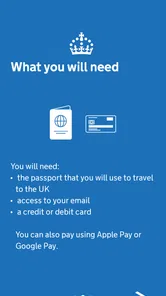
I would start by getting the essentials ready before opening the application: the travel document I plan to use and the personal details that need to match it. This is a small preparation step with an outsized practical benefit. Switching between documents or relying on memory while entering identity information is an avoidable source of mistakes, especially when a trip is already being arranged around several travellers.
It is also worth separating the application from the rest of the travel checklist. I would not assume that booking a flight, receiving a booking confirmation, or downloading the app means the travel authorisation is handled. Instead, I would make the application a distinct task, complete it with the intended document, and keep track of its outcome using the app’s available process. That habit helps prevent the common planning error of mentally marking a requirement as done merely because the relevant app is installed.
For a family or group, I would plan the work person by person rather than treating one phone session as a single group application. Each traveller has their own identity details to get right. Even when one person is coordinating the trip, a careful check of each person’s document information before proceeding is more useful than rushing through several applications in one sitting.
One practical tip is to avoid leaving the task until the last moment simply because the app makes it feel convenient. A phone-based process can be easy to start, but travel administration still deserves a buffer for careful entry and for dealing with anything that needs attention. I would also avoid making changes to the travel document details in my plans without revisiting whether the application information still corresponds to the document I will actually carry.
Another useful habit is to make the application part of the trip’s “must verify” list, not just its “must do” list. Before moving on to packing or checking in, I would confirm that I have followed the app’s process and know where to look for its outcome. That simple distinction helps avoid assuming that submitting information and having a completed travel requirement are necessarily the same thing.
Where the app earns its place
Picture a traveller arranging a short UK visit while also juggling transport, accommodation, and time away from work. A general travel app can keep the itinerary tidy, but it will not necessarily handle this particular administrative step. UK ETA earns its place when that traveller has confirmed an ETA is the relevant route and wants a focused way to make the application rather than adding the task to a pile of browser tabs and notes.
The same logic applies to someone helping a relative prepare for a trip. Instead of sending a vague reminder to “sort out travel permission,” I would explain that the official app is intended for the ETA application, then help the traveller gather their own correct document details. The useful division of labour is clear: one person can help organise the checklist, while the applicant’s identity information remains something to verify carefully against the relevant document.
This is also a case where the app’s single-purpose design can reduce confusion. Travel platforms tend to bundle destination ideas, reservations, local transport, and reminders. That breadth is valuable for planning a holiday, but it can bury a specific government application among less urgent tasks. Here the action is harder to overlook because the app is built around it.
Compared with using a general search engine to find application instructions, a dedicated official app offers a more direct starting point and reduces the risk of landing on a commercial service that presents itself as a necessary middleman. I would still be attentive to what I am opening and to the details I enter, but I prefer an official channel for an official process. For trip research, maps, bookings, and destination advice, the usual travel apps remain better tools; this one is complementary, not a replacement.
That distinction is particularly handy when travel plans are shared across several people. I might use a booking app to coordinate accommodation with companions, a map for getting around, and this app for the authorisation task. Keeping those roles separate makes it easier to see which person is responsible for each piece of preparation instead of expecting one all-in-one travel tool to manage a government application as well.
The trade-offs behind a one-purpose app
The biggest limitation is also obvious: its usefulness depends on needing this specific authorisation. If your travel situation calls for a different immigration route, or you are not the person who should apply for an ETA, this app may not solve your problem. I would not download it first and assume that its presence means my trip requirements are settled. Confirming the applicable route comes before using the application channel.
There is also a difference between a streamlined interface and a simple decision. The app may focus the process, but the traveller still has to provide accurate information and understand what they are applying for. A quick phone workflow can encourage people to tap through without pausing over names, document details, or travel plans. My advice is to slow down at identity fields and review what has been entered rather than treating the mobile format as a reason to rush.
Its public reception is mixed: it has an average rating of 3.1 from around 8.9 thousand ratings, alongside roughly 995 written reviews. I take that as a reason to approach it with realistic expectations, not as proof that it will fail for every traveller. Government processes can feel less forgiving than ordinary consumer apps, and a user’s experience may depend on the circumstances of their application as much as on the interface. I would judge the app by whether it supports the task clearly, while keeping my own information and timing under control.
On the technical side, the app requires Android 12 or later. That is worth checking before relying on it as the only practical route on a particular phone. The install figure is over 5 million, which shows that many travellers have used the app, but popularity does not guarantee compatibility with an older device or make a person’s application suitable. If the phone is not supported, I would look for the appropriate official alternative rather than installing an unofficial copy or handing sensitive details to a service I do not trust.
There is a practical trade-off in using a phone for sensitive information, too. A mobile screen is convenient when travelling, but it can make it harder to compare details against a document laid out nearby, and interruptions can break concentration. I would choose a quiet moment, check that I have the right document to hand, and avoid completing the task while rushing between errands. If I cannot give the details my full attention, waiting until I can is the safer choice.
Who benefits most—and who should look elsewhere
I would recommend UK ETA to a traveller who has already worked out that an ETA applies, prefers a mobile application, and wants an official route dedicated to submitting that application. It is especially useful for people who like to keep trip administration separate from leisure planning. Its free access also makes it easy to consider without treating it as another paid travel add-on.
It is less suitable for someone seeking broad immigration advice, a complete UK trip planner, or a guarantee that a particular journey is permitted. In those situations, the app’s narrow purpose is not a weakness to work around; it is a sign that a different source or tool is needed. I would also advise travellers who are uncomfortable entering identity information on a phone to consider the official route that best fits them, rather than using a third-party service simply because it looks more familiar.
It is also not the right first stop for someone who is still unsure which travel permission applies. In that situation, I would pause before entering anything and check the relevant official guidance for the traveller’s circumstances. The app is most useful after that decision, not as a substitute for making it; a wrong assumption at the start can turn a straightforward application channel into wasted effort.
Overall, I see this as a practical, purpose-built step in preparing for a UK trip, not an app most people will open every day. Its value comes from keeping one consequential task distinct from the noise of ordinary travel planning. If an ETA is right for your circumstances, use the app deliberately: prepare the correct document, enter details carefully, and leave time to complete the process before travel. If you want help with every other part of a holiday, keep your usual travel tools too. The best reason to install UK ETA is that it addresses one specific requirement through the official channel—not that it tries to do everything.
UK ETA Frequently Asked Questions
What is UK ETA, and who needs one?
A UK Electronic Travel Authorisation (ETA) is advance permission to travel to the United Kingdom for eligible visitors who do not need a visa for a short stay. It is not a visa and does not guarantee entry; border officers still decide whether you may enter. Whether you need an ETA depends on your nationality, travel date, and circumstances, so check the latest official UK government guidance before applying.
How do I apply for a UK ETA in the app?
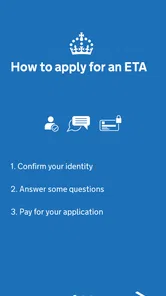
The official UK ETA app guides applicants through an online application. You will generally need to provide personal and travel details, scan your passport, take a photo of your face, and pay the application fee. Follow the in-app instructions carefully and make sure your information matches your passport. Apply using the official app or government website, and avoid unofficial services that may charge extra or misuse your personal information.
How long does a UK ETA take to be approved?
Many applicants receive a decision quickly, but processing can take longer if additional checks are needed or the information submitted requires review. Do not assume approval is immediate, and avoid leaving the application until the day of travel. Apply well in advance, allow time for a possible delay, and check your email—including junk or spam folders—for the decision or any request for further information.
How long is a UK ETA valid, and can I use it for multiple trips?
An approved ETA is generally valid for multiple journeys during its validity period, subject to the rules in force when it is issued. It is linked electronically to the passport used for the application, so you must travel with that passport. If your passport expires, is replaced, or your details change, you may need to apply again. Confirm the validity dates and current conditions in your approval notice and official guidance.
Does having a UK ETA guarantee that I can enter the UK?
No. An ETA allows an eligible traveller to board transport to the UK, but it is not a guarantee of admission and does not replace a visa where one is required. At the border, you may be asked about the purpose and length of your visit, accommodation, or plans to leave the UK. Check that your travel purpose is permitted, carry relevant supporting information, and follow the conditions explained by UK authorities.
Pros
- Apply online before travelling
- without visiting an embassy.
- The app guides you through the application process step by step.
- Scan your passport and capture your photo using your phone.
- Save progress and return to your application later.
- Check your application status and receive updates in the app.
Cons
- An ETA does not guarantee entry; border officers make the final decision.
- You need a valid passport and a compatible smartphone to apply.
- Photo and passport scans may fail
- requiring repeated attempts.
- Each traveller
- including children
- needs a separate ETA.
- Approval can take time
- so applying shortly before travel is risky.











