

UCPlaces | Guided Audio Tours
- 11.00
- 3.5
- Installs
- 500.00K
- Price
- Free

Screenshots

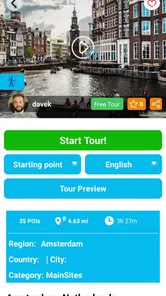

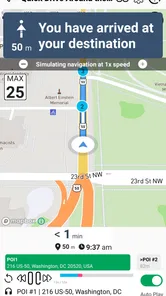

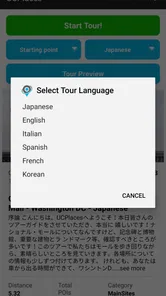

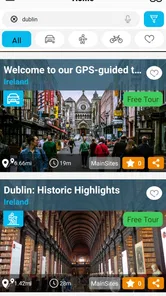
Analysis by Reviewed
UCPlaces | Guided Audio Tours is the kind of travel app I would open when I want to explore independently but still appreciate some direction. Instead of joining a scheduled group or reading a long guide while walking, I can use it as a companion for self-guided audio tours with navigation. That basic idea is appealing: I choose my pace, pause when something catches my attention, and keep moving without having to follow a guide’s timetable.
My overall impression is positive, but it is not a completely friction-free travel tool. The experience depends heavily on preparing before setting out, understanding how the selected tour is organized, and keeping calm when navigation or playback does not behave exactly as expected. For me, its strongest use is a planned city outing where I have enough time to follow a route rather than an improvised search for something nearby.
Developed by UCPlaces LLC, the app sits in the Travel & Local category and is available free of charge, with optional in-app purchases ranging from $0.99 to $39.99 per item. It is rated for Everyone, works on Android devices running version 6.0 or later, and the current release is v2.9.4. The app has passed the half-million-install mark, while its average rating is 3.5 from around 507 ratings. That combination tells me it has a meaningful audience, but also that expectations and experiences are not identical for everyone.
Where the experience can become confusing
The first thing I would explain to a friend is that this is not simply an audio player with a list of stories. The navigation element changes how I use it. I need to think about the tour as a route, not just a collection of recordings. If I start in the wrong place, skip a stop, or take an unexpected turn, the sequence may feel less natural than it did on the screen.
That can be especially noticeable in a busy destination. A landmark may have several entrances, a pavement may be blocked, or a map position may take a moment to settle. When I am standing in a crowded street checking whether I am at the right point, the app can feel less effortless than the phrase “self-guided” suggests. The freedom is real, but it also means I am responsible for making practical decisions that a human guide would normally handle.
Another possible sticking point is understanding what is included before beginning. Because the app is free to install and offers purchases inside the app, I would inspect the available tour information carefully rather than assuming every route is immediately available at no cost. This is not a criticism of the model, but it matters when I am planning a day around a particular destination. I prefer to know which experience I can use before leaving a hotel or heading somewhere with limited connectivity.
The audio format also requires a little discipline. I would not treat the app like background music that can be started and forgotten. A tour works best when I listen at sensible moments, pause before crossing a street, and look up from the phone regularly. Navigation is useful, but it should not replace ordinary awareness of traffic, other pedestrians, or local signs.
More From Our News Desk

 Weather - By Xiaomi
Weather by Xiaomi Review: Clear at a Glance, Less Clear Up Close
Xiaomi’s weather app makes everyday forecasts quick to scan, but its calm surface can leave useful details and recovery paths harder to find than they should be.

 X
XX Under Pressure: Can It Recover When Posting Goes Wrong?
A resilience-focused review of X, examining setup, mistaken posts, interruptions, weak connections, and the gaps that matter when recovery needs to be dependable.

 Clash of Clans
Clash of Clans Is Won Between the Battles
Its raids are quick; its community is a long-term project of coordination, teaching, rivalry, and shared responsibility—with all the friction that entails.

 Android Auto
Android Auto Makes the Case for Quieter Car Software
The car interface is no longer judged by how much it can do, but by how quietly it helps. Android Auto shows what drivers now expect—and what still gets in the way.

 MobiOffice: Word, Sheets, PDF
MobiOffice: Transforming Mobile Productivity with Seamless Integration
MobiOffice: Word, Sheets, PDF is redefining mobile productivity with a surprising blend of functionality and innovation.

 EA SPORTS FC Soccer Mobile 26
EA SPORTS FC™ Mobile Soccer: Redefining Mobile Sports Gaming
Dive into EA SPORTS FC™ Mobile Soccer, where immersive gameplay and strategic depth transform mobile sports gaming.
Latest News



The difference between a tour and ordinary map browsing
When I use a standard map application, I usually decide where to go one place at a time. That is great for finding a café, checking opening directions, or changing plans quickly. UCPlaces is more structured. Its value appears when I want a narrative to connect several points and give the outing a sense of progression.
That structure is also its main trade-off. A map app is better when I want maximum flexibility. A traditional written guide is better when I want to compare many attractions, read background information quickly, or jump between neighborhoods. This app makes more sense when I want to walk, listen, and let a prepared route shape the visit without committing to a group.
I would be particularly careful with expectations around depth. An audio tour can make a place feel more personal and easier to absorb, but it may not answer every question that occurs to me. If I am researching architecture, family history, museum collections, or accessibility in detail, I would use the tour alongside another source rather than expecting it to replace a complete travel reference.
Setup checks that prevent avoidable trouble
Before starting a tour, I would do the preparation at home or in the hotel rather than on a street corner. I would install the app, open it while connected to a reliable network, and look through the tour choices slowly. The important check is not only whether a destination appears, but whether the route suits the time I have, the places I actually want to visit, and the way I plan to travel.
I would also make sure the phone has enough battery for navigation and audio. A long walking session can be demanding even without a tour app, and repeatedly checking a map makes that more noticeable. Carrying a power bank is a sensible precaution for a full day. This is one of those small habits that prevents me from blaming the application when the real problem is simply a nearly empty phone.
Sound deserves its own check. I would test the volume before leaving and decide whether I am using headphones, a single earbud, or the phone speaker. In a quiet room, audio may seem loud enough, while traffic and crowds can make it difficult to hear. At the same time, blocking both ears can reduce awareness of vehicles and other people. For walking, I prefer a setup that lets me hear the surroundings and pause without fumbling with the screen.
Location accuracy is another practical consideration. I would give the device a moment to settle before assuming the route is wrong. Tall buildings, underground areas, narrow streets, and crowded urban spaces can all make a phone’s position appear less precise. If the marker seems off, I would compare it with visible landmarks and the route direction instead of immediately restarting everything.
My most useful preparation habit would be to note the tour’s starting point in plain language. “Begin near the main entrance” is easier to remember than a vague pin on a map. If I arrive by public transport, I would check whether the station exit places me on the correct side of the area. A few minutes spent orienting myself can make the opening of the tour much smoother.
A realistic afternoon workflow
Imagine I have an afternoon in a city I do not know well. I would first choose a route that fits the time before my next appointment, then travel to its starting area with enough margin to locate the first point. Once there, I would start the audio only after I am safely out of the way of foot traffic. I would listen while walking between points, pause when I want to take photographs, and resume only when I am ready to pay attention again.
If a shop, café, or unexpected street catches my interest, I would not force myself to remain perfectly synchronized with the route. I would pause the tour, explore briefly, and return when convenient. The advantage of self-guided travel is that I can make those choices. The disadvantage is that I need to remember where I stopped and how to reorient myself.
For that reason, I would use the app as a flexible framework rather than a strict timetable. I would avoid booking a tour immediately before a reservation unless I already knew the area. A route that looks short on a screen can take longer when I stop for photos, read signs, wait at crossings, or take a wrong turn.
How I recover when playback or navigation goes off track
When something feels wrong, I would troubleshoot in a simple order. First, I would check whether the audio is paused, muted, or being sent to the wrong output. Then I would look at the route position and confirm that I am near the intended starting point or stop. This sounds obvious, but travel conditions make basic checks easy to skip.
If the position is not updating, I would move to a more open location and wait briefly rather than walking farther in the wrong direction. I would also check whether the phone itself is showing an accurate location in another map view. That comparison helps separate an app-specific issue from a temporary location problem affecting the device more broadly.
If the tour appears to have lost my place, I would avoid tapping repeatedly while walking. I would stop somewhere safe, review the route, and decide whether returning to the previous point is worthwhile. Sometimes the quickest recovery is not to recreate the exact sequence, especially if I have already passed a stop. I can continue from a recognizable landmark and accept that the narration order will be slightly different.
Audio interruptions can have ordinary causes. A phone call, another media app, a changed volume setting, or a loose connection can make it seem as though the tour itself has failed. I would close distractions, reconnect my listening device if necessary, and test a short section before continuing. Restarting the phone or app would be a later step, not my first reaction, because it interrupts the outing and may not address the real cause.
I would also avoid repeatedly deleting and reinstalling the app during a trip. That can create more setup work at the exact moment I need the tour. A better approach is to record the tour or destination I was using in a note, restart calmly, and check whether the same route is still available. Keeping a small written backup of the meeting point and next landmark is useful even when technology is working perfectly.
What I would check before contacting support
If the problem continues, I would write down the practical details while they are fresh: the device operating-system version, the tour I selected, where I was on the route, and what happened to the audio or map position. I would avoid vague descriptions such as “it did not work,” because a clear sequence is more useful when someone is trying to understand the issue.
I would also separate access questions from technical questions. If I cannot use a particular tour, I would first check whether it requires an in-app purchase rather than assuming it is a playback failure. If a purchased item does not appear as expected, I would keep the transaction information available and avoid buying it again immediately. That protects me from turning a confusing screen into an accidental duplicate purchase.
Because this is a travel tool, timing matters. I would test it before reaching the attraction, not for the first time at the entrance. A short trial at home can reveal whether I understand the controls, whether the sound is comfortable, and whether the selected route matches my plans. It is much easier to adjust expectations in a hotel room than while crossing an unfamiliar intersection.
When the app is not the right cause—or the right choice
Some disappointing experiences are really caused by the environment. Weak location signals, noisy streets, poor battery health, crowded networks, or a phone that is already struggling with several tasks can all affect a navigation-based audio experience. I would not judge the app fairly after testing it underground, in a dense cluster of tall buildings, or with the phone at the edge of shutting down.
There are also situations where another type of travel tool is simply better. If I need the fastest route from one address to another, I would choose a conventional map application. If I want restaurant hours, live transit changes, or last-minute detours, a general travel or map service is more suitable. If I am visiting a museum with its own official guide, that source may provide more direct information about exhibits and building logistics.
I would skip UCPlaces when I dislike listening while walking or when I want complete control over every stop. It is also not my first choice for a tightly scheduled day with several fixed appointments. The route can enrich a relaxed outing, but it adds another layer to manage when every minute matters.
On the other hand, I think it is a good fit for solo travelers who want company without a group, couples who prefer moving at their own pace, and visitors who enjoy learning while they walk. It can also work well for someone who feels overwhelmed by a large destination and wants a defined starting point and sequence. The key is accepting that self-guided means I remain the decision-maker.
The age rating of Everyone makes the app broadly approachable, but suitability still depends on the outing itself. Parents would need to supervise ordinary street safety, listening volume, and where children are walking. The rating does not turn navigation into an automatic safety system, so I would treat the phone as a helpful reference rather than something that deserves constant attention.
My practical verdict after weighing the trade-offs
I see UCPlaces | Guided Audio Tours as a useful middle ground between a guided excursion and an ordinary map. It gives a walk more shape than wandering without a plan, while preserving the freedom to pause, look around, and change the pace. That balance is the reason I would recommend trying it for a destination-focused afternoon rather than installing it only as a general-purpose travel utility.
The best results come from treating preparation as part of the tour. Check the route, understand what is available, charge the phone, test the sound, and identify the starting point before setting out. Those steps reduce the most common sources of frustration and make it easier to recognize whether a problem comes from the app, the phone, or the surroundings.
I would keep another map or written note available for orientation, especially in an unfamiliar city. That is not a sign that the app has failed; it is sensible backup for any navigation-dependent plan. I would also leave room in the schedule, because stopping for photos, food, or an unexpected detour is part of what makes self-guided travel enjoyable.
Its 3.5 average rating suggests a mixed but substantial user response, and my own conclusion is similarly balanced. The concept is appealing and the free entry point makes experimentation easy, but the experience rewards users who are comfortable managing a route and solving small travel-tech problems themselves. People seeking a fully managed tour may prefer a human guide, while people seeking instant flexible directions may prefer a standard map.
For me, the app earns a place in the travel folder when I want an audio-led walk with navigation and personal control. I would not rely on it as my only source of directions or destination information, but I would use it as the main companion for a relaxed route that I have checked in advance. If that sounds like the way you like to explore, UCPlaces LLC has built a practical option worth testing before your next city visit.
UCPlaces | Guided Audio Tours Frequently Asked Questions
What devices and operating systems can run UCPlaces?
UCPlaces is available for Android, and the app requires Android 6.0 or later. Before downloading, check your device’s operating-system version and make sure you have enough storage for the app and any tour materials you plan to use. Keeping your phone charged is also helpful, since navigation and audio can use battery during a long sightseeing route.
Who develops UCPlaces, and is it suitable for all ages?
UCPlaces is developed by UCPlaces LLC and is a travel app for exploring destinations through self-guided audio tours. Its content rating is Everyone, making it suitable for a broad audience from a rating standpoint. As with any travel activity, parents and caregivers should still review a tour’s route and subject matter to decide whether it fits the needs and interests of their group.
What is UCPlaces | Guided Audio Tours?
UCPlaces is a location-based travel app that provides self-guided audio tours for cities, landmarks, neighborhoods, and scenic routes. Instead of following a fixed group or meeting a guide at a specific time, you use your phone to explore at your own pace while listening to narrated stories, historical information, local facts, and directions connected to places along the route.
How do UCPlaces audio tours work?
After selecting a destination or tour, the app guides you through a planned route using your phone’s location services. As you approach points of interest, the relevant audio content can play automatically or become available for you to start manually, depending on the tour. The experience is designed to combine navigation with storytelling, so you can pause, continue, or explore more flexibly than on a traditional guided tour.
Do I need an internet connection to use UCPlaces?
Internet requirements may vary depending on the specific tour and the content available in the app. It is recommended to open the tour and prepare any route or audio material before leaving reliable Wi-Fi, particularly when traveling abroad or visiting areas with weak mobile coverage. You should also keep location services enabled, since many features depend on GPS rather than audio playback alone.
Pros
- Self-guided tours let you explore at your own pace.
- Audio narration makes sightseeing more immersive and informative.
- Useful for travelers who prefer flexible plans over group tours.
- GPS-based content can provide context near notable locations.
- Can make familiar cities feel more engaging and discoverable.
Cons
- Tour availability may vary significantly by destination.
- Audio quality and narration style can differ between tour creators.
- GPS accuracy may be affected by tall buildings or poor signal.
- Some tours or features may require payment after downloading.
- Using audio and location services can drain your phone battery.











