

U-Haul
- 8.84K
- 3.0
- Installs
- 5.00M
- Price
- Free

Screenshots

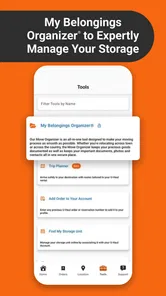
Analysis by Reviewed
I rarely want a moving app on my phone for long: most moves are occasional, and a reservation page can feel unnecessary once the boxes are unpacked. The useful question is whether U-Haul earns a place during the busy stretch when plans change and several moving tasks compete for attention. As a free travel and local app from U-Haul International, it brings truck, storage, and moving-help planning into one company’s mobile experience. I see its strongest value in keeping those practical jobs together, not in turning a move into something effortless.
Why it helps during the first week
When I’m organizing a move, I want fewer separate calls and fewer details to track. Having reservations and nearby vehicle availability in the same app gives me a practical starting point, especially if I’m comparing pickup options while coordinating keys, helpers, and a packing schedule. The app is for everyone, and it has attracted over five million installs; those figures suggest a familiar tool, though they don’t guarantee that every local location will have the option I want.
A realistic use is a weekend move where the lease handover time changes after I’ve started planning. I can check my reservation and review the pickup location from my phone instead of trying to reconstruct the plan from scattered messages. My tip is to confirm the important details before moving day, while there is still time to respond if an option or timing no longer suits. A phone-based plan is convenient, but it is not a substitute for checking that the booking matches the job.
Planning around the actual move
I find it useful to treat the app as a planning hub rather than the whole moving plan. Before I commit, I’d work out what needs to travel, who can help, and how far I’ll drive, then use the app to check whether the U-Haul option fits those decisions. That order matters: browsing vehicles first can make a convenient pickup point feel like the answer even when the route, load, or schedule points elsewhere.
For a household move, I’d also separate the tasks that belong in the app from the ones that still need human coordination. A reservation can keep the service details accessible, but helpers still need a clear arrival time, and whoever has the keys needs to know the plan. I’d send those details directly to the people involved rather than assume that a booking screen keeps everyone informed.
What keeps it useful month to month
Most people won’t need a moving app every week. Its recurring value is more situational: someone moving between rentals, arranging storage during a renovation, or helping family with a move may return to it for separate tasks. The advantage over using a general maps app plus several unrelated service pages is having U-Haul-specific reservations and availability in one place. The trade-off is that this is not a neutral directory of every truck or storage provider; if I’m choosing among companies, I’d still compare alternatives rather than assume one app shows the whole market.
It may be worth keeping installed while a move is active, then removing it if I have no likely use for it afterward. That is a sensible pattern for an occasional service, not a flaw in itself. The current version is 3.8.8, and the app runs on Android 8.0 or later. Its average rating is 3.4 from around sixteen thousand ratings, with roughly eight thousand three hundred written reviews. I take that as a reason to approach it as a useful tool to verify against my own needs, rather than as a promise of a friction-free experience.
More From Our News Desk

 Weather - By Xiaomi
Weather by Xiaomi Review: Clear at a Glance, Less Clear Up Close
Xiaomi’s weather app makes everyday forecasts quick to scan, but its calm surface can leave useful details and recovery paths harder to find than they should be.

 X
X Under Pressure: Can It Recover When Posting Goes Wrong?
A resilience-focused review of X, examining setup, mistaken posts, interruptions, weak connections, and the gaps that matter when recovery needs to be dependable.

 Clash of Clans
 Is Won Between the Battles
Its raids are quick; its community is a long-term project of coordination, teaching, rivalry, and shared responsibility—with all the friction that entails.

 Android Auto
 Makes the Case for Quieter Car Software
The car interface is no longer judged by how much it can do, but by how quietly it helps. Android Auto shows what drivers now expect—and what still gets in the way.

 MobiOffice: Word, Sheets, PDF
MobiOffice: Transforming Mobile Productivity with Seamless Integration
MobiOffice: Word, Sheets, PDF is redefining mobile productivity with a surprising blend of functionality and innovation.

 EA SPORTS FC Soccer Mobile 26
EA SPORTS FC™ Mobile Soccer: Redefining Mobile Sports Gaming
Dive into EA SPORTS FC™ Mobile Soccer, where immersive gameplay and strategic depth transform mobile sports gaming.
Latest News



Making a short-lived tool pay off
For someone who moves often, recurring value can come from returning to the same account and process instead of rebuilding a plan each time. I would keep notes outside the app about things I learned from the previous move—such as which pickup area was convenient or which part of the schedule caused a delay—so the next booking starts with better decisions. That kind of personal record is more dependable than expecting any one service app to remember the practical lessons of a household move.
For an occasional user, the payoff is less about keeping the app permanently and more about having it ready during a concentrated planning period. I’d install it once I’m comparing U-Haul services, complete the relevant arrangements, and then decide whether I have another reason to keep it. Since the app is free and intended for everyone, trying it during an active move is a low-commitment way to see whether its company-specific tools suit the way I organize. It is not a reason to book something I do not need.
Where convenience has limits
Managing a reservation on a screen can reduce back-and-forth, but a change in the app does not make a move’s underlying logistics disappear. Pickup distance, vehicle fit, timing, and the amount of help needed still matter. Availability is especially worth checking early if a specific location is important: seeing nearby options is helpful, but it doesn’t remove the need to make sure the selected one works for the route and schedule.
I’d also keep a simple backup plan for the day itself: save the reservation details somewhere easy to reach and note the location before setting off. That is not because the app is uniquely unreliable; it is because a moving day is a poor time to depend on finding a signal, remembering a login, or searching through several screens. If you only need directions, a regular navigation app may be more direct. If you want to compare independent providers, searching beyond U-Haul is the better approach.
Choosing it over familiar alternatives
Compared with calling a rental location, the app can be more convenient for checking options and keeping a reservation close at hand. A call can still be the better choice when I have a specific question or need to clarify a detail that affects the plan. I wouldn’t treat either method as a substitute for the other: the app is useful for handling straightforward arrangements, while a direct conversation can help when the situation is unusual.
Compared with a general search or maps app, U-Haul’s advantage is focus on its own moving and storage services. The same focus is also its boundary. A maps app is better for route planning across destinations, and a broad search is better when I want to compare providers without starting from one company. I’d use the tools together when the decision is important: compare options first, then use the U-Haul app if its offer and logistics make sense.
Your Move, Simplified
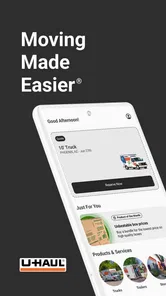
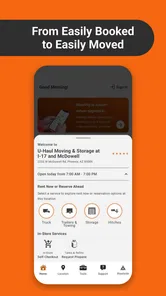
Right off the bat, the U-Haul app is all about convenience, and who doesn’t love that? The interface is clean and straightforward, which is a blessing when you're knee-deep in packing tape and bubble wrap. Just open the app, and you’re greeted with all the options you need to plan your move. You can book a truck, reserve a storage unit, or even hire some moving help. It’s like having a moving service directory at your fingertips.
Features That Make Life Easier
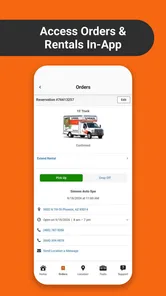
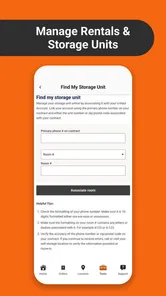
One of my favorite features is the ability to manage reservations right from the app. You can adjust your schedule, change your pickup location, or even cancel if your plans go sideways. Plus, it sends you reminders so you’re not left in the lurch on moving day. And let's not forget the 24/7 pickup and return, which is a total game-changer. Who needs to stress about store hours when you can just do it all on your schedule?
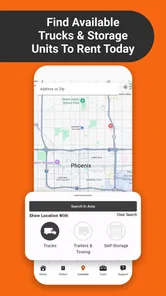
Another nifty feature is the trailer and truck availability tool. You can see what's available near you, which saves a ton of time compared to calling around. And if you’re like me, the last thing you want is to get to a location only to find out they’re out of trucks. With the app, you can avoid that whole mess.
On the Road with Confidence
The app also supports in-app navigation to guide you to your U-Haul location. It’s reliable and pretty accurate, so you won't have to worry about getting lost on your way to pick up the truck. Plus, it offers roadside assistance in case things go sideways on the road. It’s like having a little safety net, which is always nice when you’re hauling all your worldly possessions.
Keeping the move manageable
To make those tools work for me, I’d check the route and pickup location before the day of the move, then leave enough time to handle an unexpected delay. When several people are sharing jobs, I’d send the pickup address and timing to the driver separately rather than rely on one person’s phone. These small steps help avoid a common moving-day tangle: everyone assumes someone else has the right address or latest plan.
The ability to arrange moving help can be handy when friends or family cannot take on the lifting, but I’d decide what kind of assistance I actually need before booking. Moving help and vehicle rental solve different problems; having a truck does not guarantee that loading will be covered, and arranging help does not settle the transport plan. Thinking through those roles first makes it easier to avoid paying attention to the wrong part of the move.
Who should keep it—and who can skip it
I’d recommend the app to someone who is already considering U-Haul for a truck, storage, or moving help and wants those arrangements accessible on a phone. It is especially practical when plans involve more than one moving task, or when I need to revisit a reservation while coordinating a changing schedule. The broad Everyone age rating makes clear that it is not age-restricted, though the actual booking decisions are naturally for the people arranging the move.
I’d skip it if I only need a map, if I am not considering U-Haul, or if I want one place to compare every local provider. In those situations, navigation or broader search tools are a closer match. I’d also be cautious about making it the only record of a complicated move: keep essential details available elsewhere and confirm the parts that matter to your particular booking.
Maintenance and points of friction
There is little reason for me to build a permanent habit around an app I use only during a move. I’d keep it current while I am actively managing reservations, and check that it opens properly before relying on it on a busy day. Its release date was September 20, 2016, and version 3.8.8 is the current version. On iOS, I’d check the relevant store listing for device compatibility; on Android, it supports version 8.0 and later.
The rating—3.4 on average—suggests a mixed reception, so I would not assume every interaction will feel smooth. In practice, the more important test is whether the app helps with the particular reservation and location I need. Moving services depend on real-world availability and timing, and a tidy screen cannot remove those constraints. I’d verify the details that could disrupt the day rather than judge the whole plan by how quickly I can tap through it.
When the novelty wears off
After the first burst of planning, the app’s value depends on whether I still have a U-Haul task to manage. If the reservation is settled and the move is over, there may be no reason to open it again for months. That is not a failure of the product: it is a specialist tool for an irregular job, not something I expect to become part of a daily phone routine.
What keeps it worthwhile is practical reuse during the active period: checking a vehicle option, handling a reservation, or keeping storage planning alongside the rest of the move. What wears me down is expecting a single app to settle choices that need comparison, confirmation, or coordination with other people. I get the best result when I use it for U-Haul arrangements and keep the broader plan—routes, helpers, timing, and backup details—clear outside it.
Wrapping It Up
All in all, the U-Haul app is a solid companion for anyone gearing up for a move. It simplifies the whole process and helps you manage everything from your phone, which, let’s be honest, is where we do practically everything these days anyway. It’s not just about moving stuff; it’s about moving smart. So if you're planning a move, do yourself a favor and check out the app. It might just make your move a whole lot less stressful.
U-Haul Frequently Asked Questions
Can I use the U-Haul app to find a nearby location?
Yes. The U-Haul app can help users find nearby U-Haul locations, which is useful when planning where to pick up or return rental equipment. Since it brings location information and rental-related tools together, it can make organizing a move more convenient from a mobile device. You can use it alongside the reservation features to plan the practical details of your move.
Can I reserve moving equipment through the U-Haul app?
The app lets users reserve U-Haul equipment, including moving trucks and trailers, from a mobile device. It is designed to bring common rental tasks together, so you can arrange equipment as part of planning a move. Review the reservation details before confirming to make sure the selected equipment, location, and timing fit your plans.
Is the U-Haul app free, and what devices can run it?
The U-Haul app is free to download and is intended for moving and storage tasks. It runs on Android devices with Android 8.0 or later, so checking your device’s operating system before downloading can help avoid compatibility issues. The app is rated for Everyone, making its content suitable for a broad audience.
Who develops the U-Haul app, and what is it designed to help with?
U-Haul International develops the app, which is designed to make moving and storage tasks easier from a mobile device. It brings rental-related tools and information together, so users can take care of practical steps without relying entirely on a desktop browser or an in-person visit. It is a Travel & Local app focused on U-Haul services.
What is the U-Haul app and what services does it offer?
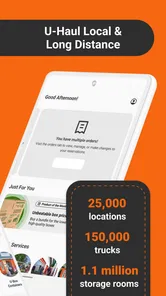
The U-Haul app is a comprehensive tool designed to simplify the process of renting moving equipment, trailers, and trucks. It allows users to reserve equipment, find nearby U-Haul locations, and manage reservations directly from their mobile devices. Additionally, the app provides options for self-pick-up and return, making the moving process more flexible and convenient.
Pros
- Wide range of truck sizes available.
- Affordable rental pricing.
- Easy online booking process.
- Multiple pick-up and drop-off locations.
- Flexible rental periods.
Cons
- Limited customer service hours.
- Trucks may not be spotless.
- Occasional hidden fees.
- Reservation not always guaranteed.
- Older vehicle models in fleet.











