TurboTenant for Renters
- 351.00
- 4.7
- Installs
- 100.00K
- Price
- Free

Screenshots
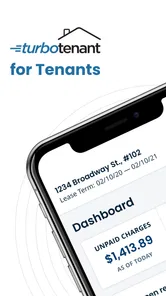
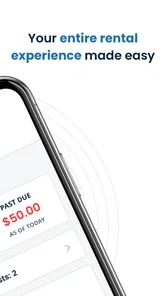
Analysis by Reviewed
Before I settle into a rental search, I like to decide what I need the phone to do and what I would rather handle at home. A listing can catch my eye while I’m out, but comparing rent, commute, timing, and unanswered questions takes more care than a quick scroll. TurboTenant for Renters is meant to bring renter-focused tasks into a mobile app from TurboTenant. In my view, its value depends on how well that connected, on-the-go approach matches the way you actually search.
When the search depends on a connection
A rental search often involves more than browsing: opening listings, comparing details, contacting a landlord, and sending an application all rely on being able to reach current information. The app brings those steps together, which can cut down on switching between a property page, email, and text messages. That matters most when I’m comparing several possibilities and want the details and conversation to stay easy to find.
There is a trade-off, though. A mobile app can make a connected search feel more organized, but it cannot make a weak signal disappear. I’d treat a listing or message that matters as something to revisit when the connection is reliable, rather than assuming every action has been completed just because I tapped once. For an application, I’d check for confirmation before moving on to the next property.
Useful in short bursts, with a little preparation
The strongest fit is a renter who needs to search between other parts of the day: checking a property on a lunch break, reviewing options on public transport, or sending a question while a listing is still fresh. If I knew I’d be visiting an area with patchy reception, I’d note the addresses and questions I wanted to follow up on before heading out. That small habit makes it easier to use the app without relying on a signal at the exact moment I need to remember something.
It is less compelling for someone who prefers to do all their research on a large screen, compare long notes side by side, or keep every rental document in a separate personal filing system. I’d still use a computer for careful reading if that suits me better, then use the phone for timely follow-ups. The app works best as a practical mobile companion, not as a reason to abandon whatever comparison method already helps me make a sound decision.
A search routine that avoids rushed decisions
One everyday use case is finding a place while balancing work and viewings. I might browse during a break, save a few promising options to a personal shortlist, and then compare them properly in the evening. If a landlord replies while I’m travelling, I can check the conversation when I have a stable connection and enough time to read it carefully. That is more useful than trying to make a housing decision in the middle of a noisy commute.
I would also keep a simple note for each serious candidate: the address, the rent as shown, the questions I still need answered, and any viewing details I have agreed on. This is not busywork. When several listings and message threads are in play, a note helps me distinguish a genuine next step from a property I only glanced at. It also gives me a way to compare options without depending on memory or trying to reopen every listing at once.
More From Our News Desk

 Gmail
Gmail in a Busy Inbox: Who Benefits Most?
From first account to crowded workday, Gmail earns its place through dependable search and flexible sorting—but its best fit depends on how much inbox maintenance you can tolerate.

 Prime Video
Switching to Prime Video: What Changes in Your Viewing Routine
Prime Video can make a compelling second home for streaming, but switching means learning a different catalog, rental layer, and route from browsing to playback.

 Universal TV Remote Control
 Works Best as a Reliable Backup
A phone remote earns its place through quick setup and reliable habits. Here is how to get more from Universal TV Remote Control—and where its limits show.

 Weather - By Xiaomi
Weather by Xiaomi Review: Clear at a Glance, Less Clear Up Close
Xiaomi’s weather app makes everyday forecasts quick to scan, but its calm surface can leave useful details and recovery paths harder to find than they should be.

 X
X Under Pressure: Can It Recover When Posting Goes Wrong?
A resilience-focused review of X, examining setup, mistaken posts, interruptions, weak connections, and the gaps that matter when recovery needs to be dependable.

 Clash of Clans
 Is Won Between the Battles
Its raids are quick; its community is a long-term project of coordination, teaching, rivalry, and shared responsibility—with all the friction that entails.
Latest News



What is TurboTenant for Renters?
At its core, TurboTenant for Renters is an app designed to streamline the rental process for tenants. It's like having a personal assistant who handles all the nitty-gritty details of finding and applying for rental properties. The app is available on both Android and iOS, making it super accessible whether you're team Android or team iPhone.
Features That Stand Out
First things first, the layout of the app is incredibly user-friendly. Upon opening it, you're greeted with a sleek interface that's easy to navigate. You won't find yourself lost in a sea of buttons and options, which is a relief!
One of the standout features has to be the ability to apply for multiple rentals with just one click. Seriously, you fill out your profile once, and then you can send applications to various properties without having to enter the same information over and over. It's a time-saver, and we all know time is money!
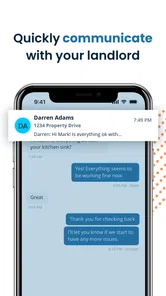
Another feature worth mentioning is the integrated messaging system. You can communicate directly with landlords or property managers without leaving the app. This means no more juggling between emails and text messages. Everything is consolidated in one place, which is super convenient.
My Personal Experience
Using the app felt like a breath of fresh air. I was able to filter my searches based on location, price range, and even specific amenities. I found a couple of potential places within minutes, and I was impressed with how detailed the property listings were. Each listing came with multiple photos, a map view, and even a breakdown of nearby amenities like grocery stores and public transport.
After spotting a place I liked, I submitted my application with a single tap. The process was so seamless that I started wondering why I hadn't used TurboTenant for Renters before.
Choosing it over familiar rental-search habits
Compared with searching through general classifieds and then contacting each landlord by email or text, keeping applications and conversations together is the main practical distinction here. That can be especially helpful if I’m pursuing more than one property: I can avoid mixing up which question belonged to which listing. Still, I would keep my own short comparison notes on priorities such as commute, move-in timing, and must-have amenities. A tidy message thread is useful, but it is not a substitute for deciding which home actually suits me.
A sensible routine is to review a listing carefully before applying, prepare accurate profile details, and use the shared application workflow only for places I would genuinely consider. Reusing information can save repetitive effort, but it also makes it worth checking that what I entered remains appropriate for each application. If a landlord needs a conversation that is better handled by another channel, I’d follow their instructions rather than assume the in-app thread covers every step.
What to expect from a mobile workflow
If a message seems slow to send or a page does not refresh, I’d first check the connection, then reopen the relevant listing or conversation and confirm the latest status before trying again. Repeating an application tap without checking could create uncertainty about whether the first attempt went through. For anything time-sensitive, a quick confirmation is a better habit than trusting a quiet screen.
For data-conscious use, I’d save heavier browsing for a reliable connection and avoid repeatedly loading the same listing while reception is poor. The app is free, but that does not mean every phone plan treats data the same way; anyone watching a limited allowance can be selective about when to browse photos and maps. The useful balance is to search when connected, shortlist thoughtfully, and use mobile access for the follow-up that benefits from being timely.
Who benefits most, and who may prefer another approach
I see the clearest fit for renters who are actively looking, use a phone throughout the day, and want application details and landlord conversations in one place. The ability to reuse a profile across applications can be especially helpful when several suitable rentals appear close together. It reduces repetitive typing, while the messaging thread gives me a practical place to return to when I need to check what I asked about a particular home.
There are sensible reasons to use something else as well. If you are only casually exploring neighborhoods, a broad property-search site or general classifieds may be enough for early discovery. If your main challenge is comparing complicated costs, coordinating several household members, or keeping extensive records, a spreadsheet and desktop browser may be more comfortable. I would not expect a renter-focused phone app to replace personal budgeting or careful lease review; those decisions deserve their own time and tools.
There is also a useful distinction between convenience and completeness. A consolidated conversation can reduce the chance that I lose track of a reply, but it does not guarantee that every landlord will use the same communication channel or that every question is resolved by a message. Before committing to a viewing or application, I would make sure I understand the next step and keep any essential information somewhere I can find it again.
Keeping the process steady when the app stalls
For a small connection hiccup, I would avoid tapping the same control repeatedly. I’d check whether the phone has a usable connection, return to the relevant listing or thread, and look for evidence that the action completed before sending anything again. This simple recovery habit matters most for applications and time-sensitive messages, where duplicate attempts or uncertainty can make the process feel more stressful than it needs to be.
If I have to leave a search midway, I would make a quick note of the property and the question I meant to ask rather than trusting myself to remember later. When I come back online, I can reopen the right listing, check the current conversation, and continue from there. That is a practical way to work around interruptions without assuming that the app will preserve every step in a particular way.
For a data-conscious routine, I would use a reliable connection for browsing photo-heavy listings and maps, then keep short follow-ups for moments when mobile access is convenient. I would avoid loading the same material repeatedly in an area with poor reception, since that can waste both time and a limited data allowance. The app costs nothing to install, but connectivity and mobile data remain part of the real-world experience.
TurboTenant is a House & Home app developed by TurboTenant, with an average rating of 4.5 from around 3.4 thousand ratings and over 50 thousand installs. It is free, rated for Everyone, and version 4.0.7 requires Android 7.0 or later. Those details make it an accessible option for many renters, while the best experience still depends on having a reliable connection when you need to view current listings or communicate.
My verdict on staying connected
In conclusion, if you're in the market for a new rental property, give it a try. It's designed to make your life easier, and in my experience, it does just that. From applying for rentals to communicating with landlords, everything is straightforward and hassle-free.
I’d recommend it most to renters who want a phone-friendly way to browse, apply, and keep landlord conversations together. If I mainly want a desktop research tool, or I need a workflow that does not depend on connectivity, I’d pair it with other methods instead. TurboTenant was released on March 11, 2024, and its mobile-first approach is most useful when I can get online at the moments that matter. So, test it during a real search and see whether its connected workflow fits how you make decisions. Happy house hunting!
TurboTenant for Renters Frequently Asked Questions
Is TurboTenant for Renters available on my device?
TurboTenant for Renters is a House & Home app developed by TurboTenant, and it is free to download. It is designed for renters who want to handle rental tasks on the go. On Android, the current version is 4.0.7 and requires Android 7.0 or later. The app is rated for Everyone, so it is suitable for a broad audience.
What is TurboTenant for Renters and how does it work?
TurboTenant for Renters is a comprehensive application designed to simplify the rental process for tenants. It allows renters to easily search for available properties, submit rental applications, and communicate directly with landlords. The app also provides tools for renters to track their applications, manage rental payments, and receive important updates from their landlords. Essentially, TurboTenant streamlines the rental experience, making it more efficient and user-friendly.
Is TurboTenant for Renters free to use?
Yes, TurboTenant for Renters is free for tenants to use. Renters can create an account, search for properties, apply for rentals, and communicate with landlords without any charge. However, some optional services, such as credit reports or background checks, may require a fee. The primary features of the app remain free, making it a cost-effective solution for renters.
How secure is my personal information on TurboTenant for Renters?
TurboTenant for Renters prioritizes the security of users' personal information. The app employs advanced encryption protocols to protect your data from unauthorized access. Additionally, TurboTenant complies with industry-standard privacy regulations to ensure your personal details are handled responsibly. Users can have confidence that their sensitive information, such as rental applications and financial data, is safeguarded throughout their use of the app.
Can I use TurboTenant for Renters to pay my rent online?
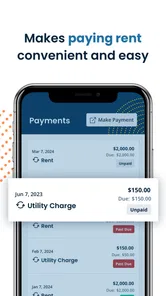
Yes, TurboTenant for Renters offers an online payment feature, allowing tenants to pay their rent conveniently through the app. This feature supports multiple payment methods, including credit cards and bank transfers, providing flexibility for renters. By using this service, tenants can ensure timely payments and maintain a transparent record of their transactions, which can be beneficial for both renters and landlords.
Pros
- User-friendly interface
- easy navigation.
- Quick application process for rentals.
- Secure payment options available.
- Access to a wide range of properties.
- 24/7 customer support assistance.
Cons
- Limited features in free version.
- Some properties lack detailed information.
- Occasional app crashes reported.
- Requires stable internet connection.
- Limited customization of profile settings.