TruckSmarter Load Board & Fuel
- 233.00
- 4.3
- Installs
- 100.00K
- Price
- Free

Screenshots


Analysis by Reviewed
For an independent truck driver, the hard part is rarely finding something that looks like a load; it is deciding whether that load makes sense for the whole trip. That is the lens I’d use with TruckSmarter Load Board & Fuel. It brings load searching and fuel information into one business app, which can make a useful planning companion, but it is not a replacement for checking the details, costs, and timing yourself.
A practical tool, not an automatic dispatcher
TruckSmarter is a free app from TruckSmarter, and its central appeal is straightforward: it gives drivers a place to look for freight and consider fuel as part of the same planning process. I like that combination because the value of a load depends on more than the rate shown beside it. Empty miles to pickup, the likely next leg, and where fueling fits can all change the real calculation.
That joined-up view is most useful when I’m comparing options rather than looking for a single answer. I’d use the app to identify possibilities, then confirm the listing and terms before making a commitment. A load board can help narrow the field, but the driver still has to decide whether the equipment, schedule, and trip economics line up.
A sensible habit is to check the board before you are under pressure to fill a gap. When time is short, it is easier to accept the first load that seems workable. A quick scan earlier in the planning process gives you a better chance to compare pickup distance and route direction, and to notice when repositioning could be more sensible than taking a poor fit.
Finding the right freight for the whole trip
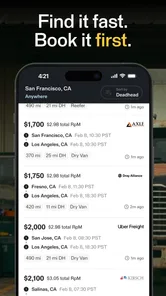
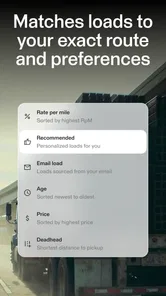
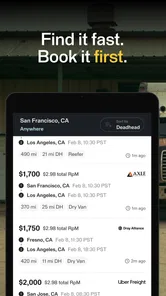
If you’ve been in the trucking business for a while, you know that finding the right load can be a hassle. With TruckSmarter Load Board & Fuel, this process is as smooth as a freshly paved highway. The app offers a comprehensive load board that’s pretty intuitive. You can easily filter loads based on distance, type, and rate, making it super convenient to find what you need without any fuss.
Search with a plan, then check the details
One of the standout features here is the user-friendly interface. It’s not cluttered with unnecessary details, which means you can focus on what matters most: finding the right load. The search function is robust, and the app updates in real-time, ensuring you don’t miss out on any opportunities. I found it quite handy that you can save your favorite searches for quick access later.
Saved searches are especially useful when you tend to work within familiar lanes. Instead of rebuilding the same query every time you open the board, you can return to the areas and load types you care about, then adjust your search when plans change. I’d still avoid assuming that a saved search is a complete picture of the market: use it as a shortcut for checking, not as a reason to stop comparing options.
More From Our News Desk

Weather by Xiaomi Review: Clear at a Glance, Less Clear Up Close

X Under Pressure: Can It Recover When Posting Goes Wrong?

Clash of Clans Is Won Between the Battles

Android Auto Makes the Case for Quieter Car Software

MobiOffice: Transforming Mobile Productivity with Seamless Integration

EA SPORTS FC™ Mobile Soccer: Redefining Mobile Sports Gaming
Picture finishing a delivery and needing to decide whether to take a nearby load or reposition toward a busier area. I’d check the board for suitable distance and rate, then weigh that result against the drive to pickup and the next leg of the trip. This is where a loadboard can help most: it gives you a quicker way to identify possibilities while leaving the judgment about schedule, equipment, and overall trip value in your hands.
A useful refinement is to keep separate saved searches for genuinely different situations, rather than trying to make one broad search cover every trip. For example, the loads you would consider near home may not be the same as those you would take after a delivery in an unfamiliar area. Treating those as separate starting points can make a repeat check more relevant; still, I’d revisit the filters when your equipment or schedule changes instead of trusting an old setup blindly.
When reviewing a result, I’d also make a quick mental checklist before contacting anyone: does the pickup location work with my current position, does the timing leave room for the drive, and does the destination make sense for what I want to do next? That small pause helps prevent a tempting rate from distracting from a costly reposition or an awkward follow-on route. The app helps surface choices; the checklist helps make them useful.
How it compares with familiar alternatives
Compared with calling contacts one by one or relying on a single familiar source, a searchable board is convenient when you want to scan several possibilities quickly. TruckSmarter’s appeal is that load search and fuel information sit in the same app, so you can consider both sides of a trip without starting from scratch in separate tools. Still, a personal broker relationship or another board may be better when you need a particular kind of support, have specialized freight requirements, or already get more dependable matches through an established network.
That makes it less of an either-or choice than a question of what your current process is missing. If a dispatcher already handles the search and negotiation well, the app may offer little day-to-day benefit unless you want an independent comparison. If you normally work through calls and messages, a searchable board can be a faster way to see alternatives, but it does not replace the context or trust built through regular contacts.
Drivers should also distinguish between a broad search tool and a specialized workflow. Someone hauling unusual freight or working under specific contract requirements may need a source tailored to those needs, even if this app is handy for general comparison. I’d keep the established channel that reliably serves those requirements and use TruckSmarter only where it adds a useful second look.
Fuel planning that belongs beside load planning
We all know that fuel can be one of the biggest expenses for truckers. This is where the app’s fuel-saving feature kicks in. It provides real-time updates on fuel prices at various stops along your route, helping you save some serious bucks. It’s like having a personal fuel advisor right in your pocket.
The app tracks fuel prices across major fuel stations and displays them in an easy-to-read format. You can compare prices and choose the best option, ensuring your hard-earned money stays in your wallet. Plus, the app’s integration with navigation systems makes it simple to find these stations without detours.
I’d treat a listed price as a useful planning signal, then check that the stop actually suits the truck and the day’s route. The lowest price is not automatically the best choice if reaching it adds time or takes you away from a practical route. Comparing fuel options while considering where you already need to go is a more grounded way to use this feature than making a separate trip just to chase a lower figure.
The combination is most useful when you are planning both the next load and the fuel stops around it. You can look at the freight opportunity first, then think through where fueling fits into the route rather than judging the load and fuel costs in isolation. That kind of joined-up planning is a real advantage over keeping a load board and a fuel-price tool open separately, though it still depends on checking that each option works for your particular run.
One practical trade-off is that a price comparison is only useful if the stop fits the day’s actual plan. I would not change a route solely to pursue a lower figure without considering added distance, time, and the location of the next appointment. Instead, I’d compare candidate stops along a route I already expect to travel, then use the price information as one factor in choosing between them. That keeps fuel planning grounded in the trip rather than turning it into a separate hunt.
For a driver who already has a dependable way to plan fuel, the app’s value will depend on whether having the information beside load searches changes a decision. If it helps you notice an option you might otherwise overlook, that is useful; if it simply duplicates a routine that works, there may be little reason to switch. I’d judge it by whether it improves a real trip choice, not by how many screens or tools it replaces.
Who is likely to benefit—and who may not
I’d recommend it most to independent drivers and owner-operators who regularly compare loads and want fuel information close at hand. It may also suit someone who is still building a routine for checking lanes and costs, since saved searches can make repeat checks less fiddly. The app is free, has an Everyone age rating, and is listed for Android devices running version 6.0 or later; its current version is 245.0.0. It has a 4.3 average from around 2.8 thousand ratings, with over 100 thousand installs.
On the other hand, it may not be the right main tool for drivers whose work comes almost entirely through a dispatcher or dedicated contracts, or for anyone who needs a highly specialized freight workflow. If you already have a system that reliably handles load selection, fuel planning, and trip details, adding another app only helps if it saves you time or reveals a useful alternative. I’d try it as a comparison tool first and keep the option to return to your existing process.
It is also better suited to someone willing to verify the information that matters before accepting a run. If your preferred workflow is to have another person handle every comparison and confirmation, a self-directed board may not change much. Conversely, a driver who wants to make their own shortlist can use it as a place to begin, while keeping calls, existing contacts, and other sources available for confirmation.
For a realistic day, imagine you have just completed a delivery and have a window to plan the next move. You can check saved searches for a suitable load, compare the pickup distance and rate, and consider whether the destination fits your next likely direction. Then you can look at fuel options in relation to that route, rather than choosing a stop before you know where the trip is heading. Before committing, you still confirm the particulars directly and decide whether the timing works. That is a useful workflow because it turns the app into a planning aid without asking it to make the business decision for you.
A natural question is whether the app is useful if you do not want to change your current load-finding routine. I think it can be, as long as you approach it as a second source rather than a mandatory replacement. Check it when you want another comparison or need a quick look at fuel alongside freight. If it does not produce a practical alternative for the lanes you work, you can simply keep using the process that serves you better.
Another question is how much to trust an attractive result. My answer is to treat it as a lead, not a promise that every detail will suit your run. Confirm the terms and logistics before accepting, and account for the miles and time between your present location, pickup, and whatever comes afterward. That discipline matters with any load search, and it is especially important when a fast filter makes a result look simpler than the trip itself.
My verdict on using it day to day
All in all, TruckSmarter Load Board & Fuel seems to be a great ally for anyone in the trucking industry. Its ability to streamline load searching and provide up-to-date fuel prices is a game-changer. While there are many apps out there, this one stands out for its simplicity and efficiency. So, if you’re looking to make your trucking operations a bit smarter, give this app a spin and see how it rolls for you.
My overall take is positive, with one practical caveat: use it to make better-informed comparisons, not to make trip decisions on autopilot. The strongest fit is a driver who wants a straightforward way to scan freight and consider fuel together, while still checking the details that determine whether a run genuinely works. If that sounds like your day-to-day, it is worth trying; if your current dispatch setup already covers those needs, it may be more app than you need.
I’d start by using it on a trip you already understand, where you can compare its search results and fuel information with the decisions you would normally make. That gives you a realistic sense of whether its saved searches and combined planning view help without putting an unfamiliar workflow in charge of a time-sensitive choice. If it earns a place in your routine, keep it as a practical extra; if not, there is no need to replace a system that already works.
TruckSmarter Load Board & Fuel Frequently Asked Questions
Does TruckSmarter Load Board & Fuel require an account, and what should I have ready before getting started?
Before downloading, consider whether you are a truck driver or fleet operator looking for load-board and fuel information in one app. TruckSmarter Load Board & Fuel is designed to streamline logistics operations, so it is most relevant to users who need to find freight and manage driving-related decisions. Once installed, follow the app’s on-screen setup prompts and have your relevant trucking details ready.
What is TruckSmarter Load Board & Fuel and how does it work?
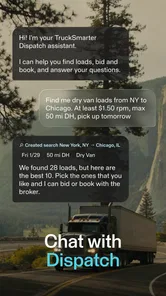
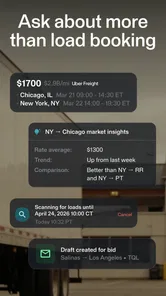
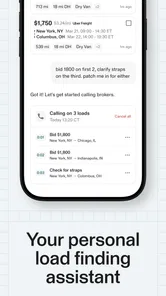
TruckSmarter Load Board & Fuel is an innovative app designed for truck drivers and fleet operators to streamline their logistics operations. It provides a comprehensive platform to access a vast network of load boards, allowing users to find and book freight efficiently. Additionally, it includes a fuel finder feature that helps locate the cheapest fuel prices along routes, optimizing both time and cost for truckers. Its load board is described as offering 100,000 daily truck loads and freight for truck drivers and owners.
Is TruckSmarter Load Board & Fuel free to use or are there any subscription fees?
TruckSmarter Load Board & Fuel is free to download. The app is presented as offering essential features, but some advanced functionalities, such as real-time load alerts and premium support, may involve subscription plans. Check the app for current pricing before relying on any paid feature, so you can decide whether its available tools suit your needs and budget.
Which platforms is TruckSmarter Load Board & Fuel compatible with?
TruckSmarter Load Board & Fuel is available for both Android and iOS devices, ensuring broad accessibility for users on various mobile platforms. This compatibility allows truckers to utilize the app on their smartphones or tablets, offering flexibility and convenience whether on the road or at a stop. On Android, it requires version 6.0 or later, so check your device’s operating system before installing.
How does the fuel finder feature in TruckSmarter Load Board & Fuel benefit truck drivers?
The fuel finder feature in TruckSmarter Load Board & Fuel is a valuable tool for truck drivers seeking to minimize fuel expenses. It provides real-time data on fuel prices at nearby stations along their route, enabling drivers to make informed decisions and save on fuel costs. This feature not only enhances cost efficiency but also contributes to better route planning.
Pros
- User-friendly interface
- Real-time load updates
- Comprehensive fuel price data
- Integrated route planner
- Easy load booking process
Cons
- Limited offline functionality
- Occasional app crashes
- Inadequate customer support
- Requires constant internet
- Limited free features











