

TripView
- 110.00
- 4.8
- Installs
- 100.00K
- Price
- $5.99

Screenshots
Analysis by Reviewed
I judge a transit app by what it helps me decide before I leave: which service to take, when to go, and what to check if the plan changes. TripView is appealing because it keeps its attention on public transport timetables for Sydney, Melbourne, and Brisbane rather than trying to become a general-purpose travel planner. That focus makes it most useful for people who return to the same routes, though it also means travellers outside those cities should look elsewhere.
A timetable tool, not a universal navigator
That distinction matters when choosing between TripView and the usual alternatives. A general mapping app can be better when I need door-to-door directions that combine walking with several kinds of transport, or when I am exploring a place the app does not cover. A city transport app may be preferable if I need information beyond the three cities TripView serves. TripView makes more sense when the question is narrower: how do I check and keep track of public transport journeys in Sydney, Melbourne, or Brisbane?
I would also separate trip planning from day-of travel decisions. Saved timetables are handy for familiar journeys and for checking a plan without rebuilding it. They are not a reason to assume every service will run as expected. If a connection is tight, or a delay would leave me stranded, I would check the latest information again before setting off and leave a margin where possible.
Small habits that make saved trips more useful
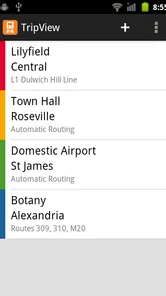
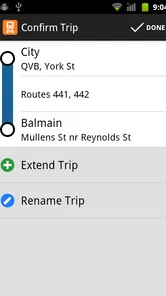
For a routine commute, I would save the route I actually take, then check it before leaving rather than searching from scratch each morning. If I have a return journey later, I would save that separately too. This keeps the trip home easy to find if the day runs late or I decide to leave from a different part of the city. It is a modest workflow, but it reduces the number of decisions I have to make while rushing.
There is a useful distinction between consulting a saved timetable offline and relying on live information. Offline access gives me a way to revisit saved journey details when reception drops, such as underground or in a weak-signal area. But a stored view cannot tell me what has changed since I last connected. I would use it as a fallback for orientation, then reconnect and check again when current service conditions affect my choice.
One realistic day with the app
Imagine I am visiting Melbourne for the day, with a morning appointment and dinner planned elsewhere. I can prepare the outward trip in advance, keep it available for a quick check, and avoid trying to work out the route while standing in a busy station. If my plans change in the afternoon, I would treat the saved return journey as a starting point, not a promise: I would review current service information before choosing when to leave.
The same approach suits a local heading to a weekend event in Sydney or Brisbane. I would check the outward and return legs separately, especially if I expect to leave at a different time from the one I first planned. The value is not that the app removes every uncertainty; it is that I can keep the timetable details I need close at hand and spend less time repeating a search.
More From Our News Desk

 Weather - By Xiaomi
Weather by Xiaomi Review: Clear at a Glance, Less Clear Up Close
Xiaomi’s weather app makes everyday forecasts quick to scan, but its calm surface can leave useful details and recovery paths harder to find than they should be.

 X
XX Under Pressure: Can It Recover When Posting Goes Wrong?
A resilience-focused review of X, examining setup, mistaken posts, interruptions, weak connections, and the gaps that matter when recovery needs to be dependable.

 Clash of Clans
Clash of Clans Is Won Between the Battles
Its raids are quick; its community is a long-term project of coordination, teaching, rivalry, and shared responsibility—with all the friction that entails.

 Android Auto
Android Auto Makes the Case for Quieter Car Software
The car interface is no longer judged by how much it can do, but by how quietly it helps. Android Auto shows what drivers now expect—and what still gets in the way.

 MobiOffice: Word, Sheets, PDF
MobiOffice: Transforming Mobile Productivity with Seamless Integration
MobiOffice: Word, Sheets, PDF is redefining mobile productivity with a surprising blend of functionality and innovation.

 EA SPORTS FC Soccer Mobile 26
EA SPORTS FC™ Mobile Soccer: Redefining Mobile Sports Gaming
Dive into EA SPORTS FC™ Mobile Soccer, where immersive gameplay and strategic depth transform mobile sports gaming.
Latest News



Where the focus becomes a limitation
The narrow scope is also the clearest reason to skip it. If I travel across several regions, need a broad city guide, or want walking and driving directions alongside transit, a general map or local alternative may cover more of the day in one place. And if I only take public transport occasionally in one of the supported cities, a free option may be enough. Paying for a dedicated tool is easier to justify when I expect to return to its timetable workflow often.
There is a practical point for visitors, too: an app can help organize a route, but it cannot decide how much time to leave for an unfamiliar station, a long walk, or a disrupted service. I would avoid planning a close connection simply because the scheduled times appear to line up. For an important appointment, building in breathing room is a better use of any timetable than trying to optimize every minute.
Have you ever found yourself stuck at a train station, staring at the schedule board, and wondering why you didn't just drive? Well, I've been there too, and that's why I gave TripView a whirl. Let me tell you, this app has been a game-changer for navigating public transport in Sydney. Whether you're a local or just visiting, this app is like having a personal transport assistant in your pocket.
All About the Features
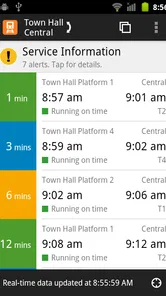
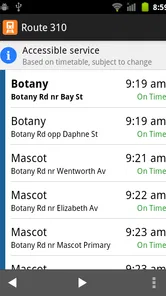
So, what's the deal with TripView? At its core, this app provides real-time updates for trains, buses, ferries, and light rail services. The beauty of it is its simplicity. The interface is clean and intuitive, which means you don't need a degree in rocket science to figure it out. Just punch in your starting point and destination, and voila! You've got the latest schedule at your fingertips.
One of the standout features is the real-time updates. I can't stress enough how crucial this is when you're rushing to catch a train. There's nothing worse than arriving at the station only to find out your train's been delayed. With the app, you get live updates, so you're always in the loop.
Planning Your Trip
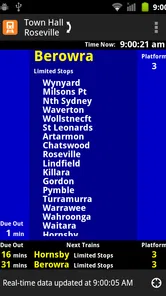
Planning a trip has never been easier. The app allows you to save your trips, which is perfect for regular commutes. Just save your route once, and you can access it with a tap. Plus, it includes platform numbers and service alerts, so you can plan your journey down to the last detail.
For those who like to plan ahead, the app provides timetable information even when you're offline. Yes, you heard me right! You can still view your saved trips without an internet connection. This feature is a lifesaver, especially when you're in areas with dodgy reception.
Personal Experience
Personally, I found the ability to customize the app extremely handy. You can set up notifications for your trips, ensuring you never miss a beat. I remember setting up alerts for a weekend getaway, and it was like having a personal reminder for every step of my journey.
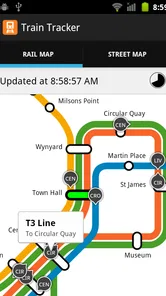
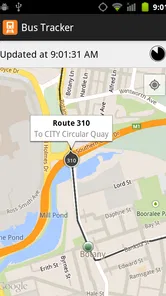
Another highlight is the map integration. Whether you’re a directionally-challenged individual like me or a seasoned navigator, the map feature helps you visualize your route. It’s especially useful if you’re exploring a new part of the city.
Who Will Get the Most from It
I’d recommend this to anyone who regularly travels by public transport in Sydney, Melbourne, or Brisbane and wants a quick way to check and revisit journeys. A commuter can save a familiar route and check it before leaving home, while a visitor can use a planned trip to make sense of an unfamiliar city. The developer, TripView Pty Ltd, has kept the focus on timetables rather than turning the experience into a broad travel-planning toolbox.
A practical routine is to save the journeys you actually repeat, then check the relevant trip before setting out rather than rebuilding the same route every morning. For a weekend outing, I’d save the outward and return journeys separately; that makes it easier to check the way home when plans shift. Offline access is useful for consulting those saved timetables in a tunnel or a weak-signal area, but it shouldn’t be treated as a substitute for current live information when services change.
Where It Fits—and Where It Doesn't
The main trade-off is geographic: this is most useful if your journeys are in the cities it covers. If you’re travelling elsewhere, a local transit app or a general mapping service is likely a better first choice. Even in a supported city, someone who wants one tool for walking directions, driving, and broad trip discovery may prefer a map app. I see TripView as a focused timetable companion, not an all-purpose navigator.
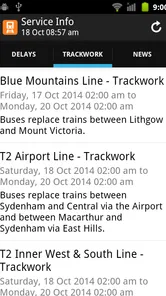
It also helps to keep the role of live updates in perspective. They can help you react to a delay, but no timetable app can make a disrupted service predictable. I’d check the service information before committing to a tight connection, and leave extra room when missing one departure would cause a serious problem. The saved timetable is convenient for planning; for a changing journey, checking again is the sensible habit.
Cost, Compatibility, and Confidence
This is a paid travel app, listed at $5.99, so I’d weigh that against how often I use public transport in the cities it serves. Occasional visitors may be perfectly comfortable with a free general mapping alternative, while a regular rider may value having familiar trips and timetable details close at hand. Its 4.8 average from around 18,000 ratings and more than 100,000 installs suggest it has found an audience, though those figures can’t tell you whether its particular workflow suits you.
The app is rated Everyone, and its current version is 4.5.2. It has been available since February 2, 2011, and supports devices running Android 6.0 or later. In everyday terms, that makes it worth checking compatibility before installing on an older phone, especially if you rely on it for a commute. The key question is whether you want a dedicated way to keep track of public transport timetables, rather than a free map that tries to handle every kind of navigation.
Final Thoughts
In a nutshell, this is a strong choice for anyone using public transport in Sydney, Melbourne, or Brisbane who values saved journeys, timetable access, and a focused interface. It’s user-friendly and can make routine travel less of a hassle, but its paid price and limited city coverage mean it won’t be the right fit for every traveller. If you’re not using it yet, consider how often you travel in those cities and whether its timetable-first approach matches the way you plan.
So, next time you're planning a trip across a supported city, remember that the app can help you keep the journey details together. It's like having a local friend who knows where to look for the timetable, though I’d still check again when a delay or service change matters. For frequent riders, that focused help can make the ride feel a little more manageable.
Who should choose a different option
I would not make this my only travel tool for a trip that crosses into places beyond Sydney, Melbourne, and Brisbane. Nor would I choose it as my main guide if the hardest part of a journey is finding a walking route from the stop to a venue or coordinating transit with other travel modes. In those situations, a map service or the relevant local transport app may give a more complete picture. TripView is strongest when timetable checking itself is the main task.
Before paying, I would ask myself how often I expect to open it and whether I regularly repeat routes it can help me keep organized. The $5.99 price is easier to rationalize as a commuter who checks journeys often than as a visitor making a single trip. Its Everyone age rating makes it suitable for general audiences, but that does not change the practical question: the app is useful only if its coverage and focused approach fit the way I travel.
My verdict on the trade-off
TripView is a specialist rather than a one-stop travel companion, and I think that is both its appeal and its boundary. It gives regular riders in its three covered cities a direct way to revisit timetable-based journeys, with saved trips, platform details, alerts, and offline access to saved information. The trade-off is that a narrow tool cannot replace a broad map or remove the need to check conditions when a service changes.
For me, the recommendation is clear: if I lived in or repeatedly visited Sydney, Melbourne, or Brisbane and wanted a dedicated public transport timetable app, I would consider installing it and testing the workflow against my regular routes. If I needed broad navigation, travelled elsewhere, or only rode transit once in a while, I would start with a free map or a local alternative instead. Its strong audience response—around 110 reviews alongside its rating history—supports its staying power, but the best reason to choose it is still whether its focused tools fit your own routine.
TripView Frequently Asked Questions
How often should I update TripView to keep it working properly?
Keeping TripView updated can help ensure you have the current app version and a smooth experience on your device. The current version is 4.5.2. If you use the app regularly to check public transport timetables, it is sensible to install updates when they are available through your device’s app store.
Is TripView suitable for visitors who are unfamiliar with public transport in its covered cities?
TripView may be useful for visitors who need to check public transport timetables in Sydney, Melbourne, or Brisbane. Its focus is on displaying timetable information for these cities, which can help travelers prepare for journeys as well as residents checking local services. Consider whether its city coverage matches your itinerary before downloading.
Which cities can I use TripView in?
TripView displays public transport timetables for Sydney, Melbourne, and Brisbane. It is intended for checking transport information in those cities, so travelers can use it to look up services while planning a journey or getting around locally. Before downloading, consider whether your trips are in one of these locations; the app’s stated coverage is focused on these three cities.
What is TripView and what does it offer?
TripView is a popular travel app designed to provide real-time public transport information for cities. It offers features such as live departure times, detailed trip planning, and service interruption alerts. Users can easily access information about buses, trains, and ferries, making it essential for daily commuters and travelers looking to navigate public transit systems efficiently.
Is TripView available for both Android and iOS devices?
Yes, TripView is available for download on both Android and iOS platforms. Users can find the app on the Google Play Store for Android devices and the Apple App Store for iOS devices. This cross-platform availability ensures that a wide range of users can benefit from the app's comprehensive public transport information and features.
Pros
- User-friendly interface for easy navigation.
- Supports real-time updates for schedules.
- Offline access to saved trips and routes.
- Customizable alerts for trip reminders.
- Integrates multiple transport modes seamlessly.
Cons
- Limited to specific cities
- not globally.
- Frequent ads in the free version.
- Occasional glitches with real-time updates.
- Requires manual data refresh sometimes.
- Limited customization of the interface.











