Tripo - AI 3D Model Generator
- 433.00
- 4.4
- Installs
- 500.00K
- Price
- Free

Screenshots
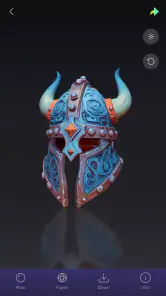
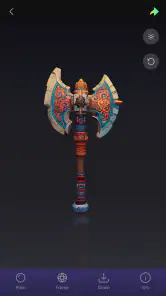
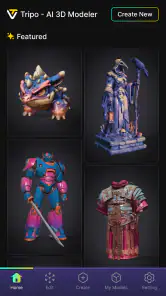
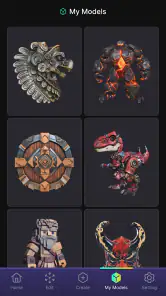
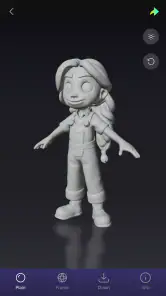
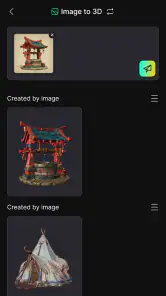

Analysis by Reviewed
When I want a rough 3D starting point without building a mesh by hand, I’m more interested in how quickly an app helps me explore an idea than in whether its first result is production-ready. Tripo is an AI 3D creation app from Tripo AI, aimed at turning text prompts and images into models. That makes it appealing for early concept work, visual experiments, and learning what a 3D idea might look like before committing to a desktop workflow.
My main advice is to approach it as a concept-making tool, not a replacement for a full 3D modeling package. The useful question is not whether AI can finish every model for you, but whether generating a first draft is a better use of your time than beginning from an empty workspace. For that job, Tripo has a clear purpose; for precise geometry and detailed editing, the usual specialist tools remain a better fit.
Choosing it for the right kind of 3D work
Start with the result you actually need
Before opening Tripo, I’d decide whether I need an object to inspect and refine, or a finished asset that must meet strict requirements. A text-to-3D workflow is useful when I can describe the idea more easily than I can model it. Image-to-3D is a natural route when I already have a visual reference and want to explore its form in three dimensions. In either case, the app’s strongest role is helping me move from “I can picture this” to “I have something to evaluate.”
That distinction matters because a generated model can be visually suggestive without being ready for a particular downstream task. A designer preparing a mood-board presentation may be satisfied with a convincing first pass. Someone who needs exact dimensions, clean topology, or carefully controlled parts should expect additional work in a dedicated 3D editor. I would choose Tripo based on the value of a fast draft, not on an assumption that generation eliminates modeling judgment.
It sits in the art and design space, but it is more specific than a general drawing or image-making app: the output is intended to be three-dimensional. That makes it worth considering for illustrators, hobbyists, product brainstorms, and people curious about 3D who find traditional modeling intimidating. It is less compelling if my everyday work already depends on precise manual control and I’m comfortable building objects from scratch.
What makes the first attempt more useful
For text prompts, I’d describe the object’s overall shape and the features that distinguish it, rather than piling on decorative adjectives. A prompt that names a clear subject, silhouette, and a few important details gives me a more useful basis for judging the result. If the output misses the point, I can then change one part of the description at a time instead of rewriting everything and losing track of what helped.
For image-based work, I’d choose a reference where the main subject is easy to read. A clean view is usually a better starting point than a crowded scene in which edges overlap or the object is partly hidden. This is a practical trade-off: the reference may be less atmospheric, but it gives the generation process a clearer subject to interpret. I’d keep the original image nearby so I can compare the generated shape rather than relying on memory.
More From Our News Desk

Clash of Clans Is Won Between the Battles

Android Auto Makes the Case for Quieter Car Software

MobiOffice: Transforming Mobile Productivity with Seamless Integration

EA SPORTS FC™ Mobile Soccer: Redefining Mobile Sports Gaming

How Microsoft OneDrive Became a Mobile Productivity Giant

How Google Translate Breaks Language Barriers Effortlessly
One useful way to work is to treat generation as a form of visual questioning. Instead of asking for the final version of a design, I might generate a basic object to test whether its proportions make sense, then use the result to decide what needs changing in a conventional modeling workflow. That makes an imperfect model productive: it can expose a weak silhouette or an unclear idea before I spend time polishing details.
Where Tripo earns its place
The biggest advantage is the change in starting point. In a traditional 3D application, I begin with tools, primitives, and a sequence of modeling decisions. Here, the first move can be a description or an image. That lowers the barrier to experimenting with forms and makes the app especially useful when I’m still deciding what the object should be. It does not remove the need for a good eye; it shifts more of the early work toward choosing, comparing, and refining ideas.
A realistic everyday use would be sketching out a custom desk ornament or a small prop for a personal project. I could describe the broad form, look at the generated version, and decide whether the proportions feel right before spending an evening learning how to model it manually. If the result is only a rough guide, that may still be enough to communicate the idea to a friend or to guide later work. The value is in shortening the distance between an idea and something I can inspect.
It may also be a helpful bridge for someone who wants to learn 3D but feels unsure how to begin. I would use the generated result as a reference, then try recreating or correcting parts of it in a manual tool. That approach turns AI output into a learning prompt rather than a finished answer. It can help reveal how a shape reads from different perspectives, while also making clear why deliberate mesh editing is still important.
Tripo is free to install, and its audience is broad: the content rating is Everyone. Its average rating is 4.4 from around 15 thousand ratings, with 433 written reviews, and it has passed 500 thousand installs. Those figures suggest that many people are willing to try it, but I would still judge it against my own use case: a popular app can be a poor match if I need exact, repeatable modeling control.
When a different kind of tool is better
If I need to shape every edge, control measurements, or build a model with a predictable technical structure, I’d choose a conventional desktop modeling application. Such tools ask for more skill and time, but they give me direct control over the geometry rather than asking me to evaluate an AI-generated interpretation. For professional fabrication or a tightly specified asset, that control can matter more than the convenience of a quick draft.
If the goal is simply to make a polished picture of an object, a 2D illustration or image-generation workflow may be the more efficient choice. There is little reason to introduce a 3D step when the final result will only be viewed as a flat image and perspective accuracy is not important. Tripo makes more sense when having a three-dimensional model to inspect is part of the point, even if the model is an exploratory one.
There is also a middle ground: use Tripo to generate a starting concept, then move to a manual tool for cleanup. I would not assume that every generated result will transfer neatly into whatever workflow I already use, so I’d test one modest project before making it central to a larger production process. That small trial helps establish whether the app’s output is genuinely useful to me or whether I spend more time correcting it than I would have spent building the form directly.
Budget and the cost of changing workflows
The initial cost is approachable because the app is free, but Tripo also offers in-app purchases ranging from $15.99 to $549.99 per item. That is a wide span, so I’d avoid making a purchase just because the first experiment feels exciting. I’d first work out what I want to create, see whether the free experience supports that purpose, and only consider spending if a specific limitation is repeatedly getting in the way.
The bigger cost may be attention rather than money. Prompt-based creation encourages iteration, and it can be tempting to keep asking for another version instead of deciding what the design needs. I’d set a simple goal for each session—such as settling the silhouette or exploring a reference—and stop once I have enough information to make the next decision. This keeps AI generation from becoming a loop of attractive but unfocused variations.
Switching from an established modeling routine also has a learning cost. Tripo can make the first draft easier, but it does not teach every skill needed to refine a model or prepare it for a demanding use. I’d keep my existing editor in the process if I rely on it for detailed adjustments. For a newcomer, the sensible path is to experiment with Tripo first, then add a manual tool when a real project calls for more control—not to assume one app must do everything.
Practical details and who should skip it
The current version is 1.12.2 and supports Android 7.0 or later. That makes it accessible to people using a range of Android devices, although I’d still think about the kind of work I’m doing: creating and evaluating 3D results is more comfortable when I can focus on the object and compare it with a reference. The app is best approached as a hands-on creative tool, not as a substitute for a larger screen when a task demands close, technical inspection.
I’d recommend skipping it if I need dependable precision, extensive manual mesh control, or a guaranteed ready-to-use asset with no cleanup. I’d also look elsewhere if my real goal is only a flat illustration. On the other hand, if I want to test object ideas quickly, have a reference image ready, or explore 3D without starting from a blank canvas, the app offers a sensible way into that process.
Making the handoff to other tools less frustrating
One practical question is whether a generated model can become part of a larger project. I’d treat that as something to test with a small, low-stakes example before planning a whole workflow around it. Start with an object whose purpose is easy to judge, then check whether the result is useful in the next tool or stage of work. If it needs extensive rebuilding, the generation may still have helped as a reference, but it has not saved time as an asset.
This distinction is especially useful for hobby projects. For a tabletop scene, a personal design sketch, or a prop idea, a suggestive form can be enough to settle a visual decision. For a model that must fit another object, print to a particular scale, or meet a strict production brief, visual plausibility is not the same as technical readiness. I would keep those outcomes separate when deciding whether the app has done its job.
There is also a useful way to avoid becoming attached to the first result: write down what the model is meant to communicate before generating it. If the goal is “show the broad silhouette,” I can judge success on that basis instead of expecting a finished object. If I cannot explain what I need the model to prove, more variations may only create more choices without making the design clearer.
A good fit for experiments, not every 3D task
For someone new to 3D, the main appeal is that the first creative decision can be made in words or through an image rather than by learning a modeling interface first. That can make an initial experiment feel approachable, but it should not be mistaken for a complete learning path. If I want to understand how geometry is built and controlled, I would pair generated concepts with hands-on practice rather than relying on generation alone.
For experienced artists, the balance is different. Tripo may be useful when a quick alternate shape could unlock a conversation or help compare directions, but it is less likely to replace established modeling habits for work where every surface has a purpose. I would use it selectively: bring it in when speed of exploration matters, and return to a familiar editor when the brief calls for exact edits, predictable structure, or careful finishing.
My recommendation is to try Tripo as an idea accelerator and keep expectations grounded. Its image- and text-led approach makes it a good fit for early concepts, personal experiments, and visual communication; the trade-off is that generated work still needs a human eye and may need a more controlled tool afterward. Use it when a fast first model is valuable, and choose a traditional 3D editor when accuracy and direct control matter more. That is the line that makes Tripo worth installing for curious creators without mistaking it for a complete modeling studio.
Tripo - AI 3D Model Generator Frequently Asked Questions
What is Tripo - AI 3D Model Generator, and what can it create?
Tripo is an AI-powered 3D creation app designed to turn ideas into three-dimensional models, typically from a text description or an image, depending on the features available in your version. It can be useful for brainstorming props, characters, objects, and other assets without building every shape by hand. Results are generated automatically, so they may need editing before they are suitable for a finished project.
How do I generate a 3D model with Tripo?
The general process is to provide a written prompt or upload a supported reference image, choose any available generation settings, and submit the request. Tripo then processes the input and presents a model you can preview. Clear descriptions that specify the object, style, and important features can help guide the result. Generation time and the controls available may vary by device, plan, and app version.
Can I export Tripo models and use them in other software?
Tripo is intended to help users create 3D assets that may be used beyond the app, but export formats, download options, and access to particular files can depend on the current version and subscription. Check the export menu and plan details before relying on a specific format or workflow. You may also need to inspect or edit a generated model in compatible 3D software before using it in a game or project.
Is Tripo free to use, and are there generation limits?
Access may include free features or credits, while additional generations, faster processing, or other capabilities may be tied to paid plans. The exact allowance and pricing can change, so review the app’s current subscription information before starting a project. Also check whether credits renew, expire, or are consumed when a generation fails; these details can affect how much experimentation you can do without paying.
Do I need an internet connection, and what should I know about privacy?
AI model generation generally requires an internet connection because requests are processed using online services, so offline use may be limited to viewing or managing previously saved content. Before uploading images or describing a project, review Tripo’s privacy policy and permissions to understand how submitted material and account data are handled. Avoid uploading confidential images or sensitive information unless you are comfortable with the applicable data practices.
Pros
- Turns text prompts or images into 3D models with little manual work.
- Useful for quickly creating concept art
- game assets
- and 3D-printing ideas.
- Offers an accessible way for beginners to explore 3D creation.
- Generated models can help speed up early design and prototyping.
- Cloud-based generation avoids needing a powerful device for the AI work.
Cons
- Results may need cleanup before they are ready for production use.
- Complex prompts can produce inaccurate details or awkward geometry.
- Generation may take time
- depending on server demand and model complexity.
- Some features or exports may require a paid plan or credits.
- Uploading images or prompts may raise privacy concerns for sensitive projects.

- Category
- Art & Design
- Version
- 1.12.2