

Tripio
- 14.00
- 4.0
- Installs
- 10.00K
- Price
- Free

Screenshots



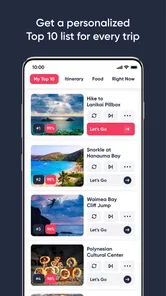
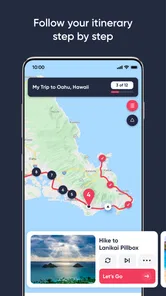



Analysis by Reviewed
Planning a trip often begins with scattered pieces: a destination in one message, a saved place in a browser tab, a note about transport, and a half-finished list of things to do. I tested Tripio as a travel and local app from Tripio to see whether it could make that early planning stage feel more manageable. My impression is that it works best as a practical starting point for organizing travel ideas, rather than as a complete replacement for every booking, map, or navigation tool you already use.
The app is free to install, carries an Everyone content rating, and has reached over ten thousand installs. Its average rating is 4.0 from roughly fifty ratings, which suggests a generally positive but still fairly small user base. Tripio was released in June 2022 and is currently at version 2.3.0, with support beginning at Android 6.0. There are also optional in-app purchases, ranging from about three dollars to thirty dollars per item, so I would treat the free experience as the first step and only consider paying after understanding what extra value those purchases provide.
From a loose travel idea to a usable plan
I look at Tripio as the bridge between a collection of travel ideas and a plan I can actually use. In this section, I’ll focus on how to make that transition more deliberate: choosing priorities, keeping flexible options in reserve, and avoiding a schedule that looks neat on screen but feels rushed on the day. That approach sets up the next section’s closer look at building a practical itinerary.
Starting with the problem most travelers actually have
I did not approach Tripio as someone who needed a single restaurant recommendation. The more useful test was to imagine a normal weekend away: I know the city, have a few places in mind, and need to turn those ideas into something I can follow without constantly switching between apps. That distinction matters because travel tools tend to specialize. Map apps are excellent for directions, booking services handle reservations, and note-taking apps are flexible but rarely travel-focused.
Tripio makes the most sense in the gap between inspiration and execution. It gives a travel-minded home for the information I want to gather before leaving, while keeping the planning process more focused than a general notes app. I found that useful when the trip was still changing. A place could move from “maybe” to “important,” and the plan could be adjusted without rebuilding everything from scratch in another service.
The strongest reason to try it is therefore not that it replaces every travel utility. It is that it offers a central place to turn separate ideas into a more coherent journey. If you already have a carefully maintained system for itineraries, saved locations, and travel notes, the benefit may be smaller. If your plans usually live across screenshots and conversations, the app has a clearer purpose.
Building the plan one decision at a time
My preferred workflow was to begin with the destination, then add the places and activities that mattered most before worrying about smaller details. This order prevents a common planning mistake: filling the schedule with attractive options before checking whether the overall route is sensible. Tripio is more useful when I treat it as a sequence of decisions rather than a box where every possible idea belongs.
More From Our News Desk

 Weather - By Xiaomi
Weather by Xiaomi Review: Clear at a Glance, Less Clear Up Close
Xiaomi’s weather app makes everyday forecasts quick to scan, but its calm surface can leave useful details and recovery paths harder to find than they should be.

 X
XX Under Pressure: Can It Recover When Posting Goes Wrong?
A resilience-focused review of X, examining setup, mistaken posts, interruptions, weak connections, and the gaps that matter when recovery needs to be dependable.

 Clash of Clans
Clash of Clans Is Won Between the Battles
Its raids are quick; its community is a long-term project of coordination, teaching, rivalry, and shared responsibility—with all the friction that entails.

 Android Auto
Android Auto Makes the Case for Quieter Car Software
The car interface is no longer judged by how much it can do, but by how quietly it helps. Android Auto shows what drivers now expect—and what still gets in the way.

 MobiOffice: Word, Sheets, PDF
MobiOffice: Transforming Mobile Productivity with Seamless Integration
MobiOffice: Word, Sheets, PDF is redefining mobile productivity with a surprising blend of functionality and innovation.

 EA SPORTS FC Soccer Mobile 26
EA SPORTS FC™ Mobile Soccer: Redefining Mobile Sports Gaming
Dive into EA SPORTS FC™ Mobile Soccer, where immersive gameplay and strategic depth transform mobile sports gaming.
Latest News



I first separated non-negotiable stops from flexible ones. A museum or appointment with a fixed time belongs in the first group. A market, viewpoint, or café can remain a backup. That simple distinction makes the eventual plan more resilient. If weather changes or a train runs late, I know which parts must survive and which can be exchanged.
A second useful habit is to plan by area instead of by popularity. Travelers often choose one famous place in the morning, another far away at lunch, and a third across town in the evening. Using Tripio to collect nearby options together helps reveal when a shorter list would produce a better day. The app cannot remove distance from a city, but it can make poor sequencing easier to notice before the trip begins.
The practical insight is to use Tripio as a decision filter, not as a warehouse for every idea. Once the list becomes too large, the plan becomes harder to read and less useful in real life. I would keep the main route compact and place optional discoveries in a separate mental category, even if the app lets me retain them for later.
Making the handoff from research to action
No travel planner works in isolation. At some point, the information gathered in Tripio has to connect with maps, transport services, accommodation details, or a booking confirmation. This handoff is where many travel apps become frustrating: they look organized inside their own interface but leave the user to manually reconstruct the trip elsewhere.
I would use Tripio for the planning layer and keep official booking or transport apps as the authority for time-sensitive information. If a reservation changes, the confirmation from the provider matters more than a previously written plan. If a route depends on live traffic or public transport disruptions, a dedicated navigation or transit tool is still the better choice. This division of labor avoids treating a planning app as if it were a live operations dashboard.
For a realistic day, I might prepare a morning attraction, a nearby lunch option, and a flexible afternoon stop in Tripio. Before leaving, I would check the actual opening information and route in the relevant official apps. During the day, I would return to Tripio to remember the broader shape of the plan, then use navigation for the precise turn-by-turn journey. That workflow is slightly less seamless than using one all-purpose platform, but it is safer because each tool handles the task it is designed for.
Planning with another person
Travel planning also involves handoffs between people. One person may research food, another may handle transport, and someone else may care about activities. Tripio is most helpful when the group agrees on a shared structure before adding details. Without that agreement, a collection of saved ideas can become a crowded compromise rather than a usable itinerary.
I recommend deciding three things early: what is fixed, what is optional, and who is responsible for checking the final details. That last point is easy to overlook. A plan can look complete while nobody has verified the timing, location, or practical requirements of the most important stop. Tripio can support the conversation, but it cannot replace that human check.
For couples or small groups, the app is likely easier to use when one person maintains the clean version of the plan and the others contribute suggestions. That may sound restrictive, but it prevents duplicate ideas and conflicting edits. For a large group, I would be more cautious. A dedicated shared itinerary or collaboration service may handle simultaneous contributions more clearly, especially when many people need to make changes.
What the finished result feels like
When the planning process is kept focused, the result is a calmer travel outline. I can see the intended shape of the day, remember why each stop was included, and keep alternatives available without letting them dominate. That is a meaningful improvement over relying on a long chat thread or a folder of screenshots.
The value is especially clear before departure. Instead of repeatedly asking, “What were we going to do after lunch?” I can use the prepared plan as a prompt. It reduces mental load without pretending that travel can be perfectly controlled. A good itinerary should guide the day, not make the traveler feel as though every delay is a failure.
Tripio also works well for the early stage of a longer trip, when I want to compare possible activities before committing. I can start broad, narrow the list, and then pass the final choices to the services that handle reservations and directions. That staged approach is more realistic than expecting one app to manage discovery, scheduling, payment, and live navigation equally well.
Where the workflow starts to break
The first point of friction is the boundary between planning and live travel information. A stored plan can become outdated when opening times, transport schedules, weather, or reservations change. I would never rely on Tripio alone for a time-sensitive connection or a high-stakes booking. Before leaving each day, I would verify the details that could cause a real problem if wrong.
The second limitation is the risk of over-organizing. Some travelers enjoy building a detailed itinerary, but others want a quick list of nearby ideas and the freedom to improvise. If you dislike entering or arranging travel information, Tripio may feel like another task rather than a solution. In that case, a map app with saved places could be faster for a casual afternoon, while a booking platform may be more appropriate for a tightly scheduled holiday.
The third issue is the presence of optional purchases. The app itself is free, but individual in-app purchases sit between approximately three dollars and thirty dollars. I would not pay automatically just because a feature appears useful in theory. First, I would use the free portion for a real planning task, identify the exact point where it slows me down, and then decide whether a purchase solves that specific problem. That approach is more sensible than paying for extras before knowing whether Tripio fits my habits.
There is also a practical question about scale. A short city break is an easy match for a focused travel organizer. A complicated journey involving several countries, multiple bookings, shared expenses, and frequent transport changes may require a combination of specialized services. Tripio can remain part of that system, but I would not make it the sole source of truth for every reservation and deadline.
Who should use it, and who should skip it
I would recommend Tripio to travelers who repeatedly collect ideas but struggle to turn them into a readable plan. It is also a good candidate for someone who wants more structure than a notes app without immediately committing to a complicated trip-management system. People planning a city break, a family day out, or a flexible itinerary are likely to see the clearest benefit.
It may also suit a traveler who enjoys researching destinations but needs a final cleanup stage. The important step is not adding more places; it is reducing the list until the plan can survive a normal day of walking, meals, delays, and changing energy levels. Used that way, the app encourages better choices rather than simply storing more information.
I would skip it if my main need is live navigation, instant transport updates, hotel booking, or a complete shared budget. A dedicated maps app is usually better for directions, an official transport app is safer for schedule changes, and a booking service is more appropriate for reservations. Travelers who prefer completely spontaneous trips may also find that a structured planner adds unnecessary effort.
My approach after testing the full process
If I were preparing a trip with Tripio, I would start with a short list of priorities, group them by location, and mark which items are flexible. I would then check the important details in their official sources, keeping Tripio as the readable overview rather than the final authority. The night before each day, I would remove anything unrealistic instead of trying to preserve every original idea.
I would also keep a backup plan for weather or fatigue. This is one of the less obvious advantages of organizing travel deliberately: the backup is easier to choose when it is prepared before the main plan fails. A nearby indoor activity, an unhurried meal, or a lower-effort neighborhood walk can make the day feel successful even when the headline attraction is unavailable.
Finally, I would review any paid option only after completing one genuine trip-planning workflow. The free entry point makes experimentation straightforward, while the optional purchases mean the app should be judged on actual usefulness rather than on promises implied by a feature list. The current version, 2.3.0, is the version I would evaluate when deciding whether the experience feels mature enough for my routine.
The bottom line for everyday travelers
Tripio is a focused travel and local app that helps turn scattered destination ideas into a more usable outline. I like it most when I use it between research and execution: it gives the trip a shape, while maps, booking services, and official providers handle the details that can change. That makes it a practical companion rather than an all-in-one replacement.
Its best result comes from disciplined use. Keep the main plan short, separate fixed commitments from optional stops, group activities by area, and verify live information elsewhere. Those habits address the app’s biggest weakness—its plan can become stale or overloaded—while making its organizational strength more visible.
With an Everyone rating and a free starting point, it is approachable for ordinary travelers, including people who do not want a complicated planning system. Still, the optional purchases deserve a careful look, and users with advanced collaboration or booking needs may prefer specialized alternatives. My honest recommendation is to try Tripio for one upcoming trip and judge it by one question: did it make the handoff from “places I might visit” to “what I can actually do” easier? For the right kind of traveler, that is where this app earns its place.
In my experience, Tripio is most valuable when it keeps a trip understandable without pretending to control it. That balance makes it worth considering for flexible city plans and everyday travel preparation, while more demanding journeys should continue to rely on dedicated services for reservations, navigation, and live updates.
Tripio Frequently Asked Questions
Can I use Tripio on my Android device?
Tripio is an Android travel app, and it requires Android 6.0 or later. Check your device’s operating-system version before downloading to make sure it meets that requirement. The app is free to download, so you can install it without an upfront purchase; optional in-app purchases are also available. Tripio is rated for Everyone, making its stated age classification suitable for a broad audience.
Who develops Tripio, and is it actively used?
Tripio is developed by Tripio and is listed in the Travel & Local category. It has more than 10,000 installs, alongside an average rating of 4.0 from 46 ratings and 14 written reviews. Those figures offer a quick sense of its store presence, though individual experiences can differ. The app’s current version is 2.3.0, so check the app page for the version available to your device before installing.
What is Tripio and what can I use it for?
Tripio is a travel-focused app designed to help users organize and improve their trips from one place. Its store summary calls it “The Ultimate Travel Resource.” Depending on the available features in your region, it may help you discover destinations, plan activities, manage travel details, and find useful recommendations. Its main appeal is convenience: instead of switching between several travel tools, you can use Tripio to keep important trip information and ideas together.
Is Tripio free to download and use?
Tripio is free to download, but optional in-app purchases range from $2.99 to $29.99 per item. The free download does not mean every feature, item, or service is included at no cost, so review the price shown in the app before purchasing. If an option involves a booking or a service from another provider, check its price and terms carefully before proceeding.
Does Tripio require an internet connection?
An internet connection is normally needed for features that load current travel information, maps, destination content, availability, or recommendations. Some information may remain accessible after it has been saved or viewed, but you should not assume that the entire app works offline. If you are traveling internationally, check mobile-data settings and consider using Wi-Fi to avoid unexpected roaming charges.
Pros
- Simple interface makes trip planning quick and approachable.
- Useful for discovering destinations and activities in one place.
- Helps organize travel ideas without needing multiple apps.
- Suitable for both short getaways and longer vacations.
- Can inspire users who are unsure where to travel next.
Cons
- Some destination information may be limited or outdated.
- Personalization may feel basic compared with larger travel platforms.
- Certain features may require an internet connection while traveling.
- Recommendations may not match every travel style or budget.
- Availability of content and features can vary by region.











