

Tricon Homes
- 264.00
- 4.6
- Installs
- 10.00K
- Price
- Free

Screenshots
Analysis by Reviewed
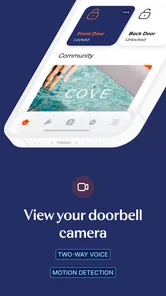
Managing a rental home usually means dealing with two separate tasks: controlling connected devices and reporting maintenance problems. Tricon Homes brings those jobs into one House & Home app from Tricon Residential. I found its most useful idea is not simply having another place to open a smart-lock screen or send a work order. The real benefit is the connection between everyday home control and property service, especially for residents who want one starting point instead of switching between several tools.
The app is free and available to an Everyone audience, which makes its basic purpose easy to understand. It is designed for people living in Tricon homes rather than for general smart-home enthusiasts looking for a universal controller. That distinction matters: the experience is most valuable when your home, devices, and service relationship already belong within the Tricon Residential system.
One app for home control and maintenance
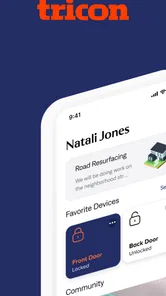
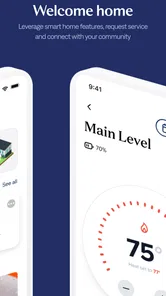
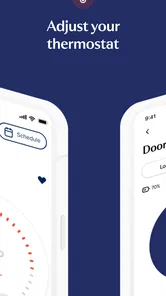
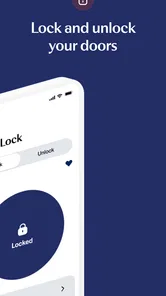
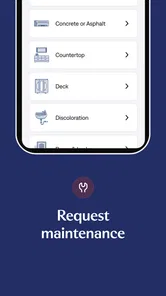
The verified store summary focuses on controlling smart-home devices and managing work orders from the same app. In practical terms, that gives the app two very different roles. One is immediate and personal: using supported home devices as part of a normal routine. The other is administrative: creating or following up on a request when something in the property needs attention.
I like this pairing because it reflects how residents actually think about a rental home. A connected device is useful when everything is working, while a work-order tool becomes important when something is not. Keeping both functions together can reduce the mental effort of remembering which app handles which part of the home.
That convenience should not be confused with universal smart-home compatibility. Tricon Homes is not presented as a replacement for every manufacturer’s dedicated app, and I would not choose it on the assumption that it can absorb every device in a house. Its strength is being a resident-facing hub for the Tricon experience. If your main goal is to combine products from unrelated brands, a broader smart-home platform may suit you better.
The app has a 4.6 average from around 2.7 thousand ratings, with over 260 written reviews. Those figures suggest a generally positive reception, although they should be read in context: satisfaction with a resident app can depend on both the software and the home-service process behind it. I would judge it less as a standalone gadget controller and more as a practical companion to living in a Tricon property.
Why combining these tasks changes the experience
Separate apps create small points of friction that become surprisingly annoying. You may need one login for a lock, another place for a maintenance request, and a third channel for checking whether someone has responded. Even when each tool works well by itself, the resident has to remember the boundaries between them.
More From Our News Desk

 Gmail
GmailGmail in a Busy Inbox: Who Benefits Most?
From first account to crowded workday, Gmail earns its place through dependable search and flexible sorting—but its best fit depends on how much inbox maintenance you can tolerate.

 Prime Video
Switching to Prime Video: What Changes in Your Viewing Routine
Prime Video can make a compelling second home for streaming, but switching means learning a different catalog, rental layer, and route from browsing to playback.

 Universal TV Remote Control
Universal TV Remote Control Works Best as a Reliable Backup
A phone remote earns its place through quick setup and reliable habits. Here is how to get more from Universal TV Remote Control—and where its limits show.

 Weather - By Xiaomi
Weather by Xiaomi Review: Clear at a Glance, Less Clear Up Close
Xiaomi’s weather app makes everyday forecasts quick to scan, but its calm surface can leave useful details and recovery paths harder to find than they should be.

 X
XX Under Pressure: Can It Recover When Posting Goes Wrong?
A resilience-focused review of X, examining setup, mistaken posts, interruptions, weak connections, and the gaps that matter when recovery needs to be dependable.

 Clash of Clans
Clash of Clans Is Won Between the Battles
Its raids are quick; its community is a long-term project of coordination, teaching, rivalry, and shared responsibility—with all the friction that entails.
Latest News



Tricon Homes gives those tasks a shared context. When I think of the app as a home dashboard rather than a single-purpose utility, its design makes more sense. A resident can begin with a device-related need and later return for a property issue without treating those as unrelated responsibilities.
There is also a useful psychological advantage. A maintenance problem is easier to act on when the reporting route sits beside the rest of the home controls. Instead of postponing a small issue because it feels like a separate administrative chore, you have a clear place to start. That will not repair anything by itself, but it can make reporting more consistent and less likely to be forgotten.
What using it in a normal routine feels like
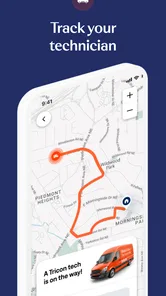
Imagine leaving for work on a weekday morning. You check the home device controls before heading out, then notice that something in the property needs attention. Rather than searching through old messages or trying to remember a service contact, you open the same app and move to the work-order side. Later, you can return to the app to review the status of that request while still having the device controls available in the same environment.
That is the kind of scenario where the combined approach earns its place. The value is not a dramatic feature demonstration; it is the removal of several small decisions. You do not have to ask yourself which tool belongs to the property and which belongs to the device. For renters who prefer a single, familiar starting point, that is a meaningful improvement.
A second useful situation is moving between different routines. Someone working from home may interact with connected devices throughout the day, while a busy family may only need them around school and bedtime. In either case, maintenance requests remain close at hand without requiring a separate habit. The app can therefore serve both occasional users and residents who rely on home controls more frequently.
My practical advice is to treat the app as the first place to check for Tricon-related tasks, not necessarily the only app you will ever need. Keep manufacturer apps available when they offer deeper settings or diagnostics, but use Tricon Homes for the resident workflow it is intended to support. That division avoids expecting it to do a job it was not designed to do.
Making work orders easier to manage
The work-order function is more important than it may initially appear. Reporting an issue is only the first step; residents also need a reliable way to keep track of what they have already submitted. A dedicated in-app workflow can help separate active property concerns from casual notes or conversations elsewhere.
I would use it immediately when an issue appears, even if the problem seems minor. A dripping fixture, a device that stops responding, or a fault that comes and goes is easier to describe while the details are fresh. Writing down the location, what happened, and whether the issue is constant or intermittent gives the service team a better starting point than a vague message sent later.
There is a trade-off here. An app can organize a request, but it cannot guarantee the speed, quality, or timing of the repair itself. Residents should not interpret a polished digital workflow as proof that every service issue will be resolved instantly. The app improves the channel for communicating the problem; the actual outcome still depends on the maintenance process and the nature of the fault.
For that reason, I see the work-order feature as a record-keeping advantage as much as a submission tool. It gives you a consistent place to begin and revisit the issue. If something changes after the original report, keeping those details connected to the existing request is likely more useful than starting a new conversation every time.
Where the smart-home side is most useful
The device-control capability is most helpful when it supports a repeated routine rather than a one-off experiment. A resident who checks or adjusts connected equipment regularly will benefit more than someone who rarely interacts with smart-home hardware. The shared app makes those actions easier to associate with the property itself.
There is a subtle advantage for renters. In a home you do not own, you may be less interested in building a complicated personal automation system that must be dismantled later. A property-focused app can feel more appropriate because it keeps the experience tied to the residence and the services available there. That can make smart-home use feel less like a long-term technology project and more like a practical part of renting.
At the same time, experienced smart-home users may find the focused approach limiting. If you want advanced routines across brands, detailed device analytics, or a single control layer for products purchased independently, a specialist platform will probably offer more depth. Tricon Homes is better judged on convenience within the Tricon environment than on the breadth expected from a general smart-home ecosystem.
Small habits that make the app more useful
First, I would open the app after moving in and learn where the device controls and work-order tools sit before an urgent problem occurs. Familiarity matters when a leak, lock issue, or device failure creates pressure. Spending a few quiet minutes exploring the layout can prevent confusion later.
Second, I would use consistent descriptions for maintenance requests. Include the room, the affected item, when the problem began, and whether it affects normal use of the home. This is not a glamorous feature, but it is a practical workflow improvement: clearer information can reduce avoidable back-and-forth.
Third, I would avoid treating every device problem as a maintenance request immediately. Check whether the issue is limited to the device, the app, or the home connection, then report it through the appropriate route. That distinction can help prevent a service request from becoming a substitute for basic troubleshooting, while still giving you a clear path when the issue is property-related.
Finally, I would revisit open requests rather than creating duplicates because a response is not immediate. Duplicate reports can make a situation harder to follow. Keeping one request organized with updated details is a cleaner approach whenever the app allows that workflow.
Important trade-offs before you rely on it
The first trade-off is focus versus flexibility. Tricon Homes is appealing because it connects resident services with smart-home control, but that same focus means it is not the obvious choice for someone building a home system around many unrelated brands. A universal platform may be more capable for device control, while a general email or messaging habit may feel simpler to a resident who rarely uses connected features.
The second is convenience versus dependence on the property ecosystem. The app makes the most sense when you are a Tricon Residential resident with access to the relevant home services. If you move to a different type of rental or want an app that remains useful regardless of landlord or property provider, its value may drop sharply. This is a specialized companion, not a portable household organizer.
The third is centralization versus troubleshooting depth. Having one place for devices and work orders is convenient, but dedicated device apps can sometimes provide more detailed controls. I would keep those alternatives in mind if a device behaves unexpectedly or if you need settings that go beyond everyday operation.
There is also the question of habit. A combined app only saves time if you actually use it as the central starting point. Residents who already have an established maintenance channel may not feel a major improvement unless they deliberately move their workflow into the app. The benefit is real, but it comes from changing behavior as well as installing software.
Who will get the most from Tricon Homes?
The strongest match is a Tricon resident who wants a straightforward way to manage connected home devices and property service requests without keeping those tasks mentally separate. It is especially suitable for people who value convenience over advanced customization, and for households where more than one person may need to understand how to report an issue.
It can also help residents who are not particularly technical. The app’s purpose is easier to explain than a collection of manufacturer tools: use it for the home’s supported controls and for work orders. That simple framing lowers the barrier for someone who does not want to learn the details of smart-home ecosystems.
I would be more cautious if you are a power user who expects deep automation, broad compatibility, or extensive device diagnostics. In that case, Tricon Homes may still be useful for property-related requests, but it probably should sit alongside a more capable smart-home platform rather than replace it.
It is also not the right fit for someone outside the Tricon Residential environment. The app’s usefulness comes from its relationship to that housing and service context. Without that connection, the central reason to install it is missing.
Availability, support context, and everyday expectations
Tricon Homes was released on October 13, 2022, and its current version is 2.3.15.1786053077. It requires Android 8.0 or later, so people using an older Android phone should check compatibility before planning around it. The app has passed the ten-thousand-install mark, which gives it a real resident user base without making it feel like a broad consumer platform.
Because it is free, the decision is mainly about fit rather than purchase cost. I would still consider the time cost of maintaining another app and the possibility that you will continue using manufacturer tools for more advanced controls. Free does not automatically mean essential; the value depends on whether the Tricon-specific workflow replaces enough scattered tasks to become part of your routine.
The developer is Tricon Residential, and that identity explains the app’s narrow but useful purpose. It is not trying to be a general home-management suite for every renter. Instead, it places the resident relationship, smart-home access, and work-order handling close together. That focus is precisely why it can feel convenient in the right home and unnecessary in the wrong one.
After looking at the way these functions fit together, I would recommend Tricon Homes to Tricon residents who want one dependable starting point for everyday home tasks. Its best feature is the practical link between device control and maintenance management, not a long list of advanced extras. The key trade-off is simple: you gain a more unified resident experience, but you give up some of the flexibility of broader, brand-neutral tools.
For me, that is a worthwhile exchange when the app matches the property and the household wants less friction. I would install it, learn the work-order flow before needing it, and keep any manufacturer apps that provide deeper device settings. Used that way, Tricon Homes does not need to replace every other home app to be useful; it only needs to become the place I naturally begin when the question is, “What do I need to do about my Tricon home?”
Tricon Homes Frequently Asked Questions
Will Tricon Homes work on my phone?
Tricon Homes is a House & Home app from Tricon Residential, and its current version is 2.3.15.1786053077. It requires Android 8.0 or later on Android devices. Before downloading, check your phone’s operating system and available storage, and make sure you are using the official app store for your device. The app is rated for Everyone.
Can I use Tricon Homes if I am not currently a resident?
The app is intended for people connected with Tricon homes, but access to its tools can depend on your relationship with the property and your account. Applicants or other customers may find some resources useful, while resident-focused features may require an active account tied to a home. If you are considering a home, check with Tricon about which app functions apply to your situation.
What is Tricon Homes, and what can I use the app for?
Tricon Homes is designed for residents and customers connected with Tricon residential communities. Depending on your account and property, the app may help you access housing information, review community updates, manage service requests, find useful resources, and communicate with support. Available tools can vary by location, home type, and whether you are a current resident, applicant, or customer.
Do I need a Tricon account to use the app?
Most personalized features require you to sign in with a Tricon account associated with your home or application. You may need to register using information provided during your rental or purchase process, then verify your email address or phone number. If your credentials are not recognized, check that your account details are correct or contact Tricon support for assistance before creating a duplicate account.
Can I pay rent or manage housing-related tasks through Tricon Homes?
The app may provide access to selected housing-management features, such as viewing account information, checking payment details, submitting maintenance requests, or receiving important notices. However, the exact options depend on your property and account status. Before relying on the app for a deadline-sensitive payment or request, confirm that the transaction shows as completed and keep any confirmation information.
Pros
- Simple way to browse available Tricon Homes communities and properties.
- Helpful details can make comparing neighborhoods and floor plans easier.
- Useful for users already interested in Tricon Residential developments.
- Mobile access lets you research homes while away from a desktop.
- Can support early-stage home searches before contacting a leasing team.
Cons
- Coverage may be limited to Tricon Residential properties and selected locations.
- Listings
- pricing
- and availability may change before the app is updated.
- Some users may still need a website or agent for complete property details.
- Search options may feel limited compared with major real-estate platforms.
- A reliable internet connection may be required to load listings and images.







