Trackman Golf
- 207.00
- 4.8
- Installs
- 500.00K
- Price
- Free

Screenshots

Analysis by Reviewed
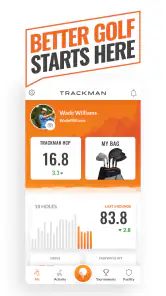
Before installing Trackman Golf, I’d set one expectation: it makes the most sense as a companion to TrackMan golf activities, rather than as a standalone replacement for every golf app. The Sports app is free, comes from TrackMan, and has an Everyone age rating. Its 4.8 average from around 14,000 ratings and more than 500,000 installs suggest that many golfers find a reason to keep it around, though my recommendation depends on how you plan to use it.
What a first-time user should expect
I’d think of the app less as something to browse casually and more as a place to support a practice session. Its strongest appeal is for golfers who can use TrackMan radar technology and want feedback to go with their swings. If you already visit a facility that uses TrackMan, the app is easier to place in your routine: it can help make practice feel more deliberate instead of leaving you to rely only on how a shot felt.
If you’re downloading it before you have a specific session in mind, that’s fine, but I wouldn’t judge its usefulness by how much you can do while sitting at home. The meaningful test is whether it fits the way you practise. For a golfer who mainly wants to record scores during a casual round, a dedicated score-tracking app is likely the more direct tool; for someone who wants to examine practice, this is the more relevant direction.
Getting into Swing with Trackman
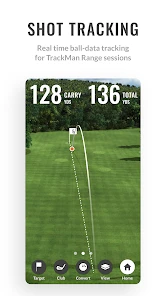
At its core, Trackman Golf offers a comprehensive suite of tools to analyze your swing and elevate your game. The app connects seamlessly with the Trackman radar technology, providing precise data about your swing, ball trajectory, and even club head speed. Setting it up was a breeze, and within minutes, I was ready to hit the virtual greens.
First setup: make the session the priority
Because the experience is tied to TrackMan activities and radar technology, I’d begin by deciding where I plan to use it. If that means visiting a facility, I’d check how its TrackMan equipment is used before I arrive and give myself a little time to get comfortable with the app. That small bit of preparation is more useful than opening it for the first time while I’m already eager to start hitting balls.
I’d also keep the first setup simple. Rather than trying to explore every screen at once, I’d arrive with a club and a basic practice goal in mind. The app is easier to evaluate when I know what I want to learn from a session. If I don’t have access to the relevant TrackMan setup, I wouldn’t assume that installing the app alone will reproduce the same swing-analysis experience.
Features that Stand Out
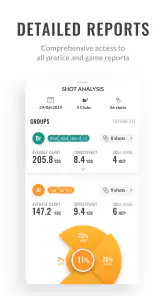
The app's detailed insights are where it truly shines. It breaks down every aspect of your swing into understandable chunks. For someone like me who’s been struggling with consistency, the swing analysis tool is a game-changer. It provides instant feedback, which is crucial for making real-time adjustments. Plus, the video playback feature allows you to compare your swing with that of professional players. Talk about a humbling experience!
More From Our News Desk

Weather by Xiaomi Review: Clear at a Glance, Less Clear Up Close

X Under Pressure: Can It Recover When Posting Goes Wrong?

Clash of Clans Is Won Between the Battles

Android Auto Makes the Case for Quieter Car Software

MobiOffice: Transforming Mobile Productivity with Seamless Integration

EA SPORTS FC™ Mobile Soccer: Redefining Mobile Sports Gaming
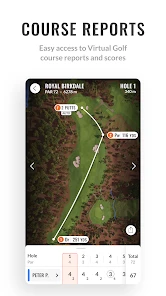
Another feature I found incredibly useful is the app’s ability to simulate various weather conditions and course layouts. It’s like having a virtual golf course at your fingertips. This means you can practice your game under different conditions, which is perfect for preparing for that unpredictable tournament day.
Making the first session count
For a first visit, I’d keep the goal small: open the app before a practice session, get oriented, and focus on one repeatable question about your swing rather than trying to interpret every number at once. If you have access to TrackMan radar technology, use a short set of swings to establish a baseline, then change one thing and see whether the feedback moves in the direction you hoped. That simple before-and-after approach is more useful than chasing a perfect-looking result on a single shot.
A practical example is a quick range session after work. I might compare several swings with the same club, note which shots feel consistent, and use playback to look for a visible difference rather than diagnosing the entire motion from memory. When I’m working on a specific issue, I’d save the broader course simulations for another day; otherwise the extra choices can distract from the one adjustment I came to practise. The app is most valuable when it helps me turn a vague feeling into a question I can check.
Reading feedback without chasing every number
Detailed measurements can be helpful, but they can also tempt me to make too many changes at once. I’d choose one focus—such as comparing the shape of shots with the same club—and treat the numbers as clues, not as a complete coaching verdict. Video playback can add context, but comparing myself with a professional is best used to notice a broad movement or rhythm, not to expect my body or swing to match theirs exactly.
There’s a trade-off here: the depth that makes the app interesting to a committed golfer can feel like unnecessary detail to someone who just wants to hit balls and enjoy the session. I’d also avoid drawing conclusions from a tiny handful of swings. A useful routine is to repeat the same task on another practice day and look for a pattern, rather than rebuilding my technique around one unusually good or poor shot.
Community and Coaching
One of the unexpected gems of the app is its community feature. Connecting with other golfers, sharing stats, and even friendly competitions add a social element to what might otherwise be a solitary sport. Moreover, the app offers access to professional coaching tips and drills. Whether you're a newbie or a seasoned golfer, there’s always something new to learn.
Also, the app’s user interface deserves a mention. It’s sleek, intuitive, and easy to navigate, which makes the whole experience enjoyable. No one wants to fumble around with complicated settings when they’re trying to focus on their swing.
When the social side helps—and when it doesn’t
I see the community element as a useful extra rather than the main reason to install. It can make practice feel less solitary if sharing progress or friendly competition motivates me to keep showing up. But if I prefer to practise privately, or I’m not interested in comparing stats, I can focus on the training side instead. Social features are most helpful when they support a habit I already want to build, not when they turn every session into a performance.
The coaching tips and drills can also give a session somewhere to go when I arrive without a clear plan. I’d still treat them as prompts rather than a substitute for individual instruction: a drill can help me practise a specific idea, but it won’t automatically explain every cause behind a miss. If I’m stuck on a persistent swing problem, a qualified coach may be a better next step than collecting more feedback without knowing how to act on it.
Common confusion: app access versus equipment
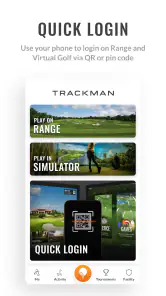
A question I’d settle early is whether I can get the full value without using TrackMan equipment. The app’s central appeal is closely connected to TrackMan activities and radar technology, so the answer depends on what kind of experience I’m looking for. I wouldn’t treat the download itself as a replacement for access to that setup. If my goal is to analyse radar-based practice, I need to plan around using the relevant technology; if I only need a round log, a simpler golf app is likely to fit better.
Another easy misunderstanding is to treat every measurement as an instruction. Feedback can describe what happened during a shot, but choosing what to change is a separate task. I’d keep a short note of the question I brought to practice and the pattern I noticed, then decide on one experiment for next time. That gives the session a useful endpoint without pretending that a screen can make all the coaching decisions for me.
Where it fits among golf apps
Compared with a basic score-tracking app, this is more about practice feedback and TrackMan activities than simply recording a round. Compared with taking a phone video on its own, its appeal is the combination of radar-based information, playback, and practice options. Those aren’t interchangeable jobs: a scorecard is easier when I’m walking a course, while this app is the more relevant choice when I want to examine practice and have access to the TrackMan setup it works with.
That difference matters in an ordinary week. If I’m playing a quick round with friends and mainly want to remember scores, I’d reach for a scorecard-style tool. If I’ve booked time to work on a recurring miss, I’d choose this app and set up a focused session instead. And if I only want to capture the look of my swing, a phone video may be enough; the extra TrackMan-oriented approach is worthwhile when I want more than visual playback alone.
Who will get the most from it
I’d recommend it most to golfers who practise with TrackMan, enjoy working on specific parts of their game, or want a social element alongside their training. It’s less compelling for someone who rarely practises, doesn’t use TrackMan technology, or prefers a simple round log. That isn’t a flaw so much as a matter of fit: the more clearly I know what I want to improve, the easier it is to benefit from the app’s depth.
It also suits a first-time user who is curious but willing to learn gradually. I wouldn’t expect a beginner to understand every swing measurement right away, and that’s not a reason to avoid it. Start by noticing one repeatable pattern and use the coaching material or a drill to give the next session structure. On the other hand, a golfer who dislikes data, wants a minimal interface, or has no realistic way to use TrackMan equipment may be happier with a simpler alternative.
Next step: turn one session into a routine
After a useful first visit, I’d resist the urge to change the whole practice routine. I’d keep the same basic question for another session, use the same club where practical, and compare the overall pattern rather than judging progress by one standout shot. If the feedback suggests a direction but leaves me unsure what to practise, I’d use a drill or ask a coach to help translate the observation into a manageable adjustment.
The app’s current version is 5.3.0, and it has been available since September 20, 2017. Those details matter less to my decision than whether I can put its TrackMan focus to use. Since it’s free, trying it is a low-commitment way to see whether it belongs in my routine; the real commitment is making time for a focused practice session and using the feedback thoughtfully.
Final Thoughts
All in all, Trackman Golf is an impressive tool that blends technology and sport seamlessly. It’s perfect for anyone serious about improving their golf game, offering insights that you simply wouldn’t get from traditional methods. While it might be a bit of an investment, the wealth of features and potential for improvement makes it worth every penny. So, whether you’re aiming to shave off a few strokes or just looking to have some fun, this app is a hole-in-one!
My overall advice is to approach it as a practice companion, not a magic fix. If you’re curious, trying it is a low-commitment way to see whether its TrackMan-focused approach suits your routine. I’d start with one session, one club, and one question; if that leaves you with clearer feedback and a useful next practice goal, you’ll know it earns a place in your golf kit.
Trackman Golf Frequently Asked Questions
Can I use Trackman Golf without owning Trackman equipment?
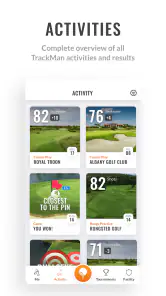
Trackman Golf is described as a one-stop shop for Trackman activities, so its usefulness depends on which activity you want to access. Some use may involve Trackman equipment, while other app functions may relate to your Trackman account or activities. If you are considering downloading it for a specific setup, check that the app supports the way you plan to use Trackman.
What can I use Trackman Golf for beyond viewing golf data?
The app is intended as a central place for Trackman activities, rather than simply a general golf scorecard. What you find useful will depend on the Trackman services or equipment you use and the activities available to you. If your main goal is to follow golf performance, it may suit that purpose, but it is best viewed as part of the broader Trackman experience.
Is Trackman Golf free to download, and what should I know about its age rating?
Trackman Golf is a free sports app from TrackMan, so you can download it without paying upfront. It has an Everyone age rating, making it suitable for a broad audience. The app is designed around Trackman activities, and what you can do inside it depends on the activity and any equipment involved.
What is Trackman Golf and how does it work?
Trackman Golf is a sophisticated golf launch monitor app that provides players with accurate data on their swing and ball flight. It uses advanced radar technology to track the ball's trajectory, speed, and spin, offering insights into your performance. Whether you're a beginner or a pro, Trackman Golf helps improve your game by analyzing your strengths and weaknesses.
Is Trackman Golf suitable for beginners, or is it only for professional golfers?
Trackman Golf is suitable for players of all skill levels, from beginners to seasoned professionals. While the app offers highly detailed data that professionals might find particularly useful, beginners can also benefit from its user-friendly interface and instructional features that help them understand their swing and improve their skills over time.
Pros
- Accurate shot tracking and analysis.
- User-friendly interface.
- Comprehensive data insights.
- Real-time performance updates.
- Supports multiple courses.
Cons
- Requires a strong GPS signal.
- Subscription needed for full features.
- High battery consumption.
- Limited offline functionality.
- Initial setup can be complex.
- Category
- Sports
- Version
- 5.3.0





