Traba
- 848.00
- 4.2
- Installs
- 100.00K
- Price
- Free

Screenshots
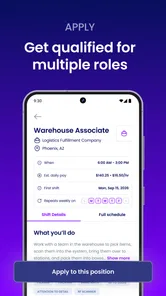
Analysis by Reviewed
Finding flexible work often sounds simple until the practical questions appear: where the shift is, what kind of work it involves, whether it fits around your existing schedule, and how quickly you can act when an opportunity appears. Traba is built around that problem. I reviewed it as a business app from Traba, and my overall impression is that it is most useful for people who want a more direct way to look for flexible shifts rather than relying only on traditional job boards.
Traba is free to use and aimed at everyone from a content-rating perspective. It has been available since July 12, 2021, and the current Android version is 1.91.0, supporting devices running Android 7.0 or later. Its average score is 4.2 from around 4.7 thousand ratings, with more than 100 thousand installs. Those figures suggest that it has moved beyond being an experimental idea, while still feeling more focused than a huge general employment marketplace.
How the everyday job-search workflow feels
The basic experience is straightforward: I would treat Traba as a place to check for suitable flexible work, review the details of an opportunity, and decide whether it fits my availability and practical needs. That sounds obvious, but it changes how I would use it compared with a conventional job board. Instead of beginning with a long-term résumé campaign, I would begin with the shifts or work opportunities that make sense for the week ahead.
This makes the app particularly relevant to people who need income that can adapt to changing circumstances. A student with open days between classes, someone building a second source of income, or a worker trying to fill gaps between longer assignments may find this approach more natural than searching through permanent positions. The app’s purpose is not to replace every kind of employment search. It is to make flexible work easier to consider and act on.
In a realistic situation, I might open Traba early in the week, look for work that does not conflict with existing commitments, and compare the practical details before committing. The important habit is to avoid treating every listing as interchangeable. Travel time, start time, the nature of the work, and how well it fits my energy level matter just as much as the headline opportunity. A flexible shift that creates a difficult commute may be less useful than one that pays similarly but fits cleanly into the rest of the day.
That is where the app’s focused purpose helps. A general job board can make users sift through permanent roles, recruitment advertisements, and positions that require a lengthy application process. Traba is more appealing when my priority is flexibility. I can approach it with a narrower question: what work can realistically fit my schedule and current situation?
The trade-off is that a focused work app may not be the best home for someone seeking a conventional career path. If I wanted extensive company research, detailed professional networking, portfolio presentation, or a long-term corporate role, I would probably use a traditional employment platform as well. Traba makes more sense as a practical work-finding tool than as a complete career-management system.
More From Our News Desk

Weather by Xiaomi Review: Clear at a Glance, Less Clear Up Close

X Under Pressure: Can It Recover When Posting Goes Wrong?

Clash of Clans Is Won Between the Battles

Android Auto Makes the Case for Quieter Car Software

MobiOffice: Transforming Mobile Productivity with Seamless Integration

EA SPORTS FC™ Mobile Soccer: Redefining Mobile Sports Gaming
What I would prepare before relying on it
I would first make sure my own availability is clear. That means knowing which days I can genuinely work, how far I am willing to travel, and what kinds of tasks I can handle comfortably. This small preparation step prevents a common mistake: opening a flexible-work app without any boundaries, then accepting options that create stress because they technically fit but are not actually convenient.
I would also keep my phone ready for timely checks. Flexible work can require attention to changing opportunities, and an app like this is more useful when I review it consistently rather than only opening it after I urgently need money. A short routine is better than random browsing: check at a predictable time, inspect the details carefully, and keep only realistic options in consideration.
One useful distinction is between availability and suitability. I may be free on a particular day, but that does not automatically mean every available shift is a good choice. Experienced users separate those questions. First, they identify when they can work. Then they judge whether the location, timing, and type of work are sensible. That simple two-stage habit makes the app feel less like a stream of possibilities and more like a manageable decision tool.
Settings and details worth checking first
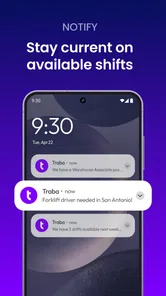
I would begin by reviewing every profile, availability, and notification control the app presents during setup. I am not suggesting that Traba has a hidden professional dashboard or a special automation system; rather, the value comes from using the ordinary controls deliberately. If notifications can be adjusted, I would avoid allowing every alert to interrupt the day. At the same time, I would not silence everything if timely awareness is important for the kind of work I am seeking.
The best notification choice depends on my goal. Someone urgently looking for work may prefer more frequent awareness, while someone who already has a regular schedule may want fewer interruptions and a focused check-in routine. The key is to make notifications serve a plan instead of letting them dictate one. If the app offers filters or preference fields during the browsing process, I would set them conservatively and then revisit them when my schedule changes.
I would pay close attention to location-related information. Flexible work is still physical work when the opportunity requires travel, and a listing that looks attractive in isolation can become inconvenient once transportation is considered. I would compare the start time with the time needed to arrive reliably, not merely the time shown in the opportunity itself. This is an easy detail to overlook when browsing quickly on a phone.
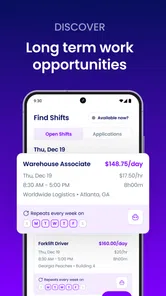
Another worthwhile check is the information attached to each opportunity before I commit. I would look for the work description, timing, location, and any stated expectations, then pause if something important is unclear. The app can help organize the search, but it cannot remove the need for personal judgment. A tidy interface does not make an unsuitable shift suitable.
There is also a practical device consideration. Since the current Android release requires Android 7.0 or later, most reasonably recent Android phones should meet the stated requirement, but anyone using an older device should check compatibility before planning around the app. The app is free, which removes a financial barrier to trying it, but the real cost of using it can still include mobile data, transportation, time, and the effort of preparing for work.
Repeatable habits that make the search faster
My preferred approach would be to create a repeatable search rhythm rather than repeatedly starting from zero. I would keep a short mental list of acceptable travel areas, workable time windows, and tasks I am prepared to perform. When I open Traba, I can compare opportunities against that list quickly instead of making an emotional decision based on whichever option appears first.
A second habit is to read the full opportunity details before focusing on the earning potential. The headline may attract attention, but the real question is whether the shift fits the rest of my day. I would check the practical conditions first, then decide whether the opportunity deserves further consideration. This reduces wasted time and helps prevent accepting work that later becomes difficult to attend.
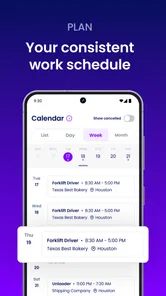
I would also use a simple calendar or notes routine alongside the app. Traba is designed to help with flexible work, but I would not expect it to replace my personal schedule. Once I decide to pursue or accept an opportunity, I would record the time, location, travel plan, and anything I need to bring. That extra step is especially useful for people combining several commitments, because flexibility becomes confusing when nothing is written down.
One non-obvious advantage of this approach is that it reveals patterns in my own availability. After checking the app regularly, I may notice that certain days are consistently realistic while others are not. I can then adjust my expectations instead of repeatedly searching during unsuitable periods. The app becomes more effective when I use it to learn my own work rhythm, not just to react to individual listings.
I would also resist the temptation to make every search broad. A wide search can feel productive, but it often produces more decisions rather than better ones. Narrowing the search to opportunities that fit my transportation limits and schedule can make the process quicker and more honest. If nothing suitable appears, that is more useful to know than spending a long time considering options I would never realistically take.
Where Traba is stronger than usual alternatives
Compared with a general job board, Traba’s main appeal is focus. Traditional platforms are useful when I want to build a résumé, research employers, or apply for a permanent role. They can also be overwhelming when I only need flexible work soon. Traba’s identity is clearer: it is for people who want to explore work that can fit around their lives and potentially improve their earning options.
Compared with asking friends or relying on local word of mouth, an app offers a more repeatable way to search. Personal recommendations can be valuable, but they depend on who I know and when someone happens to contact me. A dedicated app gives me a place to check on my own schedule. That independence is useful for someone who does not have a large professional network.
Compared with informal social-media posts, a specialized work app should also provide a more organized starting point. Social posts can be fast, but they may require sorting through unrelated content and contacting people manually. Traba is better suited to someone who prefers a structured search rather than chasing scattered messages.
Still, I would not abandon other methods entirely. A general employment platform may offer more variety for office, technical, creative, or career-track positions. A local contact may provide context that an app cannot. The strongest strategy is often to use Traba for flexible opportunities while keeping another channel available for longer-term goals. Its strength is specialization, not universal coverage.
Important limitations and situations where I would skip it
The first limitation is that flexible work still demands reliability. The app may make it easier to find an opportunity, but it does not make travel, preparation, or attendance effortless. Someone who needs fully remote work, predictable long-term hours, or a role tailored to a specific professional qualification may find the experience less suitable.
I would also be cautious if my schedule changes constantly without warning. Flexibility can help, but it can also create a mismatch between what I initially think I can do and what I can actually complete. Before pursuing an opportunity, I would leave enough margin for transportation and unexpected delays. A schedule that works only under perfect conditions is not a dependable schedule.
Another limitation is that an app cannot make every work decision for me. I still need to judge whether the opportunity suits my abilities, whether the timing is realistic, and whether the overall arrangement is worth the effort. Users looking for a completely passive income solution should skip this type of app. Traba is a tool for finding and organizing work, not a substitute for participation or personal evaluation.
I would also skip it as my only option if I were searching for a highly specialized career role. In that situation, I would want platforms built around professional profiles, detailed applications, networking, and employer research. Traba can complement that search, but I would not expect it to provide the same depth.
Who gets the most value from the app
Traba is a strong match for people who value practical flexibility over a traditional application process. It may suit someone who has open periods during the week, wants to supplement existing income, or prefers to evaluate work opportunities one at a time. It is also useful for people who appreciate a mobile-first routine and are comfortable making their own decisions about timing and travel.
The app may be especially helpful for a person whose availability changes from week to week. Instead of presenting a fixed schedule to a single employer, that user can approach work around current commitments. The important condition is organization: flexibility works best when the user knows their limits and checks details carefully.
It is less compelling for someone who wants a stable, fixed timetable or a single employer relationship that develops over years. It is also not the first tool I would choose for someone whose priority is remote freelance work, professional networking, or a detailed career portfolio. In those cases, another category of service may provide a better fit.
My final assessment after building a routine
After looking at Traba as a working tool rather than simply a download, I see its value in the routine it encourages. The app gives flexible work a clearer starting point, but the best results come from combining it with disciplined habits: define availability, review location and timing, manage notifications, record commitments, and avoid accepting opportunities that only work on paper.
Its free price makes experimenting easy, and the Everyone age classification keeps the barrier to entry broad. The 4.2 average from roughly 4.7 thousand ratings indicates a generally positive reception, while the developer, Traba, has kept the product centered on its core purpose instead of turning it into a generic business platform. I would recommend trying it if flexible work is genuinely what you need, not simply because you are curious about another job app.
My recommendation is practical rather than unconditional: use Traba when you want a focused way to look for flexible work, and pair it with your own calendar, transportation planning, and longer-term job-search tools when necessary. It is not a complete replacement for every employment service, but for the right user it can turn an irregular search into a repeatable weekly habit. That is where I think the app earns its place on an Android phone.
Traba Frequently Asked Questions
Is Traba free to download, and what devices can run it?
Traba is a free business app for people looking for flexible work. Its current version is 1.91.0, and it requires Android 7.0 or later. The app is rated for Everyone, so its age rating is suitable for a broad audience. Before downloading, make sure your device meets the system requirement and that the app is available through your device’s app store.
What is Traba and what can I use it for?
Traba is a workforce marketplace designed to connect businesses with hourly workers for temporary, flexible, and shift-based jobs. Through the app, eligible workers can browse available opportunities, review details such as location, schedule, pay, and requirements, and apply for shifts. It is mainly intended for people seeking flexible work rather than a traditional full-time employment platform.
How do I create an account and apply for jobs on Traba?
To get started, you generally need to download Traba, register with your personal information, and complete the required profile or verification steps. Depending on the position and location, the app may request work history, identification, certifications, or other details. Once your profile is approved, you can view matching shifts, check the requirements and compensation, and submit applications directly through the platform.
Where is Traba available, and can anyone use it?
Traba availability depends heavily on your city and the local employers working with the platform. It is not necessarily accessible in every country, state, or metropolitan area. Users also need to meet the eligibility requirements for individual assignments, which may include age restrictions, legal authorization to work, transportation, physical capabilities, or specific experience. Check the app before registering to confirm whether suitable shifts are offered nearby.
How and when do Traba workers get paid?
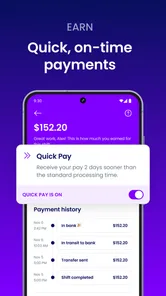
Payment terms can vary according to the assignment, employer, location, and the current policies shown in the app. Before accepting a shift, workers should carefully review the listed pay rate, payment schedule, attendance rules, and any conditions that could affect compensation. Traba may require completed shifts and verified time records before payment is processed, so users should keep their profile and payment information accurate.
Pros
- Quickly connects workers with nearby short-term job opportunities.
- Clear shift details help users compare pay
- schedules
- and requirements.
- Useful for finding flexible work without a lengthy application process.
- Mobile notifications can alert you when relevant shifts become available.
- Helpful option for earning extra income between permanent jobs.
Cons
- Job availability may vary greatly depending on your city and industry.
- Some shifts require transportation that may not be provided by employers.
- Last-minute schedule changes can make planning personal commitments difficult.
- Competition for popular
- well-paid shifts may be high.
- You may need to complete identity and eligibility checks before booking work.











