

Tourist: AI Trip Planner
- 0.00
- 0.0
- Installs
- 10.00K
- Price
- Free

Screenshots
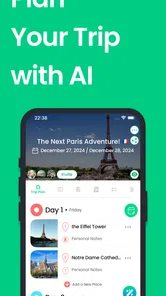

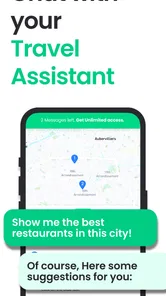
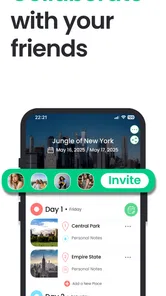

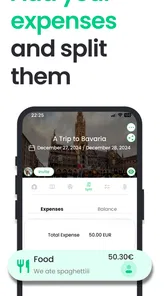

Analysis by Reviewed
I approached Tourist: AI Trip Planner as the kind of travel app I would open before a weekend away, when I have a destination in mind but no patience for assembling a plan from scattered tabs, notes, maps, and saved posts. Developed by Tourist: Travel the World, it sits in the Travel & Local category and is free to install, with optional in-app purchases ranging from $0.99 to $104.99 per item. That makes the important question less about downloading it and more about whether its planning workflow earns a place alongside the tools I already use.
My overall impression is that Tourist is aimed at turning travel inspiration into a usable itinerary. Its appeal is not simply finding somewhere interesting to visit. The more useful idea is having one place to shape a trip, organize the days, and share the result with other people. I found that approach most convincing for travelers who enjoy choosing their own destinations but want help giving the trip a clear structure.
How Tourist fits into real trip planning
I use Tourist as a bridge between collecting travel ideas and deciding what a day should actually look like. In this section, I’ll focus on where that kind of shared itinerary helps most—and where I’d still rely on a map, notes, or my own checks—before looking at how its current version fits into the app’s longer life.
A planning workspace rather than just a destination browser
The app’s role becomes clearer when I compare it with the usual alternatives. A map application is excellent for directions and checking what is nearby, but it is not always comfortable for building a multi-day travel plan. A notes app gives me complete freedom, yet I have to create the structure myself. Social platforms are useful for discovering places, although saved posts quickly become a messy collection of ideas with no sensible order.
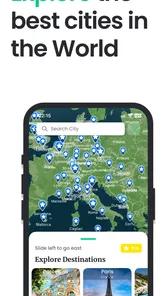
Tourist brings those activities closer together. I can begin with the broad question of where I want to go, move toward individual places and experiences, and then arrange those ideas into an itinerary. That sequence matters because it reduces the gap between “this looks worth seeing” and “this is what I will actually do on Tuesday afternoon.” The app is therefore more interesting as a trip-organizing tool than as a replacement for every other travel service.
I also like that sharing is part of its purpose. Travel planning is often collaborative, even when one person does most of the research. A partner may care about restaurants, a friend may focus on museums, and another traveler may only want to know the daily outline. Keeping the plan in a form that can be shared is more practical than forwarding a long chain of links or screenshots.
What the free starting point means
Tourist is free to install and carries an Everyone content rating, so it is easy to try without committing money at the outset. That is a meaningful advantage for occasional travelers. Someone planning one holiday does not need to buy into a service before discovering whether its style suits them.
More From Our News Desk

 Weather - By Xiaomi
Weather by Xiaomi Review: Clear at a Glance, Less Clear Up Close
Xiaomi’s weather app makes everyday forecasts quick to scan, but its calm surface can leave useful details and recovery paths harder to find than they should be.

 X
XX Under Pressure: Can It Recover When Posting Goes Wrong?
A resilience-focused review of X, examining setup, mistaken posts, interruptions, weak connections, and the gaps that matter when recovery needs to be dependable.

 Clash of Clans
Clash of Clans Is Won Between the Battles
Its raids are quick; its community is a long-term project of coordination, teaching, rivalry, and shared responsibility—with all the friction that entails.

 Android Auto
Android Auto Makes the Case for Quieter Car Software
The car interface is no longer judged by how much it can do, but by how quietly it helps. Android Auto shows what drivers now expect—and what still gets in the way.

 MobiOffice: Word, Sheets, PDF
MobiOffice: Transforming Mobile Productivity with Seamless Integration
MobiOffice: Word, Sheets, PDF is redefining mobile productivity with a surprising blend of functionality and innovation.

 EA SPORTS FC Soccer Mobile 26
EA SPORTS FC™ Mobile Soccer: Redefining Mobile Sports Gaming
Dive into EA SPORTS FC™ Mobile Soccer, where immersive gameplay and strategic depth transform mobile sports gaming.
Latest News



The free entry point should not be confused with every part of the experience being free. The app includes optional purchases priced from $0.99 to $104.99 per item. I would treat that range as a reason to inspect the purchase screen carefully before paying, particularly if I were planning a trip with several people and expected to use the app heavily. The sensible approach is to start with the free experience, build a small sample itinerary, and only then decide whether a paid option solves a problem I actually have.
That distinction is important for value. The download itself involves little risk, but the upper end of the purchase range is substantial enough that I would not buy impulsively because a feature sounds convenient. A low-cost add-on may be easy to justify for a specific trip; a much larger purchase deserves a clearer understanding of what it changes in the way I plan.
Where the artificial-intelligence angle helps
The “AI trip planner” positioning is most useful when I already have several loose requirements. For example, I might know that I want a city break with a relaxed first day, a few cultural stops, and enough free time for wandering. A planning assistant can help transform those preferences into a starting outline instead of leaving me with a blank page.
Still, I would not hand over judgment completely. Travel plans depend on opening hours, booking requirements, neighborhood layout, weather, mobility needs, and personal energy. An automatically suggested sequence can be a useful draft, but I would review each day for excessive backtracking and unrealistic timing. The best workflow is to let the app reduce the planning workload, then apply my own common sense before treating the itinerary as final.
One practical tip is to describe the trip in terms of priorities rather than only listing attractions. “A packed sightseeing schedule” produces a different kind of plan from “two major visits per day with time for coffee and local streets.” The more clearly I define the pace I want, the more likely the resulting outline will feel like my holiday rather than a checklist.
Building an itinerary that remains usable
A long list of attractions is not automatically a good itinerary. The useful test is whether I can understand the day at a glance and make decisions while I am away. I prefer grouping places by area and keeping the main activity of the day obvious. If Tourist helps me move from a collection of saved ideas to that kind of readable schedule, it delivers more value than a simple discovery feed.
I would also leave deliberate gaps. A common planning mistake is filling every available hour, especially when an app makes it easy to keep adding places. A flexible itinerary is more resilient when a museum takes longer than expected, a meal runs late, or I simply want to sit somewhere without checking the next item. Tourist works best when I use it as a framework rather than a command list.
For a group trip, I would prepare the first version before sharing it. Sharing an unfinished plan can create unnecessary discussion around every small possibility. Once the broad route and daily rhythm are clear, other travelers can react to something concrete. That makes collaboration more efficient and helps reveal conflicts, such as one person expecting a slow morning while another has planned an early start.
The friction I would expect during actual use
The main trade-off is that a centralized planner can create a false sense of completeness. Seeing a polished itinerary may make me feel prepared even though practical details still need checking. I would verify transportation, reservations, local restrictions, and opening information separately whenever they matter. Tourist can organize the plan, but organization is not the same as confirmation.
There is also a creative trade-off. A structured itinerary makes a trip easier to follow, but too much structure can remove the pleasant uncertainty of travel. If I am visiting a place specifically to explore without a fixed route, I may prefer a map and a short list of ideas. Tourist is more compelling when I have limited time, several priorities, or companions who need a shared plan.
Another consideration is the payment model. The app is easy to test for free, but the presence of purchases means I would pay attention to which parts of the workflow remain available without spending. I would not assume that the most advanced planning experience is included simply because the initial download costs nothing. This is not a criticism by itself; it is simply the point where free access and paid value need to be judged separately.
Three less obvious ways I would use it
First, I would use Tourist as a decision filter before booking anything. Instead of collecting every attractive place, I could sketch a realistic day and see whether the destination still feels appealing once travel time and energy are considered. This can prevent the common mistake of choosing a city because of a dozen disconnected highlights that cannot fit comfortably into one visit.
Second, I would create a “must happen” layer and a “nice if nearby” layer in my own planning process. The first group protects the experiences that motivated the trip. The second gives me options when I finish early or change direction. This approach keeps the itinerary useful without turning it into a rigid schedule, and it makes shared planning easier because everyone can see what is genuinely important.
Third, I would use the app to prepare a fallback version of each busy day. If weather, fatigue, or a booking problem disrupts the original plan, having an alternative cluster of nearby ideas is more useful than starting research from zero. The key is to keep the backup short. A second manageable route is helpful; another enormous list simply recreates the original problem.
Who is likely to get the most from it
I think Tourist is a strong match for people who enjoy the research stage but dislike the final organizing work. It should appeal to first-time visitors who want confidence without designing a complex spreadsheet, couples trying to combine different interests, and groups that need a shared outline before they travel. It is also suitable for travelers who have only a few days and want to make sensible use of them.
Families may find the planning concept useful as well, particularly when the day needs a balance between planned attractions, meals, breaks, and flexible time. I would still keep expectations realistic: the app can help arrange the shape of a day, but it cannot know every family’s tolerance for walking, waiting, or changing plans unless I account for those needs myself.
On the other hand, I would skip it if my preferred travel style is deliberately unplanned. If I normally choose a neighborhood, walk around, and decide what to do in the moment, a dedicated itinerary layer may feel like extra work. I would also look elsewhere if I need a specialist tool for one narrow task, such as detailed navigation, reservations, expense splitting, or live transport information. A broad trip planner is not automatically the best tool for those individual jobs.
Device and version considerations
Tourist was released on June 8, 2021, and the current version is 6.1.1. It requires at least operating system version 12, so I would check the phone or tablet before planning to rely on it for an upcoming trip. That requirement is not especially demanding for many current devices, but it can matter on an older phone that has been kept for travel or used as a backup.
The developer is Tourist: Travel the World, and the app has passed the 10K-plus install mark. I read that as a modest footprint rather than a reason to judge the product either way. For me, the more relevant question is whether the workflow feels dependable for my style of travel and whether the free experience gives me enough room to evaluate it before considering an optional purchase.
My value judgment before spending
Free access gives Tourist a fair chance to prove itself. I would download it before a trip, create a sample plan, and test how naturally I can move from destination ideas to a daily schedule. If that process saves me from juggling several notes and saved links, the app has already delivered useful value without requiring a purchase.
Paid value is more personal. A small purchase can make sense when it removes a recurring annoyance during an important trip, but I would want a clear connection between the cost and the improvement I receive. The highest listed purchase price changes the decision entirely: I would expect to use the app repeatedly or depend on a substantial upgrade before considering that level of spending. I would not pay merely for the promise of a more polished plan.
There is no need to decide immediately. The free starting point supports a cautious trial, and that is exactly how I would approach it. I would build one realistic itinerary, share it with a travel companion, revise it after considering pace and location, and then see whether the remaining limitations genuinely affect my plans.
My recommendation
After weighing the convenience against the caveats, I would recommend Tourist to travelers who want an organized, shareable trip outline without beginning with a blank document. Its strongest contribution is the bridge between inspiration and a practical schedule. That bridge is especially valuable when several people are involved or when a short visit needs thoughtful structure.
I would not recommend treating it as the only authority for a trip. I would still confirm important logistics elsewhere, leave room for changes, and resist filling every hour simply because the planner makes adding activities easy. Used that way, it becomes a planning companion rather than a substitute for judgment.
My buy-or-skip verdict is simple: try the free experience if you want help shaping destinations and ideas into an itinerary, but delay any optional purchase until you know exactly which part of your planning process it improves. For spontaneous travelers or people seeking a specialist navigation or booking tool, skipping it may be the better choice. For everyone else, Tourist is worth testing because its practical value can be judged through an actual sample trip before money enters the decision.
Tourist: AI Trip Planner Frequently Asked Questions
Is Tourist: AI Trip Planner suitable for first-time travelers?
Yes. Tourist: AI Trip Planner can be a helpful starting point if you are unfamiliar with a destination and want ideas for what to see and do. It can help you discover destinations, explore attractions, and shape a possible itinerary, so you do not have to begin with a blank page. Treat its suggestions as planning assistance, then check practical details before setting out.
What is Tourist: AI Trip Planner and what can I use it for?
Tourist: AI Trip Planner is designed to help you organize trips with the assistance of artificial intelligence. You can use it to explore destinations, generate itinerary ideas, discover attractions, and plan activities based on your travel dates, interests, budget, and preferred pace. It is especially useful when you want a starting point for a trip without researching every detail manually.
Can Tourist: AI Trip Planner create a complete itinerary for my trip?
The app can help build a day-by-day travel plan, but the quality of the itinerary depends on the information you provide and the destination you select. It may suggest attractions, restaurants, neighborhoods, and activities, then arrange them into a practical route. You should still check opening hours, travel times, reservation requirements, and current local conditions before relying on the plan.
Does Tourist: AI Trip Planner provide accurate and up-to-date travel information?
AI-generated recommendations can be helpful, but they should not be treated as guaranteed or real-time information. Businesses may change their hours, prices, availability, or location, while attractions can close temporarily or require advance tickets. Before visiting, verify important details through official websites or trusted local sources, particularly for transportation, reservations, weather-related changes, and safety information.
Is Tourist: AI Trip Planner free to download and use?
Tourist: AI Trip Planner is free to download, and in-app purchases are available for users who want to access paid options. The listed purchase range runs from $0.99 to $104.99 per item, so check the in-app purchase screen carefully before buying anything. Pricing and available options can differ between Android and iOS, and may change over time.
Pros
- Creates personalized itineraries based on destinations
- dates
- and travel preferences.
- Helps organize attractions
- activities
- restaurants
- and sightseeing in one place.
- Can reduce trip-planning time by suggesting a practical daily schedule.
- Useful for discovering lesser-known places beyond the main tourist attractions.
- Provides a convenient starting point for planning multi-city vacations.
Cons
- AI suggestions may include outdated hours
- prices
- or temporarily closed venues.
- Generated schedules can feel rushed when too many activities are planned per day.
- Recommendations may lack the local insight of an experienced human guide.
- Some features or travel details may require an internet connection.
- Users should verify bookings
- transport times
- and entry requirements independently.











