Tour Tempo Golf Total Game
- 11.00
- 3.8
- Installs
- 1.00K
- Price
- $24.99

Screenshots
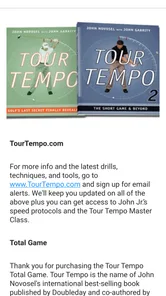
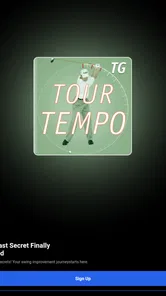
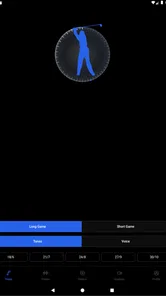
Analysis by Reviewed
When I want to work on my golf swing without turning practice into a technical checklist, I’m drawn to tools that give me one clear thing to focus on. Tour Tempo Golf Total Game takes that approach by centering practice on rhythm. It is a golf app from Tour Tempo, and its appeal is straightforward: use timing as a guide, then see whether a more repeatable motion carries over to the course. That can be useful, but it also asks you to be patient and pay attention to how the cues fit your own swing.
The Concept Behind Tour Tempo
So, what's all the fuss about? Well, the Tour Tempo Golf Total Game app is designed to help you improve your swing tempo. We all know that tempo is one of the trickiest parts of the game to master. This app claims to bring the rhythm of pro golfers right into your earbuds. The idea is that by syncing your swing to specific audio tones, you can achieve a smoother, more consistent tempo. Sounds cool, right?
Getting Started
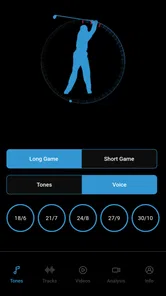
Downloading and setting up the app was a breeze. Whether you're on Android or iOS, you just head over to the store, grab the app, and you're good to go. What struck me first was the clean, user-friendly interface. It's intuitive, so even if you're not super tech-savvy, you'll figure it out in no time.
Before making it part of your routine, I’d decide where you’ll use it most: at home rehearsing a motion, at the range hitting balls, or as a guide between lessons. Those situations call for different expectations. A rhythm cue can give a practice session a useful focus, but it cannot tell you whether your alignment, grip, or clubface is causing a particular miss. I’d treat it as one practice aid rather than a substitute for feedback from a coach or a careful look at ball flight.
Features That Stand Out
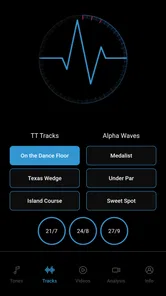
Once you're in, the app offers a variety of tempos to try out. You can start with the basics and gradually work your way up to more advanced levels. One thing I loved was the ability to customize the audio tones to suit my preferences. Whether you're into classical beats or something more upbeat, there's a tempo for you.
A practical way to use those choices is to resist changing the tempo every few swings. I’d pick one cue, make a small batch of relaxed rehearsals, and then hit a few balls while keeping the same timing in mind. That makes it easier to notice whether the rhythm helps you stay balanced or simply feels unfamiliar. If your contact gets worse when you chase a faster beat, slowing down and returning to comfortable practice is a better choice than forcing your body to match a sound.
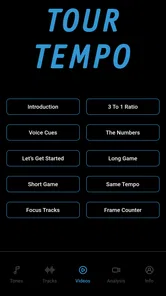
An unexpected bonus is the video library. It's packed with instructional videos that break down every aspect of the swing. These aren't just your run-of-the-mill tutorials; they're detailed and come from renowned golf instructors. I found them super helpful, especially when I was struggling to connect the audio cues with my actual swing.
More From Our News Desk

 Gmail
Gmail in a Busy Inbox: Who Benefits Most?
From first account to crowded workday, Gmail earns its place through dependable search and flexible sorting—but its best fit depends on how much inbox maintenance you can tolerate.

 Prime Video
Switching to Prime Video: What Changes in Your Viewing Routine
Prime Video can make a compelling second home for streaming, but switching means learning a different catalog, rental layer, and route from browsing to playback.

 Universal TV Remote Control
 Works Best as a Reliable Backup
A phone remote earns its place through quick setup and reliable habits. Here is how to get more from Universal TV Remote Control—and where its limits show.

 Weather - By Xiaomi
Weather by Xiaomi Review: Clear at a Glance, Less Clear Up Close
Xiaomi’s weather app makes everyday forecasts quick to scan, but its calm surface can leave useful details and recovery paths harder to find than they should be.

 X
X Under Pressure: Can It Recover When Posting Goes Wrong?
A resilience-focused review of X, examining setup, mistaken posts, interruptions, weak connections, and the gaps that matter when recovery needs to be dependable.

 Clash of Clans
 Is Won Between the Battles
Its raids are quick; its community is a long-term project of coordination, teaching, rivalry, and shared responsibility—with all the friction that entails.
Latest News



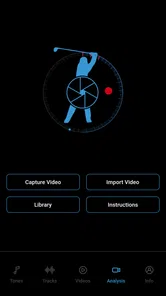
The audio and videos serve different purposes: the tones are a repeatable timing prompt, while instruction can help explain what you’re trying to do. I’d use a video to choose one specific point to work on, then keep the practice session focused on that point instead of trying to rebuild the whole swing at once. This is especially useful when you’re practicing alone and need a simple plan, though golfers who want automatic swing analysis or individualized diagnosis may prefer a different kind of coaching tool.
On the Green
Now, let's talk about the real deal—taking it to the course. Honestly, I was a bit skeptical at first about how an app could translate into real-world improvement. But after a couple of rounds, I noticed a genuine difference. My swing felt more controlled, and I was making better contact with the ball. It was like having a personal coach right in my pocket.
For an everyday example, imagine arriving at the range after work with only a short window to practice. Rather than firing through a bucket without a plan, you can focus on a tempo, rehearse it, and then test it with a few shots. I’d finish by noticing whether the rhythm remains comfortable when I’m not listening to the cue. On the course, the goal is not to think about every sound or mechanically force a beat; it’s to carry over a calmer sense of timing. If the cue distracts you during a round, keep the structured work for practice and play by feel.
Tour Tempo Golf Total Game doesn't just stop at the swing. It also offers guidance on other aspects like putting and the short game. So, if you're looking to improve across the board, this app has you covered.
That wider scope makes it more appealing than a narrow metronome-style practice aid, but it doesn’t mean every golfer needs another app for every part of the game. If your main concern is swing rhythm, the tempo work is the clearest reason to try it. If you’re looking for detailed shot tracking, course navigation, or a social scoring experience, a typical golf utility app is aimed at different needs and may suit you better. I’d choose based on the problem you actually want to solve, rather than expecting one tool to cover every part of golf.
Cost, Tradeoffs, and Who Should Try It
The app costs $24.99, so I’d consider it a paid practice tool rather than assume there’s a free option to try first. That price makes sense only if you expect to return to the rhythm exercises and instructional material over time. A golfer who practices regularly and wants a structured cue may get more value from it than someone who plays occasionally and rarely works on technique. Its Everyone age rating also makes clear that the listed audience is broad, but the practical value depends much more on your interest in deliberate golf practice.
There is some evidence of an active audience, though it is still a relatively small one: it has a 3.8 average from 32 ratings, with 11 written reviews and over 1K installs. I wouldn’t treat that as proof that it will fix a particular swing fault. The current version is 4.3.7, it was released on November 8, 2023, and it requires Android 7.0 or later. Those details matter if you’re checking device compatibility, while the more important decision is whether you’ll actually use a tempo-based routine.
The main tradeoff is that rhythm is only one part of a golf swing. A cue can help you become more consistent in timing, but it cannot guarantee better contact or lower scores, and a tempo that feels comfortable for one golfer may not feel natural for another. I’d skip it if you dislike audio guidance, want instant personalized corrections, or would rather spend your practice time working directly with an instructor. It is a more focused choice for self-directed practice than a replacement for coaching.
Making the Practice Routine Work
I’d avoid treating a sound as a command that every club and shot must obey. A driver swing, a short iron, and a delicate chip ask for different levels of effort, even if the timing idea stays in the background. The useful question is whether a chosen rhythm helps you make a balanced motion, not whether you can reproduce an identical movement in every situation. If a cue feels useful only during slow rehearsals, that is still a reasonable starting point; it simply means I would not assume it is ready to guide a full-speed shot.
One low-pressure way to judge progress is to compare how practice feels before and after using the cue, rather than relying on a single impressive shot. I’d notice whether I can repeat the motion without the audio, whether I stay comfortable through a small group of balls, and whether the timing survives a change of club. Those observations are more actionable than trying to decide immediately whether the app has transformed my game. If the rhythm makes me tense or rush, I’d pause rather than keep drilling just to complete a routine.
For a golfer taking lessons, the app can be a useful between-session prompt, but I’d bring the rhythm question to the instructor rather than assume it matches the lesson plan. A teacher may want me to focus on a movement or ball-flight issue that should take priority. In that case, the app’s best role is modest: help me practice a timing idea the coach has approved, without layering on several new swing thoughts. For someone without a coach, the videos may offer structure, but they still cannot observe and correct an individual swing in real time.
How It Differs From Other Golf Apps
Golf apps often serve quite different jobs. Some are built around recording scores, finding course information, or keeping track of shots; others give golfers a place to study technique or review their own motion. This app is most compelling when the question is narrower: can a repeatable audio rhythm help me organize swing practice? That focus is a strength if tempo is the issue I want to work on, but it also means I should not buy it expecting the broader functions of a golf companion or a detailed performance tracker.
Compared with practicing to a generic metronome, the appeal here is the golf-specific framing and the accompanying instructional material. A basic metronome may be enough for someone who only wants a simple beat and already knows how to apply it. Conversely, a golfer who needs visual feedback on posture or club movement is likely to get more from recording a swing or working with a person who can assess it. I see the app as a middle ground for guided, self-directed practice, not a replacement for every other tool.
There is also a practical distinction between learning a rhythm and measuring results. The app can give a session a consistent focus, but I would still use ordinary observation of ball flight and contact to decide whether a change is helping. If I start changing tempo, grip, stance, and club choice all at once, I won’t know what made the difference. Keeping the rest of the practice conditions fairly steady makes the audio cue easier to evaluate and reduces the temptation to credit it for every good shot.
Who Is Most Likely to Benefit
I think the strongest match is a golfer who already enjoys practicing, tends to rush or lose timing, and is willing to repeat a simple exercise before expecting results. A newer player may appreciate having one manageable focus instead of juggling several mechanical thoughts. A more experienced golfer might use it to reset a rhythm that has become hurried, provided the cue doesn’t conflict with established coaching. In either case, the value depends on returning to practice often enough to learn whether the timing feels natural.
It is a weaker fit for someone who mostly wants help choosing a club, mapping a course, recording a score, or comparing statistics after a round. It is also not ideal for a golfer who wants a device to identify the precise cause of a slice or a poor strike. Those needs call for a different kind of support. If I were only playing occasional social rounds and had little interest in practice sessions, I’d be cautious about paying for a specialized training aid that may stay unused.
Another reasonable question is whether the rhythm can be used away from a golf course. Rehearsing at home may help someone get familiar with the audio prompt, but I’d keep movements controlled and avoid swinging a club in a cramped space. The more useful test is whether the timing transfers to a safe practice setting and then remains available without playing audio. The aim is to internalize a helpful feel, not to make every swing dependent on having a phone or earbuds in hand.
Final Thoughts
All in all, if you're serious about upping your golf game, the Tour Tempo Golf Total Game app is worth a shot. It’s not just about improving your swing; it’s about enhancing your overall understanding of the game. The app's blend of technology and traditional coaching is impressive, and it’s accessible for golfers of all skill levels. So, next time you're out on the course, give it a try and see if you can swing in sync with the pros!
My recommendation is conditional: I’d consider buying it if you enjoy practicing on your own, want a clear rhythm to work with, and will use both the audio cues and instruction deliberately. I’d pass if you’re mainly looking for a free golf companion, data-heavy shot tracking, or a coach who can diagnose your individual mechanics. Used with realistic expectations, it can give a practice session direction; its value comes from the work you put in, not from the promise of a shortcut.
Tour Tempo Golf Total Game Frequently Asked Questions
How much does Tour Tempo Golf Total Game cost, and is it a one-time purchase?
Tour Tempo Golf Total Game is a paid sports app priced at $24.99. That means you should expect a charge when you download it rather than treating it as a free trial. Check the purchase details shown in your app store before confirming, since those explain the terms for your account and region. Its focus is golf swing tempo training, so consider whether that is the kind of practice aid you want before buying.
What is Tour Tempo Golf Total Game?
Tour Tempo Golf Total Game is a comprehensive golf training application designed to improve your golf swing by focusing on tempo. It provides audio tracks and instructional content to help golfers synchronize their swings, aiming to enhance consistency and performance on the course. The app caters to golfers of all skill levels, offering tailored guidance to improve your game. Its short store description is “Tour Tempo Golf,” while its central idea is captured by the phrase “Swing To The Rhythm Of The Tour Pros.”
How does Tour Tempo Golf Total Game improve my golf swing?
The app uses scientifically proven audio tracks to help golfers achieve the optimal swing tempo. By synchronizing your swing to the provided audio cues, you can develop a consistent tempo, which is critical for improving accuracy and power. The app also includes drills and tips to further refine your swing mechanics. Its approach is centered on practicing in rhythm, so it is best viewed as a training aid rather than a replacement for regular practice or broader instruction.
Is Tour Tempo Golf Total Game suitable for beginners?
Yes, Tour Tempo Golf Total Game is designed for golfers of all skill levels, including beginners. The app provides easy-to-follow instructions and tempo tracks that beginners can use to develop a solid foundation in their swing. It offers a step-by-step approach that gradually builds on fundamental techniques, making it accessible for those new to the game. More experienced golfers can also use the tempo-focused practice to work toward a steadier, more repeatable swing.
What devices are compatible with Tour Tempo Golf Total Game?
Tour Tempo Golf Total Game is available for both Android and iOS devices. It can be downloaded from the Google Play Store for Android users and the Apple App Store for iOS users. Ensure that your device meets the minimum system requirements for optimal performance and functionality of the app. For Android, the minimum operating system requirement is version 7.0, so check your device’s software before downloading.
Pros
- Improves swing accuracy significantly.
- Easy to use with intuitive interface.
- Suitable for all skill levels.
- Includes video tutorials.
- Tracks progress effectively.
Cons
- Limited free features.
- Requires subscription for full access.
- Occasional app crashes reported.
- No offline mode available.
- Interface can be overwhelming at first.