Total Connect Comfort
- 42.44K
- 3.9
- Installs
- 1.00M
- Price
- Free

Screenshots
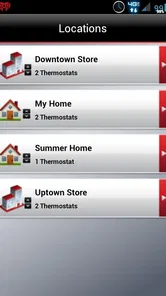
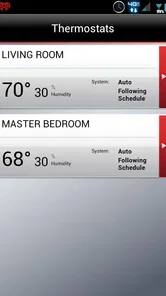
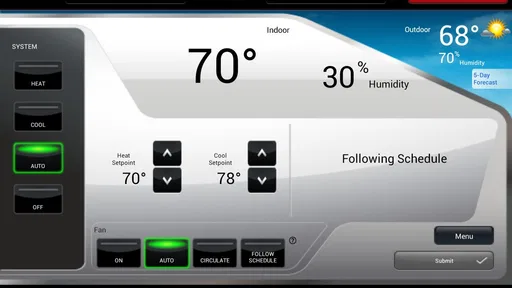
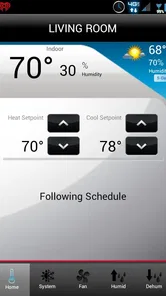
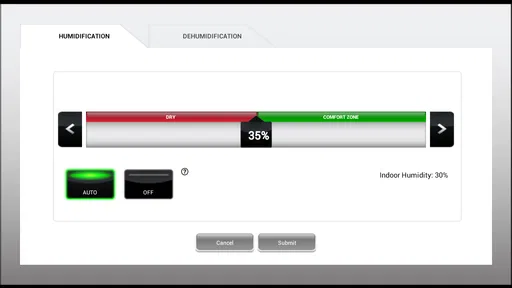
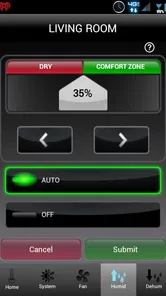
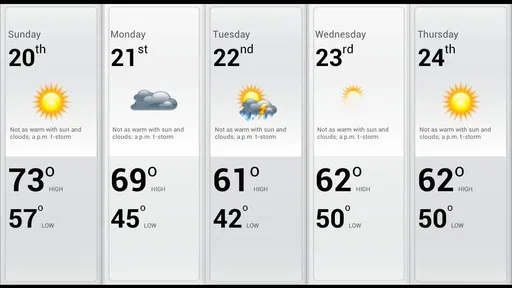

Analysis by Reviewed
I find Total Connect Comfort most useful when I want to check the heating or cooling at home without being there. It is a Lifestyle app from Resideo Technologies, Inc., built around remote thermostat management rather than turning a home into a full smart-home project. It is free, rated for Everyone, and has an average rating of 3.9 from around 89,000 ratings. That gives a prospective user a quick sense of its audience, though the practical question is whether it works with the thermostat already installed in your home.
Getting connected and sorting out snags
Compatibility is the first thing I would check before downloading. This app is meant to work with compatible Honeywell thermostats, so having a thermostat from another brand does not make it a universal remote. I would confirm the exact thermostat model and make sure its remote-access setup is supported before relying on the app. The app itself cannot make an incompatible device controllable.
Where setup can get stuck
The basic setup idea is simple: connect the app to a compatible thermostat and use an internet connection to manage it remotely. In practice, the thermostat’s connection and account setup matter just as much as the phone app. If the thermostat is not online or the account details are not accepted, repeated tapping in the app is unlikely to solve the underlying issue. I’d check the thermostat’s own connection first, then carefully re-enter the account information rather than starting the setup over immediately.
It is also worth distinguishing a local thermostat problem from a remote-control problem. If the thermostat still changes the temperature at home but the app does not reflect that change, the issue may be the connection between the thermostat and the service rather than the heating or cooling equipment itself. If neither the thermostat nor remote controls produce the expected result, I would look at the system and its settings before blaming the phone.
Using it in a real routine
The clearest use case is changing a setting before arriving home. If plans shift and I am returning earlier or later than usual, remote access can help me avoid leaving the system on a schedule that no longer fits the day. A weekly schedule is better for predictable routines; a manual adjustment is more useful for one-off changes. I would avoid making several quick adjustments in a row, since it becomes harder to tell which setting the thermostat is following.
For a household with more than one person adjusting the thermostat, a little coordination helps. Agreeing on a normal schedule and treating remote changes as exceptions can prevent people from undoing one another’s settings without realizing it. This is a small habit, but it makes remote control feel less confusing and keeps the app from becoming a running debate about the temperature.
What remote control can and cannot tell you
Remote access is useful for changing a setting, but it is not the same as diagnosing equipment. If a room feels uncomfortable, a thermostat adjustment may not address a problem with airflow, insulation, or the equipment itself. I would use the app to check and manage the thermostat, then investigate the home or heating and cooling system separately if the result does not match expectations.
More From Our News Desk

Weather by Xiaomi Review: Clear at a Glance, Less Clear Up Close

X Under Pressure: Can It Recover When Posting Goes Wrong?

Clash of Clans Is Won Between the Battles

Android Auto Makes the Case for Quieter Car Software

MobiOffice: Transforming Mobile Productivity with Seamless Integration

EA SPORTS FC™ Mobile Soccer: Redefining Mobile Sports Gaming
Alerts can be helpful when they flag an issue, especially when nobody is home to notice a change. Still, an alert is a prompt to check what is happening, not a guarantee that the app can fix it. I would read the message carefully and use the thermostat or seek appropriate support if the system needs attention. That keeps the app in its proper role: a convenient control point, not a substitute for hands-on troubleshooting.
Scheduling, comfort, and energy claims
A schedule can make day-to-day temperature changes less dependent on memory. I’d start with the times I genuinely leave and return, then make small adjustments after living with the routine. A schedule that looks efficient on paper can be annoying if it does not match real life, so comfort and consistency matter more than trying to optimize every setting at once.
I would also be cautious about treating an app as proof of lower bills. Using remote controls and schedules can help someone make more deliberate choices, but results depend on the home, equipment, weather, and habits. The practical benefit is having an easier way to manage settings; savings are not automatic. If you mainly want detailed energy analysis, compare the app’s available information with a dedicated energy tool rather than assuming thermostat control provides a complete picture.
Who will find it worthwhile
This is a sensible fit for someone who already owns a compatible thermostat and wants to manage it while away or adjust a routine without walking to the wall. It may also suit a household where schedules change often and one person handles thermostat settings. With over a million installs, it has a substantial user base, but popularity does not remove the need to check compatibility before getting started.
I would skip it if you do not have a supported thermostat, want one app to manage devices from many brands, or expect remote access to identify and repair HVAC faults. In those cases, the thermostat maker’s appropriate controls—or a qualified technician for equipment trouble—may be a better route. Compared with a basic thermostat’s on-device controls, this app adds convenience when you are away; compared with broader smart-home platforms, its focus is narrower and more directly tied to compatible thermostat control.
Setting Up: A Breeze
Getting started with the app is as easy as pie. Once you've downloaded it, the setup process is pretty straightforward. All you need is a compatible thermostat and a stable internet connection. The app guides you through the syncing process, and before you know it, you're all set to control your thermostat remotely. The user interface is intuitive, with large icons and clear instructions, making it accessible even to those who aren't tech-savvy.
Features That Make Life Easier
One of the standout features of the app is its scheduling capability. You can set up a weekly schedule, so your home is always at the perfect temperature when you walk through the door. No more coming back to a freezing house in the winter or a sauna in the summer. Plus, you can adjust the temperature with a simple tap, whether you’re in the next room or halfway across the globe.
The app also sends you alerts if there are any issues with your system, which is a lifesaver. Imagine being notified about a system malfunction while you’re away, allowing you to address the problem before it becomes a bigger issue. This proactive approach is something I never knew I needed until I started using the app.
Energy Efficiency and Savings
If you're like me and always on the lookout for ways to save on energy bills, this app is your new best friend. With detailed usage reports, you can monitor your energy consumption and make adjustments to optimize efficiency. The app helps you make informed decisions, reducing waste and lowering your environmental footprint. Who knew being eco-friendly could be this convenient?
Plus, the peace of mind that comes from knowing you’re making a positive impact on the planet while saving money is priceless. It’s a win-win situation, and honestly, I’m all for it.
Final Thoughts: A Must-Have for Modern Living
In a world where convenience is king, the app is a must-have for anyone with a compatible thermostat. It combines ease of use, energy efficiency, and peace of mind into one neat package. Whether you’re a tech enthusiast or someone who just wants a more comfortable living space, it’s a game-changer.
So, if you’re looking for a way to make your home smarter and your life simpler, give it a try. You might just wonder how you ever managed without it. Trust me, once you’ve experienced the comfort and convenience it offers, there’s no going back. The current version is 3.17, and it requires iOS 11 or later, so it is worth checking your device before installing. Overall, I’d recommend it as a practical companion to a compatible thermostat, provided you want simple remote adjustments rather than a wider smart-home control system.
A useful test before you depend on remote access
I would treat the first few days as a reliability check rather than immediately making the app part of an important routine. Try a simple adjustment while you are at home, then confirm that the thermostat responds as expected. Later, check it when you are away from the house. That gives you a practical sense of whether the phone, thermostat, and online connection are all communicating before you rely on a change during a trip or a late return.
If a change appears not to take effect, resist the urge to send it repeatedly. Check the thermostat directly when you can, and compare its displayed setting with what you intended to change. This helps separate a delayed or incomplete remote update from a misunderstanding about the current schedule. It also avoids creating a confusing string of commands that makes it harder to tell which setting is active.
Choosing between a schedule and a one-off change
The choice is less about which method is more advanced and more about how predictable your week is. A recurring routine is easier to manage through a schedule; an unusual workday or an unexpected early return is a better reason for a temporary adjustment. I would keep the regular pattern simple and use remote changes sparingly, then review the routine after a week or two. If you keep overriding the same scheduled period, that is a sign the schedule itself may not reflect your actual habits.
For example, imagine leaving home on a cool morning and learning later that you will be back much earlier than planned. Rather than rewriting the weekly routine for one day, you can use remote access to make a one-time change, then check the thermostat when you get home to make sure the normal pattern still makes sense. That distinction is a small but useful way to avoid turning a temporary exception into a permanent source of confusion.
What to check when something stops responding
When access fails, I would work from the simplest cause outward: confirm that the phone has a working internet connection, check that the thermostat itself is online, and make sure the account information being used is the one associated with the thermostat. If the local controls work but remote access does not, the heating or cooling equipment may be fine even though the app cannot reach it. If the local thermostat also fails to produce the expected response, the problem may sit beyond the app.
These checks are deliberately basic; they are not a repair procedure. I would avoid changing equipment settings that I do not understand just to make the app respond. If the thermostat indicates a system problem or the home remains uncomfortable despite reasonable settings, the next step is to consult the appropriate support for the thermostat or heating and cooling system. Remote convenience is valuable, but it should not encourage guesswork around equipment.
How it compares with other ways to manage comfort
The simplest alternative is to use the thermostat itself. That is perfectly adequate if you are usually home when adjustments are needed and do not mind changing settings at the wall. The app earns its place when you want to act from elsewhere or check the control without being physically beside it. It does not replace the thermostat; it makes some interactions with that thermostat more convenient.
A broader smart-home app may be a better fit for someone who wants one place to coordinate a range of devices from different makers. Total Connect Comfort is more focused, which can be a benefit if thermostat management is the main job and a drawback if you expect a whole-home dashboard. I would choose based on the devices already in the home and the task I need to solve, not on the assumption that one app should control everything.
Who should keep looking
This app is not the right starting point for someone shopping for a thermostat, because installing it does not add remote capability to an unsupported model. It is also a poor match for anyone whose main need is diagnosing uneven temperatures, understanding detailed household energy use, or managing a mix of smart devices. Those goals call for different tools or, in the case of a suspected equipment fault, hands-on help.
For a person with a compatible thermostat who mostly wants convenient adjustments, the narrower purpose is actually reassuring: there is less to learn than in a general smart-home platform. The trade-off is that your experience depends on the thermostat and its online connection, so a phone app alone cannot guarantee control in every situation. I would decide whether that occasional dependence is acceptable before making remote access central to a household routine.
My practical verdict
Resideo’s app has been around since January 31, 2012, and its current version is 3.17. It is free, and its age rating is Everyone. Those details make it easy to try, but I would still put compatibility and a quick real-world test ahead of any expectation that it will work with every thermostat or solve every comfort problem. Its average rating of 3.9, based on around 89,000 ratings, suggests a sizable audience with mixed experiences rather than a reason to skip that basic check.
My recommendation is specific: use Total Connect Comfort if you already have a compatible thermostat and want a straightforward way to make remote adjustments or keep a routine from becoming a chore. If you need broad device support, detailed energy insight, or equipment diagnosis, choose a tool designed for that job instead. For the right household, it can make thermostat management more convenient; the best results come from keeping schedules realistic, checking the connection when access falters, and remembering that the app is a control, not a repair service.
Total Connect Comfort Frequently Asked Questions
Can Total Connect Comfort control my thermostat when I’m away from home?
Yes. Total Connect Comfort is designed to let you remotely monitor and manage a compatible heating and cooling system, so you can use it when you are away as well as at home. Its usefulness depends on having supported equipment and a working connection for the system and your phone. The app is intended to complement a compatible thermostat, not replace it.
Do I need a compatible thermostat before downloading Total Connect Comfort?
Yes, compatible heating and cooling equipment is essential if you want to use the app’s main purpose: remote monitoring and management. Total Connect Comfort is not a standalone thermostat, so downloading it alone will not provide control of a home system. Check that your specific equipment works with the app before installing, especially if you are choosing it for an existing thermostat.
Is Total Connect Comfort free to download and use?
Total Connect Comfort is free to download and is intended for remotely monitoring and managing a compatible heating and cooling system. The app is listed for users of all ages and belongs to the Lifestyle category. Before installing, make sure your phone meets the operating-system requirement and that your thermostat works with the app, since those details affect whether it will be useful in your home.
What is Total Connect Comfort and what does it do?
Total Connect Comfort is a smart home application designed to provide users with remote access and control over their Honeywell thermostats and other compatible devices. By using this app, users can optimize their home’s heating and cooling systems, adjust temperatures, create schedules, and receive alerts for system changes or maintenance needs, enhancing energy efficiency and comfort. Its central purpose is to let you manage heating and cooling remotely, rather than replace the thermostat itself.
Is Total Connect Comfort compatible with all Honeywell devices?
Total Connect Comfort is primarily compatible with Honeywell Wi-Fi thermostats and some other select Honeywell devices. However, it's important to check the compatibility of your specific device model with the app before downloading. Users should refer to the manufacturer's website or app store listing for detailed compatibility information to ensure seamless integration and functionality. Checking first can help avoid installing an app that does not work with the equipment you already own.
Pros
- User-friendly interface for easy navigation.
- Real-time temperature updates and alerts.
- Supports multiple thermostats and locations.
- Remote access via smartphone or tablet.
- Integration with smart home devices.
Cons
- Limited compatibility with some HVAC systems.
- Occasional app crashes reported by users.
- Initial setup can be confusing for some.
- Requires stable internet connection.
- No landscape mode for tablets.













