Resideo - Smart Home
- 12.73K
- 3.6
- Installs
- 1.00M
- Price
- Free

Screenshots
Analysis by Reviewed
I find a smart-home app most useful when it helps everyone in the household understand what is happening, rather than simply adding another screen to check. Resideo - Smart Home brings supported home devices into a phone-based control experience. It is a free lifestyle app from Resideo Technologies, Inc., formerly associated with the Honeywell Home name. With an average rating of 3.6 from around 32,000 ratings and more than a million installs, it has clearly reached many homes, though those numbers alone cannot tell you whether it will suit your particular devices and routines.
One home, several people, one shared routine
Picture a weekday morning: one person is getting ready to leave, another is still at home, and someone else wants to check the house after setting off. The value of a connected-home app is that useful information and controls can be available without everyone having to walk to the thermostat or security equipment. I would treat Resideo as a practical household tool, not a magic system that makes every device or family routine work automatically.
Before making it part of a shared routine, decide which person will handle setup and where household members should go for everyday checks. That small agreement can prevent the familiar confusion of one person changing a setting while another assumes it is still on its usual schedule. It also gives the household a chance to learn the physical controls on its devices, so nobody is stranded if they would rather not use a phone.
Getting started and setting sensible boundaries
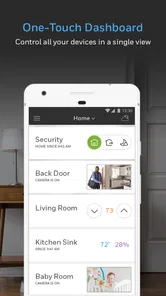
First things first, downloading and setting up Resideo - Smart Home is a breeze. Available for both Android and iOS, you can snag it from your usual app store haunts. Once installed, the app greets you with a sleek interface that feels intuitive, even for those of us who aren’t exactly tech-savvy. Setting up devices, from thermostats to security cameras, feels like a piece of cake. The app does a fantastic job of guiding you through the process, with clear instructions and helpful visual cues. Within minutes, I had my smart thermostat and security system up and running, all controlled right from my phone.
For a shared household, I would start with the person who can identify the installed equipment and make decisions about its settings. Check that the devices you already own are compatible before planning a whole routine around the app; an attractive interface cannot make an unsupported product join in. It is also worth testing one important action at a time—such as checking the thermostat or viewing a camera—before relying on it while away from home. That turns setup into a simple confidence check rather than a last-minute scramble.
Account access deserves a little thought, too. If more than one person needs to use the system, agree on who manages the account and how the household will handle access, rather than casually sharing sign-in details. I would avoid giving a child or a visitor responsibility for changing settings they do not understand. That is a sensible household boundary, not a claim that the app provides family-management tools.
A useful first test is to try the app while standing near the device, then repeat the same check from elsewhere in the home. This helps separate a setup problem from an unclear household routine: if the control itself is confusing, solve that before expecting another person to use it confidently. I would also keep a note of the device names and the purpose of any schedule or alert. Plain labels are easier for a housemate to understand than a list of settings whose meaning only the person who configured them remembers.
More From Our News Desk

Weather by Xiaomi Review: Clear at a Glance, Less Clear Up Close

X Under Pressure: Can It Recover When Posting Goes Wrong?

Clash of Clans Is Won Between the Battles

Android Auto Makes the Case for Quieter Car Software

MobiOffice: Transforming Mobile Productivity with Seamless Integration

EA SPORTS FC™ Mobile Soccer: Redefining Mobile Sports Gaming
Features that matter in everyday use
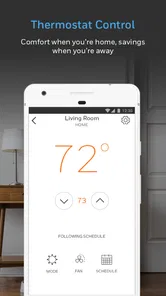
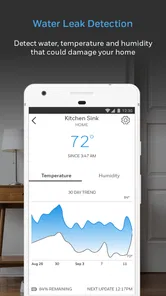
Resideo isn’t just about controlling devices; it’s about enhancing your home environment. One feature I absolutely love is the energy management system. It tracks energy usage in real-time and offers suggestions to optimize consumption. Imagine getting a gentle nudge to adjust your thermostat because it’s a sunny day outside. That’s not just smart; it’s eco-friendly genius!
I would use energy information as a prompt to look at habits, not as a promise of a particular bill reduction. For instance, if a room feels comfortable while the thermostat setting seems higher than expected, checking the pattern can help you decide whether a modest adjustment makes sense. The useful trade-off is that suggestions only help when someone in the home understands why a setting is changing. If different residents have different comfort needs, agree on a reasonable approach before turning a one-person preference into a household rule.
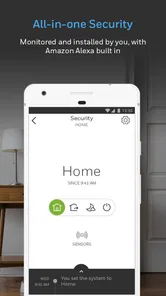
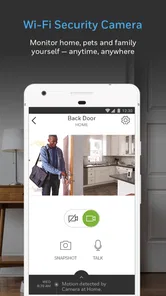
Another standout feature is its robust security system. From live streaming your security cameras to receiving instant alerts if something seems off, Resideo ensures you’re always in the loop. The app even allows you to set up personalized security alerts, so you can know if someone’s entered a specific part of your home. It’s like having a digital watchdog, minus the barking.
Alerts are most helpful when they answer a real question: should I check the camera, or is this ordinary activity? I would begin with only the notifications the household genuinely needs, then adjust if they become easy to ignore. A stream or alert can help you check in, but it does not replace being thoughtful about who can see household activity and when. For a shared device, that matters as much as convenience: people should know which cameras or alerts are in use and agree on expectations.
One practical way to avoid alert fatigue is to give every notification a job before enabling it. If nobody knows who is expected to respond, a busy alert stream can create more worry than reassurance. For a household that is often out at different times, agree on who will check a notification first and what counts as a reason to follow up. A camera view can provide context, but a person still has to judge what they are seeing and decide what to do next.
Coordination without turning home life into troubleshooting
After using Resideo for a few weeks, I noticed how seamlessly it integrated into my daily life. With automated schedules, my lighting adjusts automatically, creating the perfect ambiance whether I’m waking up or winding down. Plus, the peace of mind that comes with knowing your home is secure, even when you’re miles away, is priceless. I found myself wondering how I ever lived without this level of convenience.
Schedules can be especially useful when the household has a predictable rhythm, but they need a little coordination. If someone’s plans change, a routine that suited an ordinary weekday may not suit the evening. I would review schedules when the household routine shifts and make sure everyone knows which changes are intentional. A useful habit is to keep the first setup modest: one or two routines that solve a real annoyance are easier to understand than a complicated collection nobody remembers how to adjust.
That is also where the app differs from simpler alternatives. A basic device-maker app may be the better choice if you only need to control one product and want as few steps as possible. Resideo makes more sense when its supported devices let you bring relevant home controls and checks together. It is not automatically better just because it covers more of a household; the benefit depends on whether your equipment fits and whether the people using it actually want a shared control point.
A realistic use case is leaving home for work while another adult stays behind. Before you go, you can check the controls you rely on and leave a clear understanding of any schedule that will run. Later, if plans change, the person at home can use the device’s ordinary control rather than guessing whether a phone setting should be altered. That division makes the app helpful without making every household member responsible for managing the whole system.
For a household comparing options, the choice is less about finding the app with the longest feature list and more about matching the installed equipment. Separate manufacturer apps can be perfectly adequate when only one device needs attention, and they may feel simpler to someone who rarely changes settings. A broader control point is worthwhile when it reduces switching between apps for tasks people actually perform. I would not buy new equipment solely on the assumption that all connected products will work together; check compatibility first, then decide whether consolidation solves a real inconvenience.
However, like any app, it’s not all sunshine and rainbows. I did encounter a few hiccups, especially when trying to integrate older devices. Some required firmware updates and a bit of tinkering to get them to play nice with Resideo. But hey, a little patience goes a long way, and the support team is pretty responsive if you hit a snag.
That experience is a good reason not to replace a working setup all at once. Check older devices individually, allow time for updates, and keep their ordinary controls available while you test. If your household depends on a device every day, confirm that it behaves as expected after setup before making an app-based routine part of the daily plan. People who dislike troubleshooting or have equipment that does not work well with the app may be happier sticking with the manufacturer’s simpler control option.
If a control appears unreliable, I would first check whether the device itself is responding normally before repeatedly changing app settings. Make one change at a time and observe what happens; changing several schedules or preferences together makes it harder to identify the cause of an unexpected result. This is not the most exciting part of smart-home use, but it is a useful way to protect a routine that already works and avoid turning a small setup issue into a household-wide reset.
Who I would recommend it to
The app is best suited to someone who already has compatible home equipment and wants a convenient place to check or manage it. It can also be useful for adults in a shared home who are willing to agree on routines, notification expectations, and account responsibility. I would be more cautious about recommending it to a household looking for a complete solution without checking its devices first, or to anyone who wants a minimal app for a single task.
It is a particularly sensible fit for people who already use supported Resideo or Honeywell Home equipment and want to check settings without going directly to each device. It may also suit a household where one adult is comfortable handling setup while others mainly need a clear, predictable way to use the controls. On the other hand, someone who values a single-purpose app above all else, or who has no compatible equipment, should look elsewhere rather than install it in the hope that it will act as a universal smart-home controller.
Age context matters even though the app’s content rating is Everyone. That rating does not mean every household member should be given equal access to security feeds or settings. I would keep sensitive decisions with a responsible adult, explain any routines to younger household members, and avoid treating an app alert as proof that nothing else needs attention. Trust comes from clear expectations and sensible access, not from assuming that a phone can supervise a home on its own.
For a home with children, guests, or a housemate who is not involved in setup, I would explain which device controls are routine and which changes should be discussed first. This is especially important for temperature preferences and security-related checks, where a quick tap can affect other people’s comfort or sense of privacy. The Everyone content rating is reassuring about the app’s general audience, but household trust still comes from adults setting expectations and keeping access appropriate to each person’s role.
The app has been available since June 19, 2014, and its current version is 6.17.0; it requires Android 9 or later. Those details are useful when deciding whether an older phone can run it, but compatibility with the app is only one part of the decision. Your home devices also need to suit the setup, and the household should be comfortable using a phone as one way—not necessarily the only way—to interact with them.
Before committing, I would check three things: whether the home devices are supported, whether the phone meets the operating-system requirement, and whether the household agrees on who handles account decisions. That quick check answers the most practical questions without assuming the app will solve every coordination problem. It also helps set expectations: this is a phone-based way to manage compatible equipment, not a substitute for understanding how that equipment works in the home.
A household-level verdict
In conclusion, Resideo - Smart Home is more than just an app; it’s a lifestyle upgrade. Whether you’re a tech enthusiast or just someone looking to make life a tad easier, this app is worth checking out. It’s like having your very own Jarvis, without the snarky comments, of course. So, if you’re ready to step into the future of home living, Resideo might just be your ticket. Go on, give it a whirl!
My practical advice is to start with the device or routine that would make a noticeable difference, then see how well it fits the way your household actually lives. I would choose it over a collection of separate controls when its supported equipment works together smoothly; I would choose a simpler alternative when compatibility, account coordination, or setup effort outweighs that convenience. Resideo is free and rated for Everyone, but the best household experience still depends on careful setup, realistic expectations, and adults keeping shared access sensible.
Overall, I would recommend trying it when the household already has compatible equipment and a real reason to check or adjust that equipment from a phone. The app’s strongest case is practical coordination: fewer separate places to look, clearer routines, and a more convenient way to check in. Its weaker case is a home with unsupported devices, unclear account responsibility, or people who would rather keep every control local and simple. If you start with one useful task, involve the people affected by it, and keep expectations grounded, you can judge fairly whether it earns a place in your household’s daily routine.
Resideo - Smart Home Frequently Asked Questions
Does Resideo - Smart Home work on iOS as well as Android?
Resideo - Smart Home is a mobile app, but device compatibility matters before you install it. For Android, your phone needs to run version 9 or later. If you are using an iPhone or iPad, check the app’s page in the relevant app store to confirm availability and compatibility for your device before downloading.
Do I need compatible Resideo devices to use the app?
The app is intended for managing smart home devices, so its usefulness depends on having devices that work with Resideo - Smart Home. It is described as supporting controls for products such as thermostats, security systems, and lighting. Before downloading, check that the particular devices you own or plan to use are compatible with the app.
Is Resideo - Smart Home free to download, and what devices can I use it on?
Resideo - Smart Home is free to download and is a Lifestyle app from Resideo Technologies, Inc. It is available for Android devices running version 9 or later. The app was formerly known as Honeywell Home, so users familiar with that name may recognize it. Before installing, check that your phone meets the minimum operating-system requirement.
What is Resideo - Smart Home and what features does it offer?
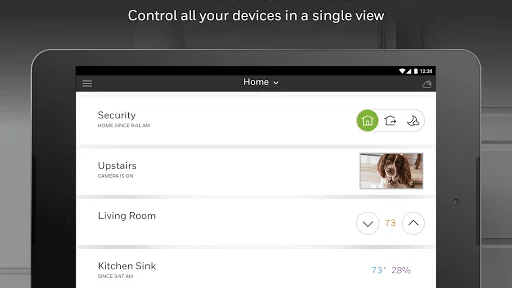
Resideo - Smart Home is an application designed to help users manage and control their smart home devices seamlessly. It offers features such as remote access to home controls, scheduling, and automation of devices like thermostats, security systems, and lighting. Users can also receive real-time alerts and notifications, ensuring their home is always monitored and secure.
Is Resideo - Smart Home compatible with other smart home devices?
Yes, Resideo - Smart Home is designed to be compatible with a wide range of smart home devices. It supports integration with popular smart platforms, allowing users to control and manage different brands and types of devices from one centralized app. This includes compatibility with devices like smart thermostats, cameras, and security systems, enhancing the overall smart home experience.
Pros
- User-friendly interface for easy navigation.
- Integrates with various smart home devices.
- Real-time alerts for home security.
- Customizable automation routines.
- Supports voice control with assistants.
Cons
- Limited device compatibility issues.
- Occasional connectivity drops.
- Requires stable internet connection.
- Subscription needed for premium features.
- Setup can be complex for beginners.













