First Alert by Resideo
- 534.00
- 4.6
- Installs
- 100.00K
- Price
- Free

Screenshots

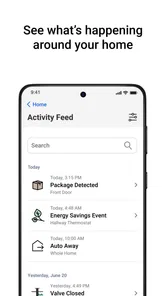
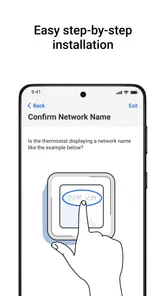
Analysis by Reviewed
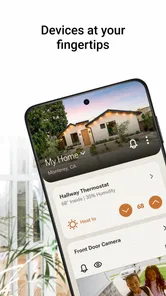
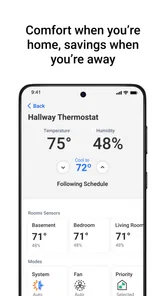
I noticed the difference with First Alert most clearly when I stopped thinking of it as just another smart-home remote. The app brings comfort, safety, video, and water-leak detection into one place, so its usefulness depends less on how impressive a single screen looks and more on whether it helps me understand what is happening at home when I am somewhere else. That makes connectivity central to the experience. When the phone, home devices, and service are communicating properly, the app can make a scattered collection of household concerns feel easier to follow.
First Alert is a free lifestyle app from Resideo Technologies, Inc., aimed at people using compatible First Alert and related smart-home equipment. It is available for Everyone, runs on operating system 11 or later, and the current version is 2.26.0. The app has reached over 100 thousand installs, with a 4.6 average from around 4.6 thousand ratings. Those figures suggest a healthy level of interest, but my recommendation depends more on your equipment and expectations than on popularity.
How First Alert feels when the home is connected
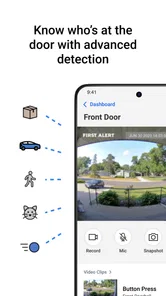
The strongest idea behind the app is consolidation. Instead of treating a smoke or carbon monoxide alarm, a camera, a comfort device, and a water sensor as completely separate products, First Alert gives them a shared mobile destination. I found that valuable because household problems rarely arrive in neat categories. A temperature concern, an unusual video event, and a leak warning can all matter during the same trip away from home.
That convenience also creates the app’s main dependency: its value is tied to communication. A notification or status view is useful only when the relevant information can travel between the device, the service, and my phone. I would not treat the app as a replacement for being able to hear an alarm locally or inspect equipment in person. It works best as an extra layer of awareness rather than as the only safety plan.
In ordinary use, I would open it before leaving home, check the devices that matter most, and then rely on alerts to tell me when something deserves attention. This is a more sensible routine than repeatedly opening every product’s separate app. It also reduces the mental effort of remembering which device belongs in which interface. The benefit is modest on a quiet day, but it becomes much more noticeable when I am traveling or managing a home occupied by other people.
Why network-dependent moments matter
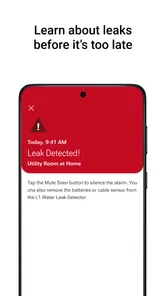
The most important moments are not necessarily the ones when I am browsing settings. They are the moments when a device notices something while I am away. A leak warning, a safety event, or a video-related alert has practical value because it can change what I do next: contact someone nearby, return home, call for help, or simply check whether the event needs action.
That chain makes connectivity part of the product experience rather than a background technical detail. If the phone has a weak connection, if the home network is unreliable, or if a device is not communicating normally, I should be cautious about treating a quiet app screen as proof that everything is fine. The app can centralize information, but it cannot remove the conditions required for that information to arrive.
More From Our News Desk

Weather by Xiaomi Review: Clear at a Glance, Less Clear Up Close

X Under Pressure: Can It Recover When Posting Goes Wrong?

Clash of Clans Is Won Between the Battles

Android Auto Makes the Case for Quieter Car Software

MobiOffice: Transforming Mobile Productivity with Seamless Integration

EA SPORTS FC™ Mobile Soccer: Redefining Mobile Sports Gaming
My useful habit here is to check the app after making a change at home rather than assuming the change has been recognized instantly. For example, after adjusting a device or moving a sensor, I would give the system time to reflect the new situation and then look for the expected status. This small pause avoids a common smart-home mistake: believing that a command has completed simply because it was sent.
Another practical insight is to decide in advance which alerts deserve immediate attention. If every possible notification feels equally urgent, I am more likely to ignore the important one. First Alert is more helpful when I use it as a focused monitoring tool, not as a stream of interruptions. The exact balance will depend on the equipment connected, but the principle is the same: fewer meaningful alerts are easier to act on than constant noise.
Using it from different mobile situations
First Alert makes the most sense when I am not standing beside the equipment. At home, I can often inspect a detector, camera, or water-prone area directly, so the app’s role is mainly convenience. Away from home, it becomes a way to keep a limited view of the household without carrying several separate controls in my head.
I can imagine using it before a weekend away, during a commute, or while staying with family. A quick check can reassure me that the connected parts of the home appear normal, while an alert can prompt a more deliberate response. The app is also relevant for people who share responsibility for a property. One person may be traveling while another is nearby, and a centralized alert can make it easier to explain what needs checking.
Still, I would not recommend installing it on an older phone without checking the operating-system requirement first. The minimum is operating system 11, which is reasonable for a current smart-home tool but rules out some older devices. On a supported phone, the experience should be easier to manage than juggling separate product apps, especially if the household has more than one kind of compatible device.
Mobile convenience has a less obvious trade-off: remote awareness can encourage overchecking. I found it more useful to create a simple routine than to open the app every few minutes. For instance, I might review the home before leaving, keep notifications available for meaningful events, and inspect the app again when I arrive somewhere or before sleeping. That approach preserves the benefit of remote visibility without turning the phone into a constant source of worry.
A realistic day away from home
Imagine leaving for work after a night of heavy rain. At home, a water-leak sensor is positioned near a vulnerable area, while other First Alert equipment handles safety or video duties. During the day, I am not looking for entertainment from the app; I want a clear signal if something needs attention. If a warning arrives, I can decide whether to contact someone nearby or return home. If nothing arrives, I gain some reassurance, but I still understand that the app is reporting connected information, not performing a physical inspection.
That distinction is important. A smart-home app can shorten the time between an event and my response, but it does not guarantee that every possible problem will be detected. Placement, power, network conditions, and the actual capabilities of the connected equipment all matter. First Alert is therefore most valuable when it complements sensible household preparation rather than replacing it.
For a family, the same scenario can work differently. One person might receive the mobile alert while another is close enough to investigate. For a landlord or someone caring for an older relative, the app may provide another way to stay aware of conditions without making constant calls. I would still agree on who is responsible for responding, because an alert without a clear next step is only partial protection.
What happens when communication fails
The difficult part of any connected safety app is failure recovery. If an alert does not appear, I may not know immediately whether there was no event, a device problem, a network interruption, or a phone issue. First Alert can organize the information available to it, but I should not confuse a lack of visible activity with a guarantee that every layer is working perfectly.
My approach would be to treat unusual silence as a reason for a quick check, especially before a trip. I would open the app, review the connected equipment, and make sure the phone itself can receive notifications. If someone is at home, asking them to look at the physical device can provide a faster answer than repeatedly refreshing the phone. This is one area where a traditional alarm’s local behavior remains important: the mobile app adds reach, but it should not become the sole line of defense.
Recovery is also easier when I avoid making several changes at once. If I alter settings, relocate equipment, and change notification behavior together, it becomes harder to identify what caused an unexpected result. I prefer a one-change-at-a-time workflow, followed by a check that the app reflects the intended setup. That may sound cautious, but it is especially sensible when the connected devices involve safety or water damage.
Another limitation is emotional rather than technical. A remote alert can make a small event feel urgent because it arrives without context. A video notification, for example, may require interpretation rather than immediate panic, while a safety or leak warning may call for a different response. I would read the alert carefully, check the relevant view or status, and then choose an action. The app is better at bringing an issue to my attention than at making every decision for me.
Keeping the connected experience manageable
Because First Alert can bring several kinds of household information together, I would be selective about what I connect and how I organize it. The goal is not to place every possible device in one screen just because I can. The goal is to make the information I genuinely need easier to find. A smaller, well-understood setup is preferable to a crowded one that produces alerts I do not recognize.
Data awareness matters here too. Cameras and household sensors can reveal details about daily life, so I would think carefully about who has access to the account and which notifications appear on a lock screen. I would also avoid sharing access casually. The app’s usefulness comes from visibility, but visibility should be deliberate, particularly in a home with children, guests, or multiple residents.
I would review notifications after living with the setup for a while. An alert that seems useful on the first day may become background noise if it appears too often. Conversely, a warning that feels minor may be important in a particular room or season. This kind of adjustment is not a glamorous feature, but it is what makes a connected app sustainable. The best system is the one I still pay attention to after the novelty disappears.
There is also a financial point to consider. The app itself is free, but in-app purchases range from $4.49 to $149.99 per item. That means the overall cost of using the ecosystem may depend on what additional services or equipment-related options I choose. I would look at the complete setup cost before committing, rather than assuming that a free download means a free smart-home experience.
Where it improves on the usual alternatives
The obvious alternative is using separate apps for separate brands or device types. That approach can be perfectly acceptable when a home contains only one product family, and a dedicated app may sometimes offer a deeper control experience for that one device. First Alert’s advantage is the shared view across comfort, safety, video, and water-related concerns. For a mixed household built around compatible First Alert equipment, that can be more practical than switching between several interfaces.
A second alternative is relying on local alarms and occasional manual checks. That is simpler, less dependent on a phone, and still essential for immediate household safety. It is weaker when I am away, because I cannot easily know what happened after leaving. First Alert fills that distance gap, but it also introduces the need to think about connectivity, notifications, account access, and recovery when something stops communicating.
General smart-home platforms may appeal to people who want broad compatibility across many brands or elaborate automations. I would look in that direction if my home already revolves around a different ecosystem or if cross-brand control is the main priority. First Alert is more convincing when the central concern is bringing its supported safety and household devices together, not building the most flexible technology setup possible.
For someone who owns one basic alarm and does not need remote awareness, this app may feel unnecessary. The download costs nothing, but setup time and ongoing attention still have value. I would skip it if I had no compatible equipment, no interest in connected monitoring, or no reliable way to keep up with alerts. The app is not a universal replacement for every smart-home platform; it is a focused companion for a particular family of needs.
Questions I would settle before installing
The first question is whether a phone is supported. The answer is straightforward: the app requires operating system 11 or later. I would check that before planning a household rollout, especially if an older spare phone is intended for a family member.
The next question is whether it replaces the physical equipment. I would say no. First Alert is a mobile layer for connected comfort, safety, video, and water-leak awareness. It can make remote monitoring and response more convenient, but I would continue to treat the installed devices and their local behavior as essential.
People also often wonder whether the free download is the entire cost. It is not safe to assume that. The app is free, while optional in-app purchases are listed between $4.49 and $149.99 per item. I would decide based on the specific devices and services I actually need, not on the download price alone.
Another practical question is whether it suits a home with several responsibilities. In my view, yes, when the household uses compatible First Alert equipment and people agree on who responds to alerts. It is less compelling when everyone already uses unrelated ecosystems or when the main requirement is advanced automation rather than safety and household awareness.
My connectivity verdict
First Alert succeeds when I use it as a calm, organized way to stay informed about a connected home. Its strongest quality is not a single flashy function, but the decision to bring several household concerns into one mobile experience. That is especially useful when I am away and need to know whether a situation deserves action.
Its weakness is inseparable from that strength. The more I depend on remote information, the more carefully I must think about network conditions, notification behavior, device placement, account access, and what to do when communication breaks down. The app can improve awareness, but it cannot turn a connected setup into an infallible one.
With that expectation in place, I would recommend it to people building a First Alert-centered smart home, particularly those who want safety, video, comfort, and leak awareness in one place. I would choose a different route for a single-device household, a heavily mixed-brand setup, or anyone unwilling to manage notifications and connectivity. My overall view is that First Alert is most valuable as a practical remote-awareness layer, not as a substitute for local safety habits or human judgment.
Resideo Technologies, Inc. has positioned this as a lifestyle app, but I experienced it as something more specific: a way to connect everyday household signals with decisions I may need to make from a distance. That is a useful role, provided I remember what the app can show, what the physical devices still do, and when a quiet phone should lead me to check rather than simply assume.
First Alert by Resideo Frequently Asked Questions
Who is First Alert by Resideo designed for?
First Alert by Resideo is aimed at people who want to manage compatible connected home products through one app. Its focus includes comfort, safety, video, and water leak detection, alongside supported First Alert alarm products. It is listed as a Lifestyle app, is free to download, and is suitable for Everyone. Features depend on the products connected to the app.
What is First Alert by Resideo?
First Alert by Resideo is a home-safety app designed to work with compatible First Alert smart smoke alarms, carbon monoxide alarms, and related devices. From the app, users can receive safety notifications, review alarm activity, manage connected products, and access helpful information. The exact features available depend on the specific First Alert device and the Resideo account setup.
What devices are compatible with the First Alert app?
Compatibility depends on the First Alert product model and its connection technology. Some devices may connect through Wi-Fi, while others may require a compatible hub or specific Resideo ecosystem support. Before downloading, check the product packaging, user manual, or official compatibility list to confirm that your smoke or carbon monoxide alarm works with the app and your Android or iOS device.
Can First Alert by Resideo send emergency alerts when I am away from home?
Compatible connected alarms can send notifications to your phone when an alarm event, low-battery condition, fault, or other supported status is detected. This can be useful when you are away from home, but the feature depends on a working internet connection, power, phone notifications, and a properly configured device. The app should supplement, not replace, audible alarms and emergency procedures.
Is First Alert by Resideo free to download and use?
The First Alert by Resideo app is free to download, though in-app purchases range from around $4.49 to $149.99 per item. Some functions may require purchasing compatible First Alert hardware, creating a Resideo account, or using additional connected services. Mobile data, internet, and other service charges may also apply.
Pros
- Clear alerts for smoke
- carbon monoxide
- and other home hazards.
- Works with compatible First Alert and Resideo smart devices.
- Remote notifications help you respond when away from home.
- Simple setup guidance makes device pairing easier for beginners.
- Useful battery and device status information in one place.
Cons
- Features depend on owning compatible First Alert or Resideo hardware.
- Some functions may require a stable Wi-Fi connection and cloud access.
- Compatibility can vary by device model
- region
- and mobile operating system.
- Notifications may be delayed by phone settings or background restrictions.
- The app offers limited value if you use non-compatible safety products.













