Toolr: Time Clock Calculator
- 29.00
- 3.3
- Installs
- 50.00K
- Price
- Free

Screenshots
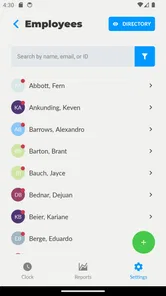
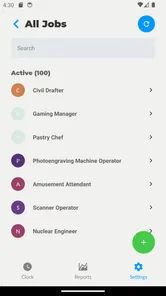
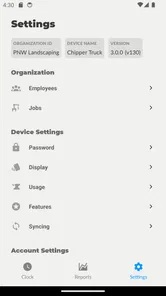
Analysis by Reviewed
When I tried Toolr: Time Clock Calculator, I found that its main idea is refreshingly narrow: record when work starts and ends, then turn those times into a usable view of worked hours. That focus makes it easier to understand than a large business suite, especially if all I need is a quick employee time card rather than scheduling, payroll, invoicing, and team communication in one place.
It is a free business app from Toolr, Inc., aimed at people who want a simple way to keep track of working time on Android. The store places it in the Everyone age category, and its current version is 3.1.2 for devices running Android 7.0 or later. I would describe it as a practical timekeeping tool rather than a complete workforce-management system.
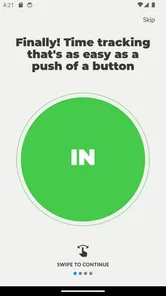
The central promise is the one I kept coming back to during use: clocking in and out should take almost no thought. That matters because time tracking usually fails at the exact moment someone is busy, carrying equipment, serving a customer, or rushing between tasks. A system that asks for too much attention quickly becomes less reliable than a basic note on paper.
One-tap time recording is the whole experience
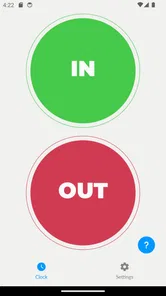
The strongest part of the app is its direct approach to starting and stopping a work period. Instead of building a complicated schedule first, I can treat the phone like a digital punch clock. The benefit is not just speed. It also creates a consistent habit: begin the shift with a tap, finish it with another tap, and use the resulting record when checking hours later.
That simple action has a useful real-world effect. When a worker enters a shop, office, studio, or job site, there is less temptation to postpone recording the start time. The same is true at the end of the day. A time card becomes more trustworthy when it is created at the moment the event happens rather than reconstructed from memory at night.
I also like the distinction between a clocking tool and a general calculator. A calculator can tell me the difference between two times, but it does not encourage a repeatable daily routine. Toolr connects the calculation with the clock-in and clock-out behavior, which is more useful for recurring work. The important value is therefore not a clever formula; it is reducing the number of steps between working and documenting work.
For a small operation, that can be enough. A manager who only needs employees to mark the beginning and end of a shift may prefer this focused workflow over a full business platform. A freelancer can also use the same basic idea to separate work sessions from personal time, although anyone needing detailed client billing should think carefully about whether a dedicated billing app would be a better fit.
More From Our News Desk

Weather by Xiaomi Review: Clear at a Glance, Less Clear Up Close

X Under Pressure: Can It Recover When Posting Goes Wrong?

Clash of Clans Is Won Between the Battles

Android Auto Makes the Case for Quieter Car Software

MobiOffice: Transforming Mobile Productivity with Seamless Integration

EA SPORTS FC™ Mobile Soccer: Redefining Mobile Sports Gaming
What happens during an ordinary workday
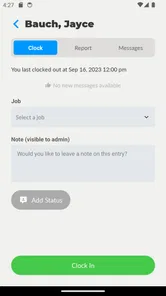
In a realistic example, I might arrive at a small repair business in the morning, open the app, and clock in before beginning the first job. After lunch or a short interruption, the important question is whether I am recording a new work session or simply continuing the existing one. That is where disciplined use matters. The app can make the initial and final entries easy, but I still need a clear personal routine for breaks and split shifts.
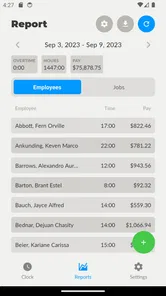
At the end of the day, I clock out and review the recorded time. The calculator aspect is useful when I want to understand how long the shift lasted instead of manually subtracting the start time from the finish time. This is particularly helpful when a shift crosses an hour boundary or when I am dealing with several work periods and do not want to rely on mental arithmetic.
My practical advice is to make clocking in part of an existing action. For example, I would do it immediately after putting on a work badge or unlocking the workplace door. For clocking out, I would pair it with closing the register, packing tools, or sending the final message of the day. Those small routines are more valuable than repeatedly promising myself that I will remember later.
Another useful habit is to check the record before submitting hours to a supervisor or using it for personal calculations. A one-tap system is fast, but speed also means an accidental tap or a missed tap can affect the result. I would not treat the app as a substitute for reviewing a time card, particularly when hours influence wages, invoices, or overtime decisions.
Where the focused design works best
The best scenario for Toolr is a small team with straightforward shifts and a clear need to capture start and finish times. Imagine a café with a few employees, a local workshop, or a family-run service business. In these settings, the owner may not need elaborate labor forecasting. They may simply want a shared expectation that each person records when work begins and ends.
It can also suit a manager who is tired of collecting handwritten timesheets. Paper records can be difficult to read, easy to misplace, and awkward to total. Moving the first step of that process onto a phone makes the record more immediate. The improvement is modest but meaningful: fewer forgotten times and less arithmetic at the end of a pay period.
For an individual worker, the app is useful when the goal is awareness rather than formal payroll administration. If I am trying to see whether a side project is taking two hours or six hours a day, a quick clock-in and clock-out routine gives me a more honest picture than guessing. It can also help me notice when “just one more task” is regularly extending the workday.
The app is less convincing for businesses with complex rules. If different employees have different break policies, multiple pay rates, location requirements, approval stages, or detailed overtime calculations, a dedicated workforce platform will likely save more time in the long run. Toolr’s appeal comes from keeping the workflow small, so adding complicated procedures around it may remove that advantage.
The trade-off between speed and control
My main reservation is that a simple time clock does not automatically solve every timekeeping problem. The easier it is to record a shift, the more responsibility remains with the user to correct mistakes and interpret the record properly. Someone who forgets to clock out may still need a manual explanation. Someone who starts a second session by accident may need to inspect the entry before relying on the total.
That is not a reason to dismiss the app, but it changes how I would deploy it. I would use it as a clean first record, then establish a short review step for the person responsible for hours. In a small business, that could mean checking entries at the end of each day. For personal use, it might mean reviewing the week before copying totals into another document.
There is also a trade-off when comparing it with a spreadsheet. A spreadsheet gives me more freedom to add notes, project codes, break details, and custom formulas. It may be better for someone who already has a carefully designed workflow. Toolr is more convenient at the moment of clocking, but the spreadsheet can offer more control afterward. The right choice depends on whether the bigger problem is recording time or analyzing it.
Compared with a full employee-management service, Toolr is easier to approach but narrower in purpose. Large platforms can connect time records with schedules, payroll, leave, and reporting. That wider system is valuable for a growing company, yet it also brings more setup and more places for a user to get lost. I would choose Toolr when the priority is a quick time card, not when I need an entire administrative center.
The presence of in-app purchases also deserves attention. The app itself is free to install, while individual purchases are listed from $9.99 to $349.99. I would therefore check the exact purchase screen and understand what a paid item provides before committing, especially if the app is being introduced across a team. A free starting point is helpful, but a business should evaluate the eventual cost against its actual workflow rather than assuming every useful part will remain free.
Connectivity, interruptions, and workday routines
A time clock is most useful when it is ready at the moment a shift begins, so I would consider connectivity as part of the practical setup rather than an afterthought. The simplest way to judge whether the workflow suits a workplace is to try it in the places employees actually start and finish their shifts: at the entrance, on a shop floor, or between appointments. If a location has unreliable reception, test the routine there before asking a whole team to depend on it. I would not assume that a tap will be saved or synchronized without a connection unless I had confirmed that behavior in practice.
That matters especially for mobile workers. A technician may begin the day at home, travel to a customer, and finish at a different site; a cleaner may move between buildings, while a market stall worker may be surrounded by activity and have little time to troubleshoot a phone. For these jobs, a quick clock action can be convenient, but only if the worker has a consistent point in the routine where they can safely use the device. The phone should not become a distraction while carrying tools, serving someone, or driving between stops.
If an entry appears missing or seems wrong, I would pause before tapping repeatedly. Repeated attempts can make it harder to tell which action was recorded, so I would first check the visible time card and compare it with my own recollection or a workplace note. If the record still looks unclear, I would flag it for whoever checks hours rather than quietly estimating a correction. That small recovery habit is more dependable than treating the displayed total as automatically authoritative.
There is also a sensible data-conscious way to introduce the app: keep the first trial limited to the timekeeping task, explain who will review the entries, and avoid collecting extra details that the business does not need for that purpose. Because a time record can affect pay and accountability, workers should know how their entries will be used and whom to contact when something goes wrong. This is a management practice, not a special feature; the app’s narrow purpose does not replace clear workplace rules.
Who will get the most from it
I think the strongest audience is a small business owner, supervisor, or independent worker who wants less friction at the beginning and end of a shift. The app’s value is greatest when the same people work regular, understandable periods and do not require a long chain of approvals. In that setting, the one-tap approach can encourage better habits without forcing everyone to learn a large system.
It may also help a person who has tried keeping hours in a notebook but repeatedly forgets the exact times. The phone is already nearby, and a dedicated action is easier to remember than opening a blank note and formatting every entry. I would still recommend pairing it with a weekly review, because reliable timekeeping comes from both convenient recording and careful checking.
I would be more cautious about recommending it to a company that needs strong oversight of remote workers, detailed project allocation, or formal payroll exports. Those needs call for more than a basic time clock. Likewise, if a worker moves between many clients during the day, a project timer with labels may provide more useful information than a simple shift record.
The app has attracted over fifty thousand installs, with an average rating of 3.3 from around ninety ratings and twenty-nine written reviews. I read that overall response as a sign that the concept is useful to some people but not universally satisfying. For me, that matches the product’s character: it can be a sensible answer to a specific problem, but it should not be mistaken for a complete business platform.
My final take on the daily workflow
After using it, I see Toolr as a tool for making the first and last moments of a shift more dependable. Its best feature is not a long list of options; it is the decision to keep clocking in and out close at hand. That simplicity can improve real behavior, particularly for small teams that currently rely on memory or paper.
The key trade-off is straightforward: you gain a faster time card, but you must provide the review and correction process yourself. If that arrangement suits your workplace, the app is worth trying because the barrier to entry is low and the basic purpose is immediately clear. If your operation needs scheduling, payroll integration, project-level billing, or detailed employee controls, I would look at a broader alternative instead.
For my own recommendation, I would start with one small group and one ordinary workweek. Ask everyone to clock in and out as part of an existing routine, then compare the records with the hours people expected to work. That trial will quickly show whether the app’s focused design is an advantage or whether your needs have already grown beyond it. In the right setting, Toolr does one everyday job neatly: it turns the act of starting and finishing work into a more consistent record.
Toolr: Time Clock Calculator Frequently Asked Questions
What devices and operating systems can run Toolr: Time Clock Calculator?
Toolr: Time Clock Calculator is an app for mobile devices, and its current version is 3.1.2. On Android, it requires version 7.0 or later, so check your device’s software version before downloading. The app is in the Business category and is rated for Everyone, making it broadly accessible to users who want a straightforward work-time calculator.
Who develops Toolr: Time Clock Calculator, and how established is it?
Toolr: Time Clock Calculator is developed by Toolr, Inc. It was released on December 7, 2016, and has reached over 50,000 installs. Its average rating is 3.3 from 91 ratings, with 29 written reviews. Those figures offer a quick sense of its reach and user feedback, though individual experiences can vary depending on how someone uses the app.
What is Toolr: Time Clock Calculator used for?
Toolr: Time Clock Calculator is designed to help users calculate working hours, shift durations, breaks, overtime, and potentially total pay based on entered time data. It can be useful for employees, freelancers, managers, and anyone who needs a quick way to check a timesheet without doing manual calculations. Before downloading, make sure its available calculation options match the type of work schedule you use.
Can Toolr calculate overtime, breaks, and overnight shifts?
The app is intended for practical timekeeping calculations, including determining the length of a work period after subtracting breaks. Depending on the version and configuration, it may also support overtime calculations and shifts that pass midnight. Users with rotating schedules or complex overtime rules should carefully review the results, because company policies, local labor laws, and special pay rates may require calculations beyond a simple time calculator.
Is Toolr: Time Clock Calculator suitable for tracking employee attendance?
Toolr can be helpful for estimating or checking attendance hours, but it should not automatically be treated as a complete workforce-management system. A calculator is different from an attendance platform with employee profiles, clock-in records, approvals, payroll exports, and cloud synchronization. It is best suited to personal use or quick verification unless the app specifically provides the management features your workplace requires.
Pros
- Quickly calculates total hours from start and end times.
- Supports break deductions for more accurate work-hour totals.
- Simple interface makes it easy to use without a learning curve.
- Useful for tracking overtime
- shifts
- and irregular work schedules.
- Helps reduce manual calculation errors when totaling daily hours.
Cons
- May lack advanced timesheet and payroll management features.
- Users may need to enter each shift manually.
- Limited customization for complex workplace policies or rounding rules.
- Results depend on accurate input and may not sync with work calendars.
- Some features or an ad-free experience may require payment.











