

Togo RV – RV GPS and more
- 237.00
- 2.8
- Installs
- 100.00K
- Price
- Free

Screenshots
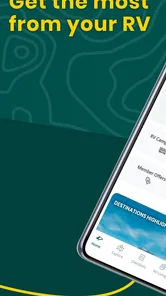
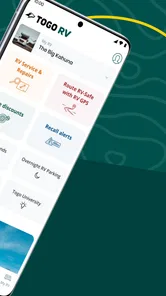
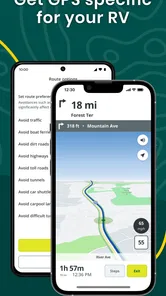
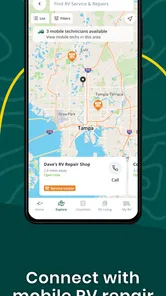
Analysis by Reviewed
I approached Togo RV as a practical travel companion rather than another general map app. Its focus is clear: it brings RV navigation, trip preparation, learning material, and checklists into one place. That combination makes sense for people who want help with the details surrounding a road trip, not only a line drawn between two destinations. My experience is that its value depends heavily on how you travel. If you drive a motorhome or tow a trailer and want one app to support planning as well as movement, it deserves a serious look. If you only need fast point-to-point directions, a familiar navigation app may feel simpler.
This is a free Travel & Local app from Roadpass Digital, aimed at everyone and available for Android devices running at least Android 6.0. It has passed the early-experiment stage, having been released in September 2018, and the current version is 1.4.55. The app has more than 100 thousand installs, while its average sits at 2.8 from 464 ratings and 237 reviews. Those figures tell me to approach it with interest but also with realistic expectations: it has a meaningful user base, yet the experience is not universally smooth.
How I would decide whether Togo RV belongs on my phone
The first question is not whether the app has many tools. It is whether those tools match the way you actually prepare for an RV trip. A driver who regularly checks vehicle limits, route suitability, campsite details, and departure tasks has more to gain than someone who treats an RV like a regular car. The app’s all-in-one approach is useful precisely because RV travel creates extra decisions before the engine starts.
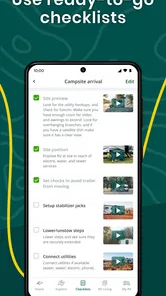
I would also separate navigation needs from planning needs. A dedicated RV GPS is expected to think differently from an ordinary map, because a tall, wide, heavy, or towing vehicle cannot always follow the same roads as a small car. At the same time, a navigation feature is only one part of a successful trip. Checklists and how-to material can help a newer owner remember preparation steps that are easy to overlook when excitement takes over.
That distinction matters when comparing it with the usual alternatives. A standard mapping app may be better for quick traffic-aware directions, familiar place searches, or spontaneous city driving. A paper checklist or notes app may be enough for a confident owner who already has a reliable routine. A specialist RV service may suit someone who wants a deeper planning workflow. Togo RV sits between these choices: broader than a simple GPS, but not necessarily the perfect replacement for every specialist tool.
The strongest reason to try it
The best argument for installing it is the connection between preparation and travel. Instead of treating the journey as only a route, Togo RV recognizes that RVing involves habits, equipment, and decisions before departure. I like that perspective because it reflects how trips actually fail. A missed preparation task can cause more trouble than taking a slightly slower road.
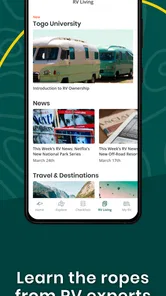
For a first-time RV renter, the educational side may be more valuable than the map itself. How-to content can give a beginner a starting point for understanding the vehicle and the trip. I would use it before departure, when there is time to read and turn advice into a personal checklist. That is a better workflow than opening guidance for the first time while parked at a busy fuel station.
More From Our News Desk

 Weather - By Xiaomi
Weather by Xiaomi Review: Clear at a Glance, Less Clear Up Close
Xiaomi’s weather app makes everyday forecasts quick to scan, but its calm surface can leave useful details and recovery paths harder to find than they should be.

 X
XX Under Pressure: Can It Recover When Posting Goes Wrong?
A resilience-focused review of X, examining setup, mistaken posts, interruptions, weak connections, and the gaps that matter when recovery needs to be dependable.

 Clash of Clans
Clash of Clans Is Won Between the Battles
Its raids are quick; its community is a long-term project of coordination, teaching, rivalry, and shared responsibility—with all the friction that entails.

 Android Auto
Android Auto Makes the Case for Quieter Car Software
The car interface is no longer judged by how much it can do, but by how quietly it helps. Android Auto shows what drivers now expect—and what still gets in the way.

 MobiOffice: Word, Sheets, PDF
MobiOffice: Transforming Mobile Productivity with Seamless Integration
MobiOffice: Word, Sheets, PDF is redefining mobile productivity with a surprising blend of functionality and innovation.

 EA SPORTS FC Soccer Mobile 26
EA SPORTS FC™ Mobile Soccer: Redefining Mobile Sports Gaming
Dive into EA SPORTS FC™ Mobile Soccer, where immersive gameplay and strategic depth transform mobile sports gaming.
Latest News



Experienced owners can use the same structure differently. Rather than reading every article, they can treat the app as a central launch point for recurring trip preparation. The benefit is not that an experienced traveler suddenly forgets everything; it is that a consistent digital routine reduces the chance of skipping one small task during a rushed morning.
A realistic weekend workflow
Imagine leaving on a Friday afternoon with a loaded motorhome. On Thursday evening, I would use the preparation material to review the trip, then work through the checklist instead of relying on memory. I would confirm that the route makes sense for the vehicle, note the planned stops, and leave enough time to correct a problem before departure. On Friday, I would use the navigation portion during the drive and keep the planning information available for the next stage.
The useful insight here is that the app should not be treated as something opened only after the vehicle moves. Its strongest role may begin earlier. A driver who waits until the last minute loses much of the value of the checklists and how-to guidance. I would make it part of a two-stage habit: prepare at home, navigate on the road.
There is also a practical trade-off. Combining several functions can reduce app switching, but it can also make the experience feel less focused than a single-purpose tool. When I want immediate directions, I prefer a clear path to navigation. When I am planning, I appreciate supporting material. Users should expect to move between different kinds of content rather than finding one uninterrupted map experience.
What the navigation role means in practice
The phrase RV GPS sets an important expectation, but I would still use judgment rather than surrendering every decision to the app. Vehicle dimensions, towing setup, road restrictions, weather, and local signs all matter. Even a route designed for RV use should be checked against the real vehicle and current conditions. I consider the app a planning aid and driving companion, not a substitute for attention.
That is especially important when a trip leaves major highways. A route that looks convenient on a screen may feel very different behind the wheel of a large vehicle. I would review the next section of the journey while stopped, not attempt to solve route questions during a difficult turn. The app can help organize the trip, but the driver remains responsible for confirming that the road is suitable.
For this reason, I would keep a backup habit. Save the important destination details in a way you can consult safely, and avoid assuming that one application will handle every unusual road situation. This is not a criticism unique to Togo RV; it is a sensible rule for any navigation product used with a larger vehicle.
Where it is more useful than a collection of ordinary apps
Togo RV’s advantage appears when the alternative is a messy combination of a map, scattered notes, browser searches, and remembered advice. One general navigation app can guide you, but it usually does not become your RV preparation center. A notes app can hold a checklist, but it does not naturally connect that list with travel planning. Togo RV’s appeal is the attempt to place those needs under one roof.
I find that especially helpful for couples or families who share responsibility. One person may handle the route while another checks preparation tasks. A central app gives both people a common reference point. It also makes it easier to build a repeatable process for different trips instead of creating a new collection of notes each time.
Another non-obvious strength is its usefulness as a transition tool. Someone moving from occasional rentals toward more regular RV travel may not yet know which routines deserve permanent attention. The how-to material and checklists can help turn vague anxiety into a sequence of manageable actions. That does not make the user an expert, but it can make preparation less improvised.
Where another category may be the better choice
I would not recommend relying on Togo RV alone if your priority is the fastest possible everyday navigation. For ordinary car journeys, a mainstream map app may be more familiar and may fit spontaneous searches better. If you already have a trusted RV navigation solution and a well-tested paper checklist, adding another all-in-one app could create duplication rather than convenience.
It may also be a poor fit for travelers who dislike mixed-purpose interfaces. Some people want a map, nothing else, and find educational pages or checklists distracting. Others prefer to keep trip planning in a desktop workflow, print their documents, and use their phone only for directions. In those cases, the app’s breadth is not automatically an advantage.
The average rating of 2.8 is another reason I would test it before making it central to a long journey. I would install it early, explore the parts relevant to my vehicle, and try the planning routine on a short outing. That approach costs little because the app is free, while it reveals whether the layout and workflow suit you before a major vacation.
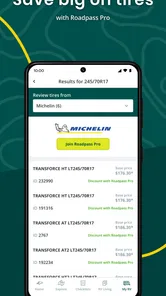
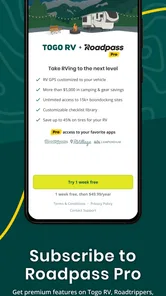
There is a second trade-off around purchases. The app is free to install, but in-app items range from $0.99 to $59.99 each. I would therefore check what is included in the free experience before building a complete plan around it. A free download can be a sensible way to evaluate the concept, but users should understand that some optional content or tools may involve additional spending.
How to reduce friction before a long trip
My first tip would be to use the app in a quiet setting and create a personal sequence from its material. Do not merely read a how-to page and assume the information has become a habit. Convert the useful points into actions you can verify before leaving. The app’s checklist concept is most effective when it supports your own vehicle, route, and travel style rather than replacing your judgment.
My second tip would be to separate “must do before departure” from “useful to know.” That distinction prevents educational content from becoming a long, stressful list. Essential preparation should be quick to check. Background guidance can be read later. This makes the app more practical for a busy departure day and helps prevent information overload.
My third tip is to test the complete workflow with a short local drive. Start with planning, review the route while parked, and then use the navigation portion in real conditions. This exposes any confusing transitions before you are far from home. It also answers a question many users have after reading a description: will the app feel like one coherent tool or several separate features placed together?
I would also update my expectations about what an RV GPS can solve. It can support route decisions, but it cannot inspect your vehicle, interpret every temporary road sign, or guarantee that a changing local condition will be represented perfectly. Keep an eye on clearance information, restrictions, and the physical reality around you. The safest workflow combines the app with common sense and a second look at critical sections.
What switching to it really costs
Switching is relatively easy if you are starting from scratch. You can install the free app, learn its sections, and try it without immediately committing money. The real cost is time: you need to understand where navigation, checklists, and learning material fit into your routine. That setup effort is worthwhile only if you will actually use more than one part of the app.
For an established RV traveler, the cost is different. You may already have routes saved elsewhere, a paper inspection routine, and a preferred navigation habit. Moving everything into a new system can create uncertainty during the first few trips. I would not replace a trusted process overnight. Instead, compare Togo RV with your existing method during a low-risk outing and keep the old backup until the new routine feels dependable.
Purchases deserve the same cautious approach. Since individual in-app items can cost from $0.99 up to $59.99, I would decide what problem each purchase solves before paying. Do not buy simply because the app contains several categories of material. The right question is whether a particular item improves your actual planning process enough to justify the expense.
Who should install it first
I would put this app near the top of the list for new RV owners, occasional travelers who want more structure, and families sharing trip preparation. It is also a reasonable option for someone who has been collecting RV advice in random places and wants a single starting point. The combination of navigation, educational guidance, and checklists gives these users a practical framework.
I would be more selective with veteran drivers who already have a mature system. They may appreciate the convenience, but they should compare it against the tools they already trust rather than assuming an all-in-one app is automatically better. Likewise, a person who needs only normal car directions probably does not need the extra RV-focused layer.
Because the content rating is Everyone, the app is suitable for a broad audience from an age-classification perspective. That does not mean every feature will suit every travel style. A beginner may want the guidance, while an expert may want only a fast route. The same product can be useful to both, but for very different reasons.
My recommendation after weighing the alternatives
Togo RV is worth trying as a preparation-first companion, not as an unquestioned replacement for every navigation tool. I like its attempt to connect the parts of RV travel that are often separated: learning what to do, remembering what to check, and planning how to get there. That makes it more relevant to RV life than a generic map alone.
Still, I would test it before a major trip, especially because the average rating is modest and the app includes paid items despite being free to download. Use it on a short journey, evaluate the navigation workflow, and see whether the checklists genuinely reduce your mental load. If the app helps you prepare consistently and keeps your trip information organized, its all-in-one design can be a real convenience.
My final choice would be straightforward. Install it if you want guidance around the whole RV experience and are willing to check its fit before depending on it. Choose a simpler mapping alternative if your only concern is ordinary directions, or stay with a specialist setup if you already have one that handles your vehicle and planning needs exceptionally well. For me, Togo RV is most convincing when used before the journey and alongside sensible driving habits, rather than treated as the only source of truth once the road gets complicated.
Togo RV – RV GPS and more Frequently Asked Questions
Is Togo RV compatible with my Android device?
Togo RV is an Android app that requires Android 6.0 or later. Before downloading, check your device’s operating system version and make sure you have enough space for the app and any content you choose to save. It is also available for iOS, so RV travelers using different mobile platforms can look for the corresponding version in their device’s app store.
Who makes Togo RV, and what is the app’s age rating?
Togo RV is developed by Roadpass Digital and is listed for everyone. Its focus is RV travel, with navigation and practical resources intended to support trip planning and life on the road. The age rating can help families understand the app’s general audience classification, while individual users should still consider whether its features and any optional purchases suit their needs.
What is Togo RV – RV GPS and more used for?
Togo RV is designed to help RV owners plan trips, navigate routes, and find useful stops along the way. It combines RV-focused GPS guidance with travel-planning tools, campground information, reviews, and resources for maintaining and enjoying a motorhome or travel trailer. It is intended for recreational vehicle travel rather than ordinary car navigation, so the experience is centered on RV-specific needs.
Does Togo RV provide GPS navigation suitable for my RV?
The app is built around RV travel and can help users plan routes with vehicle details in mind, such as the RV’s dimensions and travel preferences. Before relying on it for a long trip, carefully enter your height, length, width, and weight information where supported, and compare the suggested route with road signs. GPS data can occasionally be incomplete or outdated, especially in remote areas, so it should complement—not replace—common-sense driving and official restrictions.
Can I use Togo RV to find campgrounds and RV-friendly places?
Yes, campground discovery is one of the app’s most useful features. You can browse destinations and look for places to stay, while reviews and listing information may help you compare facilities, location, and suitability for your setup. Availability, prices, amenities, and campground policies can change, however. It is wise to confirm important details directly with the campground before making a reservation or beginning a long drive.
Pros
- RV-specific routing helps avoid unsuitable roads and low-clearance hazards.
- Supports offline maps for trips through areas with weak mobile coverage.
- Includes useful campsite and RV service location information.
- Large
- clear navigation display is easy to read while driving.
- Trip planning tools help organize stops
- fuel
- and overnight locations.
Cons
- Some advanced navigation features may require a paid subscription.
- Map data can become outdated without regular updates or downloads.
- Battery and data usage may increase during long navigation sessions.
- Routing accuracy depends on the quality of local map information.
- The interface may feel complex until all RV settings are configured.











