TiviMate IPTV Player
- 430.00
- 4.1
- Installs
- 1.00M
- Price
- Free

Screenshots

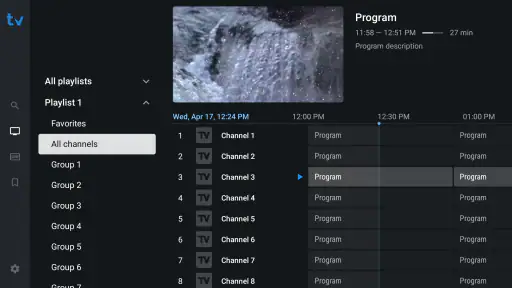
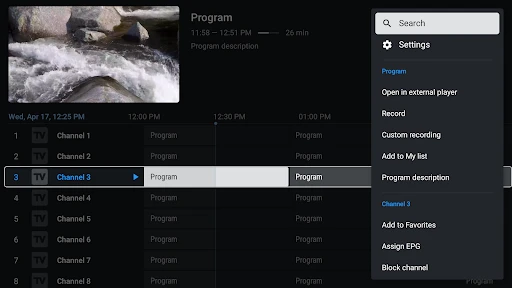
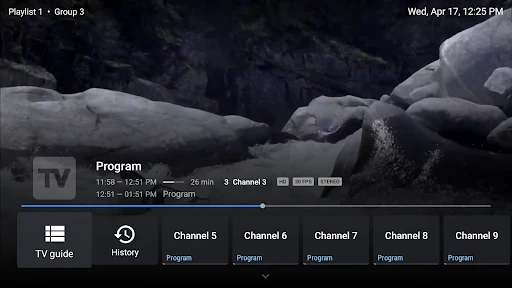
Analysis by Reviewed
For a first-time user, the main thing to understand about TiviMate IPTV Player is that it is a player, not a source of TV channels. You bring a playlist from an IPTV provider, then use the app to browse and watch what that playlist makes available. That distinction makes the first step less mysterious: if you open the app without a playlist, there may be nothing to watch yet. I find it most useful for people who already have legitimate IPTV access and want a more organized way to view it on a compatible device.
What to expect before you install
This is a video player in the Video Players & Editors category, developed by Armobsoft FZE. It is free to install, rated for Everyone, and its current version is 5.2.0. It has a 4.1 average from around 7,100 ratings and over 1 million installs, so it has a sizable audience, though those numbers alone cannot tell you whether it will suit your playlist or device.
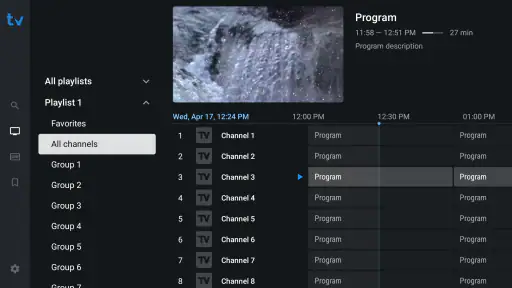
The practical appeal is the TV-style organization: rather than treating every stream like a separate video, the app brings channel listings and schedule information together. If you mostly watch one or two streams casually, a basic player may be simpler. If you switch among channels, check what is on next, or want a more guided browsing experience, this approach is more compelling.
Getting from install to a working playlist
After installing, look for the option to add a playlist and use the connection details supplied by your IPTV provider. Take care when entering them; a small typo can leave the list empty or prevent it from loading. The provider is also the right place to ask about playlist access or account details. TiviMate organizes playback, but it does not replace that service.
Once the playlist loads, give the guide time to populate and check whether your provider supplies program information. A channel list and an electronic program guide are related but not identical: channels may appear even when schedule details are sparse. That is a common point of confusion, and it helps to separate a playback problem from missing guide data before changing settings at random.
The first useful test
I would start by opening one familiar channel and letting it play for a short while, then return to the guide and check whether the program title and time look sensible. This simple test checks the parts you will actually rely on: the playlist is recognized, a stream opens, and the guide is useful enough to browse. If the channel does not play, confirm the playlist details and your connection before assuming the app itself is at fault.
For an everyday example, imagine getting home in time for the second half of a match. Instead of opening channels one by one, you can use the guide to locate the relevant listing, and, where your provider supports catch-up, go back to the missed portion. Catch-up depends on the service and the content; having the player does not make every channel rewindable. That distinction is worth knowing before you plan around it.
More From Our News Desk

Clash of Clans Is Won Between the Battles

Android Auto Makes the Case for Quieter Car Software

MobiOffice: Transforming Mobile Productivity with Seamless Integration

EA SPORTS FC™ Mobile Soccer: Redefining Mobile Sports Gaming

How Microsoft OneDrive Became a Mobile Productivity Giant

How Google Translate Breaks Language Barriers Effortlessly
Exploring the Features
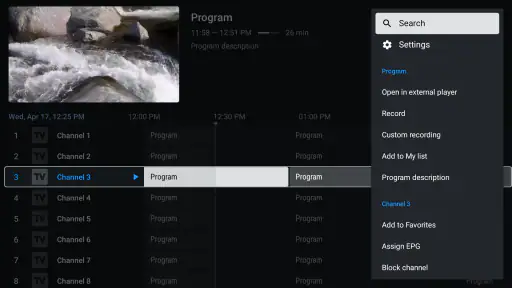
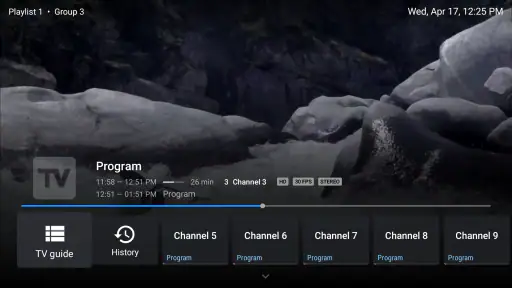
First off, the user interface of TiviMate IPTV Player is sleek and intuitive. Unlike other clunky apps, navigating through the menus feels smooth and responsive. The app allows you to add multiple playlists and even has a catch-up option for those times you miss your favorite show. I mean, who hasn't been caught up with work and missed the start of a game? With TiviMate, you can easily scroll back and catch up on what you missed.
Personalization Galore
One thing I really appreciate about this app is the level of personalization it offers. You can customize your viewing experience with different themes, and the multi-view feature is a game-changer. Imagine watching a cooking show while keeping an eye on the news – all on the same screen! It's like having a mini command center right on your phone.
Performance and Usability
Performance-wise, TiviMate doesn't disappoint. The streaming quality is top-notch, provided you have a decent internet connection. I’ve had hardly any buffering issues, which is a big win in my book. The app supports both Android and iOS, so no matter what device you’re using, you’re covered.
Setting up the app is a breeze too. With a few taps, you can add your IPTV provider and start watching. The electronic program guide (EPG) is detailed and makes it easy to see what's on and what's coming up. It’s like having a TV guide right in your pocket!
Choosing how much to customize
The number of options can be an advantage, but I would not customize everything on day one. First confirm that the playlist and guide behave as expected; then change the theme or arrange the viewing layout to match your habits. That order makes it easier to tell whether a problem comes from the source, the connection, or a setting you just changed.
Multi-view is most useful when two live programs genuinely matter at once, such as following a match while checking another broadcast. It is less appealing on a small screen if the reduced views make text or action hard to follow. In that case, switching between channels is more comfortable than keeping both visible. The feature is a choice, not a reason to force a split-screen routine.
Where it fits among other players
Compared with a plain video player, which is usually built around opening individual files or streams, TiviMate is better suited to playlist browsing and a channel guide. Compared with a provider’s own app, it may feel more focused on arranging channels and making navigation familiar, while the provider app can be the easier choice if you want its service’s own account tools and support in one place. I would choose based on the job: a simple player for occasional one-off viewing, the provider app for service-specific features, and this app when a TV-style guide is the part you value.
It is also not the right choice if you expect an app installation alone to deliver channels, or if you do not have playlist access. Before paying for any IPTV service, check what it offers and whether it works with the player in the way you need. The app itself is free, with in-app purchases ranging from under a dollar to just under thirty-four dollars per item; I would review the purchase options in context rather than assume you need one to complete your first test.
Performance and practical trade-offs
When playback stutters, I would test another channel before changing several settings. If only one stream has trouble, the issue may be specific to that source; if several fail, check the connection and playlist first. This small troubleshooting habit saves time and avoids making the setup harder to understand. A stable connection matters, and no player can guarantee smooth playback when the stream or network is unreliable.
There is a comfort trade-off too. A guide is handy when choosing what to watch, but it can be more information than someone wants when they simply tap a familiar channel and settle in. If you watch mostly on a phone, consider whether you prefer browsing a full schedule or a simpler list; if you use a larger screen, the guide and multi-view options may feel more worthwhile. The best fit depends on how you actually watch, not how many settings an app offers.
Making the routine work for you
Once the basics are steady, I would make a short list of the channels I actually use rather than relying on a large playlist as a substitute for organization. A provider may include many entries that are duplicates, inactive, or simply irrelevant to your household. Starting with the channels you regularly watch keeps browsing practical and makes it easier to notice when a familiar entry stops working. It also gives the guide a clear purpose: finding something specific, not scrolling endlessly.
If you share the screen with someone else, it is worth agreeing on a simple browsing routine before changing lots of personal settings. One person may prefer jumping straight to a known channel; another may use the schedule to decide what to watch. The useful compromise is to keep the initial setup understandable, then adjust only the parts that solve a real annoyance. That approach is particularly helpful when troubleshooting, because you can explain what changed rather than trying to remember a long chain of tweaks.
Questions to settle before relying on it
A common first-time question is whether installing the player is enough to start watching. It is not: you need a playlist and valid access from an IPTV provider. Another is whether a populated channel list guarantees a complete guide. It does not; schedule details depend on the information available through the service, so a channel can play even if the program titles are missing or incomplete. Keeping those two expectations separate prevents a lot of unnecessary setup changes.
People also wonder whether catch-up will cover anything they missed. I would treat it as a provider-dependent convenience, not a blanket recording service. Check whether the specific channel and program offer it before counting on a replay. Likewise, if a stream buffers, the app is only one possible cause: the source and the network can matter just as much. Test a second channel and confirm the connection before deciding that a different player will fix the issue.
Who will get the most from it
I would recommend it to someone who already has IPTV access, watches several channels, and values a guide that makes live viewing feel closer to browsing television than opening isolated streams. It is especially useful when your viewing changes from day to day: checking a schedule before settling in, moving between news and sports, or keeping more than one playlist organized. Those habits give the interface a real job to do.
I would steer away from it if you want a ready-made channel service, do not want to manage playlist details, or mainly watch individual video files. A provider’s own app may be less effort for account management and service-specific help, while a basic media player can be a cleaner fit for occasional playback. If you are deciding whether to pay for IPTV access, assess the provider separately; a polished guide cannot make an unsuitable service worthwhile.
Final Thoughts
In conclusion, if you're on the hunt for a reliable and feature-packed IPTV player, TiviMate IPTV Player should be at the top of your list. Its user-friendly interface, extensive customization options, and solid performance make it a standout choice for streaming enthusiasts. Whether you're a sports fan, a news junkie, or just love binge-watching series, this app has got you covered.
So, if you're ready to take your TV viewing experience to the next level, give TiviMate a try. With its impressive array of features, it’s bound to keep you entertained for hours on end.
My recommendation is to begin with one playlist, one familiar channel, and a quick check of the guide before exploring the extras. That gives you a clear answer to the most important first-time question: does your source work comfortably with this player? If it does, the guide, multiple playlists, themes, and multi-view can make regular viewing feel better organized. If you wanted channels included automatically, need a simpler one-tap experience, or rely on a provider’s account features, another option may fit better. For the right viewer, though, it is a useful way to bring IPTV viewing into a more navigable routine.
TiviMate IPTV Player Frequently Asked Questions
Can I use TiviMate IPTV Player without an IPTV subscription?
TiviMate is a player for IPTV, not a television service that supplies channels. To watch live content, you need a playlist or access details from an IPTV provider. You can install and explore the app, but having a provider’s playlist is what lets you load channels and use the player for viewing.
What is TiviMate IPTV Player and how does it work?
TiviMate IPTV Player is a popular application that allows users to stream live television channels via IPTV (Internet Protocol Television). The app is designed to work with IPTV services that provide M3U playlists. Users can import these playlists into the app, enabling them to watch their favorite TV channels on any compatible device. It offers a user-friendly interface with features like program guides, catch-up TV, and more, enhancing the overall viewing experience.
Is TiviMate IPTV Player free to use?
TiviMate IPTV Player offers both free and premium versions. The free version provides basic functionalities, but to unlock advanced features such as multiple playlist support, recording, and more customizable options, users need to subscribe to the premium version. The premium version is available through a yearly subscription, which can be purchased directly within the app. The app is free to download, with in-app purchases ranging from $0.99 to $33.99 per item.
Does TiviMate IPTV Player work on iPhone or iPad?
TiviMate IPTV Player is primarily designed for Android devices, including Android TV and Amazon Fire TV. It is not available for iOS devices, so iPhone and iPad users should not expect to install it as a native app. If you are choosing a player specifically for an Apple device, check that the alternative you select supports your device and IPTV playlist format.
What devices are compatible with TiviMate IPTV Player?
TiviMate IPTV Player is primarily designed for Android devices, including Android TV and Amazon Fire TV. It can be installed on any device running Android 5.0 or higher. Unfortunately, TiviMate is not available for iOS devices at this time. Users should ensure their device meets the minimum system requirements to enjoy a smooth streaming experience with the app.
Pros
- User-friendly interface
- Supports multiple playlists
- Catch-up TV feature
- Customizable appearance
- Reliable performance
Cons
- Limited EPG support
- No built-in channels
- Requires premium for full features
- No native Chromecast support
- Complex initial setup
- Category
- Video Players & Editors
- Version
- 5.2.0











