

Timeshifter® Jet Lag
- 706.00
- 4.4
- Installs
- 100.00K
- Price
- Free

Screenshots
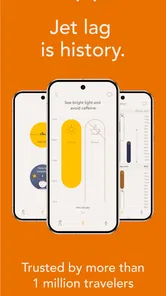

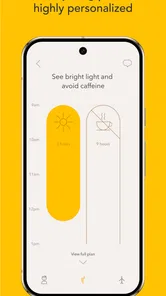
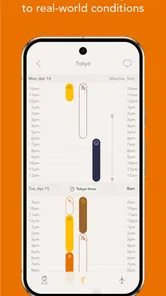
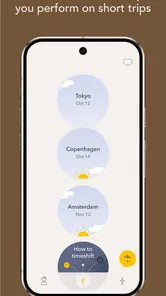
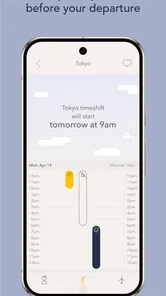
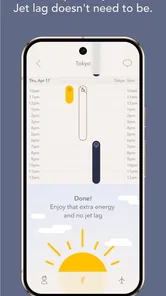
Analysis by Reviewed
I usually think of jet lag as a problem to manage rather than eliminate, but Timeshifter® Jet Lag gives that problem a more practical shape. Instead of leaving me to guess when to sleep, seek light, or avoid light, it turns a trip into a personal schedule built around my flight and sleep routine. That makes it especially interesting in a household where one person travels often, another helps organize the trip, or several people need to coordinate around the same arrival.
This is a free travel and local app from Timeshifter Inc., aimed at reducing jet lag through personalized timing advice based on sleep and circadian science. It is available for Everyone, and its current version is 2.6.1. The app has reached over 100K installs and holds a 4.4 average from around 1.9K ratings, which gives it a respectable presence without making popularity the main reason to use it.
My overall impression is that its value comes from turning vague advice into a sequence of decisions. The trade-off is that the plan only works if I actually follow it. If I ignore the recommended sleep window, stay in bright light at the wrong moment, or treat the schedule as optional, the app cannot compensate for that. It is a planning tool, not a magic reset button.
How it works when a household shares the travel problem
A realistic example is a couple flying across several time zones with different sleep habits. One person may fall asleep easily on planes, while the other normally needs a careful bedtime routine. A parent may also be arranging the journey around a child’s school timetable, even though the app itself should not be treated as a family-management system. In that situation, I would use Timeshifter to build a plan for the individual traveler who needs the most help, then discuss the important parts with everyone else.
That distinction matters. The schedule belongs to the person whose sleep pattern and trip details were entered. It should not be assumed that one plan automatically fits a partner, roommate, or child. Circadian timing is personal, and even two adults on the same flight can have different starting routines. I would not copy one traveler’s recommendations onto another person without checking the differences in their normal sleep, destination, and ability to rest.
The app is most useful before departure, when I still have time to prepare. A plan can influence when I begin shifting my sleep, how I think about light exposure, and whether I arrange a nap or a quieter period during the journey. That preparation is easy to overlook because travel planning usually focuses on tickets, luggage, and transport. Here, the sleep plan becomes another part of the itinerary.
For a shared trip, I would keep the app open on the traveler’s own device and use a separate conversation for coordination. The other person does not need to follow every detail. It is enough to agree on practical points: when the traveler may want darkness, when a meal or activity could interfere with rest, and whether the group should avoid scheduling something demanding immediately after arrival.
More From Our News Desk

 Weather - By Xiaomi
Weather by Xiaomi Review: Clear at a Glance, Less Clear Up Close
Xiaomi’s weather app makes everyday forecasts quick to scan, but its calm surface can leave useful details and recovery paths harder to find than they should be.

 X
XX Under Pressure: Can It Recover When Posting Goes Wrong?
A resilience-focused review of X, examining setup, mistaken posts, interruptions, weak connections, and the gaps that matter when recovery needs to be dependable.

 Clash of Clans
Clash of Clans Is Won Between the Battles
Its raids are quick; its community is a long-term project of coordination, teaching, rivalry, and shared responsibility—with all the friction that entails.

 Android Auto
Android Auto Makes the Case for Quieter Car Software
The car interface is no longer judged by how much it can do, but by how quietly it helps. Android Auto shows what drivers now expect—and what still gets in the way.

 MobiOffice: Word, Sheets, PDF
MobiOffice: Transforming Mobile Productivity with Seamless Integration
MobiOffice: Word, Sheets, PDF is redefining mobile productivity with a surprising blend of functionality and innovation.

 EA SPORTS FC Soccer Mobile 26
EA SPORTS FC™ Mobile Soccer: Redefining Mobile Sports Gaming
Dive into EA SPORTS FC™ Mobile Soccer, where immersive gameplay and strategic depth transform mobile sports gaming.
Latest News



This is one of the less obvious strengths of a structured jet-lag plan. It gives a household a common reference point without pretending that everyone needs identical behavior. Instead of saying, “I’m tired, so I should sleep whenever I can,” the traveler can explain that a particular part of the journey is being reserved for sleep or reduced light. That makes cooperation easier, especially when travel companions have different energy levels.
What I would prepare before entering a trip
I would first decide whose plan is being created and make sure the information entered reflects that person’s normal routine. A shared phone can create confusion if several people use the same device and one person accidentally continues an earlier travel setup. Before accepting recommendations, I would check the traveler, the route, the departure and arrival details, and the usual sleep pattern shown during setup.
This is not just tidiness. A schedule based on the wrong person or wrong journey can be misleading even if the app is functioning perfectly. In a household, the boundary between “my trip” and “our trip” needs to be clear. I would label the active plan in my own notes or calendar with the traveler’s name and destination, because the app should not be expected to act as a household organizer.
The setup also deserves a realistic attitude. Personalized guidance is useful only when I answer honestly about my routine and constraints. If I know that I cannot sleep on an aircraft, that I must supervise a child, or that I will be driving soon after landing, those realities should influence how seriously I treat each recommendation. A theoretically ideal schedule may not be the safest or most workable option for every traveler.
For a shared-device household, I would avoid handing the phone around while a plan is open. The app is free to download and use as an entry point, but in-app purchases range from $4.99 to $24.99 per item. That makes it sensible to pause before buying anything, especially if multiple people use the same device or payment setup. I would confirm which traveler the purchase is intended to support and avoid assuming that one purchase automatically covers every person in the household.
That is a practical boundary rather than a criticism of the app. Travel products often involve personal itineraries, and a family’s device habits can make ownership unclear. If one adult is paying for a plan used by another adult, I would agree on that beforehand. If a child is involved, I would keep the purchasing decision with the parent or guardian rather than letting the child explore payment screens independently.
Coordinating sleep, light, and ordinary travel plans
The recommendations are easier to follow when I connect them to things that are already happening. For example, if the plan indicates a period when light should be limited, I would not schedule a sightseeing walk through a bright outdoor area during that time unless there were a strong reason. If it points toward a sleep opportunity, I would tell my travel companion in advance that I may skip a meal, wear an eye mask, or become less available for conversation.
The important insight is that the app’s schedule should be treated as a coordination aid, not as a command that overrides common sense. A traveler may need to balance the plan against airport security, a delayed connection, a child’s needs, medication timing, or a work obligation. I would use the recommendations to make better choices among realistic options. I would not create a stressful trip by trying to obey every instruction with no flexibility.
For a family arriving at a new destination, the first day is often where coordination matters most. One person may want to explore immediately, while another needs to protect a planned sleep period. I would use the schedule to set expectations before landing: perhaps the energetic traveler handles practical errands while the tired traveler rests, or the group chooses a low-pressure activity instead of a fixed tour. That kind of planning can preserve the benefit of the app better than simply reading the schedule and then ignoring it.
I also like the idea of separating the traveler’s plan from the group’s timetable. The person following the plan should not have to make the entire household live by it. A better approach is to identify the few moments that genuinely affect cooperation. Those might include a quiet period, a planned nap, or a time when the traveler wants to avoid bright light. Everything else can remain flexible.
Compared with ordinary alternatives, Timeshifter is more focused than searching the web for general jet-lag advice. A generic article may explain time zones and sleep hygiene, but it usually leaves me to translate that information into exact actions around my own flight. A phone alarm or calendar can remind me of a decision I have already made, but it does not replace the planning step. The app sits between broad education and manual scheduling: it gives me a personalized framework, while I still have to adapt it to real life.
That comparison also reveals its limitation. A calendar is better for sharing appointments with a household, and a normal notes app may be better for recording who is responsible for luggage, children, meals, or transport. Timeshifter should not replace those tools. Its role is narrower and more specialized: helping one traveler think about circadian timing before and during a long-distance journey.
Age, trust, and sensible use
The Everyone content rating makes the app approachable for a broad audience, but that does not mean every traveler should use it without adult judgment. The recommendations relate to sleep and light, so a parent should consider the individual needs of a child rather than treating an adult traveler’s plan as a template. Children may have different routines, supervision needs, and limits that a general travel schedule cannot resolve on its own.
I would also be careful with anyone whose sleep is affected by a medical condition, medication, pregnancy, or another personal health concern. The app can help organize travel behavior, but it is not a substitute for advice from a qualified professional. In those situations, I would use the plan only if it fits guidance already received, and I would not force a schedule simply because it appears personalized.
Trust is important in shared use for another reason: the traveler needs to understand what the recommendations mean. If a partner silently changes the schedule, dismisses a planned rest period, or pressures the traveler to ignore it, the app becomes much less useful. I would explain the purpose behind the plan in simple terms so that cooperation is based on understanding rather than obedience.
For teenagers traveling with adults, I would keep the arrangement transparent. The adult can help interpret the schedule, check whether it conflicts with transport or supervision, and make sure any in-app purchase is deliberate. I would not present the app as a monitoring tool, and I would not assume it provides family controls or shared-account boundaries. Its usefulness depends on the people around the traveler communicating clearly.
Another trust issue is the difference between a recommendation and a guarantee. The app can make the timing of sleep and light more deliberate, but individual responses vary. A traveler who follows the plan may still feel tired after a demanding journey. I would describe the app honestly to a family member as a way to improve the odds of a smoother adjustment, not as a promise that jet lag disappears.
Where the app earns its place and where it does not
I think this app is a strong fit for people crossing several time zones who want more than general advice. It is particularly useful for travelers with an important first day, such as a work meeting, a family event, or a tightly planned arrival. It can also help someone who has tried to manage jet lag manually and found that “sleep when tired” is too vague to work.
Frequent travelers may appreciate having a repeatable process. Instead of reinventing a strategy before every long trip, they can use the app as a starting point and then learn which parts are realistic for their own habits. The benefit is not only the schedule itself; it is the discipline of thinking ahead about sleep rather than waiting until exhaustion arrives.
On the other hand, I would skip it for a short trip with little time-zone change, a journey where the schedule is impossible to follow, or a traveler who does not want to plan sleep at all. If I am taking a brief holiday and prefer to adjust naturally, the extra structure may feel like work. It is also a poor fit when the trip is so unpredictable that fixed sleep and light decisions will be repeatedly disrupted.
People who want a shared family itinerary should choose a calendar or travel-planning tool first. People who only need a simple reminder may find alarms sufficient. Someone seeking medical guidance for a serious sleep concern needs a clinician, not an app. Timeshifter is best when the problem is ordinary travel-related disruption and the traveler is willing to make behavioral changes around the journey.
The app’s age also gives me a useful perspective. It was released on May 28, 2018, and the current version is 2.6.1. Those details do not determine whether the experience suits me, but they remind me to check that the app behaves well on my particular device and operating system. Its minimum requirement is Android 7.0, so compatibility is reasonable for many Android users, though I would still keep the app updated before relying on it during travel.
The developer, Timeshifter Inc., has built something more deliberate than a collection of sleep tips. The 4.4 average and over 700 written reviews suggest that many users find the concept worthwhile, while the feedback volume is still small enough that I would judge it against my own travel style rather than treating the rating as proof of universal success.
My household verdict after using it as a planning tool
My recommendation is positive, with one condition: use it early and use it collaboratively. The best result comes when the traveler enters accurate details, reads the plan before departure, and tells companions which parts will affect shared activities. That workflow turns a private sleep strategy into a manageable household arrangement without requiring everyone to follow the same schedule.
I would keep the traveler’s identity clear on a shared device, review any purchase before confirming it, and avoid treating the app as a family account, parental-control system, or medical authority. Those boundaries prevent the most common household misunderstandings. They also make it easier to decide whether the paid options are worthwhile for this particular trip instead of buying impulsively during a busy travel moment.
The most useful non-obvious lesson for me is that the plan works best when translated into ordinary decisions: which activity to decline, when to ask for quiet, when to protect darkness, and when to let the rest of the group continue without me. That is where personalization becomes practical. A schedule that stays inside the app is less valuable than one that changes how the household organizes the first day.
My final view: Timeshifter® Jet Lag is worth trying for serious long-distance travel, but it rewards preparation more than wishful thinking. It is free to start, rated for Everyone, and offers a focused alternative to generic jet-lag articles or improvised alarms. I would recommend it to an adult traveler who wants a science-informed routine and has companions willing to respect a few planned boundaries. I would not recommend making it the only travel tool, copying one person’s plan to the whole family, or expecting it to solve every sleep problem. Used in its proper role, it can make a difficult adjustment more organized and easier for everyone around the traveler to understand.
Timeshifter® Jet Lag Frequently Asked Questions
Is Timeshifter® Jet Lag available for both Android and iOS?
Timeshifter® Jet Lag is a travel-planning app for people who want help adjusting their sleep and daily routine around a journey across time zones. It is available through mobile app stores, so check the store for your device before downloading. The app is free to install, while some plan options may involve in-app purchases.
Who makes Timeshifter® Jet Lag, and is it suitable for all ages?
Timeshifter® Jet Lag is developed by Timeshifter Inc. Its focus is travel and jet-lag planning, rather than general health tracking or booking flights. The app is rated for Everyone, though its suggestions involve sleep, light, and sometimes caffeine or melatonin. People should use personal judgment and seek professional guidance when health circumstances make those recommendations a concern.
What is Timeshifter® Jet Lag, and how does it work?
Timeshifter® Jet Lag is a travel-planning app designed to help reduce the effects of jet lag after crossing time zones. It creates a personalized schedule based on your flight details, destination, sleep habits, preferred light exposure, and caffeine use. The plan may recommend when to sleep, seek bright light, avoid light, and consume caffeine so your body can adjust more smoothly.
Do I need to provide personal information to create a jet-lag plan?
Yes, the app needs several details to build a useful schedule, including your departure and arrival times, origin and destination time zones, usual sleep pattern, and personal preferences. Some plans may also ask whether you want to use caffeine or melatonin. Review the app’s privacy policy before entering information, especially if you are concerned about how travel and health-related preferences are stored or processed.
Does Timeshifter® Jet Lag require a subscription or payment?
Timeshifter® Jet Lag is not necessarily completely free. Access may depend on the specific plan, travel itinerary, promotional offer, or purchase option available through the Android or iOS app. Before confirming payment, check whether you are buying a single trip plan, a package, or a subscription, and review renewal terms, trial conditions, and cancellation instructions in the relevant app store.
Pros
- Personalized plans adapt to your flight schedule and time zones.
- Clear notifications make it easy to follow light and sleep recommendations.
- Supports complex itineraries with multiple flights and stopovers.
- Can help reduce jet lag without requiring prescription medication.
- Useful guidance is available before
- during
- and after the trip.
Cons
- Most useful features require a paid subscription or individual plan purchase.
- Recommendations may be difficult to follow during busy travel days.
- Light-exposure advice depends on having suitable outdoor or indoor light.
- The app cannot fully prevent jet lag
- especially after long-haul flights.
- Some users may find repeated reminders intrusive or inconvenient.











