

TimelyCare Health & Well-being
- 56.00
- 4.4
- Installs
- 50.00K
- Price
- Free

Screenshots

Analysis by Reviewed
When I look at a medical app, I do not judge it by how polished the opening screen feels. I want to know whether it helps at the exact moment I need care, especially when I am away from a clinic, short on time, or unsure whether a problem deserves attention. TimelyCare Health & Well-being is built around that situation. Developed by Timely Telehealth, LLC, it gives users a digital route to care and support rather than asking them to begin with a traditional appointment search.
My overall impression is that its greatest strength is convenience, but convenience here depends heavily on connectivity. The app is most useful when my phone has a stable internet connection, enough battery, and a quiet place for a conversation. That sounds obvious, yet it changes how I would use it. This is not something I would treat as a replacement for emergency services or a complete substitute for every in-person medical visit. It is better understood as a practical first step for eligible, non-emergency needs when getting to a healthcare setting is inconvenient.
The app is free, carries an Everyone age rating, and has reached over 50 thousand installs. Its average score sits at 4.4 from around 400 ratings, which suggests that many users find the basic idea useful while still leaving room for individual differences in access and experience. I tested it with the mindset of someone deciding whether it deserves a permanent place on a phone, not merely someone browsing a medical category.
How TimelyCare feels when the network is doing the work
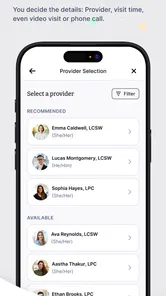
The central experience is not really the app interface; it is the connection between the user and care. A medical service delivered through a phone can feel wonderfully direct when the network is strong. I can start from a familiar device, explain what is happening, and avoid the travel and waiting-room steps that normally make a minor health concern feel like a large project. That convenience is especially valuable late in the day, while traveling, or when I am trying to manage an issue around work or study.
At the same time, a telehealth conversation is more demanding than reading information on a webpage. A weak connection can interrupt the flow of symptoms, make questions harder to hear, or force me to repeat details. In a normal app, a brief loading pause is irritating. In a care conversation, it can affect clarity and confidence. I therefore see connectivity as part of the quality of care experience, not just a technical background detail.
My practical advice is to open the app before the situation becomes urgent. Checking that I am signed in, that the phone has a reasonable signal, and that the battery is not nearly empty removes avoidable stress. I would also keep a short note of symptoms, timing, current medicines, and relevant questions. That preparation matters because a connection problem becomes more disruptive when I am trying to remember everything at once.
The app’s 24/7 positioning is appealing because health concerns do not follow office hours. Still, round-the-clock access should not be confused with instant resolution for every problem. A connected service can help me reach a care pathway, but the appropriate next step may still be an in-person appointment, a pharmacy, urgent care, or emergency help. I appreciate TimelyCare most when I use it as a doorway to informed guidance rather than as a promise that every medical situation can be completed inside the phone.
More From Our News Desk

 Gmail
GmailGmail in a Busy Inbox: Who Benefits Most?
From first account to crowded workday, Gmail earns its place through dependable search and flexible sorting—but its best fit depends on how much inbox maintenance you can tolerate.

 Prime Video
Switching to Prime Video: What Changes in Your Viewing Routine
Prime Video can make a compelling second home for streaming, but switching means learning a different catalog, rental layer, and route from browsing to playback.

 Universal TV Remote Control
Universal TV Remote Control Works Best as a Reliable Backup
A phone remote earns its place through quick setup and reliable habits. Here is how to get more from Universal TV Remote Control—and where its limits show.

 Weather - By Xiaomi
Weather by Xiaomi Review: Clear at a Glance, Less Clear Up Close
Xiaomi’s weather app makes everyday forecasts quick to scan, but its calm surface can leave useful details and recovery paths harder to find than they should be.

 X
XX Under Pressure: Can It Recover When Posting Goes Wrong?
A resilience-focused review of X, examining setup, mistaken posts, interruptions, weak connections, and the gaps that matter when recovery needs to be dependable.

 Clash of Clans
Clash of Clans Is Won Between the Battles
Its raids are quick; its community is a long-term project of coordination, teaching, rivalry, and shared responsibility—with all the friction that entails.
Latest News



What changes when I use it away from home
Mobile use is where the concept makes the most sense. I can imagine using TimelyCare from a dorm room, hotel, shared apartment, or workplace when leaving is difficult. Someone who feels unwell while traveling may value the ability to begin with a familiar digital service instead of searching for an unfamiliar local provider. That is a meaningful advantage over the usual alternative of calling several offices and trying to work out availability.
However, mobile convenience does not mean every location is equally suitable. A video or voice conversation in a crowded café can make it difficult to speak openly. A moving vehicle is obviously inappropriate, and public Wi-Fi may be unreliable at exactly the wrong moment. I would choose a stationary place with privacy, good lighting if visual communication is involved, and enough time to finish the interaction without rushing.
One less obvious benefit of using a phone is continuity of context. My device is already with me when a symptom appears, so I do not have to wait until I return home to begin thinking about care. That can be helpful for an issue that is uncomfortable but not clearly urgent. I can record the time symptoms started and gather the information a clinician may ask for before connecting. The trade-off is that a phone is also easy to use impulsively. I might open the app while distracted, provide incomplete details, and then feel disappointed by an interaction that was weakened by my preparation rather than by the service itself.
I would be careful about assuming that a phone alone solves accessibility concerns. Small screens, background noise, limited privacy, and inconsistent signal can each make a remote consultation harder. If I have difficulty hearing, communicating, or describing a physical symptom, an in-person option may be more appropriate. TimelyCare is strongest when the mobile format reduces barriers; it is less convincing when the phone becomes another barrier to clear communication.
Handling interruptions, stalled sessions, and the next step
Connectivity failures deserve a realistic plan. If a session stalls, I would first avoid repeatedly tapping buttons or closing the app in frustration. I would check the signal, move to a more reliable location, and make sure the phone has not switched between networks. If the problem continues, restarting the connection may be sensible, but I would also keep track of what I had already submitted or explained so I could repeat it accurately if needed.
This is one reason I would not begin a consultation while my battery is low or while using a connection I already know is unstable. A few minutes of preparation can protect the most important part of the interaction: communicating the health concern clearly. I would also keep an alternative plan in mind. If the issue is worsening, severe, or potentially life-threatening, I would not wait for a mobile session to recover. I would use the appropriate emergency route immediately.
The recovery experience is also influenced by the kind of problem I am trying to solve. For a general question or a non-urgent concern, reconnecting may be inconvenient but manageable. For symptoms that require rapid assessment, the same interruption feels much more serious. That distinction is important when deciding whether to rely on telehealth in the first place. The app can make access easier, but it cannot remove the consequences of a failed connection or replace physical examination when one is necessary.
I would treat every completed interaction as something to organize afterward. Writing down the advice, any recommended follow-up, and changes I need to watch for creates a personal safety net if I later lose access to the conversation. This is not a flashy feature; it is simply a better workflow for a service that depends on a live digital exchange. It also helps prevent the common mistake of remembering only the reassuring part and forgetting the conditions under which further care is needed.
Using mobile data without making the experience harder
Because TimelyCare is a remote medical service, I would use it with the same basic data awareness I apply to other live communication tools. A stable Wi-Fi connection may be preferable when available, but I would not choose an unknown public network merely because it is free. A trusted cellular connection can be more practical than a crowded hotspot, particularly when privacy matters. The right choice depends on reliability as well as convenience.
I would avoid starting a consultation while several other demanding apps are running, especially if the phone is older or already warm. Closing unnecessary background activity can make the device feel less strained, though it cannot fix a poor network. I would also disable distractions that could interrupt the conversation. The goal is not to turn the phone into a laboratory; it is to give a health interaction the clearest conditions I can control.
Data-conscious use is not only about conserving a mobile allowance. It is also about choosing when and where to discuss personal health information. I would not use speakerphone in a place where strangers can hear, and I would be cautious about sharing details while connected through equipment I do not trust. A medical app deserves more deliberate handling than a casual messaging service, even when the interface feels simple.
Another useful habit is to prepare the information that matters before connecting. A concise timeline, a list of symptoms, and the names of medicines or allergies can reduce the time spent searching through the phone during the consultation. It may also reduce the need to reconnect if the first conversation is interrupted. This is a concrete advantage of planning around connectivity: better preparation makes a fragile connection less damaging to the overall exchange.
Where it fits beside ordinary healthcare options
The usual alternatives each solve a different problem. A primary care appointment is better for ongoing management, physical examinations, and building a long-term relationship with a clinician. Urgent care is more suitable when an issue needs hands-on assessment without waiting for a routine appointment. A pharmacy can be faster for some straightforward medication questions. Emergency services remain the right choice for serious or rapidly worsening symptoms.
TimelyCare occupies the space between “I need professional guidance” and “I know exactly where to go.” Its advantage is reducing the first logistical hurdle. Instead of searching broadly or waiting for a convenient opening, I can begin digitally when access is the main obstacle. Its limitation is equally clear: a remote conversation cannot provide every examination, test, procedure, or local service that an in-person setting can provide.
I would recommend it most to people who value convenient access, can hold a reasonably private conversation, and understand the difference between non-emergency telehealth and emergency treatment. It may be particularly useful for someone whose schedule, location, or mobility makes a conventional visit difficult. I would be more hesitant to recommend relying on it as the only healthcare option for complex ongoing conditions, severe symptoms, or situations where a clinician needs to examine the body directly.
The developer, Timely Telehealth, LLC, has kept the product focused on access rather than turning it into a broad lifestyle platform. That focus is helpful because I do not have to treat it like a general wellness dashboard. I open it with a specific purpose: reaching care or support. The downside is that users expecting a full personal health-record system, extensive self-guided education, or a replacement for their regular doctor may find the experience narrower than they hoped.
Who should install it and who should pause first
I would install TimelyCare if I wanted a convenient medical option available on my phone and was comfortable planning around network quality. The free price removes an obvious trial barrier, and the Everyone rating makes it approachable for a broad audience. Its current version is 3.0.8, and it supports devices running Android 7.0 or later, so compatibility is worth checking before depending on it with an older phone.
I would pause before using it if my phone is unreliable, my usual internet access is poor, or I rarely have a private place for health conversations. Those are not minor inconveniences; they directly affect whether the service can work when needed. I would also avoid making it my first choice for an emergency, a rapidly changing condition, or a problem that clearly calls for physical assessment.
For a realistic everyday example, imagine waking up with a new but non-severe concern before an important day away from home. I could prepare a short symptom timeline, move somewhere private, confirm the phone is charged, and use the app to seek guidance without spending the morning traveling to a clinic. If the connection failed, I would already have the information ready for another care route. If the clinician advised an in-person visit, I would treat that as a useful outcome rather than a failure of telehealth.
That example captures the right mindset. The app does not need to solve every part of healthcare to be valuable. It needs to make the first step easier while helping me recognize when the next step belongs elsewhere. Its usefulness rises when I plan for the network, protect privacy, and stay realistic about what remote care can do.
My connectivity verdict
TimelyCare Health & Well-being is most convincing as a convenient bridge to care, not as a complete replacement for healthcare. I like the way its mobile format can remove travel and scheduling friction, and I can see why its 4.4 average and growing install base appeal to people looking for accessible support. The experience is strongest when I have a dependable connection, a charged phone, and enough privacy to explain the issue properly.
Its main weakness is inseparable from its main feature: access happens through a network. A slow or interrupted connection can make a medical conversation stressful, and the app cannot compensate for every limitation of remote assessment. I would keep an in-person or urgent alternative in mind, prepare my details before connecting, and never allow a technical problem to delay emergency help.
With those boundaries understood, I think this free medical app is worth considering for non-emergency situations where reaching care is inconvenient. It is practical, focused, and easier to justify than an app that merely repeats general health information. I would recommend it to a friend who wants a dependable digital starting point, while making clear that the best experience comes from using it thoughtfully rather than treating twenty-four-hour availability as a guarantee that every medical need can be handled through a screen.
TimelyCare Health & Well-being Frequently Asked Questions
Is TimelyCare Health & Well-being available on my phone?
TimelyCare Health & Well-being is an app for mobile devices, with a minimum operating system requirement of 7.0. Before installing, check that your device meets this requirement and has enough available space for the app. Keeping your operating system and app updated can also help you use the current version and access the service smoothly.
How much does the TimelyCare app cost to download?
The TimelyCare app is free to download. That does not necessarily mean every service is available to every user without conditions: access is generally tied to eligibility through a participating college or university, and included services can vary by school. Confirm your institution’s plan and eligibility before booking or relying on a particular type of care.
What is TimelyCare Health & Well-being?
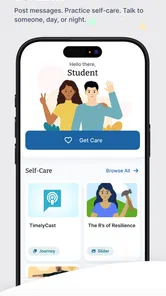
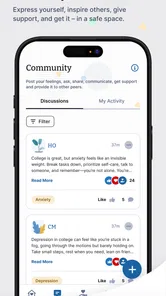
TimelyCare Health & Well-being is a virtual care platform designed primarily for students through participating colleges and universities. It can provide access to services such as on-demand medical visits, scheduled counseling, emotional support, psychiatry, health coaching, and wellness resources. Available features can vary by institution, so users should confirm what their school includes before relying on the app for care.
Who can use the TimelyCare app, and is it free?
Access is generally offered to eligible students at colleges or universities that partner with TimelyCare. In many cases, the service is included as part of student benefits and does not require payment at the time of an included visit, although coverage rules differ between schools. You typically need to register with your institutional email or approved student credentials, and eligibility may change after graduation or withdrawal.
What types of healthcare can I receive through TimelyCare?
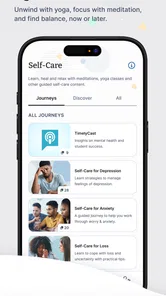
Depending on your school’s plan, TimelyCare may offer virtual medical appointments, mental health counseling, psychiatry, emotional support, self-care programs, and wellness guidance. Medical providers may help with common, non-emergency concerns, while counseling can support issues such as stress, anxiety, loneliness, or academic pressure. The app is not a replacement for emergency services, in-person diagnosis, or treatment requiring physical examination.
Pros
- 24/7 access to virtual medical and mental health support
- Appointments can be scheduled from a phone or tablet
- Useful for students who need care away from home
- Mental health services are included in the platform
- Secure messaging helps maintain contact with providers
Cons
- Availability depends on your school or organization’s eligibility
- Some services may require an appointment instead of instant access
- Not intended for emergencies or severe medical conditions
- Provider availability can vary by location and time
- Certain prescriptions or treatments may require in-person care











