TimeClock Plus Clock
- 411.00
- 4.9
- Installs
- 100.00K
- Price
- Free

Screenshots
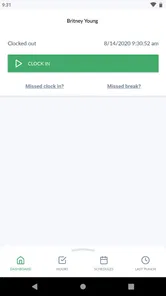
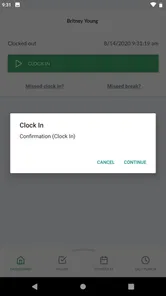
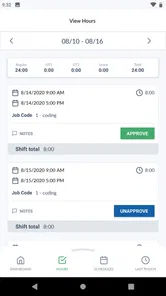
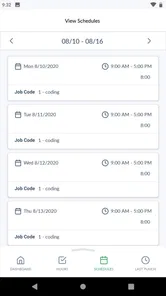
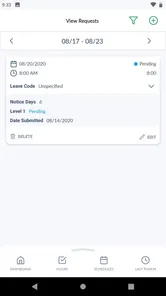
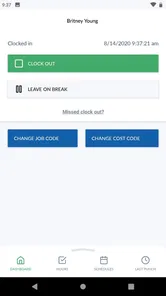
Analysis by Reviewed
When a team needs dependable time records, the hardest part is rarely remembering that a clock exists. The real challenge is getting everyone to use it consistently, while keeping entries clear enough for a manager to trust later. That is where TimeClock Plus Clock makes its case. I reviewed it as a business app from TimeClock Plus, LLC, and its central strength is straightforward: it gives employees a focused way to record working time while they are away from a desk.
I like the app most when I think of it as a shared routine rather than a complete business-management system. It is free, rated for Everyone, and available for devices running Android 7.0 or later. The current release is version 1.43.0, and its presence on more than one hundred thousand devices suggests that it is aimed at practical workplace use rather than personal experimentation. Its average rating is 4.9 from roughly four thousand six hundred ratings, with about four hundred ten written reviews, so there is clear evidence that many users find the basic experience dependable.
The important capability is mobile time tracking for teams on the go. That sounds simple, but it changes the workflow for employees who move between rooms, sites, customers, vehicles, or job locations. Instead of waiting until they return to a computer and trying to reconstruct the day, they can record time closer to the moment it happens. In my experience, that reduces the small memory gaps that eventually turn into incorrect timesheets.
Why the mobile clock matters more than it first appears
A conventional paper sheet is easy to start with, but it depends on people writing entries down and on someone later interpreting them. A spreadsheet gives a manager more structure, yet it still asks employees to remember details and enter them accurately. A general-purpose timer can help an individual measure a task, but it is not necessarily designed around a team’s working-time process. TimeClock Plus Clock sits closer to the last category: it is built around recording time as part of an organized workplace routine.
The benefit is not simply speed. It is timing. If a worker clocks in at the beginning of a shift, records the end when the shift is finished, and handles changes as they occur, the record is created while the information is still fresh. That is especially useful for people whose day does not follow a neat office schedule. A technician moving between appointments, a retail employee changing departments, or a field worker starting at a temporary location can be more accurate with a phone-based process than with a form completed hours later.
I would not describe this as an app that magically solves attendance administration. It still depends on the team following the agreed process, and managers still need to review the resulting records. What it does well is remove one common source of friction: forcing mobile workers to postpone a simple action until they have access to a desktop system.
What using it feels like during a normal shift
The best way to use the app is to make it part of the beginning-and-end rhythm of work. I would open it before starting, complete the clocking action required by the workplace, and treat the same action at the end of the shift as non-negotiable. That sounds obvious, but consistency matters more than cleverness here. A timekeeping tool becomes useful when every employee handles it in the same way.
More From Our News Desk

Weather by Xiaomi Review: Clear at a Glance, Less Clear Up Close

X Under Pressure: Can It Recover When Posting Goes Wrong?

Clash of Clans Is Won Between the Battles

Android Auto Makes the Case for Quieter Car Software

MobiOffice: Transforming Mobile Productivity with Seamless Integration

EA SPORTS FC™ Mobile Soccer: Redefining Mobile Sports Gaming
For a worker, the advantage is that the phone is already nearby. There is no need to carry a separate notebook or remember a sequence of times at lunch. For a supervisor, the value appears later, when records are easier to compare because they were entered through the same team process. The app therefore works best when the organization establishes a clear rule for when people should use it and what they should do if they forget.
One practical habit I recommend is checking the day’s entries before leaving work, rather than waiting until the end of the pay period. A quick review catches mistakes while the shift is still easy to remember. If your workplace has a correction or approval process, handling the issue immediately is less stressful than trying to explain an old entry from memory. This is not a flashy feature; it is the kind of workflow discipline that makes a clocking app genuinely useful.
Another useful approach is to separate clocking from task notes. I would not rely on a time entry alone to explain every detail of a complicated day. If a job requires additional documentation, keep that information in the system your employer already uses and use the timekeeping app for the time record itself. That keeps the clocking action quick and avoids turning a simple start or finish into a long administrative task.
A realistic day in the field
Imagine a service employee who begins the morning at a customer site instead of at the company office. With a paper sheet, the employee might write down the arrival time later, after driving to the next appointment. By then, a few minutes may already be uncertain. With a mobile clock, the employee can record the start of work at the point where the shift actually begins, then finish the day from the same kind of mobile workflow.
The manager benefits in a different way. The record is less dependent on a handwritten note and less likely to be reconstructed from memory. If the employee forgets to clock out, the manager still has to resolve the issue, but the exception is visible rather than hidden inside a vague end-of-day estimate. That distinction matters. Good timekeeping is not about pretending mistakes never happen; it is about making them easier to identify and correct.
The same idea applies to a worker whose schedule changes during the week. A person may start early one day, work a standard shift the next, and cover a different location later. A mobile process is more natural for that pattern than a fixed paper station. The app’s value grows as the distance between the employee and the office grows.
For a small team, I would introduce it with a short written routine: when to clock in, when to clock out, how to handle a missed action, and who reviews irregular entries. Without that shared agreement, employees may use the same tool in different ways, which weakens the consistency the app is supposed to provide. The software can support the routine, but it cannot define workplace policy for you.
Where it compares well with familiar alternatives
Compared with paper, TimeClock Plus Clock is more convenient for distributed employees and should reduce the need for manual transcription. Paper still has one advantage: it works without a battery or app session. If your workplace has unreliable access to devices or expects very occasional time recording, paper may remain simpler. For a team that already carries phones throughout the day, however, the mobile approach is easier to integrate.
Compared with a spreadsheet, the app offers a more focused experience. A spreadsheet can be customized extensively, but that flexibility also creates opportunities for inconsistent formats, accidental edits, and confusing formulas. I would choose a spreadsheet when the main need is analysis or a highly unusual reporting structure. I would choose this app when the first priority is giving employees a clear timekeeping path.
Compared with a general timer, the distinction is about purpose. A timer is useful for measuring a project or personal task, while a workplace clock is intended to support a team’s attendance process. If you need detailed project costing, task-level billing, or broad business reporting, a specialized platform may be a better fit. If the immediate problem is that workers need an uncomplicated way to record their working time while mobile, this app is more directly aligned with that need.
The tradeoffs I noticed
The focused design is also its main limitation. I would not install it expecting a full human-resources suite, payroll replacement, or project-management environment. Time records are only one part of running a workplace. Scheduling, approvals, policy enforcement, labor review, and payroll preparation may require other tools or organizational steps. The app is strongest when its role is clearly defined instead of being asked to become the entire back office.
There is also a human tradeoff. A mobile clock makes time entry more immediate, but it does not remove the need for training. New employees need to know exactly when to use it, and supervisors need a consistent way to deal with missed or incorrect entries. If those rules are unclear, the app can simply move confusion from a paper sheet to a phone screen.
Phone dependence is another consideration. A worker whose device is unavailable, uncharged, or unsuitable for the workplace still needs an approved fallback. I would establish that fallback before deployment rather than assuming every employee will always be able to use the app. This is particularly important for teams working outdoors, in noisy environments, or in places where carrying a personal phone is inconvenient.
Privacy and workplace expectations should be discussed openly as well. Employees may reasonably want to know what the organization expects from the app and how time records are reviewed. I would make the purpose clear: record working time accurately, not create uncertainty about what is being monitored. A transparent policy improves adoption and prevents the tool from becoming a source of avoidable tension.
Finally, mobile convenience can encourage rushed entries. A worker may tap through the process without checking whether the action matches the actual shift. The solution is not to add complexity; it is to build a brief verification habit into the routine. Before leaving the screen, confirm that the action was completed and review the day regularly. That small step protects the accuracy the app is meant to improve.
Who gets the most value from it
I think the strongest audience is a team with employees who are frequently away from a shared workstation. Field services, mobile support, distributed retail duties, and workplaces with changing locations are natural examples. The app is also a good candidate for managers who are tired of deciphering handwritten entries or chasing people for end-of-day updates.
Small and midsize teams may appreciate the low barrier to trying it because the app is free. That does not mean the entire timekeeping process has no cost; someone still needs to define rules, review exceptions, and connect the records to whatever administrative work follows. But removing an upfront app price makes it easier to test whether a mobile workflow fits the team before committing to a more elaborate system.
It can also help a supervisor who wants a cleaner daily habit without forcing employees into a complicated interface. The value is greatest when the team’s central question is, “When did this person start and finish work?” It is less compelling when the central question is, “How much time did we spend on each project, task, client, or billing code?” In that second situation, a project-focused product may provide better detail.
I would be more cautious about recommending it to someone who works alone and only wants a personal productivity timer. The team-oriented purpose may be more structure than an individual needs. Likewise, a company with highly specialized payroll requirements should evaluate the entire workflow around the app rather than choosing it solely because the clocking action is convenient.
Questions I would settle before rolling it out
The first question is whether employees can use their devices reliably at the moments they need to record time. Test the routine in the actual work environment, not only from an office desk. A process that feels effortless indoors may be awkward for a worker carrying equipment or moving between locations.
The second is what happens after a missed clocking action. Decide who handles corrections and how quickly they should be reported. This is a management question rather than a reason to reject the app, but leaving it unanswered will create inconsistent treatment across the team.
The third is whether the app’s focused role matches your reporting needs. If you mainly need straightforward work-time records, it is a sensible option to consider. If you need extensive project accounting, complex scheduling, or broad employee administration, compare it with a more comprehensive workplace platform before making a final decision.
The fourth is whether employees understand the purpose. I would explain the routine in plain language, demonstrate it once, and ask workers to practice the start-and-finish sequence. The goal is not to make training elaborate; it is to prevent small misunderstandings from appearing in every timesheet.
My final view after using the workflow
TimeClock Plus Clock succeeds because it concentrates on a real workplace problem: recording time accurately when employees are not sitting in front of a shared computer. I found the mobile-first approach more practical than paper for moving teams, and more focused than a spreadsheet for everyday clocking. Its strongest result is not a dramatic new feature but a better moment of capture: the time is recorded when the work begins or ends, rather than rebuilt later.
That said, I would recommend it with realistic expectations. It is not a substitute for clear policies, manager review, or a broader system when your organization needs detailed scheduling, payroll, or project analysis. Its simplicity becomes a weakness if you expect it to cover every administrative task.
For a team that needs a free, accessible business app for mobile time tracking, I think it is worth trying. The best test is a short, clearly managed rollout with a defined fallback for missed entries and a daily review habit. If that routine fits the way your employees work, TimeClock Plus Clock can turn timekeeping from an end-of-week guessing exercise into a more dependable part of the workday.
My recommendation is therefore specific rather than universal: choose it when the main challenge is capturing team hours on the move, especially across changing locations. Look elsewhere when your priority is deep project accounting or a complete workforce-management system. Used for the job it is designed to handle, it offers a practical balance of accessibility and structure, and that is exactly what many mobile teams need.
TimeClock Plus Clock Frequently Asked Questions
Is TimeClock Plus Clock available for both Android and iOS?
TimeClock Plus Clock is a mobile app for employees who need to manage work time while away from a desk. Before downloading, check that your phone’s operating system meets the app’s requirements; it supports devices running version 7.0 or later. The app is free, but access to its workplace features depends on your organization’s TimeClock Plus setup and account.
Who develops TimeClock Plus Clock, and is it suitable for general personal time tracking?
TimeClock Plus Clock is developed by TimeClock Plus, LLC and belongs to the business category. It is designed around employee timekeeping for teams, rather than acting as a general-purpose personal timer or a standalone way to log hours for any activity. If your employer uses TimeClock Plus, the app may be useful for work attendance; otherwise, its workplace functions may not be relevant to you.
What is TimeClock Plus Clock used for?
TimeClock Plus Clock is a workforce time-tracking application designed to let employees clock in and out, review their worked hours, and manage attendance-related tasks from a mobile device. Depending on how an employer has configured the service, the app may also support schedules, breaks, time-off requests, job or department selection, and timesheet review. Its available features can vary between organizations.
Do I need an employer account to use TimeClock Plus Clock?
Yes, the app is generally intended for employees whose organization uses the TimeClock Plus workforce management platform. Installing the application alone usually is not enough to begin recording time. You may need login credentials, an organization code, or an invitation supplied by your employer. If you cannot sign in, your manager or company administrator will normally need to activate or correct your account.
Does TimeClock Plus Clock track my location?
Location tracking depends on your employer’s settings and the permissions enabled on your phone. Some organizations use location services or geofencing to confirm that clock-ins and clock-outs occur at approved workplaces, while others may not require location access. Before downloading or granting permissions, review the app’s privacy information and ask your employer how location data is collected, used, and retained.
Pros
- Simple clock-in and clock-out process for everyday employee use.
- Supports location-based tracking for added attendance verification.
- Can help reduce manual timesheet errors and duplicate data entry.
- Useful for organizations managing employees across multiple locations.
- Provides a dedicated mobile option for staff away from desktop terminals.
Cons
- Some features may require employer setup or an active TimeClock Plus account.
- Location permissions can raise privacy concerns for some employees.
- Performance may depend on the employer’s configuration and network connection.
- The interface can feel less intuitive for first-time users.
- Employees may have limited control over settings and recorded time entries.











