Time Clock: Easy Tracker
- 5.92K
- 4.7
- Installs
- 1.00M
- Price
- Free

Screenshots
Analysis by Reviewed
I judge a time-tracking app by what happens across an ordinary workday: can I record the hours without turning every transition into a chore, and can I trust the resulting log enough to pass it along? Time Clock: Easy Tracker is aimed at that practical problem. I’d consider it for personal work-hour records, especially when shifts vary or a week is too irregular to reconstruct from memory.
When a simple record is all you need
I find this kind of time clock most useful when the problem is not planning a whole business operation but remembering what I actually worked. A freelancer moving between client jobs, a part-time worker with changing shifts, or someone who needs a personal record before submitting hours can benefit from a dedicated log instead of trying to reconstruct a week from calendar entries and memory.
For example, after a morning appointment, I might start work at home, take a break, and then finish a separate task later in the day. Recording each work period close to when it happens gives me a clearer account than entering a guessed total at night. The practical tip is to make the time entry part of the transition: log the start before opening the task, then check the end when you stop. That small habit matters more than a complicated setup.
A useful way to decide whether this fits is to look at what you need to hand over at the end of the week. If the goal is a dependable account of your own hours, a dedicated record can reduce the mental arithmetic and second-guessing that come with scattered notes. If someone else must approve shifts, assign coverage, or enforce detailed pay rules, I’d first check whether a personal clock app fits that organization’s established process.
Why Time Clock: Easy Tracker Stands Out
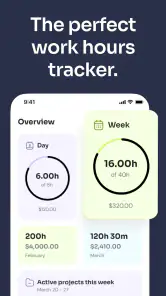
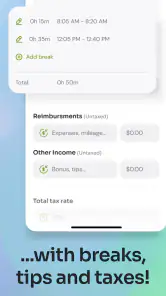
First off, what drew me to Time Clock: Easy Tracker was its sheer simplicity. You know how some apps just bombard you with features you never use? Not this one. It’s all about getting the basics right. The app is designed to help you log your work hours, breaks, and even overtime with just a few taps. And let me tell you, it's as easy as pie!
Features that Make Life Easier
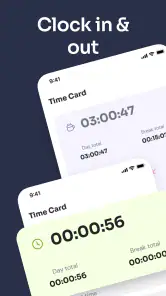
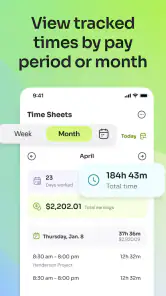
One feature I absolutely adore is the automatic clock in and out. Imagine walking into your workplace and having the app log your entry time without lifting a finger. Sweet, right? Plus, it keeps a detailed record of all your work sessions, which is super handy for those end-of-month reports.
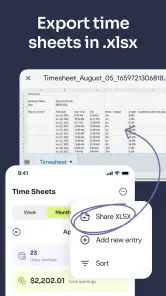
The app also offers a comprehensive timesheet that you can customize to suit your needs. Whether you're freelancing or managing a team, the ability to tweak your timesheet ensures you're always on top of things. And if you're like me, who sometimes forgets to log out, the app sends you reminders. It's like having a personal assistant!
More From Our News Desk

Clash of Clans Is Won Between the Battles

Android Auto Makes the Case for Quieter Car Software

MobiOffice: Transforming Mobile Productivity with Seamless Integration

EA SPORTS FC™ Mobile Soccer: Redefining Mobile Sports Gaming

How Microsoft OneDrive Became a Mobile Productivity Giant

How Google Translate Breaks Language Barriers Effortlessly
For a realistic routine, I’d keep the clock action tied to a clear event rather than to a vague intention. When I sit down to begin a client assignment, I record the start; when I stop for lunch or switch to a personal errand, I make the break explicit in my own process. This makes later review easier because the log reflects the workday’s shape, not just a total that happens to look plausible. It is especially useful for people whose day has several short interruptions.
That log becomes most valuable at the handoff from daily tracking to a manager, client, or payroll process. I would review the entries before passing them on, especially after an interrupted shift: a reminder can help catch a missed clock-out, but it cannot decide whether an unusual gap was a break, a job change, or simply a forgotten tap. A quick end-of-day check is a useful safeguard against letting a small mistake turn into a disputed timesheet.
One non-obvious habit that helps is setting aside a consistent moment to audit the record, rather than waiting until a deadline. I’d scan for days with unusually long or short sessions and correct anything I can still explain accurately. That is more reliable than trying to remember details at the end of a pay period. If a change needs another person’s sign-off, I’d follow the employer’s method instead of assuming the app itself handles approval.
Design and User Experience
Let's talk about the design. The interface is clean, intuitive, and dare I say, delightful to use. Everything is where you'd expect it to be, and the learning curve is practically nonexistent. It’s like the app knows what you need before you do. The color scheme is easy on the eyes, making those long work hours a tad bit more bearable.
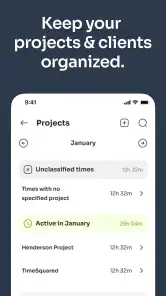
Ease matters here for a specific reason: a time log only helps if I keep using it when I’m busy. A complicated project setup can be worthwhile for a team with many categories, but it can also add enough steps that a solo worker postpones entries. I’d start with the simplest timesheet arrangement that distinguishes the hours I actually need to report, then add detail only if it answers a real question later.
In a typical business-hours category, the alternatives are a paper timesheet, a spreadsheet, or a broader scheduling and payroll system. Paper is dependable when a phone is inconvenient, but totals must be added by hand. A spreadsheet gives more room for custom calculations, yet depends on disciplined entry and cleanup. A dedicated clock app is the middle ground I’d choose for quick personal logging; it is less suitable when a company needs approvals, shared staffing views, or payroll rules built into one system.
Integration and Accessibility
Another standout aspect is its ability to integrate with other platforms. Whether you're using Google Calendar or other scheduling tools, syncing them with Time Clock: Easy Tracker is a breeze. This feature ensures all your appointments and work schedules are aligned, saving you from the dreaded double-booking scenario.
I’d treat a calendar as a reference for planned work, not as proof that the work happened. A meeting may move, a shift may run late, or a planned block may turn into an unexpected break. Comparing the schedule with the actual time record can help spot mismatches, but I would still base a submitted timesheet on the hours worked rather than copying planned appointments across automatically. That distinction is a small but important safeguard for freelancers billing clients as well as employees reporting shifts.
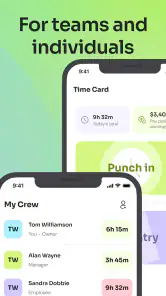
For a small team, I would treat the app as a record-keeping aid rather than assume that every colleague automatically sees or approves the same entries. Before relying on it for a formal handoff, agree on who checks the hours and how corrections are handled. That simple division of responsibility prevents the common problem of everyone assuming someone else has reviewed the sheet.
Its listing identifies it as a free business app from Time Squared (TSQ Publishing Corp.), with a 4.7 average from around 24,000 ratings and over 1 million installs. It is rated for Everyone, and the current version is 3.4.1635. That broad uptake is encouraging, though popularity alone does not guarantee that its workflow matches a particular employer’s rules.
And for those who are constantly on the move, the app's accessibility is top-notch. Whether you're using it on Android or iOS, the performance is seamless. It's like carrying your office in your pocket!
If I were choosing it for a small group, I’d agree on the routine before asking everyone to rely on it: when to start and stop a session, who checks the weekly record, and where disputed corrections go. The app can make personal logging more convenient, but a shared process still needs clear ownership. For one person, that agreement may simply be a reminder to review the week before sending hours to a client.
One point I would check before making it part of a routine is the cost boundary: the app is free to download, while in-app purchases range from $0.99 to $179.99 per item. If you only need to record your own shifts, start with the free experience and see whether it covers your habits before paying for anything. The listed minimum operating-system requirement is 7.0, so it is also worth checking compatibility on an older device before planning a team-wide switch.
Where the workflow can break
The convenience of automatic clocking is also a trade-off: a phone-based process is only dependable when the device and the person using it are available at the right moment. If a shift begins in a place where handling a phone is impractical, or if work changes location and task repeatedly, a quick manual record may be safer than trusting a start or stop event to capture every detail. I would not use a personal tracker as the sole authority for a formal attendance dispute without checking that it meets the workplace’s process.
Another point to think through is what happens when a day does not follow the usual pattern. An unexpected call, an off-site errand, or a late finish can make an otherwise neat sequence of clock events confusing. I’d make a brief note for myself while the reason is fresh, then check that the recorded hours still match the work I intend to report. This is not busywork: it keeps an odd entry from becoming an unexplained number later.
Phone-based tracking also depends on ordinary practicalities: the device needs to be available when the work begins or ends, and the person using it needs a habit that survives a hectic shift. For work where phones must stay put, or where several people share a device, paper or a workplace-approved clocking method may be less fragile. I would test the routine on a normal day before depending on it during a busy week.
It may also be the wrong choice if you mainly need project budgeting, invoice creation, staff scheduling, or manager approvals rather than a straightforward time record. Those jobs call for a broader business tool, even if it takes longer to learn. The useful question is not whether a clock app can do everything, but whether recording hours is the main friction you want to remove.
That makes the best audience fairly clear to me: people who want to keep a personal work-hour record and are willing to check it, rather than organizations looking for a complete workforce system. A freelancer can use it to prepare a clearer account of time before billing, while a worker with rotating shifts can use it to avoid relying on memory. Someone whose employer mandates a specific clock-in platform should follow that process instead, even if this one feels simpler.
Before adopting it, I’d ask three practical questions. Can I record a session quickly in the places where I work? Does the resulting timesheet match what my client or employer expects to receive? And will I remember to review unusual entries before handing them over? If the answer to those is yes, the lightweight approach is a strength; if not, a spreadsheet, paper record, or organization-wide system may fit better.
Overall, Time Clock: Easy Tracker is a gem for anyone looking to streamline their time management. It's not just an app; it's a lifestyle change. Give it a whirl, and who knows, you might just find yourself with more free time on your hands!
Time Clock: Easy Tracker Frequently Asked Questions
Can I use Time Clock: Easy Tracker to record hours manually instead of clocking in and out?
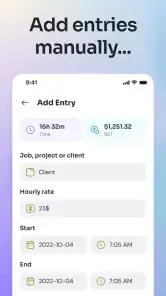
Yes. The app’s summary describes two ways to handle work time: clocking in with a work-hours tracker or simply adding time cards. That makes it worth considering if you prefer entering hours after a shift rather than starting and stopping a timer as you work. Choose the approach that best fits your routine and how you keep track of your hours.
Is Time Clock: Easy Tracker suitable for someone who only needs a basic time clock?
Its focus is work-hour tracking and time cards, so it may be a practical option if you want an app centered on recording time rather than a broader business tool. The short description is simply “Time Clock,” and the summary emphasizes an easy way to clock in or add time cards. Whether that feels basic enough depends on the way you prefer to record your work.
Who is Time Clock: Easy Tracker designed for?
Time Clock: Easy Tracker is a business app for people who want a straightforward way to keep track of work time. Its clock-in and time-card approach may suit employees, freelancers, or others who need to record hours, whether they work independently or as part of a team. It is rated for Everyone, so its age rating is suitable for a broad audience.
What is Time Clock: Easy Tracker and how does it work?
Time Clock: Easy Tracker is an app designed to help users efficiently track their work hours and manage time effectively. It works by allowing users to clock in and out of tasks, projects, or work shifts, providing a detailed log of worked hours. This app is particularly beneficial for freelancers, remote workers, and businesses who require accurate time tracking. Users can easily generate reports and summaries of their tracked time, making it a comprehensive tool for managing productivity.
Is Time Clock: Easy Tracker available for both Android and iOS devices?
Yes, Time Clock: Easy Tracker is available for download on both Android and iOS platforms. The app can be found on the Google Play Store for Android users and the Apple App Store for iOS users. This cross-platform availability ensures that users can seamlessly use the app regardless of their device, making it versatile and accessible for a wide range of users.
Pros
- User-friendly interface for quick navigation
- Accurate time tracking for projects
- Integrates with popular payroll systems
- Customizable alerts for time management
- Supports multiple languages
Cons
- Limited offline functionality
- Subscription required for full feature access
- Initial setup can be time-consuming
- No integration with Google Calendar
- Lacks advanced reporting features

- Category
- Business
- Version
- 3.4.1635











