

TikTok Pro - Events
- 8.68K
- 4.4
- Installs
- 10.00M
- Price
- Free

Screenshots
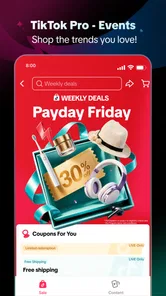
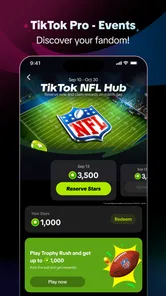
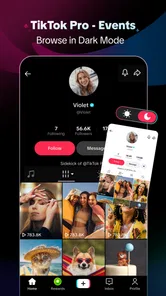
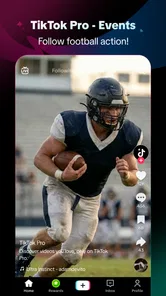
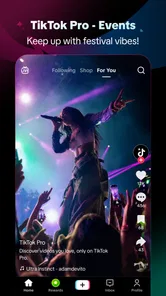
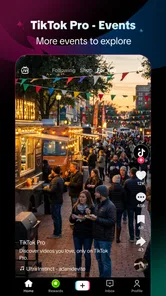
Analysis by Reviewed
I judge a short-video app less by how entertaining its best clip is than by how well it fits the little gaps in a real day. TikTok Pro - Events is built around taking part in TikTok’s viewing experience and earning rewards, so the connection is not merely a technical detail: it affects how smoothly that central idea works. In my use, it makes most sense for people who already enjoy discovering short videos and are curious about adding participation and rewards to that habit.
This is an entertainment app from TikTok Pte. Ltd., rather than a replacement for every kind of video or social platform. It is free to install, rated Teen, and has an average rating of 4.4 from around 50,000 ratings. Its reach is substantial, with more than 10 million installs, but popularity does not automatically make it a fit for everyone. The important question is whether its connected, feed-based experience suits the way you watch.
What the experience feels like when you’re connected
The app’s main appeal is immediacy. When the network is working well, short videos are easy to dip into without committing to a long session. That makes it handy while waiting for a ride, taking a break, or looking for a quick stream of entertainment after work. The rewards angle gives participation an extra reason to keep exploring, though I would treat rewards as a possible bonus rather than the main reason to install it.
That distinction matters. If you open it expecting a traditional video library where you pick a specific film and watch from beginning to end, the feed-based style may feel less deliberate. TikTok Pro is better suited to browsing and reacting to whatever catches your attention than to planning a focused viewing session. I find that the most satisfying use is a short, intentional visit, not leaving the feed open without a stopping point.
Connection quality shapes the rhythm. A reliable network helps the stream feel continuous, while a weak or changing connection can interrupt that flow. This is especially noticeable when you are moving between locations or switching from Wi-Fi to mobile data. Rather than assuming every pause is an app fault, I first check whether other online services are also struggling; that simple distinction can save time when diagnosing a stalled video.
Keep participation intentional
One practical habit is to decide what you want from a session before opening the feed: a brief break, a look at a particular kind of clip, or a chance to participate. A loose purpose makes it easier to stop when the app has served its purpose. It also helps keep the rewards element in perspective, since an incentive can make a casual visit stretch longer than intended.
For a realistic everyday example, imagine waiting for an appointment with only a few minutes to spare. A connected feed can fill that pause with quick entertainment, but a brief signal drop may make the experience choppy just when you have little time to troubleshoot. I would use the app in that moment only if I have a stable connection and am comfortable closing it as soon as I’m called. It is less suitable when uninterrupted access is essential.
More From Our News Desk

 Gmail
GmailGmail in a Busy Inbox: Who Benefits Most?
From first account to crowded workday, Gmail earns its place through dependable search and flexible sorting—but its best fit depends on how much inbox maintenance you can tolerate.

 Prime Video
Switching to Prime Video: What Changes in Your Viewing Routine
Prime Video can make a compelling second home for streaming, but switching means learning a different catalog, rental layer, and route from browsing to playback.

 Universal TV Remote Control
Universal TV Remote Control Works Best as a Reliable Backup
A phone remote earns its place through quick setup and reliable habits. Here is how to get more from Universal TV Remote Control—and where its limits show.

 Weather - By Xiaomi
Weather by Xiaomi Review: Clear at a Glance, Less Clear Up Close
Xiaomi’s weather app makes everyday forecasts quick to scan, but its calm surface can leave useful details and recovery paths harder to find than they should be.

 X
XX Under Pressure: Can It Recover When Posting Goes Wrong?
A resilience-focused review of X, examining setup, mistaken posts, interruptions, weak connections, and the gaps that matter when recovery needs to be dependable.

 Clash of Clans
Clash of Clans Is Won Between the Battles
Its raids are quick; its community is a long-term project of coordination, teaching, rivalry, and shared responsibility—with all the friction that entails.
Latest News



On the move, screen time and signal changes
Mobile use is where TikTok Pro’s convenience and its dependence on connectivity meet most clearly. A phone makes it easy to check in during spare moments, but public Wi-Fi and cellular coverage can vary from one place to another. If clips pause or take longer to appear while you are travelling, that does not necessarily mean the app itself has changed; the network may simply be handing off or weakening.
There is also a trade-off between spontaneous browsing and control over your time. Short clips are easy to watch one after another, so a session that begins as a quick check can become longer than planned. I recommend setting a personal stopping cue—such as closing the app before leaving a waiting room or when a break ends—rather than relying on the feed to signal that you have seen enough. That is particularly useful if you open the app for rewards, since the incentive can make stopping less natural.
For people who prefer a fixed collection of saved videos or carefully arranged playlists, a conventional streaming service may be more comfortable. Those services are generally designed around choosing a title and following it in sequence, while TikTok Pro is oriented toward discovering individual short-form clips. Conversely, someone who wants a quick, varied feed may find a long-form service too much effort for a spare minute. The better choice depends on whether you want a curated destination or ongoing discovery.
When a connection falters
If a video stops loading, I use a simple recovery routine: wait briefly, check whether the phone still has a usable connection, and then try again. If the problem continues, switching between available network connections can help identify whether the issue is tied to coverage rather than the app. I avoid repeatedly tapping or restarting in a hurry, because that can make it harder to tell what actually fixed the problem.
It is worth separating a temporary interruption from a persistent one. A single pause in a weak-signal area is ordinary friction for a connected video experience. If the issue follows you across locations or continues after the connection is working elsewhere, closing and reopening the app is a reasonable next step. For a problem that remains, checking whether the app has an update available is sensible; the current version is 47.0.3, and keeping software current is a straightforward maintenance habit.
The limitation is that this kind of entertainment loses much of its appeal when you cannot count on a connection. I would not choose it as my only plan for a long trip through areas with unreliable coverage, nor would I assume that content will be available without a network. If dependable access matters more than fresh discovery, a service with content you can deliberately prepare in advance may be the safer option.
Be mindful of mobile data and spending
Video browsing can be demanding on a mobile connection compared with reading text or checking messages, so I would be deliberate about where I use it. When data is limited, prefer a trusted Wi-Fi connection and keep sessions short. If you are unsure how much data a particular session uses, check your phone’s own usage controls rather than guessing; that gives you a more useful picture for your device and plan.
The app is free to download, but it also offers in-app purchases ranging from a few cents to roughly $250 per item. That range makes it worth paying attention to any purchase prompt and confirming what an item costs before proceeding. I would not treat a reward-oriented experience as a reason to spend money, and I would use device-level purchase controls if a phone is shared or used by a teenager.
The Teen content rating is relevant for families deciding whether the app belongs on a young person’s phone. I would discuss expectations around screen time, spending, and what to do when a clip feels unsuitable, rather than assuming the rating alone resolves every household concern. The app’s entertainment focus can be appealing to teens, but an adult’s guidance and the phone’s own controls still matter.
Who will enjoy it—and who may prefer something else
I can recommend TikTok Pro to someone who already likes short-form video, has dependable internet access, and wants participation and rewards to be part of the experience. It is especially convenient for brief breaks when you are comfortable letting a feed surface clips rather than selecting every item yourself. Its scale—more than 10 million installs—and a strong average rating suggest plenty of people find that format appealing, though neither figure guarantees that its style will match yours.
I would suggest looking elsewhere if you want a quiet, offline-first pastime, a predictable sequence of long videos, or strict control over every minute of browsing. A podcast or downloaded reading material may suit a low-signal commute better; a conventional streaming app may suit a planned movie night better. TikTok Pro’s strength is quick discovery, not being the universal answer to every entertainment need.
My connectivity verdict
For connected, short visits, I find the app’s core idea easy to understand: browse, participate, and enjoy the possibility of rewards. Its biggest practical trade-off is equally clear: the experience depends on a usable connection, and mobile viewing can compete with limited data and attention. Keep sessions purposeful, use Wi-Fi when data matters, and do not count on it as a reliable distraction in places where coverage is poor.
Overall, TikTok Pro - Events is worth trying if short videos are already part of how you unwind and you want a participation-oriented twist. It is less compelling if you value uninterrupted access, tightly planned viewing, or a firm separation between entertainment and incentives. The app is free to install, but purchases are available, so I would explore at my own pace, stay alert to costs, and judge it by whether the connected experience genuinely fits my routine.
A few practical choices before you settle into a routine
If you are deciding whether to make the app part of your day, I would start with the context in which you actually have time to watch. A short break at home on Wi-Fi is a much fairer test than a crowded commute, where a fluctuating signal can make any video feed feel worse than it is. That trial also helps answer a useful question: do you enjoy being shown a changing selection, or do you prefer choosing exactly what plays next?
The app is a better fit for people who like discovery and can treat the reward element as incidental. If you are primarily interested in a particular creator, topic, or planned programme, a search-led video platform or a service with a defined catalogue may get you to the desired content more directly. I would not choose a feed simply because it promises an incentive; the viewing itself needs to be enjoyable enough to justify the time.
One small way to keep sessions useful is to place them between tasks rather than alongside tasks. For example, I might check in after finishing lunch, then close the app before returning to work instead of keeping it open while answering messages. That reduces the temptation to split attention and makes it easier to notice whether I opened it for entertainment or just out of habit. It is a simple boundary, but it matters more with a stream of short clips than with a single episode that has a clear ending.
What to expect from rewards and everyday access
The rewards idea can make participation feel more purposeful, but I would not build a budget or schedule around it. The useful question is whether the app remains worth opening when you set the incentive aside. Treating rewards as an extra keeps expectations realistic and helps avoid turning a quick entertainment break into a task you feel obliged to complete.
It is also sensible to distinguish the free download from optional spending. Before confirming any purchase, I would pause to read the price shown on the device and make sure I understand what I am agreeing to. This is especially important on a shared phone, where a family member may tap through a prompt without realizing that it involves a charge. Device purchase protections can add a practical safeguard, but a quick conversation about spending is still worthwhile.
For anyone wondering whether it suits a teen, I would make the decision with them rather than relying on the age label alone. Talk through when the app is appropriate, how to handle clips that feel uncomfortable, and what limits make sense for screen time. The same conversation can cover purchases, so entertainment and spending expectations are clear before the app becomes part of a routine.
Choosing the right viewing tool
Compared with a long-form streaming service, TikTok Pro asks less commitment from each viewing moment but gives you less control over a planned sequence. Compared with a podcast or an ebook, it depends more on a stable connection and asks for visual attention. Those differences make the choice practical rather than competitive: use it when you want quick, visual variety, and pick another format when your hands, eyes, data allowance, or signal are better suited to something else.
I would also avoid judging the experience from one bad patch of reception. A video that stutters in a station or on a moving vehicle may say more about the network handoff than about the app’s normal rhythm. Test it in a place where your connection is reliable, then decide whether the feed and participation suit you. If the same difficulty persists when other online activity works normally, closing and reopening the app or checking for an update gives you a sensible next step without turning troubleshooting into a project.
The current version is 47.0.3, and the app requires Android 6.0 or later. That makes compatibility worth checking before installing on an older device. Beyond that basic check, I would judge the experience by how it behaves on the phone and connection I use every day, especially if I rely on mobile data or often watch in places with patchy coverage.
My bottom line is straightforward: this is for someone who wants an easy entry point into short-form video and is happy to browse while connected, not for someone seeking a dependable offline library or carefully scheduled viewing. Try it during a low-pressure break, set a natural stopping point, and keep spending and data in view. If those conditions suit you, the app can make spare moments more entertaining; if they do not, a prepared playlist, podcast, or reading app is likely to be the more comfortable choice.
TikTok Pro - Events Frequently Asked Questions
What is TikTok Pro - Events?
TikTok Pro - Events appears to be an app related to TikTok events, but its exact features may depend on the developer and the version available in your region. It should not be assumed to be an official TikTok app or to include standard TikTok features. Before downloading, check the app listing for a clear description, developer identity, screenshots, update history, and links to official support or privacy information.
Is TikTok Pro - Events an official TikTok app?
The name alone does not confirm that TikTok Pro - Events is made or endorsed by TikTok. Check the developer name on Google Play or the App Store and compare it with TikTok’s official publisher details. Be cautious of apps that use TikTok branding without clearly explaining their relationship to the service, and avoid entering your TikTok password unless the app’s legitimacy and authorization are independently verified.
Is TikTok Pro - Events free to download, and are there in-app purchases?
Pricing can differ by platform, country, and app version. Review the store listing before installing to see whether TikTok Pro - Events is free, contains advertising, or offers in-app purchases or subscriptions. If a payment is involved, check its price, billing period, renewal terms, and cancellation instructions. Do not rely on promotional wording alone; the current details shown in your device’s official app store are the most relevant.
What permissions and personal information might TikTok Pro - Events require?
The permissions requested depend on what the app actually does, and they can change between versions. Before granting access, review the installation prompts and the app’s privacy policy to understand how it handles information such as your device data, location, photos, or account details. A permission should make sense for the advertised feature. If the app requests unnecessary access or does not provide understandable privacy information, consider not installing it.
How can I download TikTok Pro - Events safely, and what should I check first?
Use Google Play or Apple’s App Store when the app is available there, and confirm that the listing matches the intended app and developer. Check recent reviews, update dates, device compatibility, and the privacy and support links before installing. Avoid third-party download files or pages that ask you to disable security protections. If the app’s identity or purpose remains unclear, do not provide credentials or sensitive information.
Pros
- Event listings make it easier to discover TikTok-related activities.
- A dedicated events section keeps event information separate from videos.
- Useful for finding opportunities to meet other TikTok users.
- Event details can help you plan ahead before attending.
- May surface activities that are relevant to your interests.
Cons
- Event availability may vary significantly by location.
- Some listings may have limited details or outdated information.
- You may need a TikTok account to access certain features.
- Not every listed event will be free or open to all users.
- The app’s name may be confused with the official TikTok app.













