

TicketSmarter - Events Tickets
- 47.00
- 3.0
- Installs
- 50.00K
- Price
- Free

Screenshots
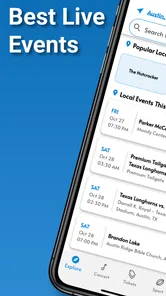
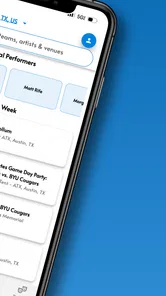
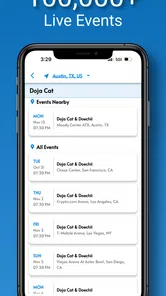
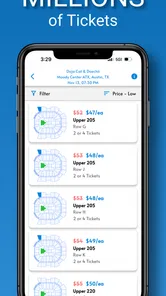
Analysis by Reviewed
When I want to turn a vague plan such as “we should see a game sometime” into an actual outing, the difficult part is usually not choosing the event. It is moving from interest to a suitable date, a workable seat, and a purchase decision without losing track of the details. TicketSmarter - Events Tickets approaches that problem as a dedicated events app from TicketSmarter Inc. I see it as a useful starting point for browsing live entertainment, especially when I am still comparing possibilities rather than arriving with one exact event already chosen.
The app is free, available to everyone, and supports devices running Android 8.0 or later. Its audience is broad: somebody looking for a sports fixture, a concert, a theatre performance, or another live occasion can use the same general ticket-search workflow. That flexibility is its main appeal, although it also means the experience depends heavily on how clearly I already understand what I want.
From a loose idea to a ticket decision
I use this section to look at the moment when a casual suggestion becomes a real ticket choice: what I would settle before opening a search, and how that keeps browsing from turning into an impulsive purchase. A little planning makes the next step more useful, especially when other people’s schedules matter.
Beginning with the event rather than the checkout
My natural starting point is not a ticket number or a specific seat. It is a situation: I have a free evening, a friend has suggested a concert, or I am visiting another city and want something live to do. TicketSmarter fits that early stage well because it gives me a place to explore events before I commit to one destination or date.
I find this distinction important. A person who already knows the exact performer, venue, and date may prefer a direct route through a venue box office or a familiar ticket provider. A browsing app is more valuable when the question is still open. I can use it to narrow the outing gradually, first by the kind of event, then by location and timing, and finally by the ticket details that make the plan realistic.
The app’s store summary presents it as a way to experience live events, but the practical value is less dramatic and more useful: it puts discovery and ticket consideration in one mobile workflow. I would not treat it as a replacement for deciding what matters to my group. Instead, I use it after agreeing on the basics, such as the preferred city, acceptable dates, and whether the priority is a low cost, a particular performer, or a convenient seat.
A sensible search routine
My first tip is to decide the non-negotiable before searching. If I am arranging an evening with two other people, I note the date range and the maximum travel distance first. Otherwise, an appealing listing can pull the whole plan in a different direction. This sounds simple, but it prevents the common mistake of choosing an event before checking whether everyone can actually attend.
More From Our News Desk

 Gmail
GmailGmail in a Busy Inbox: Who Benefits Most?
From first account to crowded workday, Gmail earns its place through dependable search and flexible sorting—but its best fit depends on how much inbox maintenance you can tolerate.

 Prime Video
Switching to Prime Video: What Changes in Your Viewing Routine
Prime Video can make a compelling second home for streaming, but switching means learning a different catalog, rental layer, and route from browsing to playback.

 Universal TV Remote Control
Universal TV Remote Control Works Best as a Reliable Backup
A phone remote earns its place through quick setup and reliable habits. Here is how to get more from Universal TV Remote Control—and where its limits show.

 Weather - By Xiaomi
Weather by Xiaomi Review: Clear at a Glance, Less Clear Up Close
Xiaomi’s weather app makes everyday forecasts quick to scan, but its calm surface can leave useful details and recovery paths harder to find than they should be.

 X
XX Under Pressure: Can It Recover When Posting Goes Wrong?
A resilience-focused review of X, examining setup, mistaken posts, interruptions, weak connections, and the gaps that matter when recovery needs to be dependable.

 Clash of Clans
Clash of Clans Is Won Between the Battles
Its raids are quick; its community is a long-term project of coordination, teaching, rivalry, and shared responsibility—with all the friction that entails.
Latest News



Once I have that boundary, I browse the available event choices and compare them as complete outings rather than isolated ticket listings. The event name is only one part of the decision. I also consider the day of the week, the venue area, the likely journey home, and whether the seating arrangement makes sense for the number of people going. A ticket that looks attractive on its own can be inconvenient when the group needs adjacent places or when the venue is difficult to reach.
A second useful habit is to pause before moving forward with a promising result. I reread the event information, check the selected date, and make sure I have not confused a venue name with a city or a performance with another date in the same series. Mobile interfaces encourage quick taps, while live events are much less forgiving of a mistaken selection.
What the app is good at during comparison
TicketSmarter is most helpful when I need to compare several live-event possibilities in one sitting. Rather than opening unrelated searches for every performer or venue, I can keep the planning centered on the outing itself. That is particularly convenient for spontaneous decisions: a free weekend, a visiting friend, or a family member who wants to see something different.
It also suits people who do not want to begin with a long list of venue websites. The app gives the search process a single home, which reduces the mental handoff between discovery and ticket consideration. I still verify important details before buying, but I do not have to start every search from a blank browser page.
There is a trade-off, though. A broad event marketplace can feel less focused than a venue’s own calendar. If I already know the exact hall I want, the venue’s official service may present the schedule, seating context, and local information in a more direct way. I would choose TicketSmarter for exploration and comparison, not automatically for every highly specific purchase.
Moving from browsing to choosing seats
The point where browsing becomes a real commitment is the ticket-selection stage. This is where I slow down. I check the event identity again, then consider the seating location in relation to the purpose of the visit. For a concert, I might value a clear view or proximity to the stage. For a sports event, I may prefer an angle that makes the whole playing area easy to follow. For a family outing, keeping everyone together may matter more than getting the closest available position.
My third practical insight is to judge the total plan, not just the headline ticket amount. Even when an app makes the event easy to find, the final decision can be affected by seating, travel, timing, and any later charges shown during the transaction. I do not rush through the final screens. I read the order summary carefully and compare it with the budget I set before opening the app.
This is also the moment when I would switch to another source if the information feels unclear or if I need venue-specific guidance. The app can help me reach a ticket decision, but it cannot remove the need for personal judgment. A polished search result is not the same thing as a suitable evening.
The handoff from app to real-world plan
Buying a ticket is not the end of the workflow. The result has to be handed from the app into a group chat, a calendar, or a travel plan. I make a note of the event name, date, venue, and the number of tickets immediately after completing the process. That small step prevents confusion when several outings are being discussed at once.
For a group, I also send one concise message with the agreed details rather than forwarding a stream of screenshots. Everyone should know what was selected and when to arrive. If the outing involves a child, an older relative, or someone with mobility concerns, I treat the venue and seating information as part of the handoff, not as an afterthought.
This is one area where the app’s usefulness depends on my own organization. Ticket discovery is centralized, but the social coordination still happens elsewhere. I see that as normal rather than a flaw, although users expecting the app alone to manage every part of an outing may find the workflow less complete than they hoped.
What success looks like after the purchase
A successful result is not merely having found an event. For me, it means the group agrees on the choice, the date is correct, the seats fit the plan, and the ticket information is easy to retrieve when the day arrives. TicketSmarter helps most with the front half of that journey: finding possibilities and progressing toward a purchase without starting over for every event.
Imagine a realistic Saturday scenario. I have friends visiting, but nobody wants to spend an hour researching separate sites. We agree that the event should be nearby and suitable for the evening. I browse through the app, compare a few options, remove anything that clashes with our timing, and then inspect the remaining ticket choices with the group. We select one, record the details, and use the rest of the day to plan transport and dinner. In that situation, the app earns its place because it reduces the search burden without pretending to make the social decision for us.
For a last-minute outing, the same workflow can be quicker, but I become more cautious. I check the date and venue twice, avoid assuming that the most visible listing is the best value, and leave enough time for the journey. Convenience is useful only when it does not encourage careless buying.
Where the experience can break down
The app’s average rating is 3.0 from around 127 ratings, with around 47 written reviews, so I would approach it with practical expectations rather than assuming every user has had a smooth experience. That does not tell me that the app is unusable, but it does suggest that the path from search to completed outing may not feel equally polished for everyone.
The first weak point is uncertainty during comparison. Live-event ticketing is naturally more complicated than browsing ordinary products because date, venue, seat location, and availability all matter together. If I am forced to revisit screens to confirm those details, the process feels fragile. My answer is to keep a written note of the exact event I want and to reread every summary before proceeding.
The second weak point is the difference between finding an event and understanding the purchase fully. A marketplace can be excellent for discovery while still requiring extra attention at checkout. I look for the complete order information, not only the initial figure that attracted me. If the final terms do not make sense to me, I would rather stop and verify through another official source than make a rushed decision.
The third issue is suitability for highly particular searches. If I need a very specific venue arrangement, accessibility detail, or local policy, I may get a better answer from the venue directly. TicketSmarter is not my first choice when the purchase depends on information that only the venue can explain accurately. In those cases, the app can still help me discover the event, but the handoff should move to a more authoritative channel before I commit.
How it compares with the usual alternatives
Compared with a venue box office, TicketSmarter is more useful at the discovery stage because I can begin with an event idea instead of navigating one venue’s calendar. The box office usually wins when I already know the location or when I want venue-specific context. My choice depends on whether breadth or local certainty matters more.
Compared with a performer’s or team’s official ticket route, the app can be more convenient for comparing different kinds of live events. The official route may be preferable when authenticity, venue instructions, or event-specific communication is my top concern. I would not assume that one source is automatically better in every situation; I use the app to reduce searching, then verify the details that affect my decision.
Compared with ordinary web browsing, a dedicated app feels more focused for repeated event searches. I do not have to maintain several open pages while moving between possibilities. On the other hand, a browser can make it easier to cross-check information from multiple sources at once. If I am investigating a complicated event or comparing policies, I may deliberately use both approaches.
Who should install it and who should skip it
I would recommend TicketSmarter to people who regularly look for live entertainment but do not always know exactly what they want at the start. It is also a reasonable fit for someone planning a group outing, a visitor searching for something to do, or a fan who wants a mobile place to begin comparing events. The free price makes trying that discovery workflow straightforward, and the Everyone age rating keeps the app broadly accessible.
I would be more hesitant to recommend it as the only tool for a user who already has a precise venue and event in mind, needs detailed accessibility confirmation, or prefers dealing directly with an official box office. Those users may save time by going straight to the source. I would also skip a rushed purchase if I could not clearly review the event and order details; no app is worth sacrificing confidence over a ticket decision.
The current version is 3.5.0, and the app has been available since October 21, 2019. I mention that because it is not a brand-new experiment, yet its modest rating means I still judge it by the specific task I need completed rather than by its age or install count. With over 50 thousand installs, it has found a real audience, but popularity alone is not a substitute for checking whether its workflow suits me.
My final take after following the whole workflow
TicketSmarter - Events Tickets works best as a practical discovery and comparison tool for live events. I like it when my starting condition is uncertain and I need to turn a general plan into a shortlist. The strongest part is the ability to keep that search centered on live experiences instead of jumping between unrelated event pages.
Its limitations appear when the decision becomes highly specific or when I need venue-level certainty. I still take responsibility for checking dates, seating, the complete order summary, and the details that matter to my group. The app can shorten the route from “what could we do?” to “this event fits,” but it does not replace careful reading or sensible planning.
My recommendation is to use TicketSmarter as the first step in an event search, then treat the final purchase as a deliberate handoff rather than a quick tap. For broad browsing and mobile convenience, it is worth trying. For a precise, venue-dependent purchase, I would compare it with the official alternative before deciding.
TicketSmarter - Events Tickets Frequently Asked Questions
Is TicketSmarter free to download, and what devices can run it?
TicketSmarter is free to download and is rated for everyone. It requires iOS 8.0 or later, so check your device’s operating-system version before installing. Although downloading the app does not cost anything, buying event tickets is a separate transaction, and ticket prices and any applicable charges are shown as you review listings and proceed through checkout.
Who makes TicketSmarter, and how established is the app?
TicketSmarter is developed by TicketSmarter Inc and focuses on finding tickets for live events. It has been available since October 21, 2019, and its current version is 3.5.0. The app has over 50,000 installs and an average rating of 3.0 from around 127 ratings, which gives you a general sense of its reach and user feedback before you decide to try it.
What is TicketSmarter - Events Tickets?
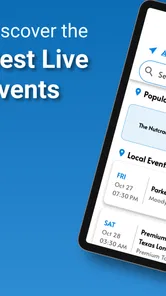
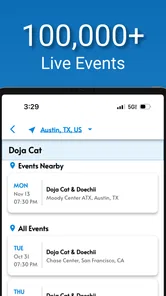
TicketSmarter is a ticket marketplace for discovering and purchasing tickets to concerts, sports games, theater performances, festivals, comedy shows, and other live events. The app is designed to help users browse events by category, location, date, or performer, then review available listings before completing a purchase. Ticket availability and prices can vary depending on the event and seller.
How do I search for and buy tickets in TicketSmarter?
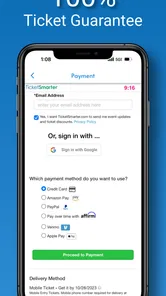
After opening TicketSmarter, you can search for a specific artist, team, venue, event, or city, or browse the available categories and dates. Select an event to view ticket listings, seating information, prices, and applicable fees. Before confirming your order, carefully check the event details, ticket quantity, delivery method, and total cost, since some purchases may be final and difficult to change afterward.
Are TicketSmarter tickets legitimate and guaranteed?
TicketSmarter operates as a ticket marketplace connecting customers with ticket sellers, so listings may come from different sources rather than directly from the event organizer. The platform provides purchase-related guarantees and customer support policies, but users should still review the listing details and terms before paying. Make sure the event name, venue, date, section, row, delivery method, and final price are correct.
Pros
- Quick access to tickets for sports
- concerts
- theater
- and other events.
- Event listings include useful venue
- date
- and seating information.
- Mobile tickets can be convenient to access directly from your phone.
- Search and filtering tools help narrow down events by location and category.
- The app provides a centralized place to manage upcoming ticket purchases.
Cons
- Ticket availability and prices can vary quickly
- especially for popular events.
- Additional fees may increase the final checkout price.
- Some listings may redirect users to complete the purchase externally.
- Refund and cancellation policies can differ by event or ticket provider.
- Customer support response times may be slower during high-demand events.











